1. Įvadas
Thank you for choosing the Vamav Sync 15 Professional Amplified Speaker. This manual provides essential information for the safe and efficient operation of your device. Please read it thoroughly before use and retain it for future reference.
2. Saugos instrukcijos
- Maitinimo šaltinis: Ensure the speaker is connected to a power source that matches the voltage nurodyta prietaise.
- Vėdinimas: Do not block ventilation openings. Maintain adequate space around the speaker for proper airflow.
- Vanduo ir drėgmė: Keep the speaker away from water, rain, and excessive humidity. Do not operate with wet hands.
- Šiluma: Nestatykite garsiakalbio šalia šilumos šaltinių, tokių kaip radiatoriai, šildytuvai, viryklės ar kiti šilumą skleidžiantys prietaisai.
- Valymas: Disconnect from power before cleaning. Use a dry, soft cloth. Do not use liquid cleaners or aerosols.
- Aptarnavimas: Nemėginkite patys aptarnauti šio gaminio. Visą techninę priežiūrą patikėkite kvalifikuotam aptarnavimo personalui.
- Vieta: Padėkite garsiakalbį ant stabilaus, lygaus paviršiaus, kad jis nenukristų.
3. Pakuotės turinys
Patikrinkite, ar pakuotėje yra visi reikalingi daiktai:
- Vamav Sync 15 Amppareiškė pranešėjas
- Maitinimo kabelis
- Vartotojo vadovas (šis dokumentas)
4. Produktas baigtasview
Familiarize yourself with the various components of your Vamav Sync 15 speaker.
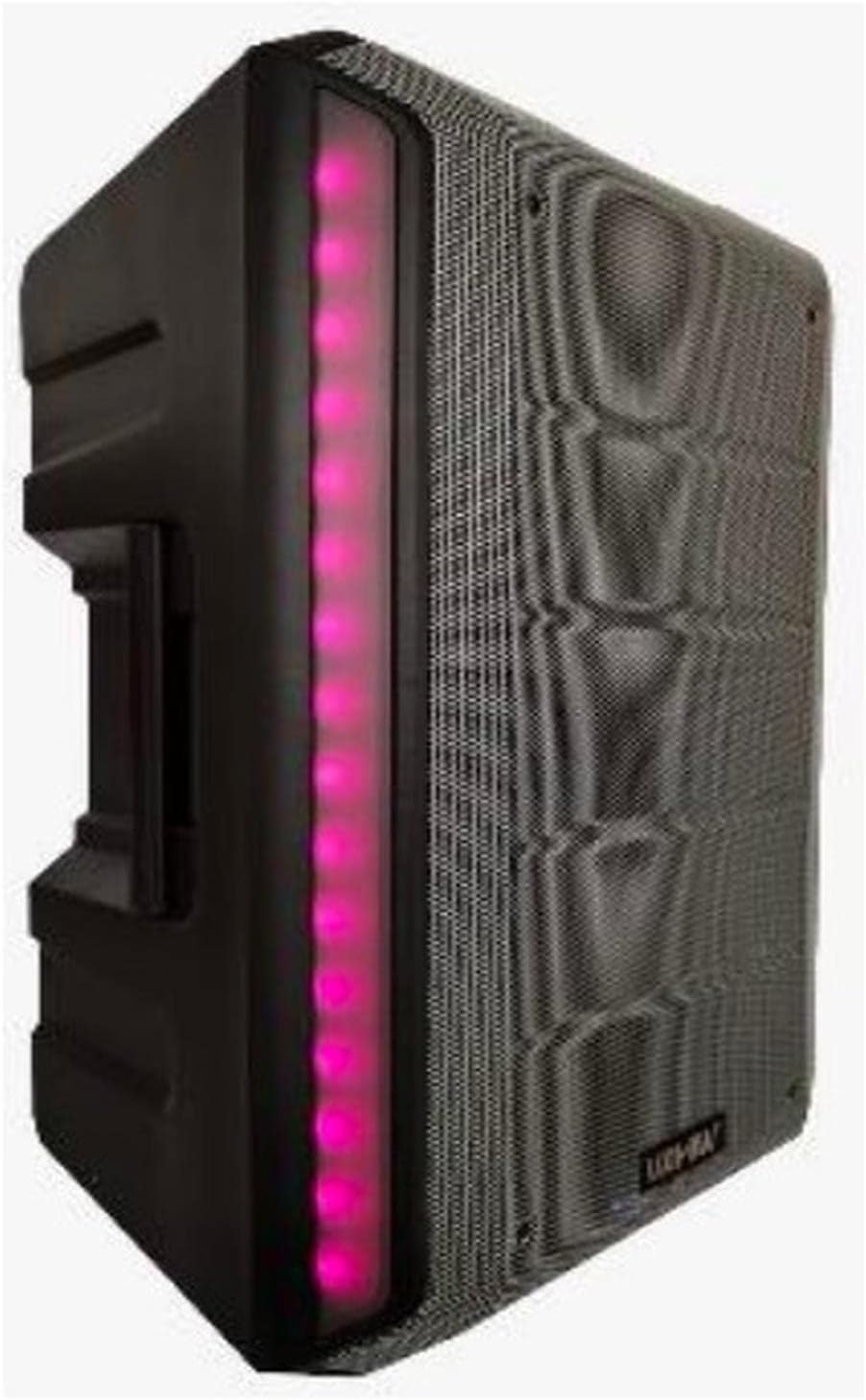
4.1 pav.: priekis View. This image displays the front of the Vamav Sync 15 speaker, featuring a protective grille over the speaker cone and an illuminated LED strip along the side, indicating power and operational status.
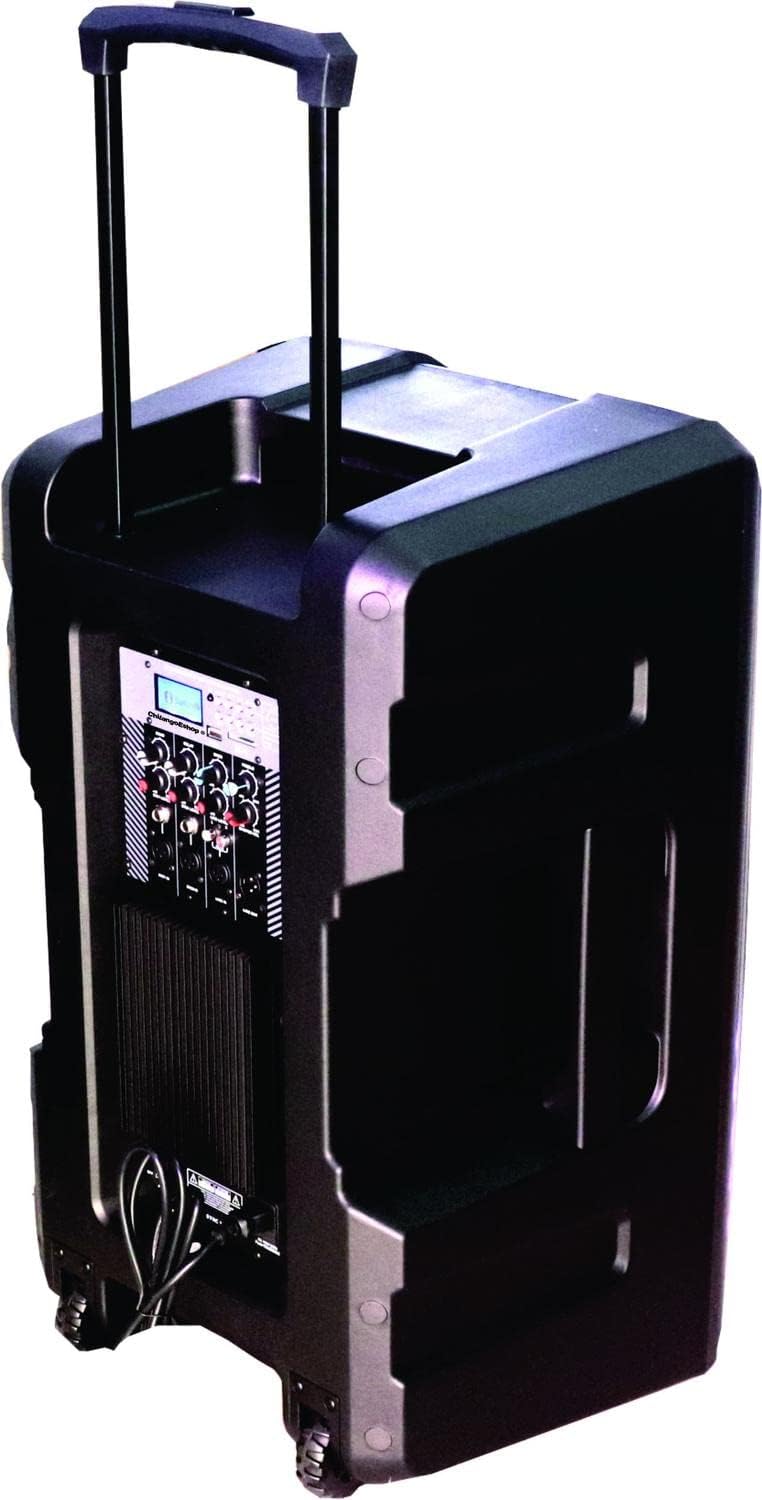
4.2 pav.: galinis View. The rear of the speaker is shown, highlighting the retractable handle for portability and integrated wheels at the base, designed for easy transport.

4.3 pav.: Valdymo skydas. Išsamią view of the control panel, featuring an MP3 digital display, Bluetooth connectivity indicator, USB and SD card slots, various input ports (XLR, 6.3mm Jack, RCA), and control knobs for Echo, Delay, Bass, Treble, Microphone Levels, Line Level, and Master Volume.

4.4 pav. Apačia View. This image illustrates the bottom of the speaker, showing the robust wheels for mobility and a central socket designed for mounting the speaker on a stand.

4.5 pav.: Garsiakalbio matmenys. An illustration indicating the approximate dimensions of the Vamav Sync 15 speaker: 70 cm in height, 35 cm in depth, and 40 cm in width.
5. Sąranka
- Išpakavimas: Atsargiai išimkite garsiakalbį ir visus priedus iš pakuotės.
- Vieta: Position the speaker on a stable, flat surface or mount it on a compatible speaker stand using the bottom pole mount socket. Ensure adequate space for ventilation.
- Maitinimo jungtis: Connect the provided power cable to the speaker's power input and then to a suitable electrical outlet.
- Pradinis įjungimas: Turn the Master Volume knob to its minimum setting before powering on the unit to avoid sudden loud sounds. Press the power switch to turn on the speaker.
6. Naudojimo instrukcijos
6.1. Maitinimo įjungimas/išjungimas
- To power on, ensure the Master Volume is low, then flip the power switch located on the control panel.
- To power off, turn the Master Volume to minimum, then flip the power switch.
6.2. „Bluetooth“ ryšys
- Turn on the speaker. The display will show the current mode.
- Press the 'MODE' button on the control panel until 'Bluetooth' is selected. The Bluetooth indicator will flash, signifying it is ready for pairing.
- Mobiliajame įrenginyje (išmaniajame telefone, planšetiniame kompiuteryje ir kt.) įjunkite „Bluetooth“ ir ieškokite galimų įrenginių.
- Select 'CHSYNC 15' from the list of devices. Once connected, the Bluetooth indicator will stop flashing and remain solid.
- You can now play audio from your device through the speaker. The effective Bluetooth range is approximately 10 meters.
6.3. USB / SD kortelės atkūrimas
- Įdėkite USB atmintinę arba SD kortelę į atitinkamą lizdą valdymo skydelyje.
- Garsiakalbis automatiškai persijungs į USB/SD režimą ir pradės groti garsą files. If not, press the 'MODE' button to select USB or SD.
- Use the playback controls (Play/Pause, Next, Previous) on the control panel to manage your audio.
6.4. Connecting Microphones and Line-in Devices
- Mikrofonai: Connect microphones to the 'MIC 1 IN' or 'MIC 2 IN' XLR or 6.3mm Jack inputs. Adjust individual microphone levels using the 'MIC 1 LEVEL' and 'MIC 2 LEVEL' knobs.
- Line-in Devices: Connect external audio sources (e.g., mixer, CD player) to the 'LINE IN' RCA inputs or the 6.3mm Jack input. Adjust the input level using the 'LINE LEVEL' knob.
- Išrikiuoti: Use the 'LINE OUT' 6.3mm Jack to connect to another amplified speaker or recording device.
6.5. Garso valdikliai
- ECHO: Reguliuoja mikrofonų aidėjimo efektą.
- DELAY: Controls the delay time of the echo effect.
- BOSAS: Reguliuoja žemo dažnio garso išvestį.
- TREBLE: Reguliuoja aukšto dažnio garso išvestį.
- MASTER VOL: Valdo bendrą garsiakalbio išvesties garsumą.
7. Priežiūra
- Valymas: Regularly wipe the speaker's exterior with a soft, dry cloth. Do not use abrasive cleaners or solvents.
- Saugykla: Kai garsiakalbio nenaudojate ilgesnį laiką, laikykite jį vėsioje, sausoje vietoje, toliau nuo tiesioginių saulės spindulių ir ekstremalių temperatūrų.
- Kabelio priežiūra: Inspect power and audio cables periodically for damage. Replace any frayed or damaged cables immediately.
8. Problemų sprendimas
| Problema | Galima priežastis | Sprendimas |
|---|---|---|
| Nėra galios | Neprijungtas maitinimo laidas; Sugedęs maitinimo lizdas; Išjungtas maitinimo jungiklis. | Ensure power cable is securely connected; Test outlet with another device; Turn power switch on. |
| Nėra garso išvesties | Master Volume too low; Input source not selected; Input device not connected or faulty; Mute activated. | Increase Master Volume; Select correct input mode (Bluetooth, USB, Line In); Check connections of input device; Ensure no mute function is active. |
| Bluetooth neprisijungia | Speaker not in Bluetooth mode; Device too far; Bluetooth not enabled on source device; Already connected to another device. | Press MODE button to select Bluetooth; Move device closer (within 10m); Enable Bluetooth on your device; Disconnect from other devices. |
| USB / SD kortelė neveikia | Neteisinga file format; USB/SD card faulty or improperly inserted; Speaker not in USB/SD mode. | Užtikrinkite garsą files are compatible (e.g., MP3); Reinsert USB/SD card; Press MODE button to select USB/SD. |
9. Specifikacijos
| Funkcija | Specifikacija |
|---|---|
| Modelio pavadinimas | CHSYNC 15 |
| Garsiakalbio tipas | Monitorius, Amplified (Active) |
| Garsiakalbio dydis | 15 colių |
| Sistema | Dviejų krypčių sistema |
| Balso ritė | 2" KSV |
| Vairuotojas | 34 mm |
| RMS galios išėjimas | 150 vatų |
| Belaidė technologija | Bluetooth (10 meters distance) |
| Ryšio technologija | Bluetooth, USB |
| Medijos atkūrimas | USB prievadas, SD kortelės lizdas |
| Garso valdikliai | Bass, Treble, Echo, Delay, Master Volume, Mic Levels, Line Level |
| Įėjimai | XLR, 6.3mm Jack (x1), RCA |
| Išvestis | 6.3 mm lizdas |
| Maitinimo šaltinis | Baterija |
| Kontrolės metodas | Lytėjimo |
| Medžiaga | Plastikiniai |
| Spalva | Juoda |
| Gaminio matmenys | 13.8 colio gylis x 15.8 colio plotis x 27.6 colio aukštis (35 cm gylis x 40 cm plotis x 70 cm aukštis) |
| Suderinami įrenginiai | Desktop computer, Laptop, Projector, MP3 player, Smartphone, Tablet, Television, Video game console |
10. Garantija ir palaikymas
Dėl garantijos informacijos ir techninės pagalbos žr. pirkimo metu pateiktus dokumentus arba susisiekite su pardavėju. Išsaugokite pirkimo įrodymą, jei prireiktų pateikti pretenziją dėl garantijos.


