1. Įvadas
This manual provides detailed instructions for the installation, operation, and maintenance of the PeakDo Wireless HDMI Transmitter and Receiver P3 S. This device is designed to wirelessly transmit uncompressed 1080P Full HD video and digital audio with zero latency, making it ideal for various applications including gaming, home entertainment, and professional presentations. The P3 S model features a USB-C port on the receiver for compatibility with AR smart glasses and portable monitors, in addition to standard HDMI output.

Figure 1: PeakDo Wireless HDMI Transmitter (left) and Receiver (right).
2. Produktas baigtasview
2.1 Pagrindinės savybės
- Wireless AR Smart Glasses Setup: Features a Type-C port on the Receiver for direct connection to AR smart glasses (e.g., XREAL Air, Rokid Max/Air, RayNeo, VITURE One) and portable monitors, enabling cable-free AR experiences.
- Uncompressed FHD Video & Digital Audio: Transmits 1080P Full HD video and digital audio without compression, ensuring high-quality output.
- Zero Latency Transmission: Provides 0 latency for real-time applications such as live sports, synchronized gaming, and interactive meetings.
- „Plug and Play“ veikimas: Requires no Wi-Fi connection or app installation for setup.
- Platus suderinamumas: Transmitter (TX) connects to PC, Laptop, Xbox, PlayStation, Nintendo Switch, TV Box. Receiver (RX) connects to TVs, monitors, projectors via HDMI, and AR smart glasses/portable monitors via USB-C.
- Perdavimo diapazonas: Effective wireless transmission up to 100 feet (approximately 30 meters).
2.2 Pakuotės turinys
Prašome patikrinti, ar pakuotėje yra visi reikalingi daiktai:
- PeakDo Wireless HDMI Transmitter (TX)
- PeakDo Wireless HDMI Receiver (RX)
- USB Power Cable(s)
- Vartotojo vadovas (šis dokumentas)
3. Sąrankos instrukcijos
3.1 Connecting the Transmitter (TX)
- Connect the HDMI end of the Transmitter (TX) to the HDMI output port of your source device (e.g., PC, laptop, game console, TV box).
- Connect the USB power cable to the TX unit and plug the other end into a USB power source (e.g., a USB port on your source device, a USB wall adapter). Ensure the TX receives at least 5V 2A power supply.

Figure 2: Compatible input (TX) and output (RX) devices.
3.2 Connecting the Receiver (RX)
- Svarbu: First, connect the USB power cable to the RX unit and plug the other end into a USB power source (e.g., a USB wall adapter). Ensure the RX receives at least 5V 2A power supply. The RX unit requires sufficient power to function correctly.
- For HDMI displays (TV, Monitor, Projector): Connect an HDMI cable from the HDMI output port of the Receiver (RX) to the HDMI input port of your display device.
- For AR Smart Glasses or Portable Monitors: Connect a USB-C cable from the Type-C port on the Receiver (RX) to the USB-C input port of your AR smart glasses or portable monitor.
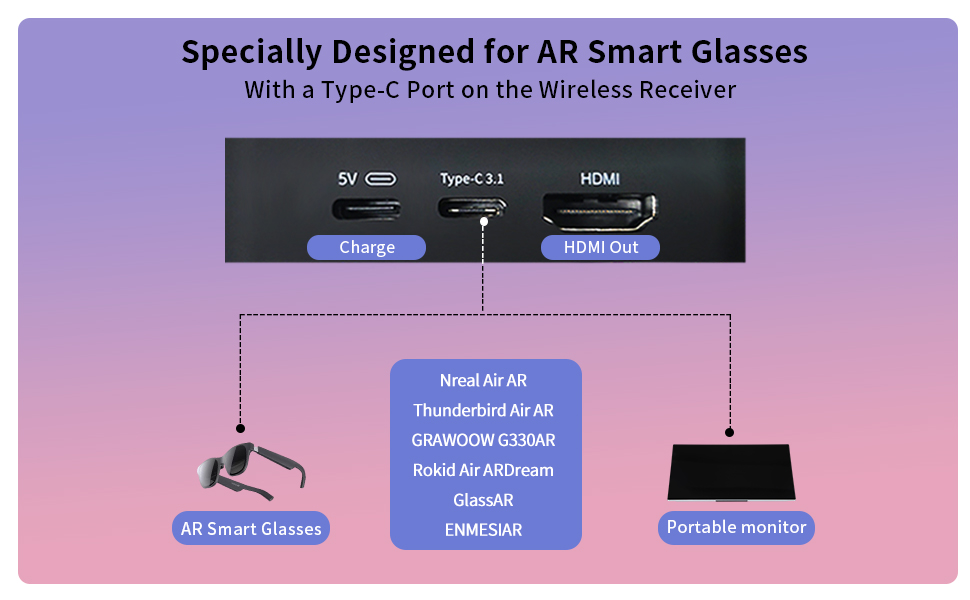
Figure 3: Receiver ports (5V power, Type-C 3.1, HDMI) and AR glasses compatibility.
Pastaba: For certain AR glasses like Nreal, you may need to upgrade their firmware for optimal compatibility. Refer to your AR glasses manufacturer's instructions for firmware updates.
4. Naudojimo instrukcijos
4.1 Įjungimas ir susiejimas
Once both the Transmitter (TX) and Receiver (RX) units are connected to their respective power sources and devices, they will automatically power on and attempt to pair. The system is designed for plug-and-play operation, requiring no manual pairing steps or software installation.

Figure 4: Plug and Play setup in a meeting environment.
4.2 Naudojimo scenarijai
- Žaidimai: Experience zero-latency gaming on a large screen or through AR glasses.
- Namų pramogos: Stream movies, TV shows, or other media from your PC or TV box to any display.
- Presentations/Meetings: Share content wirelessly from your laptop to a projector or large monitor in a conference room.
- AR Experiences: Connect directly to compatible AR smart glasses for immersive gaming or productivity.
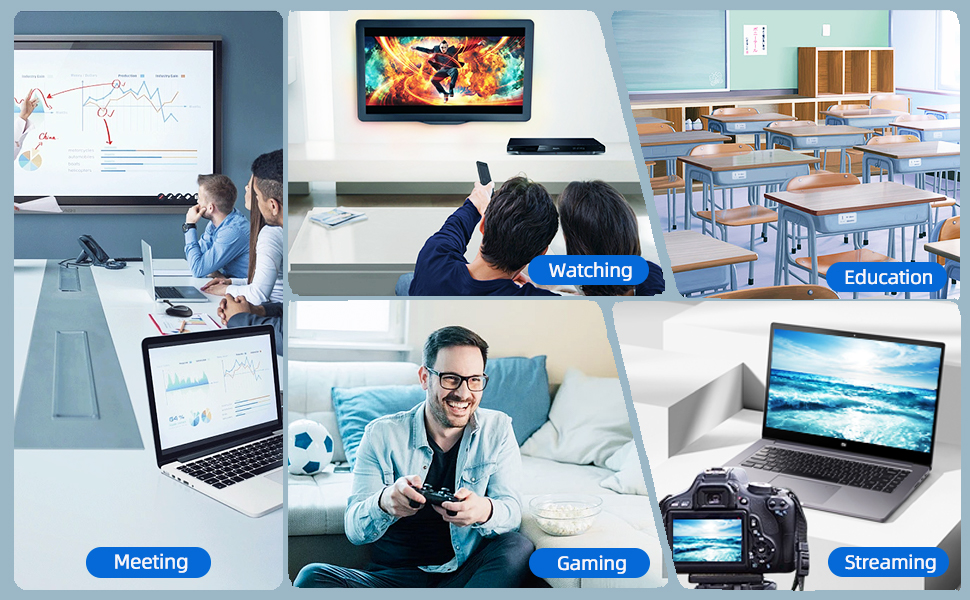
Figure 5: Diverse applications of the PeakDo Wireless HDMI system.

6 pav. Pvzample of a wireless AR gaming setup.
5. Priežiūra
The PeakDo Wireless HDMI Transmitter and Receiver P3 S requires minimal maintenance.
- Valymas: Įrenginių išorę valykite minkšta, sausa šluoste. Nenaudokite skystų valiklių ar aerozolių.
- Saugykla: Kai prietaisai ilgą laiką nenaudojami, juos laikykite vėsioje, sausoje vietoje, apsaugotoje nuo tiesioginių saulės spindulių ir ekstremalių temperatūrų.
- Maitinimas: Always ensure both TX and RX units receive adequate power (5V 2A) from a stable power source.
6. Problemų sprendimas
6.1 Nėra signalo / Juodas ekranas
- Patikrinkite galią: Ensure both the Transmitter (TX) and Receiver (RX) units are properly powered. The RX unit specifically requires sufficient power (5V 2A) and should be powered first before connecting the HDMI/USB-C cable to the display.
- Kabelių jungtys: Verify that all HDMI and USB-C cables are securely connected to their respective ports on the devices and displays.
- Šaltinio įrenginio išvestis: Confirm that your source device (PC, game console) is outputting video correctly. Try connecting the source device directly to the display with a cable to rule out issues with the source.
- Ekrano įvestis: Ensure your display (TV, monitor, projector, AR glasses) is set to the correct input source (e.g., HDMI 1, USB-C).
- Iš naujo paleiskite įrenginius: Disconnect power from both TX and RX units, then reconnect. Also, restart your source device and display.
6.2 Intermittent Signal / Flickering
- Atstumas ir kliūtys: Reduce the distance between the TX and RX units. Ensure there are no significant physical obstructions (walls, large furniture) between them that could interfere with the wireless signal.
- Trikdžiai: Keep the units away from other wireless devices (e.g., Wi-Fi routers, cordless phones, microwave ovens) that operate on similar frequencies.
- Maitinimas: Ensure stable and sufficient power supply to both units. Fluctuations in power can affect signal stability.
6.3 Nėra garso
- Source Audio Settings: Check the audio output settings on your source device to ensure audio is being sent via HDMI.
- Display Audio: Verify that the audio on your display device (TV, monitor, AR glasses) is not muted and the volume is turned up.
- Kabelio vientisumas: Ensure the HDMI or USB-C cable connecting the RX to the display is not damaged.
6.4 AR Glasses Compatibility Issues
- Programinės aparatinės įrangos atnaujinimas: As mentioned in the setup, some AR glasses (e.g., Nreal) may require a firmware update to work correctly with external video sources. Consult your AR glasses manufacturer's support.
- Power to RX: Ensure the RX unit is adequately powered, especially when connecting to power-hungry AR glasses.
- USB-C laidas: Use a high-quality USB-C cable that supports video transmission.
7. Specifikacijos
| Funkcija | Aprašymas |
|---|---|
| Modelio numeris | P3 S |
| Vaizdo įrašų kodavimas | YUV422 or RGB444 (uncompressed 1080P) |
| Rezoliucijos palaikymas | Iki 1080p Full HD |
| Latencija | 0 Vėlavimas |
| Ryšio technologija | Wireless (Millimeter Wave) |
| Transmisijos diapazonas | Iki 100 pėdų (apie 30 metrų) |
| Compatible Transmitter Devices | PC, Laptop, Xbox, PS4, PS5, Switch, PS3, TV Box, etc. |
| Compatible Receiver Devices | TV, Monitor, Projector (via HDMI); AR Smart Glasses, Portable Monitor (via USB-C) |
| Iš viso HDMI prievadų | 1 (on Receiver) |
| Jungties tipas | HDMI, Micro USB (for power), USB-C (on Receiver) |
| Garso išvesties režimas | Mono (Digital Audio) |
| Erdvinio garso kanalo konfigūracija | 2.0 |
| Maitinimo šaltinis | 5V 2A (for both TX and RX units) |
| Prekės svoris | 1.08 svaro (apie 0.49 kg) |
| Pakuotės matmenys | 6.73 x 5.83 x 2.48 colio (apytiksliai 17.1 x 14.8 x 6.3 cm) |
8. Garantija ir palaikymas
For warranty information and technical support, please refer to the official PeakDo websvetainėje arba susisiekite tiesiogiai su jų klientų aptarnavimo tarnyba. Išsaugokite pirkimo kvitą garantiniams reikalavimams.
- Gamintojas: PeakDo
- Pirmą kartą pasiekiama data: 16 m. kovo 2023 d
- Klientas Reviews: 3.3 out of 5 stars (based on 6 ratings at time of data extraction)


