1. Įvadas
Thank you for choosing the Vamav VSP18 18-inch Active Subwoofer. This manual provides essential information for the safe and efficient operation of your new audio equipment. Please read this manual thoroughly before installation and use, and retain it for future reference.

1.1 vaizdas: priekis view of the Vamav VSP18 18-inch Active Subwoofer, showcasing its robust grille and Vamav branding.
2. Svarbios saugos instrukcijos
Kad sumažintumėte elektros smūgio, gaisro ar sužalojimo riziką, visada laikykitės šių pagrindinių saugos priemonių:
- Prieš naudodami žemųjų dažnių garsiakalbį, perskaitykite visas instrukcijas.
- Nelaikykite šio prietaiso nuo lietaus ar drėgmės.
- Neužblokuokite jokių ventiliacijos angų. Montuokite pagal gamintojo instrukcijas.
- Nemontuokite šalia jokių šilumos šaltinių, pvz., radiatorių, šilumokaičių, viryklių ar kitų įrenginių (įskaitant ampkeltuvai), kurie gamina šilumą.
- Saugokite, kad maitinimo laidas nebūtų užeinamas ar užspaudžiamas, ypač prie kištukų, patogių talpyklų ir vietų, kur jie išeina iš prietaiso.
- Naudokite tik gamintojo nurodytus priedus/priedus.
- Atjunkite šį prietaisą iš elektros lizdo žaibuojant arba kai jis nenaudojamas ilgą laiką.
- Visą techninę priežiūrą patikėkite kvalifikuotam aptarnavimo personalui. Techninė priežiūra reikalinga, kai aparatas yra bet kokiu būdu pažeistas.
3. Sąranka ir diegimas
3.1 Išpakavimas
Carefully remove the subwoofer from its packaging. Inspect the unit for any signs of damage that may have occurred during transit. Retain the original packaging for future transport or storage.
3.2 Įdėjimas
Position the subwoofer on a stable, level surface. Ensure adequate ventilation around the unit to prevent overheating. Avoid placing the subwoofer directly against walls or in corners, as this can affect sound quality. The dimensions of the subwoofer are approximately 68 cm (depth) x 68 cm (width) x 58 cm (height).

Image 3.1: The Vamav VSP18 Subwoofer with its approximate dimensions (68cm depth, 68cm width, 58cm height) clearly marked.

Image 3.2: Integrated side handles on the Vamav VSP18 Subwoofer, designed for easier transport and positioning.
3.3 Jungtys
Before making any connections, ensure the subwoofer's power switch is in the OFF position and the power cable is disconnected from the mains supply.
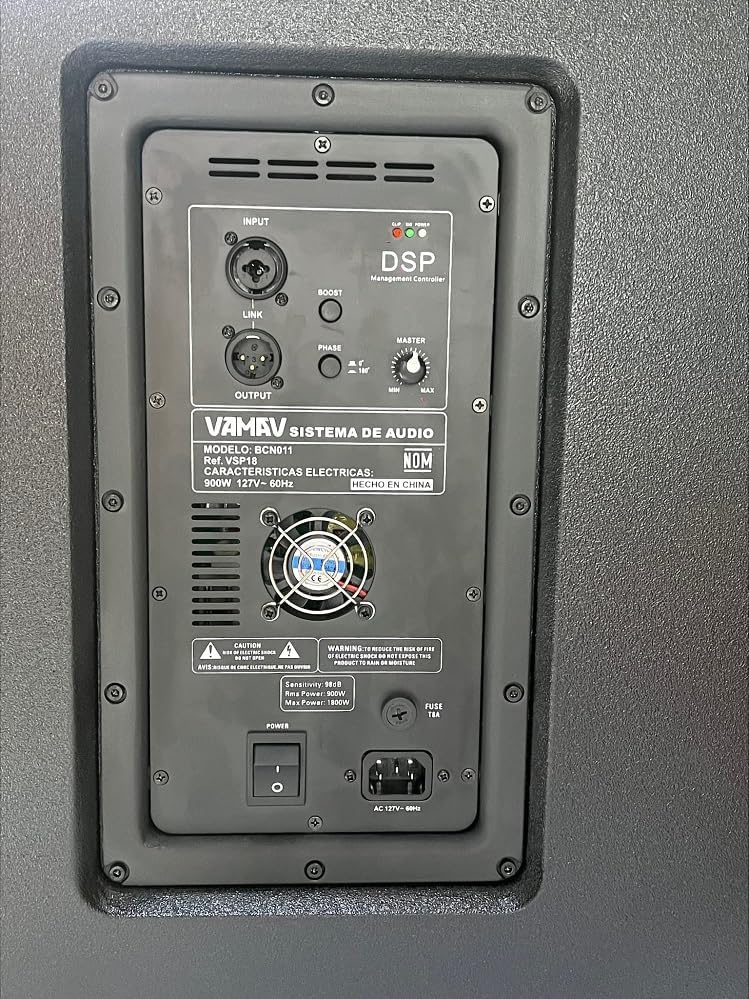
3.3 pav.: Išsamus view of the Vamav VSP18 Subwoofer's rear panel, highlighting the DSP Management Controller, input/output ports, and various controls.
- Garso įvestis: Prijunkite garso šaltinį (pvz., maišytuvą, pirminįampkeltuvas) prie ĮVESTIS port using a balanced XLR cable.
- Garso išvestis: If you need to daisy-chain multiple subwoofers or send the signal to full-range speakers, use the IŠVADA port with an XLR cable.
- Maitinimo jungtis: Prijunkite pateiktą maitinimo kabelį prie AC 127V ~ 60Hz inlet on the rear panel, then plug the other end into a suitable grounded power outlet.
4. Naudojimo instrukcijos
4.1 Įjungimas / išjungimas
- To power on, ensure all connections are secure, then flip the GALIA switch to the 'ON' position. The power indicator LED will illuminate.
- Norėdami išjungti, apverskite GALIA perjunkite į padėtį „IŠJUNGTA“.
4.2 Valdikliai ir reguliavimas
The VSP18 features a DSP Management Controller on its rear panel for precise sound adjustments:
- MEISTRO: This knob controls the overall output volume of the subwoofer. Start with a low setting and gradually increase to your desired level.
- PAdidinti: Activates a bass boost function for enhanced low-frequency impact. Use sparingly to avoid distortion.
- ETAPAS: Allows you to adjust the phase of the subwoofer output (0° or 180°). This is crucial for proper integration with full-range speakers and to prevent phase cancellation. Experiment with both settings to find the best sound in your listening environment.
- DSP Management Controller: Provides advanced digital signal processing for optimizing sound performance. Refer to the DSP interface (if applicable, typically via a display or software) for detailed settings.
5. Priežiūra
- Valymas: Disconnect the power before cleaning. Use a soft, dry cloth to wipe the exterior of the subwoofer. Do not use abrasive cleaners, waxes, or solvents.
- Vėdinimas: Regularly check that the ventilation openings are clear of dust and debris to ensure proper airflow.
- Saugykla: If storing the subwoofer for an extended period, place it in its original packaging in a cool, dry environment, away from direct sunlight and extreme temperatures.
6. Problemų sprendimas
| Problema | Galima priežastis | Sprendimas |
|---|---|---|
| Nėra galios | Atjungtas maitinimo laidas; Išjungtas maitinimo jungiklis; Perdegęs saugiklis | Check power cable connection; Ensure power switch is ON; Check and replace fuse if necessary (refer to fuse specifications on rear panel). |
| Nėra garso išvesties | Input cable disconnected; Volume too low; Source device not playing | Check XLR input cable connection; Increase MASTER volume; Verify audio source is active and sending signal. |
| Iškraipytas garsas | Volume too high; Input signal too strong; BOOST engaged excessively | Reduce MASTER volume; Lower input signal level from source; Disengage or reduce BOOST. |
| Silpnas bosas | Incorrect phase setting; Subwoofer placement | Toggle the PHASE switch (0°/180°) to find the optimal setting; Adjust subwoofer placement for better room acoustics. |
7. Specifikacijos
- Modelis: VSP18 (CHVSP18)
- Garsiakalbio tipas: Aktyvus žemųjų dažnių garsiakalbis
- Garsiakalbio dydis: 18 colių
- AmpLifavimo tipas: Aktyvus
- RMS galia: 900W
- Dažnio atsakas: 35-150 Hz
- Jautrumas: 97 dB
- Matmenys (D x P x A): 68 cm x 68 cm x 58 cm
- Įvestis / išvestis: XLR
- Galios poreikis: AC 127V ~ 60Hz
- Įtraukti komponentai: Subwoofer unit, Power cable
- Gamintojas: Vamav
8. Informacija apie garantiją
Vamav products are manufactured to high-quality standards. For specific warranty terms and conditions, please refer to the warranty card included with your product or contact your local Vamav dealer. Keep your purchase receipt as proof of purchase for any warranty claims.
9. Pagalba klientams
If you encounter any issues or have questions regarding your Vamav VSP18 Active Subwoofer that are not covered in this manual, please contact Vamav customer support or your authorized dealer for assistance. Please have your model number (VSP18) and purchase information ready when contacting support.