1. Įvadas
This manual provides detailed instructions for the installation, use, and maintenance of your JINGDU G PRO Wireless Gaming Mouse Nonslip Skin. This product is designed to enhance the grip and stability of your G PRO Wireless Gaming Mouse, providing a more secure and comfortable experience during use.
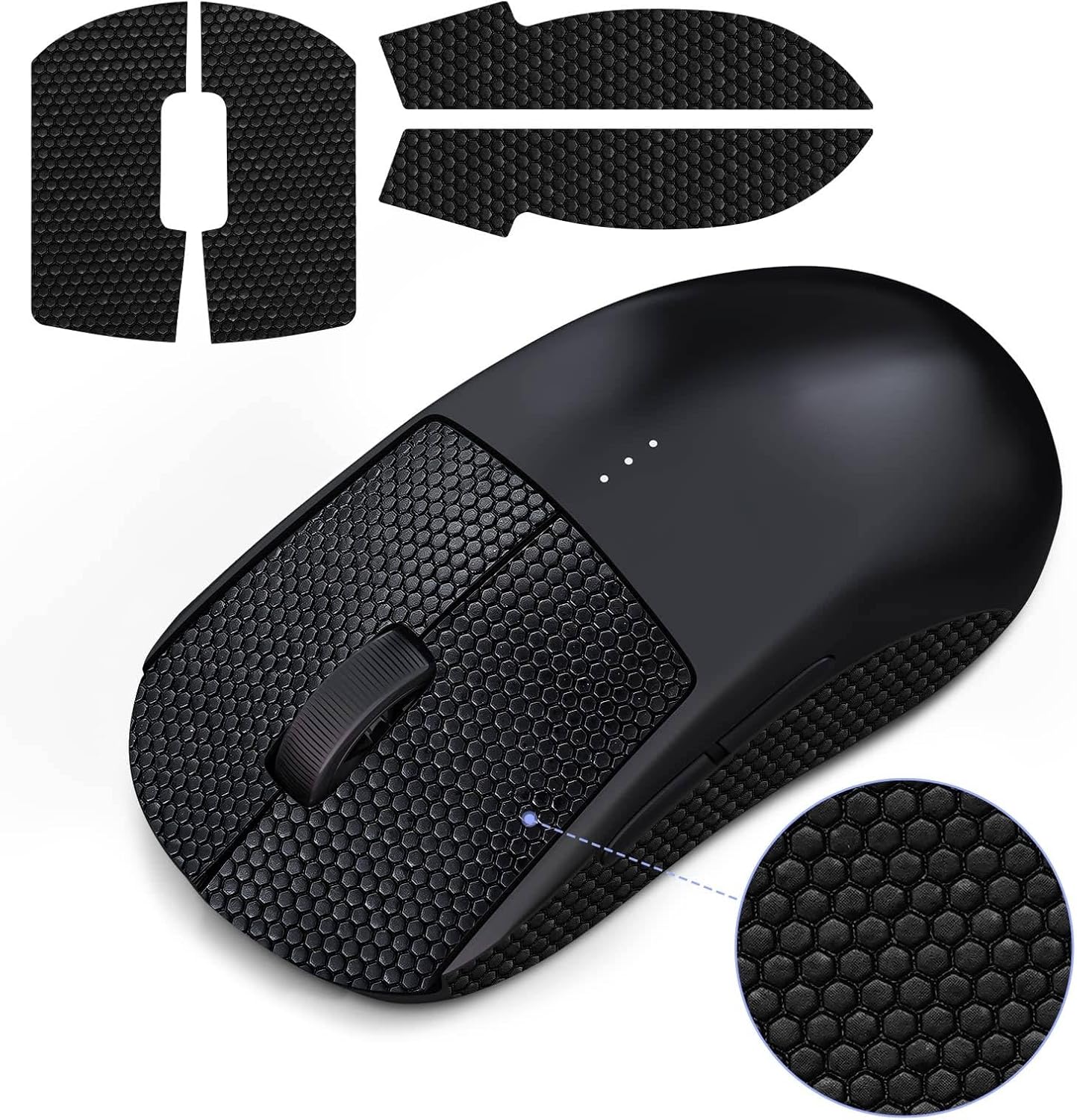
1.1 vaizdas: Baigtaview of the JINGDU G PRO Wireless Gaming Mouse Nonslip Skin and its application.
2. Savybės
The JINGDU G PRO Wireless Gaming Mouse Nonslip Skin offers several key features designed to improve your gaming experience:
- Suderinamumas: Specifically designed for the G PRO Mouse. (Note: Mouse is not included).
- Patobulintas sukibimas: Features a micro convex point design for accurate and smooth movement, significantly improving stability during intense gaming sessions.
- Atsparumas prakaitui: Made from high-quality materials that absorb sweat and moisture, keeping your hands dry and comfortable.
- Patvari medžiaga: Constructed from Polyvinyl Chloride, ensuring long-lasting performance and resistance to wear.
- Tikslus pritaikymas: Utilizes a 1:1 mold design with 0.5 mm thickness for a perfect fit and easy application.
- Pašalinimas be likučių: Designed for easy installation and removal without leaving any sticky residue or damaging the mouse surface.

Image 2.1: The grip skin enhances the user's experience by increasing friction and control.
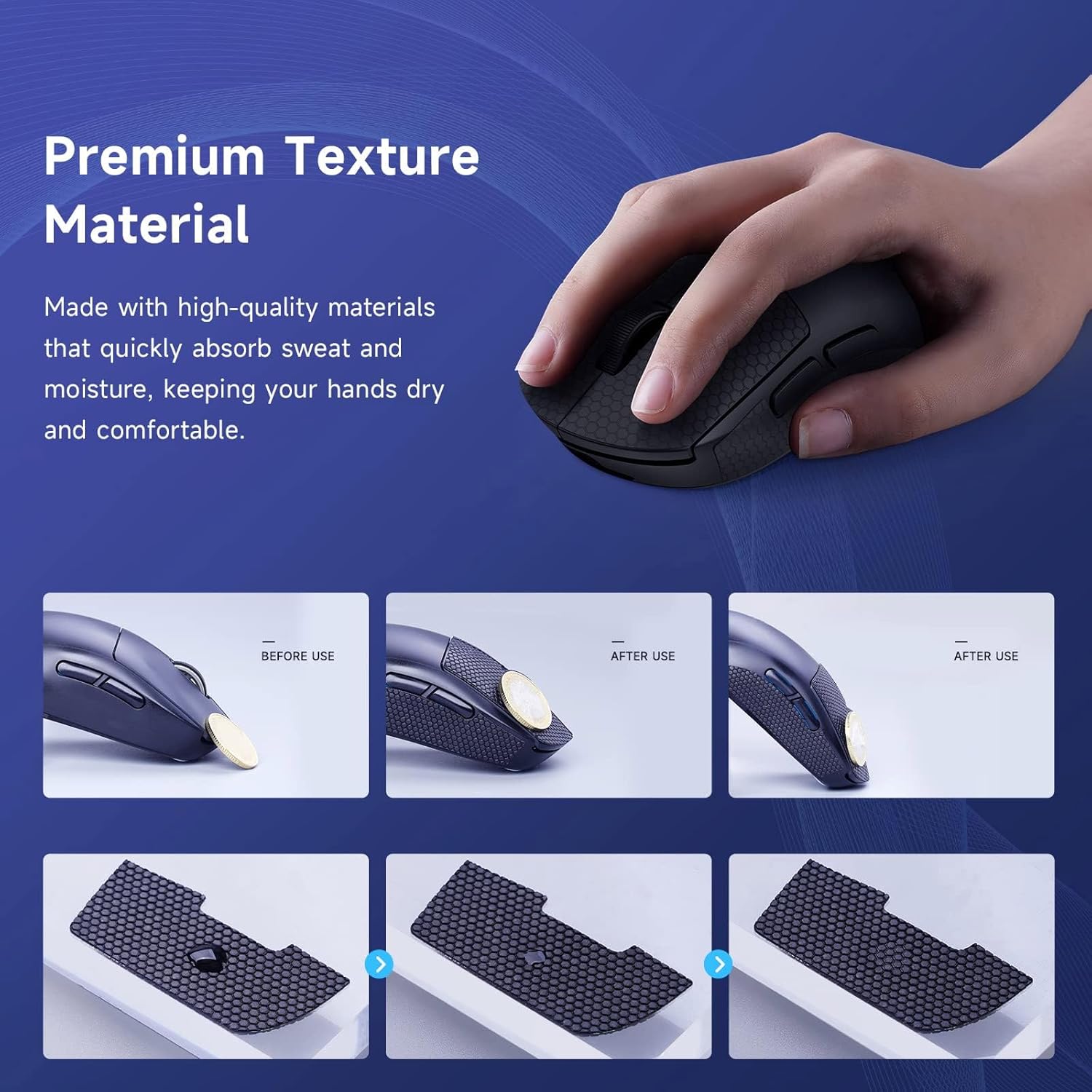
Image 2.2: Premium texture material absorbs sweat, keeping hands dry and comfortable.
3. Sąranka ir diegimas
Follow these steps to properly install the JINGDU G PRO Wireless Gaming Mouse Nonslip Skin:
- Prepare the Mouse: Ensure your G PRO Mouse surface is clean and dry. Remove any dust, oil, or existing residue from the areas where the grip skin will be applied.
- Atpažinkite dalis: The grip skin comes in pre-cut pieces designed for specific areas of your mouse (e.g., left click, right click, sides). Refer to the product images to identify each piece.
- Nulupkite pagrindą: Carefully peel off the protective backing from one grip skin piece, exposing the adhesive side. Avoid touching the adhesive with your fingers to maintain its stickiness.
- Suderinti ir pritaikyti: Align the grip skin piece with the corresponding area on your mouse. The 1:1 mold design ensures a precise fit. Once aligned, gently press the piece onto the mouse surface, starting from one edge and smoothing it down to prevent air bubbles.
- Saugus sukibimas: Apply firm, even pressure across the entire surface of the applied grip skin piece to ensure strong adhesion.
- Repeat for All Pieces: Repeat steps 3-5 for all remaining grip skin pieces until your mouse is fully covered as desired.

Image 3.1: The grip skin features precise 1:1 cut-outs for easy application.

Image 3.2: The grip skin is designed for durable adhesion and easy, residue-free removal.
4. Operacinis
Once installed, the JINGDU G PRO Wireless Gaming Mouse Nonslip Skin operates passively by enhancing the tactile feel and grip of your mouse. No additional configuration or power is required. The micro convex point design increases the coefficient of friction, allowing for more precise and stable mouse movements, particularly beneficial during fast-paced gaming or extended use.
5. Priežiūra
To ensure the longevity and effectiveness of your nonslip skin, consider the following maintenance tips:
- Valymas: If the grip skin accumulates dirt or grime, gently wipe it with a damp cloth. For more stubborn dirt, a soft brush (like a toothbrush) can be used with a small amount of mild soap and water. Ensure the mouse is completely dry before resuming use.
- Venkite stiprių cheminių medžiagų: Do not use abrasive cleaners, solvents, or harsh chemicals, as these can damage the material and adhesive.
- Pakeitimas: The grip skin is designed to be durable and can be used repeatedly. If the grip skin shows significant wear, loses its texture, or the adhesive weakens over time, it can be easily removed and replaced with a new set without leaving residue.
6. Problemų sprendimas
If you encounter any issues with your JINGDU G PRO Wireless Gaming Mouse Nonslip Skin, refer to the following common problems and solutions:
| Problema | Galima priežastis | Sprendimas |
|---|---|---|
| Grip skin not sticking properly. | Mouse surface was not clean or dry during application; insufficient pressure applied during installation; adhesive has degraded. | Ensure mouse surface is thoroughly cleaned and dried before application. Apply firm, even pressure across the entire surface. If the adhesive is old or degraded, consider replacing the grip skin. |
| Grip skin feels slippery or less effective. | Accumulation of sweat, oils, or dirt on the surface; material wear over time. | Clean the grip skin as described in the Maintenance section. If the material is significantly worn, replacement may be necessary. |
| Stains appear on the grip skin. | Sweat or dirt accumulation, especially on lighter colored skins. | Regularly clean the grip skin. While the material is sweat-resistant, prolonged exposure to sweat and dirt without cleaning can lead to staining. |
7. Specifikacijos
| Specifikacija | Detalė |
|---|---|
| Prekės ženklas | JINGDU |
| Suderinami įrenginiai | G PRO Mouse |
| Medžiaga | Polivinilchloridas |
| Spalva | Juoda |
| Prekės svoris | 0.317 uncijos |
| Pakuotės matmenys | 6.18 x 5.47 x 0.28 colio |
| Gamintojas | JINGDU |
| ASIN | B0BYP3949K |
| Pasiekiama pirmoji data | 16 m. kovo 2023 d |
8. Garantija ir palaikymas
For warranty information and customer support regarding your JINGDU G PRO Wireless Gaming Mouse Nonslip Skin, please contact JINGDU directly through their official channels or the retailer from whom you purchased the product. Keep your proof of purchase for any warranty claims.
For general inquiries or technical assistance, you may visit the JINGDU store on Amazon: JINGDU Store.


