1. Įvadas
Thank you for choosing the HIKMICRO HEIMDAL H4D Digital Night Vision Monocular. This device is designed for observation in low light and complete darkness, featuring a high-resolution sensor and AMOLED display for clear imaging.
Pagrindinės funkcijos:
- 1.39" AMOLED display with 454 x 454 resolution
- High-resolution 2560 x 1440 sensor
- Integrated 850 nm infrared illuminator with smart IR function
- Day/Night/Auto/Defog modes
- Elektroninis vaizdo stabilizavimas (EIS)
- Detection range up to 200 meters
- Replaceable and rechargeable battery with over 4 hours of use
- Compact and portable design, waterproof and dustproof (IP67)
- Integrated 32 GB EMMC for storing recorded videos and photos
- Wireless connection via HIKMICRO Sight app, local album function
Pakuotės turinys:
- HIKMICRO HEIMDAL H4D Digital Night Vision Monocular
- Baterija
- Dulkių šluostė
- Apsauginis maišelis
- Riešo dirželis
- USB-C laidas
- Trumpas vadovas
2. Produktas baigtasview
Familiarize yourself with the components and controls of your HIKMICRO HEIMDAL H4D monocular.
Įrenginio išdėstymas
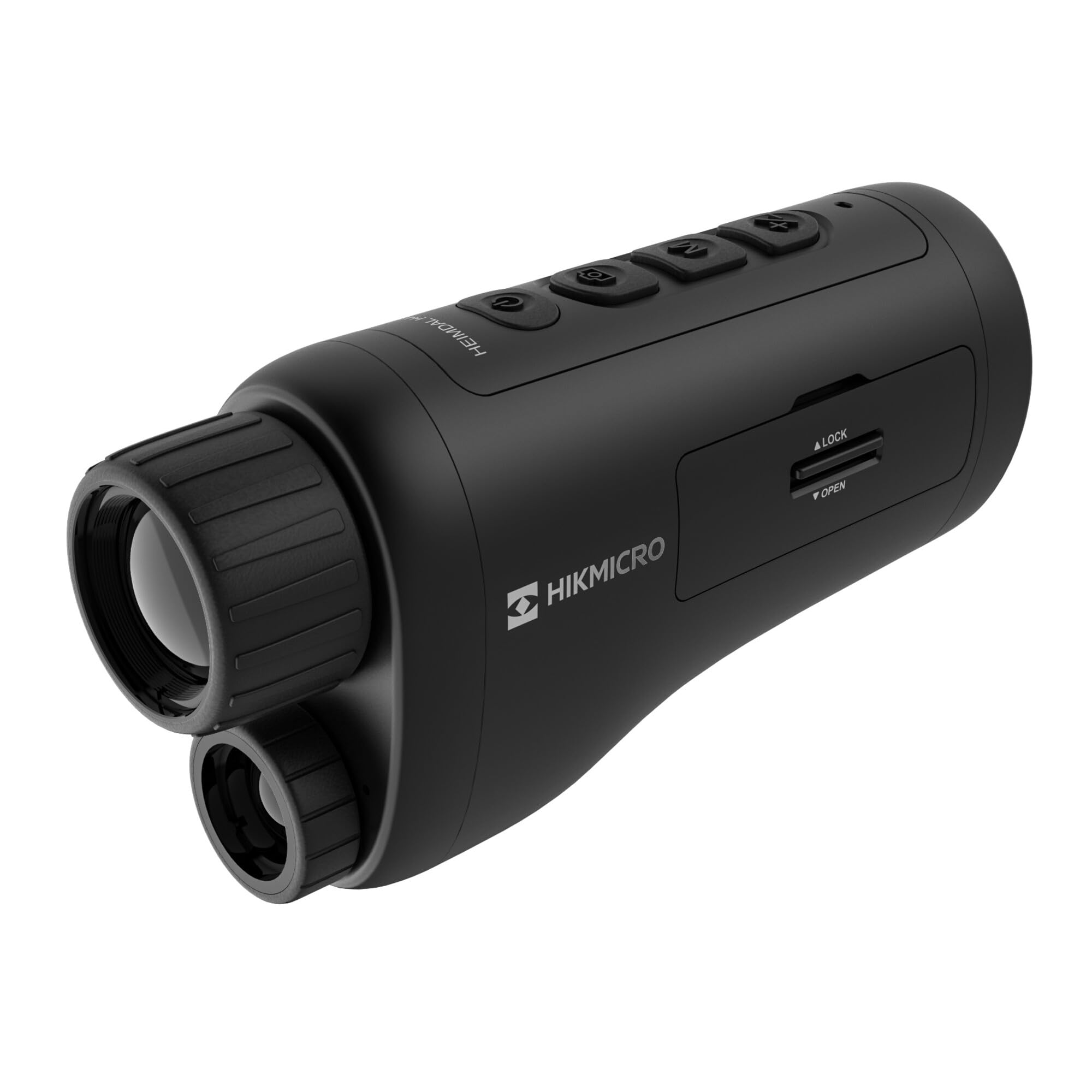
Kampinis view of the HIKMICRO HEIMDAL H4D monocular, showing its compact, ergonomic design and the main lens.
Valdikliai ir mygtukai

Į viršų view of the monocular showing the power button, photo/video record button, mode button, and zoom/IR adjustment buttons.
Lenses and Focus

Priekyje view displaying the objective lens and the integrated infrared illuminator.
Baterijų skyrius

Šoninė view showing the battery compartment with 'LOCK' and 'OPEN' indicators.
3. Sąranka
Akumuliatoriaus montavimas
- Raskite baterijų skyrių įrenginio šone.
- Slide the lock mechanism to the 'OPEN' position.
- Įdėkite įkraunamą bateriją, užtikrindami teisingą poliškumą.
- Close the compartment and slide the lock mechanism to the 'LOCK' position.
Akumuliatoriaus įkrovimas
Connect the device to a power source using the provided USB-C cable. The charging indicator will show the charging status.
Pradinis įjungimas
Paspauskite ir palaikykite maitinimo mygtuką (paprastai pažymėtą Ⓘ) until the HIKMICRO logo appears on the display.
4. Naudojimo instrukcijos
Maitinimo įjungimas/išjungimas
- Maitinimas: Paspauskite ir palaikykite maitinimo mygtuką maždaug 3 sekundes.
- Išjungti: Press and hold the power button for approximately 3 seconds until the device shuts down.
Fokuso reguliavimas
Rotate the focus ring on the objective lens to achieve a clear image of your target.
Režimo pasirinkimas
Press the 'M' (Mode) button to cycle through observation modes: Day, Night, Auto, and Defog.
Zoom and IR Adjustment
Use the '+' and '-' buttons to adjust the digital zoom level. These buttons also control the intensity of the infrared illuminator in night mode.
Photo and Video Recording
- Fotografuoti: Press the photo/video button (usually marked with 📷) once to capture an image.
- Įrašyti vaizdo įrašą: Press and hold the photo/video button to start recording. Press again to stop.
Connecting to HIKMICRO Sight App
Download the HIKMICRO Sight app from your device's app store. Follow the in-app instructions to connect your monocular for live view, remote control, and media management.
5. Priežiūra
Valymas
- Use the provided dust cloth or a soft, lint-free cloth to clean the lenses.
- For stubborn dirt, use a lens cleaning solution specifically designed for optics.
- Nuvalykite įrenginio korpusą minkšta,amp audinys. Nenaudokite abrazyvinių valiklių ar tirpiklių.
Sandėliavimas
- Store the monocular in its protective bag in a cool, dry place when not in use.
- Išimkite bateriją, jei prietaiso nenaudosite ilgą laiką.
Akumuliatoriaus priežiūra
- Charge the battery regularly, even if not in frequent use, to maintain its lifespan.
- Įkraunant ir laikant venkite ekstremalių temperatūrų.
6. Problemų sprendimas
Bendros problemos ir sprendimai
| Problema | Galima priežastis | Sprendimas |
|---|---|---|
| Įrenginys neįsijungia. | Baterija išsikrovusi arba netinkamai įdėta. | Įkraukite bateriją. Įsitikinkite, kad baterija įdėta teisingu poliškumu. |
| Vaizdas neryškus. | Focus is not adjusted. | Sukite objektyvo fokusavimo žiedą, kol vaizdas taps aiškus. |
| Prasta vaizdo kokybė tamsoje. | IR apšvietiklis išjungtas arba nustatytas mažo intensyvumo režimas. | Activate the IR illuminator or increase its intensity using the '+' button. Ensure you are in Night mode. |
| Cannot connect to HIKMICRO Sight app. | Bluetooth/Wi-Fi is off on device or phone, or app is not updated. | Ensure Bluetooth/Wi-Fi is enabled on both devices. Restart the app and monocular. Check for app updates. |
| Įrenginys užstringa arba nereaguoja. | Laikinas programinės įrangos triktis. | Atlikite minkštąjį atkūrimą laikydami nuspaustą maitinimo mygtuką, kol įrenginys bus paleistas iš naujo. Jei problema išlieka, susisiekite su palaikymo tarnyba. |
7. Specifikacijos
| Funkcija | Detalė |
|---|---|
| Jutiklio skyra | 2560 x 1440 |
| Ekrano tipas | AMOLED |
| Ekrano raiška | 454 x 454 |
| Ekrano dydis | 1.39 colio (3.5 cm) |
| Infraraudonųjų spindulių apšvietimas | Integrated 850 nm |
| Aptikimo diapazonas | Iki 200 metrų |
| Sandėliavimas | 32 GB EMMC (internal) |
| Baterijos veikimo laikas | More than 4 hours (replaceable, rechargeable) |
| Atsparumo vandeniui įvertinimas | IP67 |
| Matmenys | 153 mm x 50 mm x 80 mm (6.02 colio x 1.97 colio x 3.15 colio) |
| Svoris | 375 gramų (0.83 svaro) |
| Medžiaga | Plastikiniai |
| Suderinami įrenginiai | Rifle, Compound Bow |
| Montavimo tipas | Picatinny laikiklis |
| Sport Use | Camping, žygiai |
| Spalva | Baltas |
8. Garantija ir palaikymas
HIKMICRO products are covered by a limited warranty. For detailed warranty information, please refer to the official HIKMICRO websvetainėje arba susisiekite su vietiniu platintoju.
For technical support, troubleshooting assistance, or service inquiries, please visit the official HIKMICRO support page or contact their customer service department.
Oficialus Websvetainė: www.hikmicrotech.com


