1. Įvadas
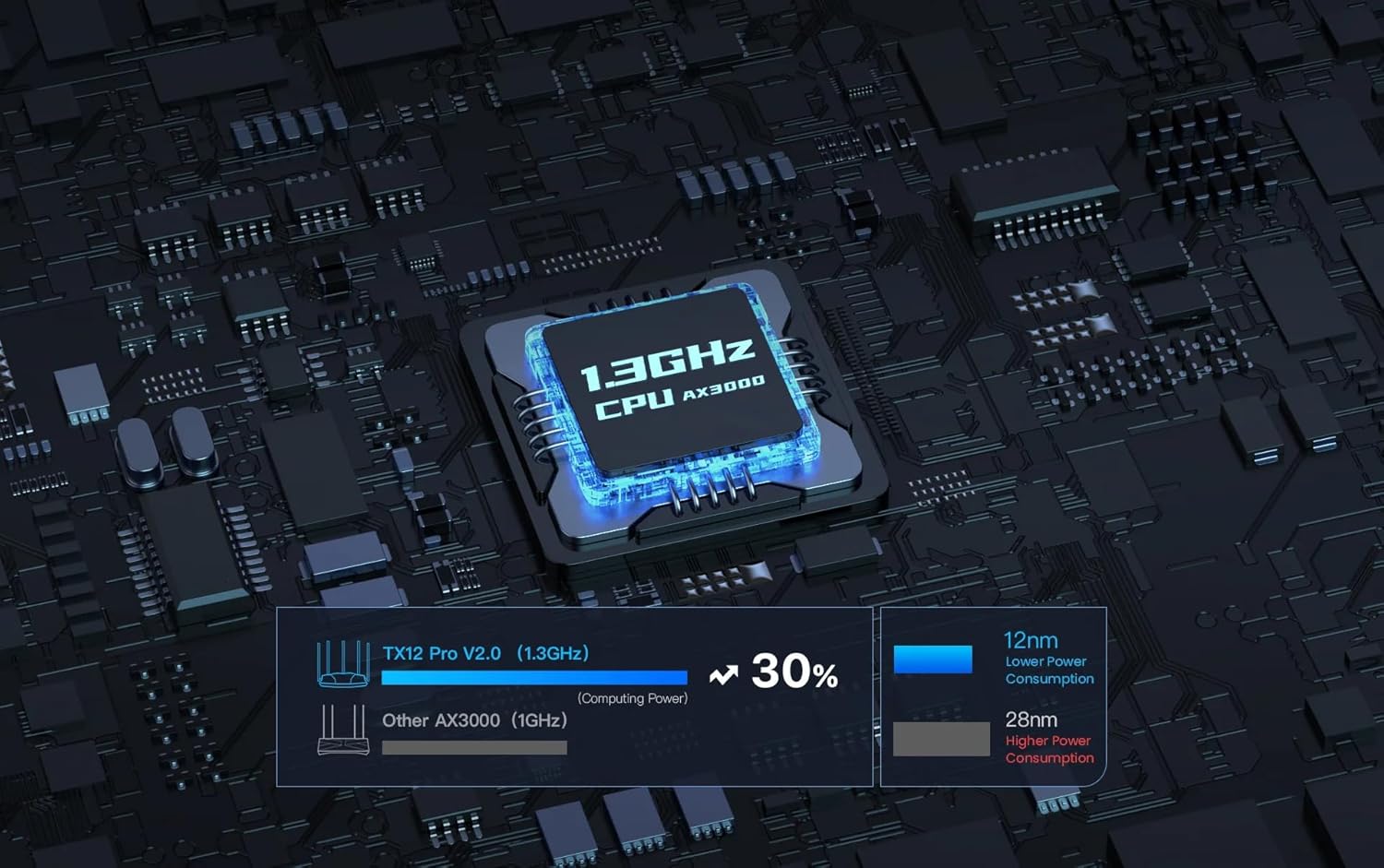
This manual provides detailed instructions for the installation, configuration, and operation of your Tenda TX12 Pro AX3000 Dual Band Gigabit Wi-Fi 6 Router. The TX12 Pro V2.0 is designed to deliver high-performance wireless connectivity, supporting Wi-Fi 6 (802.11ax) with a combined speed of up to 2976Mbps. It features a 12nm 1.3GHz dual-core CPU for stable network performance and incorporates advanced technologies like Wi-Fi+, OFDMA, and MU-MIMO to enhance coverage and efficiency.
2. Pakuotės turinys
Please verify that all items are present in your package. If any item is missing or damaged, please contact your retailer.
- Tenda TX12 Pro AX3000 Router Body
- Maitinimo adapteris
- Ethernet kabelis
- Greito diegimo vadovas

Vaizdas: priekis view of the Tenda TX12 Pro AX3000 Router, showcasing its design and antennas.
3. Fizinis viršusview
Susipažinkite su maršrutizatoriaus prievadais ir indikatoriais.
Vaizdas: Galinis view of the Tenda TX12 Pro AX3000 Router, highlighting the various ports for connectivity.
3.1. LED indikatoriai
- Sistemos šviesos diodas: Nurodo maršrutizatoriaus veikimo būseną.
- WAN šviesos diodas: Indicates the status of the internet connection.
- LAN šviesos diodai: Indicate the status of wired connections to LAN ports.
- „Wi-Fi“ šviesos diodas: Rodo belaidžio tinklo būseną.
3.2. Prievadai ir mygtukai
- WAN prievadas: Prisijungia prie modemo arba interneto paslaugų teikėjo (IPT) tinklo.
- LAN prievadai: Connect to wired devices such as computers, gaming consoles, or network storage.
- Maitinimo prievadas: Jungiamas prie pridedamo maitinimo adapterio.
- Atkūrimo mygtukas: Naudojamas maršrutizatoriaus gamykliniams nustatymams atkurti. Paspauskite ir palaikykite maždaug 8–10 sekundžių, kai maršrutizatorius įjungtas.
- WPS / Reset mygtukas: May combine WPS function with reset. A short press activates WPS, a long press initiates reset.
4. Sąranka
4.1. Aparatinės įrangos ryšys
- Išjungti: Atjunkite modemo ir maršrutizatoriaus maitinimą (jei taikoma).
- Prijunkite WAN: Connect one end of the Ethernet cable to the WAN port of the Tenda TX12 Pro router and the other end to your modem's LAN port.
- Prijungti LAN (nebūtina): Laidiniams įrenginiams prijunkite Ethernet kabelį prie maršrutizatoriaus LAN prievado prie kompiuterio ar kito tinklo įrenginio.
- Maitinimas: Connect the power adapter to the router's power port and plug it into an electrical outlet. Power on your modem, then power on the router. Wait for the System LED to indicate a stable state (usually solid green or blue).
4.2. Pradinė konfigūracija
Maršrutizatorių galite konfigūruoti naudodami web browser or the Tenda Wi-Fi app.
4.2.1. Per Web Naršyklė
- Prisijunkite prie maršrutizatoriaus: Connect your computer to the router via an Ethernet cable (to a LAN port) or wirelessly to the default Wi-Fi network (SSID and password are usually on a label on the router's bottom).
- Prieiga Web NS: Atidarykite a web naršyklę ir įveskite numatytąjį prieigos adresą (pvz., http://tendawifi.com or http://192.168.0.1) adreso juostoje.
- Vykdykite sąrankos vedlio veiksmus: The setup wizard will guide you through setting up your internet connection type (e.g., PPPoE, Dynamic IP, Static IP) and configuring your Wi-Fi network name (SSID) and password.
- Set Admin Password: Create a strong login password for the router's management interface.
4.2.2. Via Tenda Wi-Fi App
- Atsisiųsti programą: Download the Tenda Wi-Fi app from your mobile device's app store.
- Prisijunkite prie maršrutizatoriaus: Prijunkite mobilųjį įrenginį prie numatytojo maršrutizatoriaus „Wi-Fi“ tinklo.
- Paleisti programą: Open the Tenda Wi-Fi app and follow the on-screen instructions to set up your router.
5. Maršrutizatoriaus valdymas
5.1. Basic Wi-Fi Usage
Once configured, your Wi-Fi network will be broadcast. Connect your wireless devices (smartphones, tablets, laptops) by selecting your Wi-Fi network name (SSID) and entering the password you set during setup.
5.2. Išplėstinės funkcijos
- Svečių tinklas: Create a separate Wi-Fi network for guests to provide internet access while isolating your main network for security. This feature is accessible via the router's web sąsają arba „Tenda Wi-Fi“ programėlę.
- Tėvų kontrolė: Manage internet access for specific devices. This includes features like blacklisting (blocking specific websites) and whitelisting (allowing only specific websites), and setting time limits for internet usage.
- Pralaidumo valdymas: Allocate specific bandwidth to different devices or applications to prioritize network traffic and ensure fair usage.
- Web Nuotolinis valdymas: Access and manage your router's settings remotely via the Tenda Wi-Fi app or web interface, even when you are not at home.
- Wi-Fi+: This feature allows for easy mesh networking, extending Wi-Fi coverage in large homes by seamlessly connecting multiple Tenda Wi-Fi+ compatible devices.
- OFDMA + MU-MIMO Technology: These Wi-Fi 6 technologies improve network efficiency by allowing the router to communicate with multiple devices simultaneously, reducing latency and improving overall performance, especially in environments with many connected devices.

Image: Illustration demonstrating the performance advantage of AX3000 with 160MHz bandwidth compared to AC1200.

Image: Diagram showing the 1.3GHz dual-core CPU of the TX12 Pro V2.0, highlighting its lower power consumption and higher computing power compared to other 1GHz AX3000 CPUs.
6. Priežiūra
6.1. Firmware atnaujinimai
Reguliariai tikrinkite, ar yra programinės įrangos atnaujinimų, ir juos įdiekite, kad užtikrintumėte optimalų našumą, saugumą ir prieigą prie naujų funkcijų. Programinės įrangos atnaujinimus paprastai galima atlikti per maršrutizatoriaus web interface under "System Tools" or "Firmware Upgrade," or via the Tenda Wi-Fi app.
6.2. Maršrutizatoriaus nustatymas iš naujo
If you encounter persistent issues or forget your login password, you can restore the router to its factory default settings. With the router powered on, press and hold the Reset button (usually located in a small pinhole) for approximately 8-10 seconds until the LEDs flash. The router will then restart with default settings.
6.3. Valymas
Gently wipe the router's exterior with a soft, dry cloth. Do not use liquid cleaners or aerosols. Ensure the router is powered off before cleaning.
7. Problemų sprendimas
- Nėra interneto prieigos:
- Check if the WAN LED is solid. If not, ensure the Ethernet cable from the modem is securely connected to the router's WAN port.
- Patikrinkite, ar jūsų modemas veikia tinkamai.
- Prisijunkite prie maršrutizatoriaus web interface and check the internet connection status. Re-run the setup wizard if necessary.
- Norėdami patvirtinti paslaugos būseną, susisiekite su savo interneto paslaugų teikėju.
- Mažas „Wi-Fi“ greitis:
- Ensure your devices support Wi-Fi 6 (802.11ax) to benefit from the router's full speed capabilities.
- Reduce interference by placing the router in a central location, away from obstacles and other electronic devices.
- Patikrinkite, ar nėra programinės įrangos naujinių.
- Utilize the 5GHz band for higher speeds, as the 2.4GHz band is more susceptible to interference and offers lower speeds.
- Frequent Wi-Fi Disconnections:
- Adjust Wi-Fi channel settings in the router's interface to avoid crowded channels.
- Įsitikinkite, kad maršrutizatoriaus programinė įranga yra atnaujinta.
- Patikrinkite, ar nėra fizinių kliūčių ar trukdžių šaltinių.
- Nepavyksta pasiekti maršrutizatoriaus Web Sąsaja:
- Įsitikinkite, kad jūsų įrenginys prijungtas prie maršrutizatoriaus tinklo (laidinio arba belaidžio).
- Verify you are entering the correct IP address or domain name (e.g., http://tendawifi.com).
- Išvalykite naršyklės talpyklą arba išbandykite kitą naršyklę.
- Jei pamiršote slaptažodį, atlikite gamyklinių parametrų atkūrimą (žr. 6.2 skyrių).
8. Specifikacijos
| Modelio pavadinimas | „TX12 Pro“ |
| bevielio ryšio standartas | 802.11ax („Wi-Fi 6“) |
| Dažnių juosta | Dviejų dažnių juosta (2.4 GHz ir 5 GHz) |
| Maksimalus belaidis greitis | Iki 2976 Mbps (5 GHz: 2402 Mbps, 2.4 GHz: 574 Mbps) |
| CPU | 12nm 1.3GHz Dual-core |
| Ryšio technologija | Ethernet, Wi-Fi |
| Ypatingos savybės | Parental Controls, Bandwidth Control, Guest Network, MAC Clone, Web Remote Management, Wi-Fi+, OFDMA, MU-MIMO |
| Suderinami įrenginiai | Žaidimų konsolė, asmeninis kompiuteris, išmanusis televizorius, išmanusis telefonas, planšetinis kompiuteris |
| Rekomenduojami naudojimo būdai | Žaidimai, Namai |
| Prekės svoris | 70 gramų |
| Pakuotės matmenys | 35.9 x 30.1 x 6.4 cm |
9. Garantija ir palaikymas
For warranty information and technical support, please refer to the warranty card included in your product package or visit the official Tenda websvetainę. DUK ir papildomų išteklių taip pat galite rasti jų pagalbos puslapiuose.
Tenda Oficialus Websvetainė: https://www.tendacn.com


