1. Įvadas
Thank you for choosing the GenMachine Mini PC. This compact yet powerful computer is designed to deliver exceptional performance for a variety of tasks, including gaming, office productivity, and creative design. Equipped with an AMD Ryzen 7 3750H processor, ample memory, and fast storage, it offers a seamless computing experience. This manual provides essential information for setting up, operating, maintaining, and troubleshooting your new Mini PC.
2. Kas yra dėžutėje
Please verify that all items are present and in good condition upon unboxing.
- 1 x GenMachine Mini PC
- 1x HDMI laidas
- 1x maitinimo adapteris
- 1 x Naudotojo vadovas (šis dokumentas)
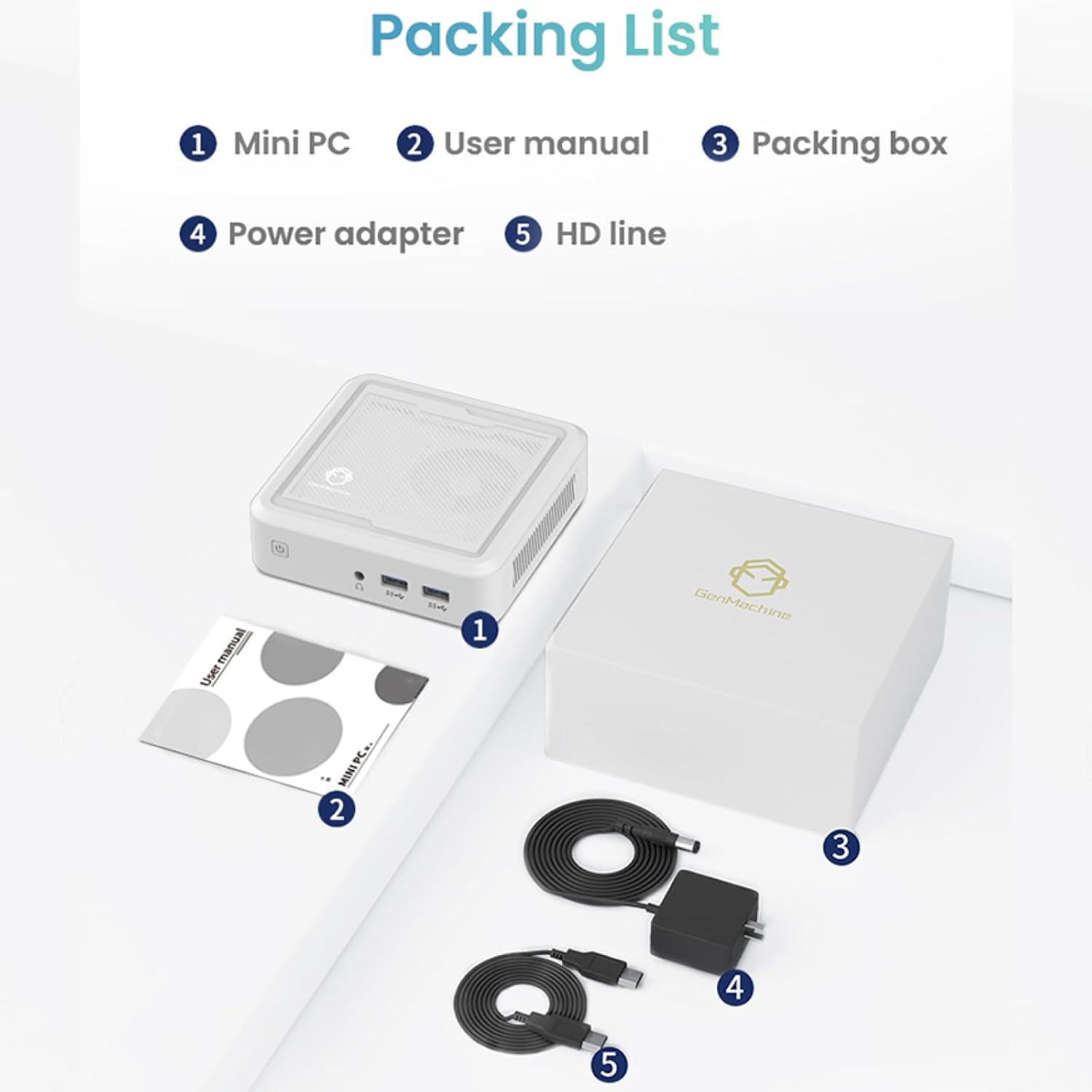
Figure 2.1: Packaging contents of the GenMachine Mini PC.
3. Produkto ypatybės
The GenMachine Mini PC is engineered with features to enhance your computing experience:
- Galingas našumas: Equipped with an AMD Ryzen 7 3750H processor, delivering speeds up to 4.0GHz with 4 cores and 8 threads for demanding tasks.
- AmpAtmintis ir saugykla: Features 8GB of DDR4 RAM and a 256GB SSD with M.2 NVMe support for seamless multitasking and quick file prieiga.
- Universalus ryšys: Advanced WiFi 6 and Bluetooth 5.2 capabilities ensure high-speed internet and smooth device pairing.
- Kompaktiškas dizainas: A sleek, small form factor that fits easily into any workspace or gaming setup.
- Kelios ekrano parinktys: HDMI and DisplayPort outputs support dual 4K displays for expanded productivity and immersive visuals.

3.1 pav.: priekis view of the GenMachine Mini PC.
3.1 Rich Interface for Easy Connection
The Mini PC offers a comprehensive set of ports to meet various connectivity needs:
- USB 3.0 x 4
- HDMI x 1
- DisplayPort (DP) x 1
- LAN (Ethernet) x 1
- 3.5mm Audio Jack x 1
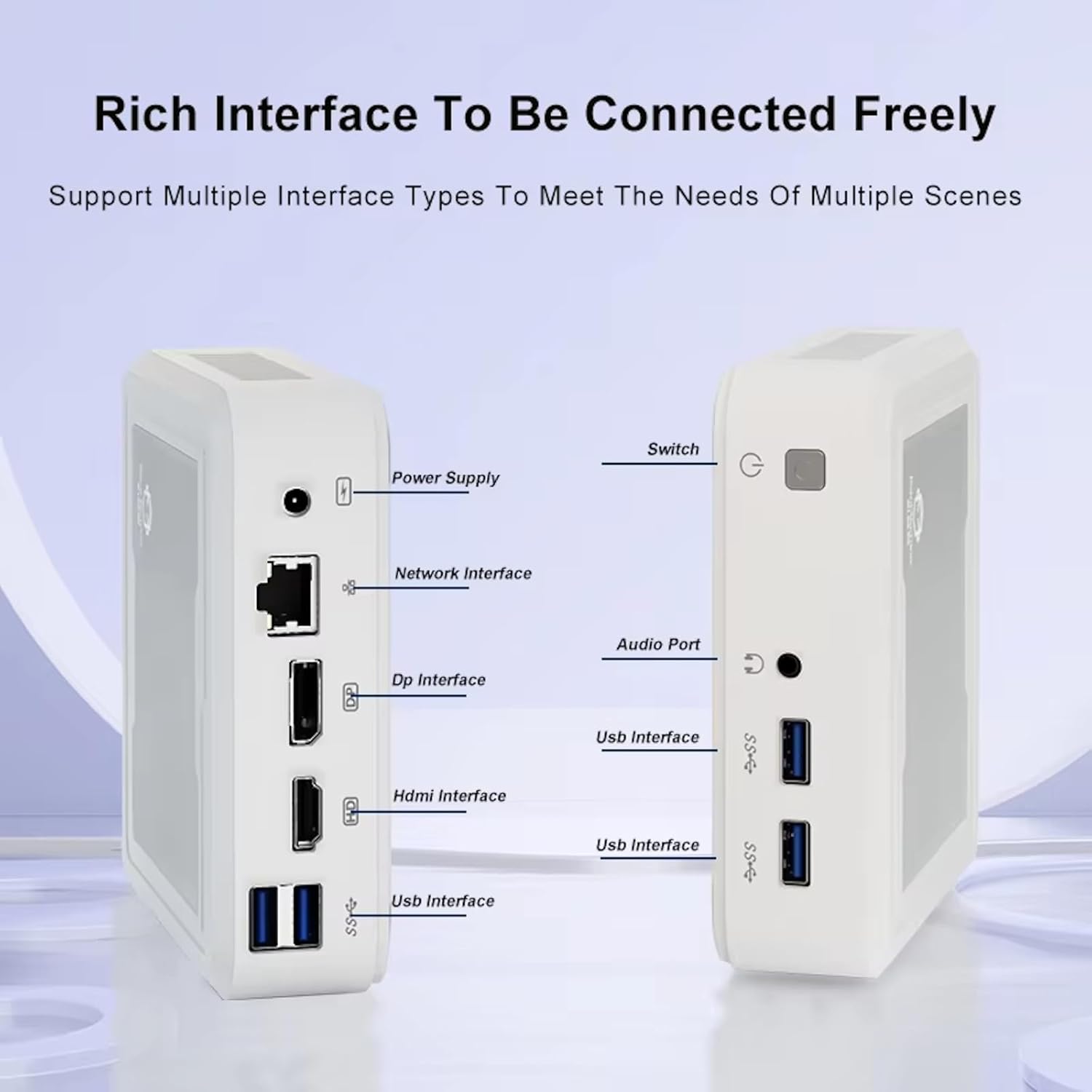
Figure 3.2: Available ports on the GenMachine Mini PC.
3.2 Dual Monitor Support
Enhance your productivity or gaming experience by connecting up to two 4K displays simultaneously using the HDMI and DisplayPort outputs.

Figure 3.3: Dual 4K display setup with the GenMachine Mini PC.
Video 3.1: Demonstration of the GenMachine Mini PC supporting two monitors simultaneously.
3.3 Energy Efficiency and Quiet Operation
Designed for low noise operation, the Mini PC maintains a quiet environment, making it suitable for various settings.

Figure 3.4: Noise level comparison of the GenMachine Mini PC.
3.4 Compact and Durable Design
The Mini PC features an ultra-durable, lightweight metal casing, making it space-saving and robust for any work environment.
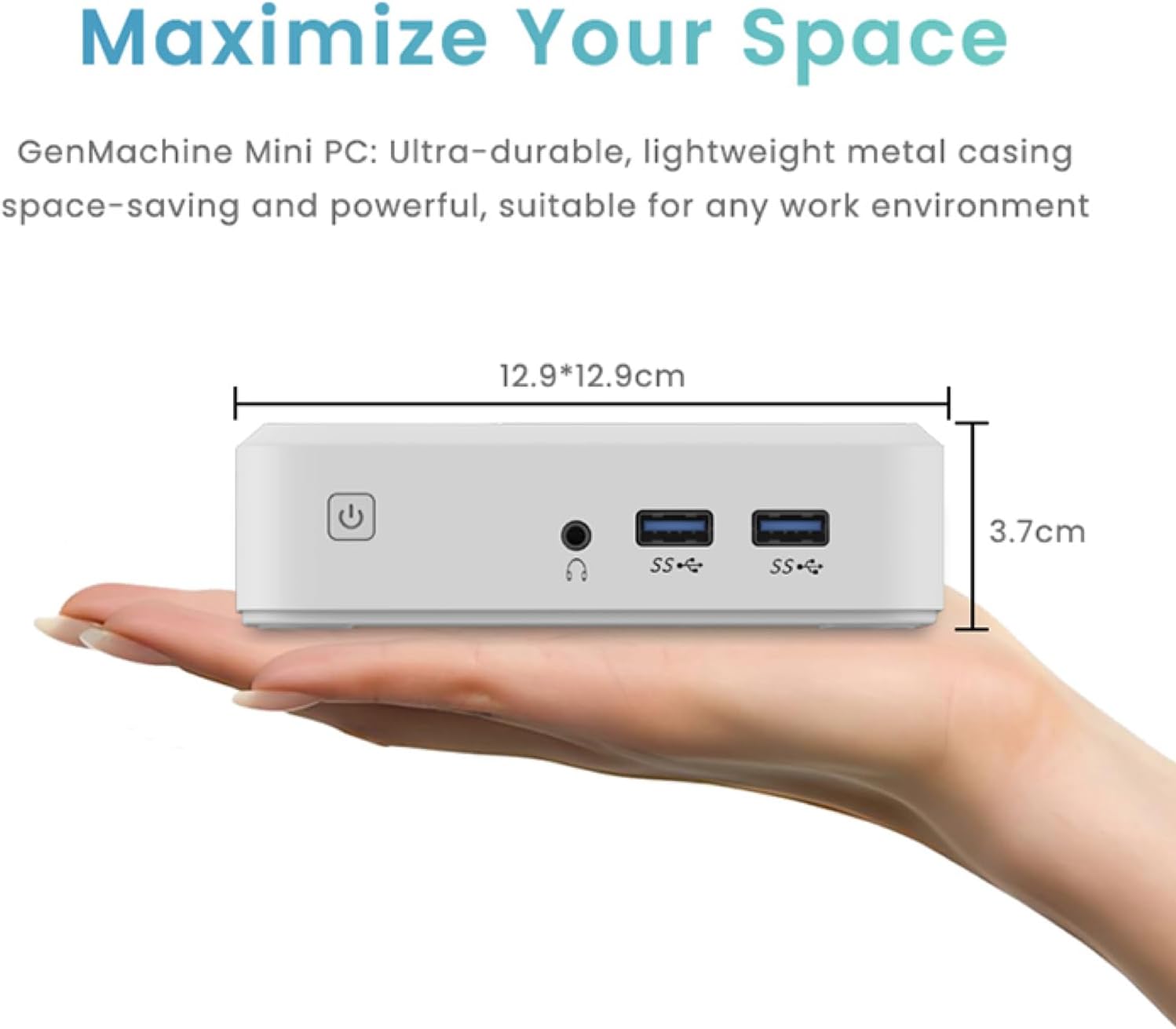
Figure 3.5: Compact size of the GenMachine Mini PC.
3.2 vaizdo įrašas: Viršview of the GenMachine Mini PC's features and compact design.
4. Sąrankos vadovas
Follow these steps to set up your GenMachine Mini PC:
- Išpakuokite mini kompiuterį: Atsargiai išimkite visus komponentus iš pakuotės.
- Prijunkite prie ekrano: Use the provided HDMI cable to connect the Mini PC to your monitor or TV. If using a DisplayPort monitor, use a compatible DP cable (not included).
- Prijunkite išorinius įrenginius: Prijunkite klaviatūrą, pelę ir kitus USB įrenginius prie laisvų USB 3.0 prievadų.
- Prisijungimas prie tinklo (neprivaloma): Jei norite laidinio interneto ryšio, prijunkite eterneto kabelį prie LAN prievado. Jei norite belaidžio ryšio, pradinio nustatymo metu įsitikinkite, kad jūsų „Wi-Fi“ tinklas yra pasiekiamas.
- Prijunkite maitinimą: Prijunkite maitinimo adapterį prie „Mini PC“ nuolatinės srovės įvesties prievado, tada prijunkite adapterį prie maitinimo lizdo.
- Maitinimas: Press the power button on the front of the Mini PC. The system should boot up.
5. Naudojimo instrukcijos
5.1 Pradinis paleidimas ir operacinės sistemos sąranka
Upon first power-on, the Mini PC will guide you through the operating system setup process. Follow the on-screen prompts to configure language, region, user accounts, and network settings.
5.2 Energijos valdymas
- Maitinimas: Vieną kartą paspauskite maitinimo mygtuką.
- Išjungti: Access the power options through the operating system's start menu and select 'Shut down'.
- Paleisti iš naujo: Access the power options through the operating system's start menu and select 'Restart'.
- Miegojimo rezimas: Access the power options through the operating system's start menu and select 'Sleep'.
5.3 Prisijungimas prie „Wi-Fi“ ir „Bluetooth“
To connect to a wireless network or Bluetooth device, use the respective settings within your operating system. The Mini PC supports WiFi 6 and Bluetooth 5.2 for fast and reliable connections.
6. Priežiūra
Reguliarus techninis aptarnavimas padeda užtikrinti jūsų „Mini PC“ ilgaamžiškumą ir optimalų veikimą:
- Valymas: Use a soft, dry cloth to clean the exterior. For dust in vents, use compressed air. Ensure the device is powered off and unplugged before cleaning.
- Vėdinimas: Ensure the Mini PC is placed in a well-ventilated area. Do not block the air vents.
- Programinės įrangos atnaujinimai: Regularly update your operating system, drivers, and applications to ensure security and performance.
- Duomenų atsarginė kopija: Periodiškai kurkite svarbių duomenų atsargines kopijas išoriniame diske arba debesies saugykloje.
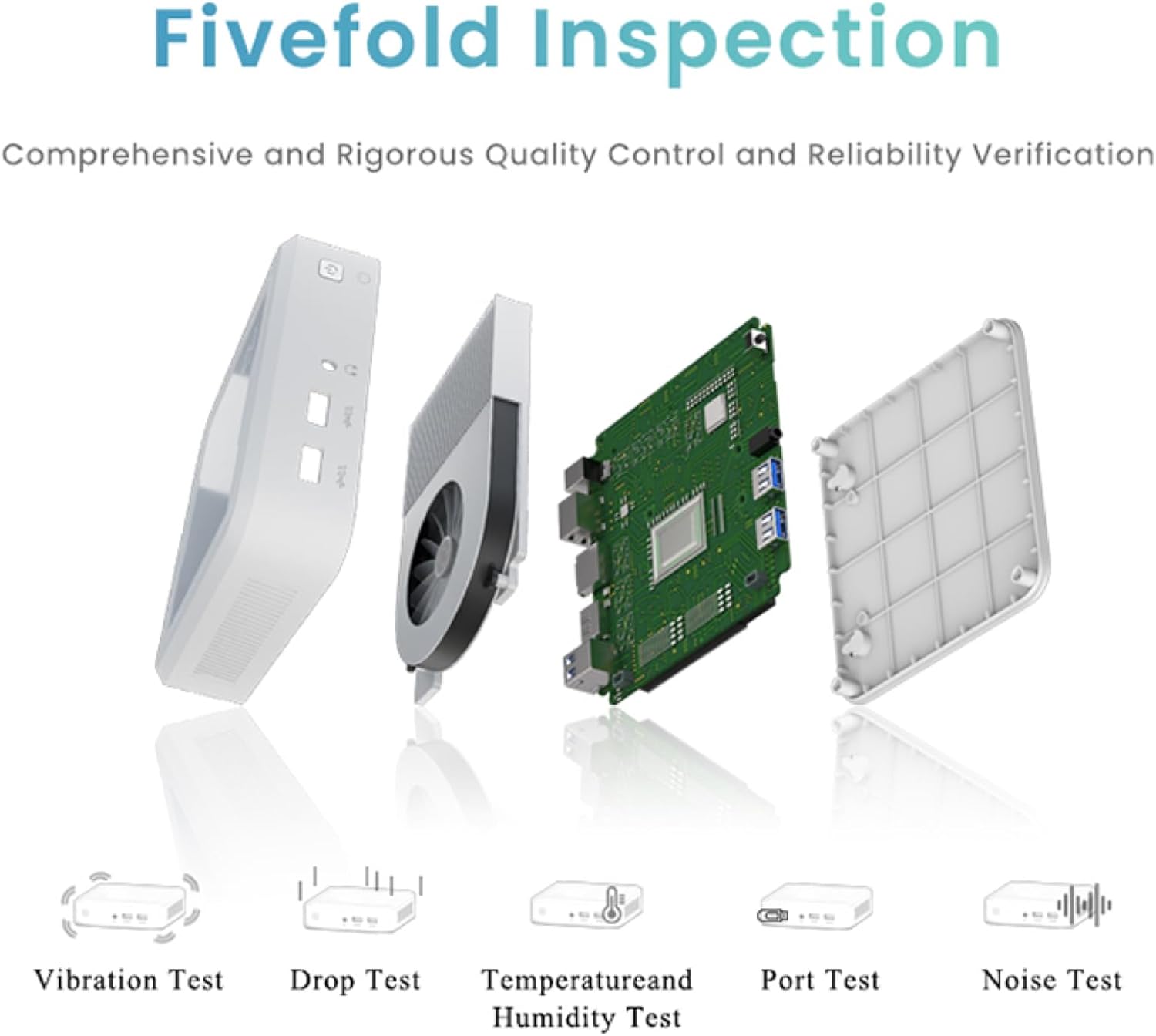
Figure 6.1: GenMachine's Fivefold Inspection process for quality control.
7. Problemų sprendimas
Jei kyla problemų dėl „Mini PC“, žr. šias dažniausiai pasitaikančias problemas ir sprendimus:
- Nėra galios:
- Įsitikinkite, kad maitinimo adapteris yra tvirtai prijungtas tiek prie „Mini PC“, tiek prie veikiančio maitinimo lizdo.
- Išbandykite kitą maitinimo lizdą.
- Nėra ekrano:
- Verify that the HDMI or DisplayPort cable is securely connected to both the Mini PC and the monitor.
- Įsitikinkite, kad monitorius įjungtas ir nustatytas tinkamas įvesties šaltinis.
- Jei įmanoma, pabandykite kitą ekrano kabelį arba monitorių.
- System Freezes or Unresponsive:
- Perform a hard reset by holding the power button for 5-10 seconds until the device powers off, then restart.
- Ensure the operating system and drivers are up to date.
- Patikrinkite, ar nėra perkaitimo; užtikrinkite tinkamą vėdinimą.
- Run a system diagnostic or memory test if the issue persists.
- Nėra interneto ryšio:
- Laidinio ryšio atveju patikrinkite eterneto kabelio ir maršrutizatoriaus būseną.
- For Wi-Fi, ensure Wi-Fi is enabled in the operating system and you are connected to the correct network with the correct password.
- Paleiskite maršrutizatorių / modemą iš naujo.
8. Specifikacijos
| Funkcija | Specifikacija |
|---|---|
| Procesorius | AMD Ryzen 7 3750H (4 cores, 8 threads, up to 4.0GHz) |
| RAM | 8GB DDR4 |
| Sandėliavimas | 256GB SSD (with M.2 NVMe support) |
| Grafikos koprocesorius | „AMD Radeon Vega 10“ grafika |
| Maksimali ekrano skiriamoji geba | 3840 x 2160 pikselių (4K) |
| Belaidis tipas | 802.11ac (WiFi 6), Bluetooth 5.2 |
| USB prievadai | 4 x USB 3.0 |
| Vaizdo išvestys | HDMI, „DisplayPort“ |
| Operacinė sistema | OS (iš anksto įdiegta) |
| Prekės svoris | 2.1 svaro |
| Gaminio matmenys | 4.9 x 4.9 x 1.4 colio |
| Spalva | Juoda |
9. Garantija ir palaikymas
For warranty information and technical support, please refer to the warranty card included with your product or visit the official GenMachine websvetainėje. Išsaugokite pirkimo kvitą kaip pirkimo įrodymą garantiniams reikalavimams.
If you require further assistance, please contact GenMachine customer support through the channels provided on their official websvetainę.


