Keychron Q6P-M1

„Keychron Q6 Pro“ visiškai aliuminio mechaninės klaviatūros naudotojo vadovas

Model: Q6P-M1

1. Įvadas

Welcome to the user manual for your Keychron Q6 Pro Full Aluminum QMK/VIA Programmable Knob Bluetooth Custom Mechanical Keyboard. This keyboard is designed to provide an exceptional typing experience with its full-size layout, durable aluminum body, and advanced customization options. It features hot-swappable Keychron K Pro Red mechanical switches, KSA double-shot PBT keycaps, a double-gasket design, screw-in stabilizers, and south-facing RGB backlighting.

The Q6 Pro offers both wireless (Bluetooth 5.1) and wired (USB Type-C) connectivity, making it versatile for various devices including laptops, phones, and tablets. Its QMK/VIA compatibility allows for extensive key remapping and macro creation, powered by an ultra-low-power ARM Cortex-M4 32-bit STM32L432 chip.

Keychron Q6 Pro keyboard with red switch detail

Image 1.1: Keychron Q6 Pro Full Aluminum Custom Mechanical Keyboard with a close-up of a red switch.

2. Pakuotės turinys

Prašome patikrinti, ar pakuotėje yra visi reikalingi daiktai:

  • 1x pilnai surinkta klaviatūra
  • 1x aliuminio dėklas
  • 1x PCB (Printed Circuit Board)
  • 1x PC plokštė
  • 1x garsą sugeriančios putos
  • 1x korpuso putos
  • 16x tarpikliai (12 sumontuoti ir 4 dėžutėje)
  • 8 komplektai x stabilizatoriai
  • 1 set x Keycaps (Double-Shot KSA PBT)
  • 1 rinkinys x jungikliai
  • 1x C tipo–C tipo kabelis
  • 1x A tipo–C tipo adapteris
  • 1x jungiklio traukiklis
  • 1x raktų dangtelio traukiklis
  • 1x Atsuktuvas
  • 1x šešiabriaunis raktas
Diagram showing contents of the Keychron Q6 Pro package

Image 2.1: Visual representation of the Keychron Q6 Pro package contents, including the keyboard, cables, and tools.

3. Sąranka

3.1 Pradinis įkrovimas

Before first use, it is recommended to fully charge the keyboard. Connect the provided USB Type-C cable to the keyboard's Type-C port and the other end to a USB power source (e.g., computer, wall adapter). The keyboard contains a 4000 mAh rechargeable Li-polymer battery.

3.2 Laidinis ryšys

To use the keyboard in wired mode, connect the USB Type-C cable from the keyboard to your computer. The keyboard will automatically detect the wired connection. The polling rate in wired mode is 1000 Hz.

3.3 Belaidis „Bluetooth“ ryšys

The Q6 Pro can connect to up to 3 devices wirelessly via Bluetooth 5.1.

  1. Įsitikinkite, kad klaviatūra įkrauta.
  2. Toggle the switch on the back of the keyboard to the Bluetooth (BT) mode.
  3. On your device (laptop, phone, tablet), enable Bluetooth and search for available devices.
  4. Select "Keychron Q6 Pro" from the list of devices.
  5. Jei būsite paraginti, įveskite ekrane rodomą susiejimo kodą.
  6. To switch between paired devices, use the designated function keys (refer to the keyboard layout or QMK/VIA software for specific key combinations). The polling rate in wireless mode is 90 Hz.
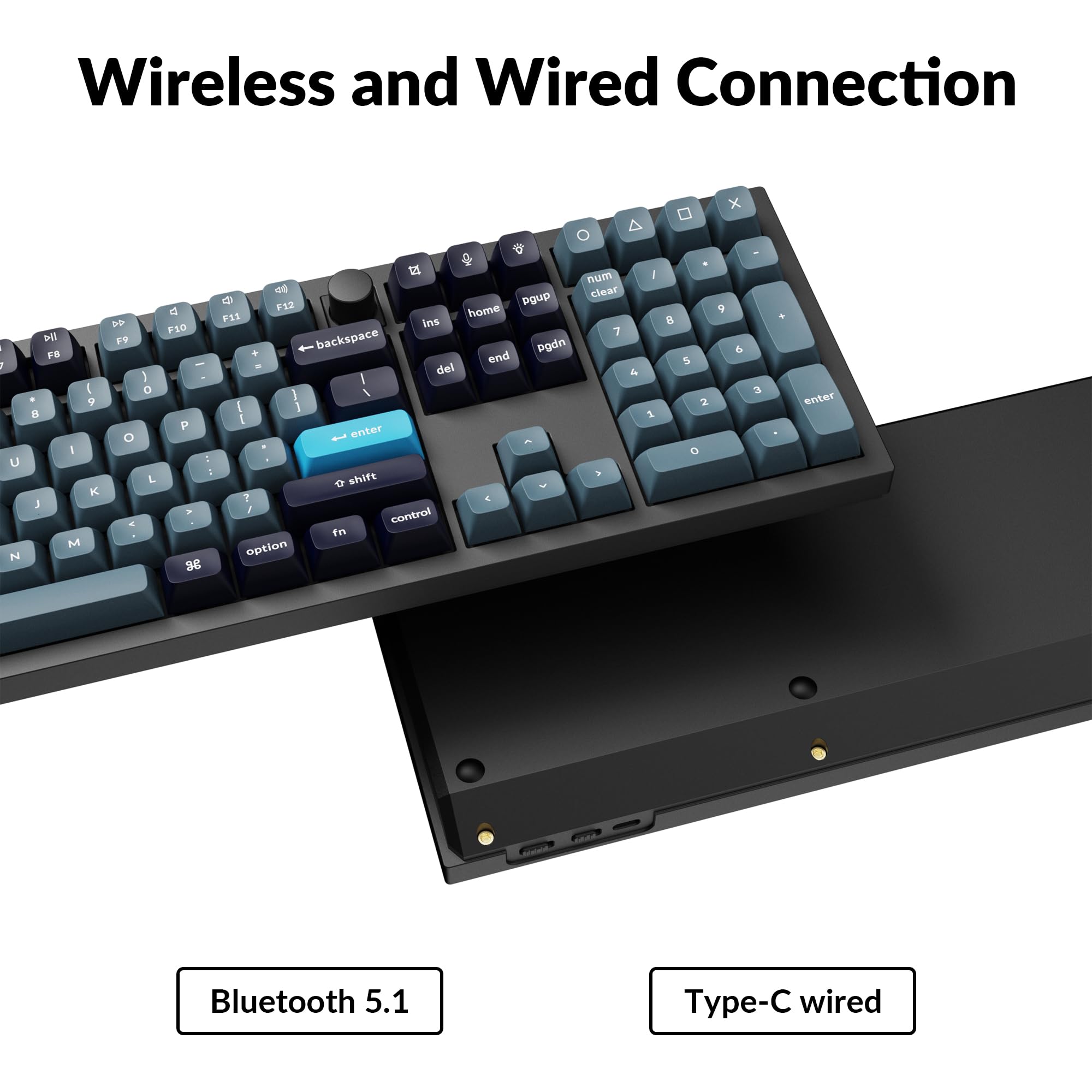
Close-up of Keychron Q6 Pro's USB-C port and wireless switch

Image 3.1: The USB Type-C port and the wireless/wired mode switch on the Keychron Q6 Pro keyboard.

3.4 Operacinės sistemos perjungimas

The keyboard is compatible with both Mac and Windows operating systems. Use the OS switch located on the back of the keyboard to select the appropriate mode for your system. This ensures correct key mapping for modifier keys like Command/Alt.

4. Naudojimo instrukcijos

4.1 QMK/VIA pritaikymas

The Keychron Q6 Pro supports QMK/VIA firmware, allowing extensive customization of key functions, macros, and lighting effects. To use VIA:

  1. Atsisiųskite VIA programinę įrangą iš oficialios „Keychron“ svetainės websvetainė (www.keychron.com/pages/qmk-via).
  2. Connect your keyboard to your computer via the USB Type-C cable.
  3. Launch the VIA application. The software should automatically detect your Q6 Pro keyboard.
  4. You can now remap any key, create complex macros, and customize lighting settings across multiple layers.
VIA programinės įrangos sąsajos, skirtos klaviatūros pritaikymui, ekrano kopija

Image 4.1: The VIA software interface demonstrating key remapping and layer management.

4.2 RGB apšvietimas

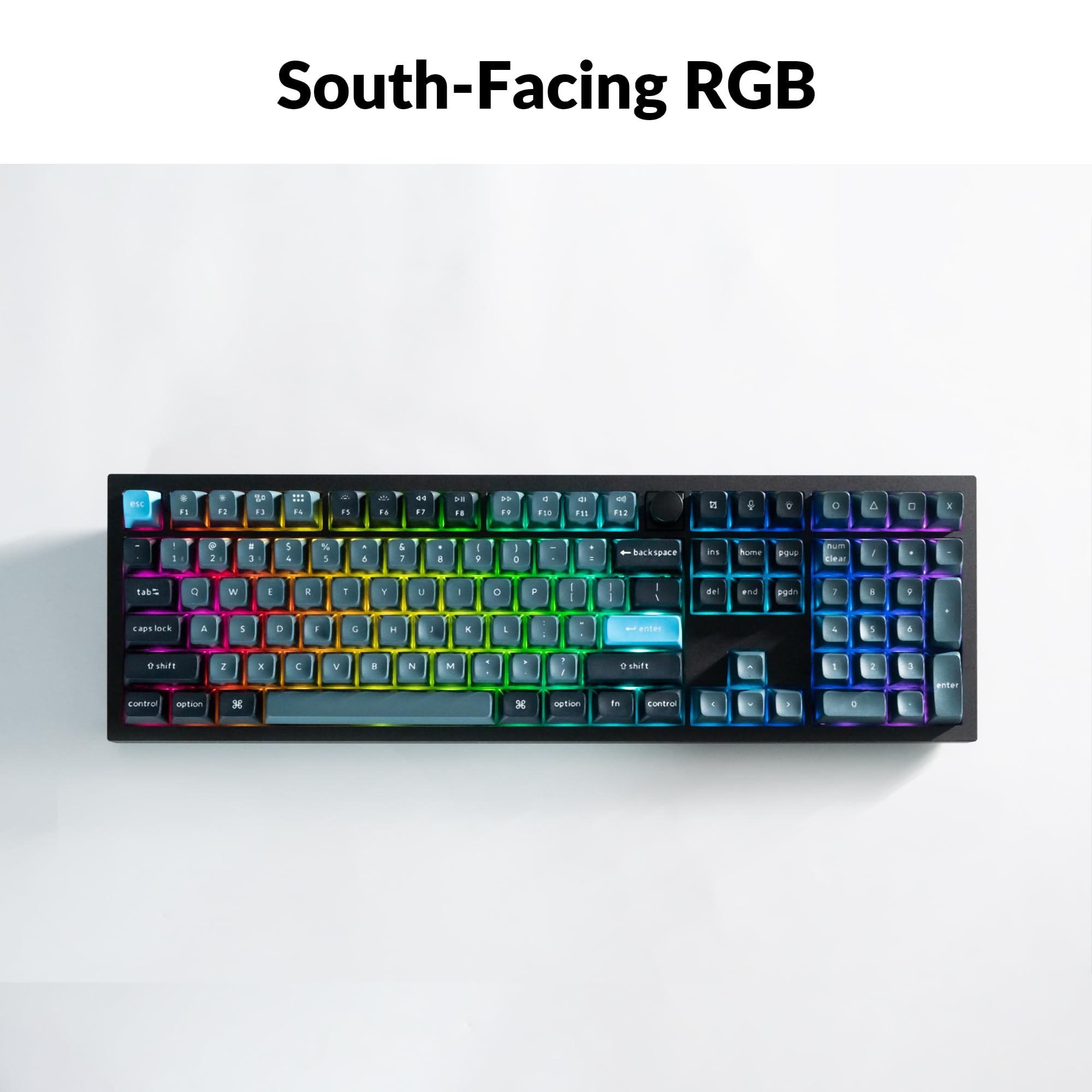
The Q6 Pro features south-facing RGB backlighting with 22 types of preset effects. You can adjust the RGB hue, saturation, brightness, and effect speed directly on the keyboard using specific key combinations (refer to the keyboard's default layout or VIA software for details). These settings can also be remapped via QMK/VIA.

Keychron Q6 Pro keyboard displaying vibrant RGB backlighting

Image 4.2: The Keychron Q6 Pro keyboard illuminated with south-facing RGB backlighting.

4.3 Programuojama rankenėlė

The integrated programmable knob typically controls volume by default (turn to adjust, press to mute/unmute). Its function can be fully customized using the QMK/VIA software to perform other actions such as scrolling, zooming, or switching applications.

5. Priežiūra

5.1 Klaviatūros valymas

Norėdami išlaikyti optimalų našumą ir išvaizdą, reguliariai valykite klaviatūrą:

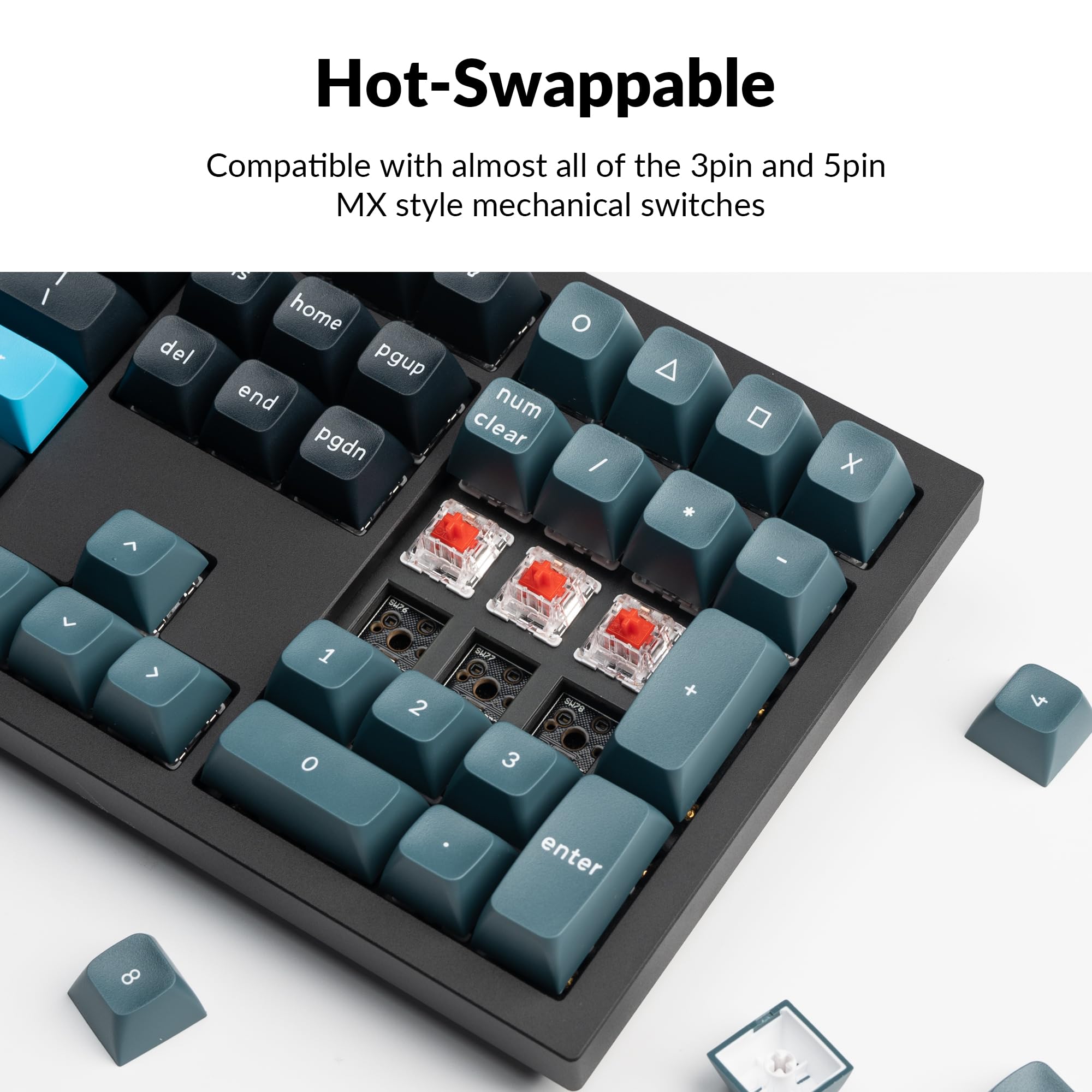
5.2 Karštojo keitimo jungikliai

The Q6 Pro features hot-swappable sockets, allowing you to change switches without soldering. It is compatible with most 3-pin and 5-pin MX-style mechanical switches.

  1. Nuimti klaviatūros dangtelį: Norėdami švelniai nuimti norimą klavišo dangtelį, naudokite klavišo dangtelio traukiklį.
  2. Nuimkite jungiklį: Use the switch puller to carefully grip the top and bottom clips of the switch and pull it straight up.
  3. Įdiekite naują jungiklį: Align the pins of the new switch with the holes on the PCB. Ensure the pins are straight to avoid bending. Press the switch firmly until it clicks into place.
  4. Pritvirtinkite klaviatūros dangtelį: Place the keycap onto the new switch stem and press down gently.

Always ensure the keyboard is disconnected from power before hot-swapping switches to prevent damage.

Close-up of hot-swappable switches on the Keychron Q6 Pro keyboard

Image 5.1: Demonstrating the hot-swappable feature of the Keychron Q6 Pro, showing switches being removed and inserted.

6. Problemų sprendimas

6.1 Klaviatūra nereaguoja

6.2 „Bluetooth“ ryšio problemos

6.3 Raktai neregistruojami arba įvedami du kartus

6.4 RGB foninis apšvietimas neveikia

7. Specifikacijos

Table of Keychron Q6 Pro technical specifications

Image 7.1: Detailed technical specifications for the Keychron Q6 Pro keyboard.

Keychron Q6 Pro Technical Specifications
FunkcijaDetalė
ModelisQ6P-M1
Matmenys (I x P x A)17.56 x 5.39 x 1.28 colio (446 x 137 x 32.6 mm)
Svoris6.69 svaro (3034 g)
Korpuso MedžiagaFull CNC machined aluminum
KlaviatūrosKSA double-shot PBT (not shine-through)
JungikliaiKeychron K Pro Red Mechanical Switches (Hot-swappable)
Foninis apšvietimasĮ pietus nukreiptas RGB LED
RyšysBluetooth 5.1 / USB Type-C wired
Apklausos rodiklis1000 Hz (wired) / 90 Hz (wireless)
Baterija4000 mAh Rechargeable Li-polymer battery
Battery Life (Backlight off)Iki 300 valandų
Battery Life (RGB)Up to 100 hours (lowest brightness)
Suderinamos sistemosmacOS/Windows/Linux
MCUUltra-low-power ARM Cortex-M4 32-bit STM32L432 (128KB Flash)
N-Key Rollover (NKRO)Yes (both wireless and wired modes)
Veikimo aplinka-10 iki 50°C

8. Garantija ir palaikymas

Keychron products are manufactured with high-quality standards. For warranty information, technical support, or to access additional resources (such as firmware updates or VIA keymap files), please visit the official Keychron websvetainė:

www.keychron.com

Taip pat galite apsvarstyti pirkimąasing extended protection plans for your device. Details on available protection plans can be found where you purchased the product or through authorized retailers.

Susiję dokumentai - Q6P-M1

Preview „Keychron Q2 Pro Bluetooth“ mechaninė klaviatūra: vartotojo vadovas, sąranka ir funkcijos
Išsamus „Keychron Q2 Pro Bluetooth“ mechaninės klaviatūros vadovas. Sužinokite apie jos funkcijas, sąranką, VIA klavišų perkėlimą, sluoksnius, ryšį, trikčių šalinimą, specifikacijas ir saugos informaciją.
Preview Keychron C2 Pro Quick Start Guide: Setup, VIA Software, and Customization
A comprehensive quick start guide for the Keychron C2 Pro mechanical keyboard, covering system switching, VIA software setup, key remapping, backlighting adjustments, and factory reset procedures.
Preview „Keychron Q5 Pro Bluetooth“ mechaninės klaviatūros naudotojo vadovas ir vadovas
Išsamus „Keychron Q5 Pro Bluetooth“ mechaninės klaviatūros naudotojo vadovas, kuriame aprašoma sąranka, ryšys, pritaikymas naudojant VIA programinę įrangą, foninio apšvietimo valdikliai, trikčių šalinimas ir specifikacijos.
Preview „Keychron K2 Pro QMK/VIA“ belaidės mechaninės klaviatūros greito paleidimo vadovas
Greitas belaidės mechaninės „Keychron K2 Pro QMK/VIA“ klaviatūros pradžios vadovas, kuriame aprašomas „Bluetooth“ ir kabelinis ryšys, klavišų perprogramavimas naudojant VIA programinę įrangą, foninio apšvietimo valdikliai, garantija ir gamyklinių parametrų atkūrimas.
Preview „Keychron K2 Pro Bluetooth“ mechaninės klaviatūros naudotojo vadovas ir vadovas
A comprehensive user manual for the Keychron K2 Pro Bluetooth Mechanical Keyboard. This guide covers setup, connectivity (Bluetooth and wired), keymap customization with VIA software, layer management, backlight controls, troubleshooting, specifications, and safety precautions.
Preview „Keychron K10“ belaidės mechaninės klaviatūros 2 versijos naudotojo vadovas
Šiame dokumente pateikiamas išsamus belaidės mechaninės „Keychron K10“ klaviatūros (2 versijos) naudotojo vadovas, kuriame aptariama sąranka, funkcijos, trikčių šalinimas ir specifikacijos. Sužinokite, kaip prisijungti per „Bluetooth“ arba laidinį režimą, pritaikyti foninį apšvietimą, valdyti sluoksnius ir naudoti programėlę „Keychron Launcher“.