Įvadas
The bopmen Star10 Wireless Bluetooth Karaoke Microphone is a versatile 4-in-1 device designed for singing, acting as a portable handheld microphone, speaker, and featuring an integrated disco light. It offers high-resolution audio quality and extensive compatibility, making it suitable for various entertainment settings including car travel, home parties, and general use for adults and children.

Image: The Star10 Wireless Bluetooth Karaoke Microphone in Rose Gold, showcasing its sleek design and integrated disco ball.
Saugos informacija
- Nelaikykite prietaiso nuo ekstremalių temperatūrų ar drėgmės.
- Stenkitės, kad prietaisas nenumestų ar nepatirtų stipraus smūgio.
- Laikyti mažiems vaikams nepasiekiamoje vietoje, kad būtų išvengta užspringimo pavojaus smulkiomis dalimis.
- Use only the provided USB C-A cable for charging.
- Nebandykite ardyti ar modifikuoti įrenginio.
- Valykite įrenginį minkšta, sausa šluoste. Venkite naudoti stiprias chemines medžiagas ar abrazyvinius valiklius.
Pakuotės turinys
Pažymėkite langelį prie šių elementų:
- 1 x Karaoke microphone (Star10)
- 1 x USB C-A charging cable
- 1 x Vartotojo vadovas
Produktas baigtasview
Familiarize yourself with the main controls and ports of your Star10 microphone.

Image: Detailed diagram illustrating the main control panel and bottom ports of the Star10 microphone, including Microphone Volume, On/Off/Play/Pause, Reverb On/Off, Volume Up/Down, Next/Previous Song, Tone Mode, Disco Light Control, USB Port, 3.5mm Earphone Jack, and TF Card slot.
Pagrindiniai valdikliai:
- Microphone Volume / Accompaniment Mode On/Off: Adjusts microphone volume or toggles accompaniment.
- On/Off, Play/Pause: Powers the device on/off and controls music playback.
- Reverb On/Off / Bluetooth & TF Card Mode: Toggles reverb effect and switches between input modes.
- Garsumo didinimas / sumažinimas: Reguliuoja bendrą garsiakalbio garsumą.
- Ankstesnė / kita daina: Naviguoja po takelius.
- Tono režimas: Cycles through different voice effects.
- Disco Light Control / Twins Pairing: Controls the disco light and initiates Twins Mode pairing.
Bottom Ports:
- Indikatoriaus lemputė: Rodo įrenginio būseną (pvz., kraunamas, prijungtas).
- 3.5 mm Earphone Jack / Re-Set button inside: For private listening or resetting the device.
- USB prievadas: Mikrofono įkrovimui.
- TF kortelės lizdas: For playing music directly from a micro TF card (up to 32GB, not included).
Sąranka
Mikrofono įkrovimas:
- Connect the provided USB C-A cable to the USB port on the bottom of the microphone.
- Kitą laido galą prijunkite prie suderinamo USB maitinimo adapterio (nepridedamas) arba kompiuterio USB prievado.
- The indicator light will show charging status. A full charge provides up to 10 hours of use (minimum 5 hours).
Maitinimo įjungimas/išjungimas:
- Paspauskite ir palaikykite Įjungti/Išjungti/Leisti/Pristabdyti button for a few seconds to power on the microphone. You will hear an audible prompt.
- To power off, press and hold the same button until you hear the power-off prompt.
Naudojimo instrukcijos
„Bluetooth“ ryšys:
The Star10 microphone uses Bluetooth 5.2 for seamless connection to your devices.
- Power on the microphone. It will automatically enter Bluetooth pairing mode.
- On your smartphone, tablet, or other Bluetooth-enabled device, open the Bluetooth settings.
- Ieškokite "STAR 10" in the list of available devices and select it to pair.
- Once connected, you will hear a confirmation prompt. You can now play music from your device through the microphone's speaker and sing along.

Image: The Star10 microphone demonstrating its wide compatibility, connecting wirelessly to smartphones, tablets, and laptops via Bluetooth.
TF kortelės režimas:
Play music directly from a micro TF card.
- Insert a micro TF card (up to 32GB, not included) with your music files into the TF Card slot on the bottom of the microphone.
- The microphone will automatically switch to TF Card mode. If not, press the Reverb On/Off / Bluetooth & TF Card Mode button to cycle modes.
- Naudokite Ankstesnė / Kita daina mygtukai, skirti naršyti takelius ir Leisti / pristabdyti for playback control.
Disco Light Control:
Enhance your karaoke experience with the built-in disco light.
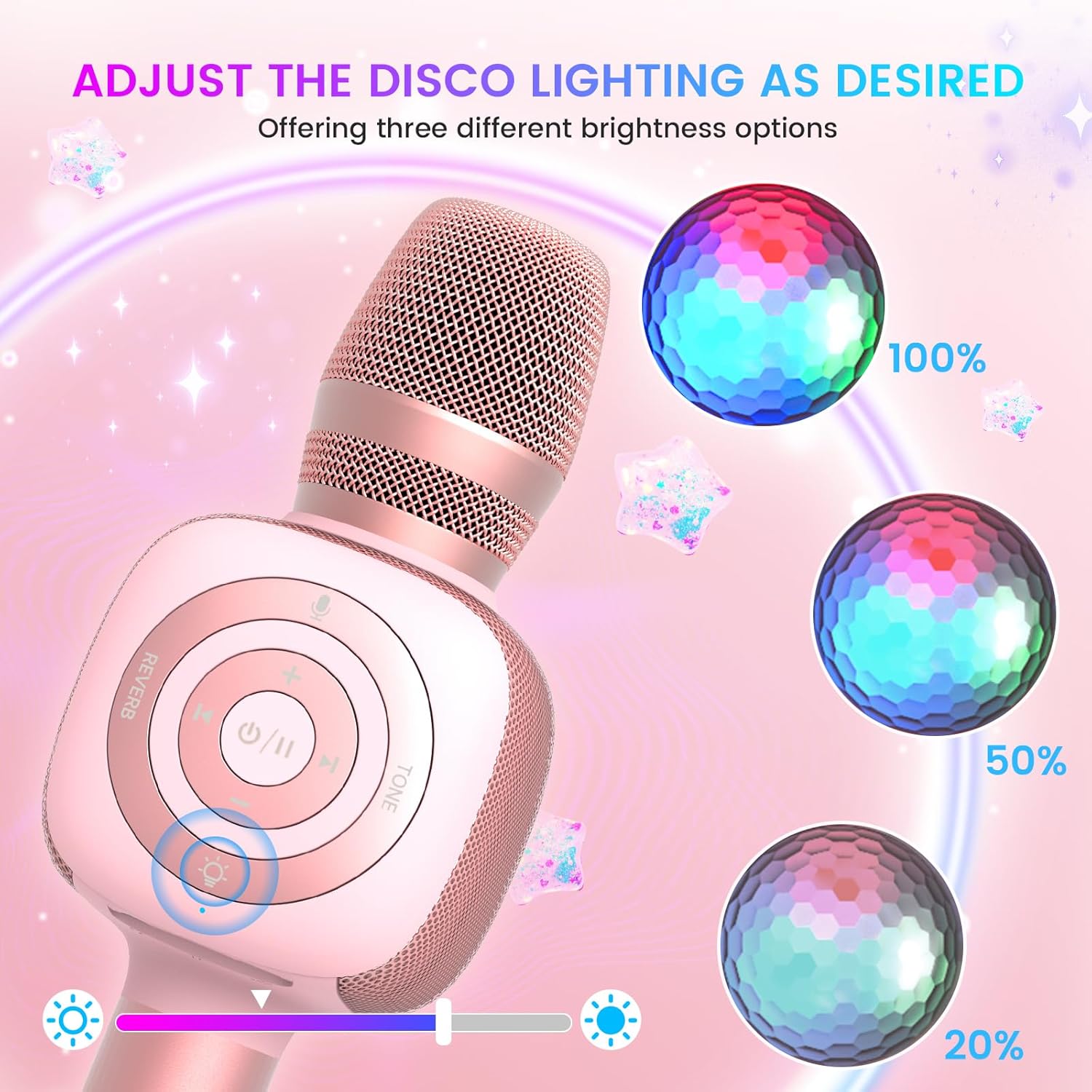
Image: The Star10 microphone's disco light feature, illustrating three adjustable brightness levels (100%, 50%, 20%) to suit different ambiance needs.
- Paspauskite Disco Light Control button (light bulb icon) to cycle through three RGB color modes and brightness levels.
- Press again to turn the disco light off.
Tone Modes (Magic Mode):
Experiment with different voice effects for added fun.

Image: The Star10 microphone's "Magic Mode" feature, depicting icons for Male Voice, Female Voice, Cartoon Voice, and Monster Sound effects.
- Paspauskite Tono režimas button to cycle through various voice effects such as Male Voice, Female Voice, Cartoon Voice, and Monster Sound.
- Continue pressing to return to the original tone.
Twins Mode (Duet Mode):
Pair two Star10 microphones for a duet experience.

Image: Two individuals enjoying a duet, each holding a Star10 microphone, illustrating the "Twins Mode" functionality for shared singing experiences.
- Ensure both Star10 microphones are powered on.
- On one microphone, press and hold the Disco Light Control button for 2 seconds until a prompt tone "LINK CONNECTED" is heard. This microphone is now in Twins Mode pairing.
- On your cellphone/device, perform Bluetooth pairing selection and choose either of the two microphones. Both microphones will now be connected and output audio.
- To exit Twins Mode, press and hold the Disco Light Control button on the paired microphone for 2 seconds.
Priežiūra
- Valymas: Wipe the microphone with a soft, dry cloth. Do not use liquid cleaners or aerosols.
- Saugykla: Mikrofoną laikykite vėsioje, sausoje vietoje, toliau nuo tiesioginių saulės spindulių ir ekstremalių temperatūrų.
- Akumuliatoriaus priežiūra: For optimal battery life, charge the microphone regularly, even if not in frequent use. Avoid fully discharging the battery for extended periods.
Trikčių šalinimas
| Problema | Galima priežastis | Sprendimas |
|---|---|---|
| Mikrofonas neįsijungia. | Išsikrovusi baterija; Maitinimo mygtukas nepakankamai ilgai laikomas. | Charge the microphone fully; Press and hold the power button for 3-5 seconds. |
| Nepavyksta prisijungti per „Bluetooth“. | Microphone not in pairing mode; Device Bluetooth off; Interference. | Ensure microphone is on and in pairing mode; Enable Bluetooth on your device; Move closer to the microphone; Restart both devices. |
| Iš garsiakalbio nėra garso. | Volume too low; Device volume too low; Incorrect mode. | Increase microphone volume; Increase device volume; Ensure correct mode (Bluetooth/TF Card). |
| Voice effects not working. | Neteisingas mygtuko paspaudimas. | Press the 'Tone Mode' button repeatedly to cycle through effects. |
| Disco light not working. | Šviesa išjungta. | Press the 'Disco Light Control' button to turn on/cycle modes. |
Specifikacijos
- Modelis: ŽVAIGŽDĖ 10
- Prekinis ženklas: bopmenai
- Mikrofono formos koeficientas: Rankinis
- Ryšio technologija: Bluetooth 5.2
- Maitinimo šaltinis: Maitinamas baterijomis (pridedamos 2 ličio jonų baterijos)
- Baterijos veikimo laikas: Up to 10 hours (minimum 5 hours)
- Gaminio matmenys: 18.7 x 16.54 x 12.2 colio
- Prekės svoris: 1.19 svaro (540 gramų)
- Signalo ir triukšmo santykis: 52 dB
- Dažnio atsakas: 10 KHz
- Suderinami įrenginiai: Personal Computer, Smartphone, Karaoke Machine
- Ypatinga funkcija: Mute Function, Disco Light, Voice Changer, Twins Mode
- Spalva: Rožinis auksas
- Rekomenduojami naudojimo būdai: Viduje/lauke
Garantija ir palaikymas
Your bopmen Star10 Karaoke Microphone comes with a standard manufacturer's warranty. For detailed warranty information, please refer to the warranty card included in your package or visit the official bopmen websvetainę.
If you encounter any issues or have questions regarding your product, please do not hesitate to contact our professional customer service team. We are committed to providing support and assistance within 24 hours to ensure your satisfaction.
Kontaktinė informacija: Please refer to the contact details provided in your product packaging or on the official bopmen support page for the most up-to-date information.


