1. Įvadas
Dėkojame, kad pasirinkote FIFINE AmpliGame H9 Gaming Headset. This manual provides essential information for setting up, operating, and maintaining your headset to ensure optimal performance and longevity. The H9 headset is designed to deliver immersive audio and clear communication for an enhanced gaming experience across multiple platforms.

FIFINE AmpliGame H9 Gaming Headset, showcasing its main components: the headset, detachable microphone, and USB control box.
2. Kas yra dėžutėje
- GERAI AmpliGame H9 Gaming Headset
- Nuimamas mikrofonas
- USB valdymo dėžutė
- Vartotojo vadovas
3. Pagrindinės savybės
- 7.1 erdvinis garsas: Immerse yourself in rich, detailed audio for an enhanced gaming experience.
- 50 mm dinaminės tvarkyklės: Delivers powerful and clear sound reproduction.
- Platus suderinamumas: Connects via USB (PC, PS4, PS5, Switch Docked Mode) or 3.5mm jack (Xbox, Switch, mobile devices).
- Nuimamas mikrofonas: Flexible and sensitive microphone for clear voice capture (-42dB sensitivity).
- USB Control Box: Intuitive inline controls for headset volume, microphone volume, and mute switch.
- Pasyvus triukšmo slopinimas: Over-ear design provides isolation from ambient noise.
- Lengvas ir patogus: Weighs approximately 329 grams with soft earcups and an adjustable headband for extended use.
- Patvarus dizainas: Features a metal bridge for enhanced durability.

Experience immersive 7.1 virtual surround sound with the H9 headset, bringing your games to life.

The H9 headset features a lightweight design (approx. 329g) and comfortable earpads for extended gaming sessions.
4. Sąranka
4.1 Connecting the Detachable Microphone
Align the 3.5mm jack of the detachable microphone with the port on the left earcup of the headset. Push firmly until it clicks into place.

The detachable microphone easily plugs into the headset for clear communication.
4.2 Prisijungimas prie įrenginių
FIFINE AmpliGame H9 offers two primary connection methods:
4.2.1 3.5 mm TRRS jungtis
Plug the 3.5mm jack directly into your device's audio port. This method is compatible with:
- „Xbox“ valdikliai
- Nintendo Switch (handheld mode)
- Mobile Players (smartphones, tablets)
- PC/Computer (if your PC has a combined 3.5mm audio jack)
When using the 3.5mm connection, volume control is typically managed directly through your connected device.
4.2.2 USB Connector (via USB Control Box)
For enhanced features like 7.1 surround sound and independent volume controls, connect the headset to the provided USB Control Box, then plug the USB-A connector into your device. This method is compatible with:
- Computers (PC/Mac)
- PlayStation (PS4, PS5)
- „Nintendo Switch“ (prijungto prie doko režimas)

The H9 headset offers versatile connectivity with both 3.5mm and USB options for a wide range of gaming devices.
5. Naudojimo instrukcijos
5.1 USB Control Box Functions
The USB Control Box provides convenient access to audio settings:
- Headset Volume Control (+/-): Adjust the overall listening volume.
- Mic Volume Control (+/-): Adjust the microphone input level.
- Mikrofono nutildymo jungiklis: Toggle the microphone on/off. Ensure the switch is in the "mic on" position for the microphone to function.
- 7.1 Surround Sound Mode Button: Press the central "7.1" button to activate or deactivate 7.1 virtual surround sound. The button will illuminate when active.

The intuitive USB Control Box allows for easy adjustment of audio and microphone settings.
5.2 Galvos juostos reguliavimas
The headset features an adjustable headband. Gently slide the earcups up or down along the metal frame to find a comfortable fit for your head.
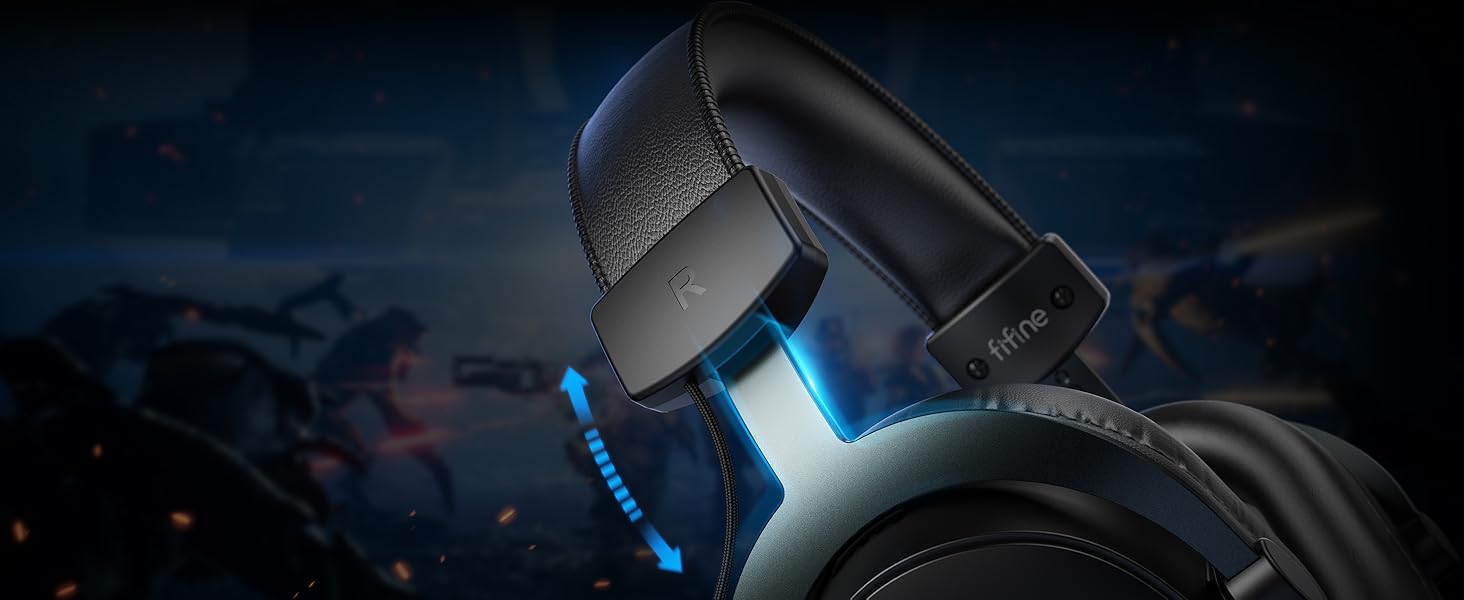
Adjust the headband for a personalized and comfortable fit during long gaming sessions.
6. Priežiūra
- Valymas: Use a soft, dry cloth to clean the headset and earcups. Avoid using harsh chemicals or abrasive materials.
- Saugykla: Laikykite ausines vėsioje, sausoje vietoje, toliau nuo tiesioginių saulės spindulių ir ekstremalių temperatūrų.
- Kabelio priežiūra: Venkite staigių lenkimų ar per didelio tempimo, kad nepažeistumėte kabelių.
- Mikrofono priežiūra: When not in use, you can detach the microphone to prevent accidental damage.
7. Problemų sprendimas
7.1 Nėra garso / Mažas garsumas
- Ensure the headset is securely connected to the device (3.5mm jack or USB).
- Check the volume levels on the USB Control Box and your connected device.
- If using the USB Control Box, ensure the 7.1 button is illuminated if surround sound is desired, or off if not.
- Išbandykite ausines su kitu įrenginiu, kad atmestumėte su įrenginiu susijusias problemas.
7.2 Mikrofonas neveikia
- Ensure the detachable microphone is fully inserted into the headset.
- Check the Mic Mute switch on the USB Control Box; it should be in the "mic on" position.
- Adjust the microphone volume using the +/- buttons on the USB Control Box.
- Verify microphone input settings on your computer or console.
7.3 Garso iškraipymas
- Lower the volume on both the headset and the connected device.
- If using 7.1 surround sound, try disabling it to see if the distortion persists.
- Ensure no other audio enhancements or equalizers on your device are causing interference.
8. Specifikacijos
| Funkcija | Detalė |
|---|---|
| Modelio pavadinimas | H9 |
| Ryšio technologija | Wired (USB, 3.5mm) |
| Garso tvarkyklės tipas | Dinaminis vairuotojas |
| Garso tvarkyklės dydis | 50 milimetrų |
| Dažnių diapazonas | 20 Hz–20 000 Hz |
| Varža | 32 omų |
| Mikrofono jautrumas | -42 dB |
| Triukšmo valdymas | Pasyvus triukšmo slopinimas |
| Prekės svoris | 329 gramų (apie 11.6 uncijos) |
| Gaminio matmenys | 7.61 x 6.57 x 2.6 colio |
| Medžiaga | Oda, metalas |
| UPC | 850052511036 |
9. Garantija ir palaikymas
FIFINE products typically come with a limited warranty. Please refer to the warranty card included in your product packaging or visit the official FIFINE websvetainėje, kurioje pateikiamos išsamios garantijos sąlygos.
For technical support, troubleshooting assistance, or any inquiries regarding your FIFINE AmpliGame H9 headset, please contact FIFINE customer support through their official websvetainėje arba kontaktinę informaciją, pateiktą jūsų produkto dokumentuose.


