Įvadas
Ačiū, kad pirkoteasing the THOMSON Sound Bar B206. This sound bar is designed to enhance your audio experience for television, music, and gaming, featuring multiple connectivity options and two wireless microphones for karaoke. This manual provides essential information for safe and efficient use of your device. Please read it thoroughly before operation and retain it for future reference.
Saugos informacija
- Saugokite įrenginį nuo lietaus, drėgmės ar ekstremalių temperatūrų.
- Ensure proper ventilation around the sound bar to prevent overheating.
- Neatidarykite casing; visus techninės priežiūros darbus patikėkite kvalifikuotiems darbuotojams.
- Naudokite tik pateiktą maitinimo adapterį.
- Saugokite įrenginį nuo stiprių magnetinių laukų.
- Avoid placing heavy objects on the sound bar.
Pakuotės turinys
Patikrinkite, ar pakuotėje yra visi toliau išvardyti daiktai:
- THOMSON Sound Bar (B206) x 1
- Nuotolinio valdymo pultas x 1
- Belaidis mikrofonas x 2
- Maitinimo adapteris x 1
- Garso kabelis x 1
- Coaxial Cable x 1
- Optical Fiber Cable x 1
- Wall Mounting Kit x 1 (includes padlocks, gel column, screws)
- Vartotojo vadovas x 1

1 pav.: Pridedami priedai
This image displays the complete set of items provided with your THOMSON Sound Bar B206, including the sound bar unit, remote control, two wireless microphones, power adapter, user manual, audio cable, coaxial cable, optical fiber cable, and wall mounting kit components.
Produktas baigtasview
Garso juostos komponentai
The THOMSON Sound Bar B206 features a sleek design with integrated controls and various input ports for versatile connectivity.

Figure 2: Sound Bar, Microphones, and Remote
This image shows the main sound bar unit, two wireless microphones, and the remote control, providing a complete view pagrindinių komponentų.
Internal Speaker Design
The sound bar is equipped with four large dual drive units, delivering a maximum output power of 200 Watts for HiFi sound quality, including dual bass and clear mid-range frequencies for a 3D surround sound effect.

Figure 3: Internal Speaker Structure
This diagram illustrates the internal construction of the sound bar's speakers, emphasizing the dual drive units responsible for audio output, alongside the Bluetooth connectivity symbol.
Rear Panel Connections and Remote Control
The rear panel provides various input options, while the remote control offers full command over the sound bar's functions.

Figure 4: Rear Panel Ports and Remote Control
This image details the connectivity options on the sound bar's rear panel, including the power switch, HDMI ARC, power input, subwoofer output, coaxial, optical, and AUX inputs. The accompanying remote control is also shown, indicating various function buttons.
Sąranka
1. Įdėjimo parinktys
The THOMSON Sound Bar B206 can be placed on a desktop or mounted on a wall. A wall mounting kit is included for convenient installation.
- Vieta darbalaukyje: Padėkite garso juostą ant stabilaus, lygaus paviršiaus priešais televizorių.
- Montavimas ant sienos: Use the provided wall mounting kit (padlocks, gel column, screws) to securely attach the sound bar to a wall below your TV. Ensure the wall material can support the weight of the sound bar.
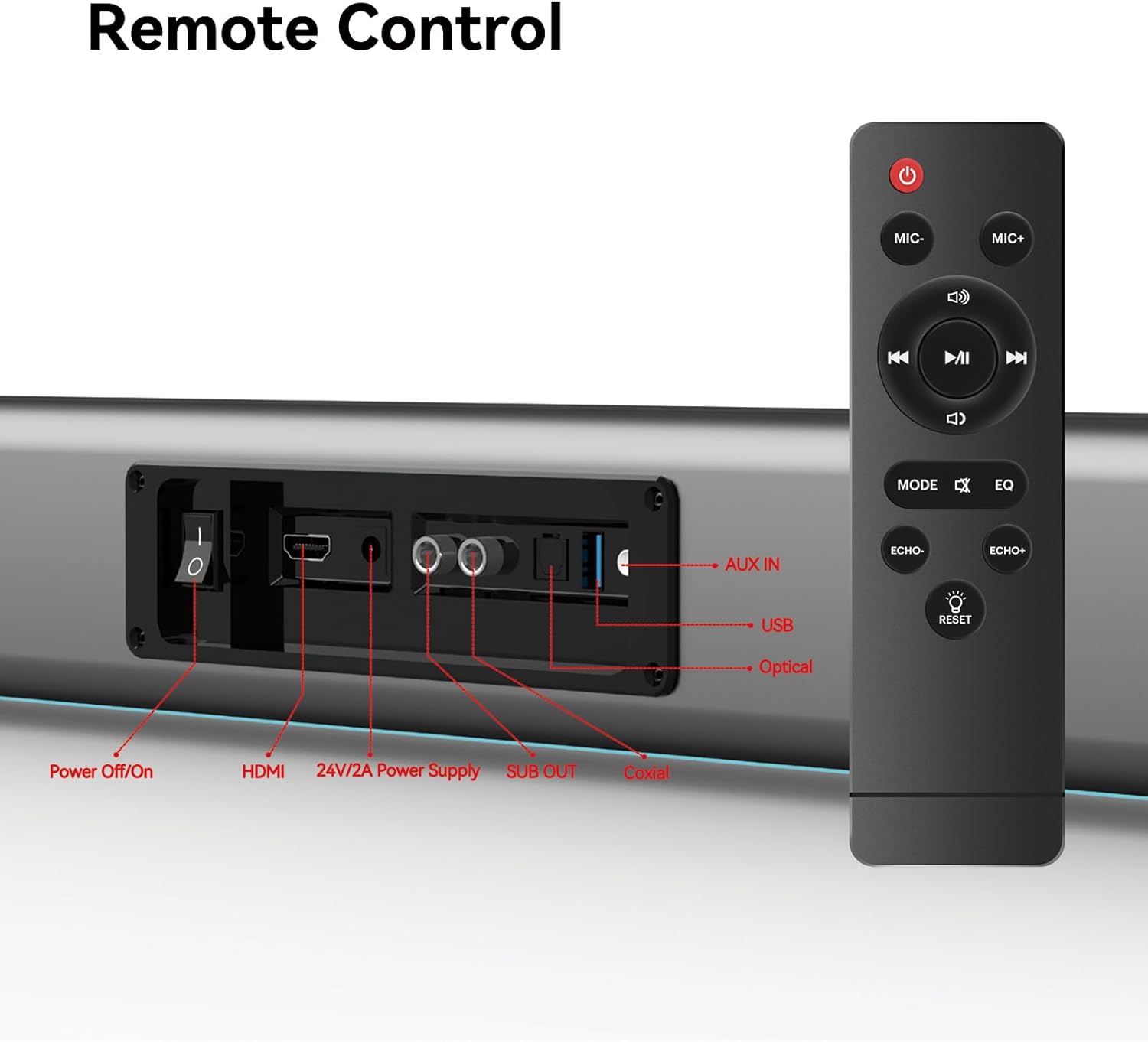
Figure 5: Placement Options (Wall Mount and Desktop)
This image illustrates the versatility of the sound bar's placement, showing it both mounted on a wall beneath a television and resting on a media console, highlighting the included wall mount kit for an elegant setup.
2. Prisijungimas prie maitinimo
- Connect the power adapter to the "24V/2A Power Supply" port on the sound bar's rear panel.
- Įkiškite maitinimo adapterį į sieninį lizdą.
3. Garso jungtys
Choose one of the following methods to connect the sound bar to your audio source (e.g., TV, smartphone, tablet, laptop):
- HDMI ARC:
Connect an HDMI cable (not included) from the HDMI ARC port on your TV to the HDMI port on the sound bar. Ensure your TV's HDMI ARC function is enabled in its settings.
- Optinis:
Connect the provided optical fiber cable from your TV's optical output to the "Optical" port on the sound bar. Select "Optical" as the input source on the sound bar.
- AUX (3.5 mm garso lizdas):
Connect the provided audio cable from your device's headphone jack or audio output to the "AUX IN" port on the sound bar. Select "AUX" as the input source.
- Koaksialinis:
Connect the provided coaxial cable from your TV's coaxial output to the "Coaxial" port on the sound bar. Select "Coaxial" as the input source.
- USB:
Įdėkite USB atmintinę su garso įrašais files into the "USB" port. The sound bar will automatically switch to USB mode and begin playback.
- Bluetooth:
Refer to the "Bluetooth Pairing" section under Operating Instructions for detailed steps.
Naudojimo instrukcijos
1. Maitinimo įjungimas/išjungimas
Paspauskite Išjungti/įjungti button on the sound bar's rear panel or the Galia mygtuką ant nuotolinio valdymo pulto, kad įjungtumėte arba išjungtumėte įrenginį.
2. Įvesties šaltinio pasirinkimas
Paspauskite REŽIMAS button on the remote control to cycle through available input sources: HDMI ARC, Optical, AUX, Coaxial, USB, and Bluetooth. The LED display on the sound bar will indicate the currently selected mode.
3. Garsumo valdymas
Naudokite Tomas + ir Apimtis - buttons on the remote control or the physical controls on the right side of the sound bar to adjust the volume. The sound bar supports 8 levels of bass and treble adjustment.
4. Ekvalaizerio režimai
The sound bar offers 5 Equalizer (EQ) modes to optimize audio for different content types. Press the EQ button on the remote control to switch between modes:
- Filmo režimas: Pagerina kinematografinius garso efektus ir dialogus.
- Muzikos režimas: Optimizuoja garsą muzikos atkūrimui.
- Naujienų režimas: Clarifies spoken dialogue for news and talk shows.
- Additional modes may be available for specific audio profiles.
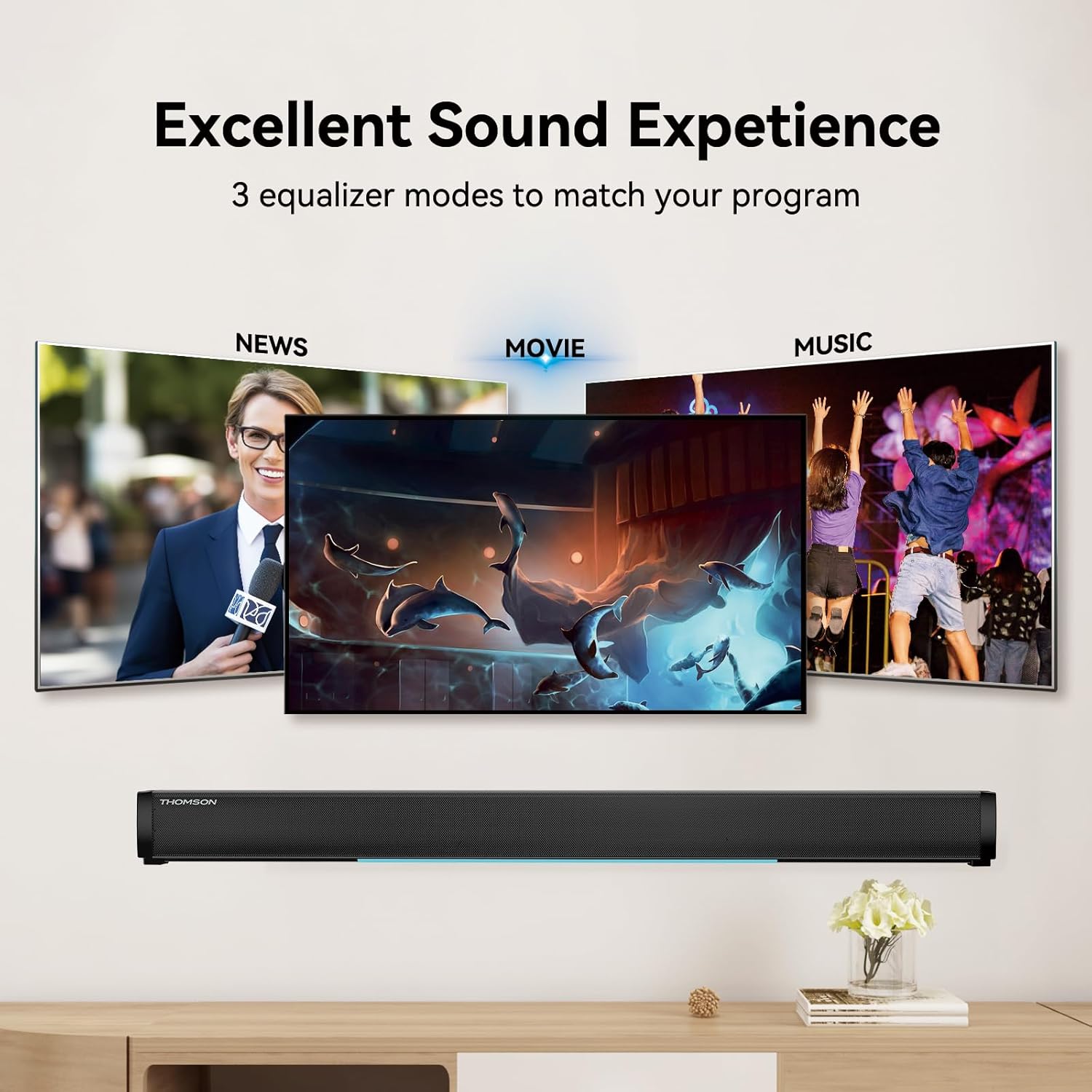
Figure 6: EQ Modes
This image illustrates the three primary equalizer modes (News, Movie, Music) available on the sound bar, demonstrating how each mode is tailored for different audio experiences.
5. „Bluetooth“ poravimas
- Turn on the sound bar and select Bluetooth mode using the REŽIMAS button on the remote. The LED display will show "BT" and flash, indicating pairing mode.
- Savo įrenginyje (išmaniajame telefone, planšetiniame kompiuteryje ir kt.) įjunkite „Bluetooth“ ir ieškokite galimų įrenginių.
- Select "THOMSON B206" from the list. Once connected, the sound bar's LED display will stop flashing.
6. Belaidžiai mikrofonai
The sound bar comes with two wireless microphones for karaoke or vocal use.
- Ensure the microphones have fresh batteries (AAA, not included).
- Turn on the microphones. They should automatically pair with the sound bar.
- Naudokite MIC+ ir MIC- buttons on the remote to adjust microphone volume.
- Naudokite ECHO+ ir ECHO- buttons to adjust the echo effect.

Figure 7: Karaoke Functionality
This image depicts two individuals enjoying a karaoke session, utilizing the THOMSON sound bar and its wireless microphones connected to a large display, showcasing the product's entertainment capabilities.
Trikčių šalinimas
| Problema | Galima priežastis | Sprendimas |
|---|---|---|
| Nėra galios | Maitinimo laidas neprijungtas; Maitinimo lizdas neaktyvus. | Įsitikinkite, kad maitinimo laidas yra tvirtai prijungtas. Patikrinkite, ar veikia maitinimo lizdas. |
| Nėra garso | Pasirinktas neteisingas įvesties šaltinis; per mažas garsumas; netinkamai prijungti laidai. | Select the correct input source (HDMI, Optical, AUX, etc.). Increase volume. Check all audio cable connections. |
| „Bluetooth“ susiejimas nepavyko | Sound bar not in pairing mode; Device too far; Bluetooth disabled on device. | Ensure sound bar is in Bluetooth mode and flashing. Move device closer. Enable Bluetooth on your device. |
| Mikrofonai neveikia | Microphone batteries low/dead; Microphones not turned on. | Replace microphone batteries. Ensure microphones are switched on. |
| Volume jumps too much with one press | This can be a characteristic of the sound bar's volume control sensitivity. | Adjust volume carefully. Consider using the TV's volume control if connected via HDMI ARC, as it may offer finer adjustments. |
Specifikacijos
| Funkcija | Detalė |
|---|---|
| Modelio pavadinimas | THOMSON Sound Bar B206 |
| Garsiakalbio tipas | Garso juosta |
| Didžiausia garsiakalbio išėjimo galia | 200 vatų |
| Erdvinio garso kanalo konfigūracija | 2.0 |
| Ryšio technologija | Auxiliary, Bluetooth, Coaxial, HDMI ARC, Optical, USB |
| Belaidžio ryšio technologija | Bluetooth |
| Kontrolės metodas | Nuotolinis |
| Gaminio matmenys | 37 "D x 3.35" P x 2.9" A |
| Prekės svoris | 8.63 svaro |
| Medžiaga | Plastikiniai |
| Maitinimo šaltinis | Su laidu elektra |
| Ypatinga funkcija | Belaidžiai mikrofonai |
Priežiūra
- Valymas: Garso juostos paviršių valykite minkštu, sausu skudurėliu. Nenaudokite skystų valiklių ar abrazyvinių medžiagų.
- Saugykla: When not in use for extended periods, store the sound bar in a cool, dry place, away from direct sunlight and extreme temperatures.
- Mikrofono priežiūra: Jei belaidžiai mikrofonai ilgą laiką nebus naudojami, išimkite iš jų baterijas, kad išvengtumėte jų pratekėjimo.
Garantija ir palaikymas
THOMSON products are designed and manufactured to the highest quality standards. For warranty information and customer support, please refer to the warranty card included in your package or visit the official THOMSON websvetainėje. Išsaugokite pirkimo kvitą kaip pirkimo įrodymą.
Atitikties informacija
This device complies with relevant regulations for electronic equipment. Any changes or modifications not expressly approved by the manufacturer could void the user's authority to operate the equipment.


