1. Įvadas
The MOBI CONNECT Smart DualScan Bluetooth Thermometer (Model 700026) is designed for accurate and versatile temperature measurement. It offers multiple reading methods including ear, forehead, room, and object temperature. This device features a backlit screen, LED fever indicators, and memory recall for up to 20 previous readings. It supports both Fahrenheit and Celsius modes and can connect via Bluetooth to the MOBI Smart App for enhanced tracking and management capabilities.

Image: The MOBI CONNECT Smart DualScan Bluetooth Thermometer, its packaging, and a smartphone displaying the companion app.
2. Pakuotės turinys
Patikrinkite, ar pakuotėje yra visi reikalingi daiktai:
- 1 x MOBI CONNECT Smart DualScan Bluetooth Thermometer
- 1 x Protective Cap (for forehead mode)
- 1 x laikymo maišelis
- 1 x Vartotojo vadovas
- 1 x Greitos pradžios vadovas
- 2x AAA baterijos

Vaizdas: Išsamus view of the thermometer with its components labeled for easy identification.
3. Sąranka
3.1. Akumuliatoriaus įdėjimas
- Open the battery compartment cover located on the back of the thermometer.
- Įdėkite dvi AAA tipo baterijas, užtikrindami teisingą poliškumą (+/-).
- Saugiai uždarykite akumuliatoriaus skyriaus dangtelį.
3.2. Įjungimas/išjungimas
- Norėdami įjungti, paspauskite SCAN/Power button. The device will perform a self-test and display the last reading.
- The thermometer will automatically power off after approximately 30 seconds of inactivity to conserve battery life.
3.3. Temperatūros vienetų (Farenheito / Celsijaus) perjungimas
Įjungę įrenginį, paspauskite ir palaikykite REŽIMAS button for 3 seconds to switch between Fahrenheit (°F) and Celsius (°C).
4. Veikimo režimai
4.1. Forehead Measurement
- Ensure the protective cap is on the probe.
- Paspauskite SCAN/Power mygtuką, kad įjungtumėte termometrą.
- Position the thermometer approximately 0.5 to 1 inch (1-2.5 cm) from the center of the forehead.
- Paspauskite ir palaikykite NUSKAITYTI button. A beep will sound, and the temperature will be displayed on the LCD screen.

Image: Demonstrating forehead temperature measurement.
4.2. Ear Measurement
- Gently remove the protective cap from the probe.
- Paspauskite SCAN/Power mygtuką, kad įjungtumėte termometrą.
- Carefully insert the probe into the ear canal. For children under 1 year, gently pull the ear straight back. For children over 1 year and adults, gently pull the ear up and back.
- Paspauskite ir palaikykite NUSKAITYTI button. A beep will sound, and the temperature will be displayed on the LCD screen.

Image: Removing the protective cap for ear measurement.

Image: Demonstrating ear temperature measurement.
4.3. Room and Object Temperature Measurement
The thermometer can also measure ambient room temperature and the temperature of objects (e.g., liquids, surfaces). To switch to these modes, press the REŽIMAS button repeatedly until the desired icon (room or object) appears on the display. Then, point the thermometer at the object or area and press NUSKAITYTI.
4.4. Karščiavimo indikatorius
The LCD display changes color to indicate temperature status:
- Žalias foninis apšvietimas: Indicates a normal body temperature.
- Raudonas foninis apšvietimas: Indicates a high body temperature (fever warning).
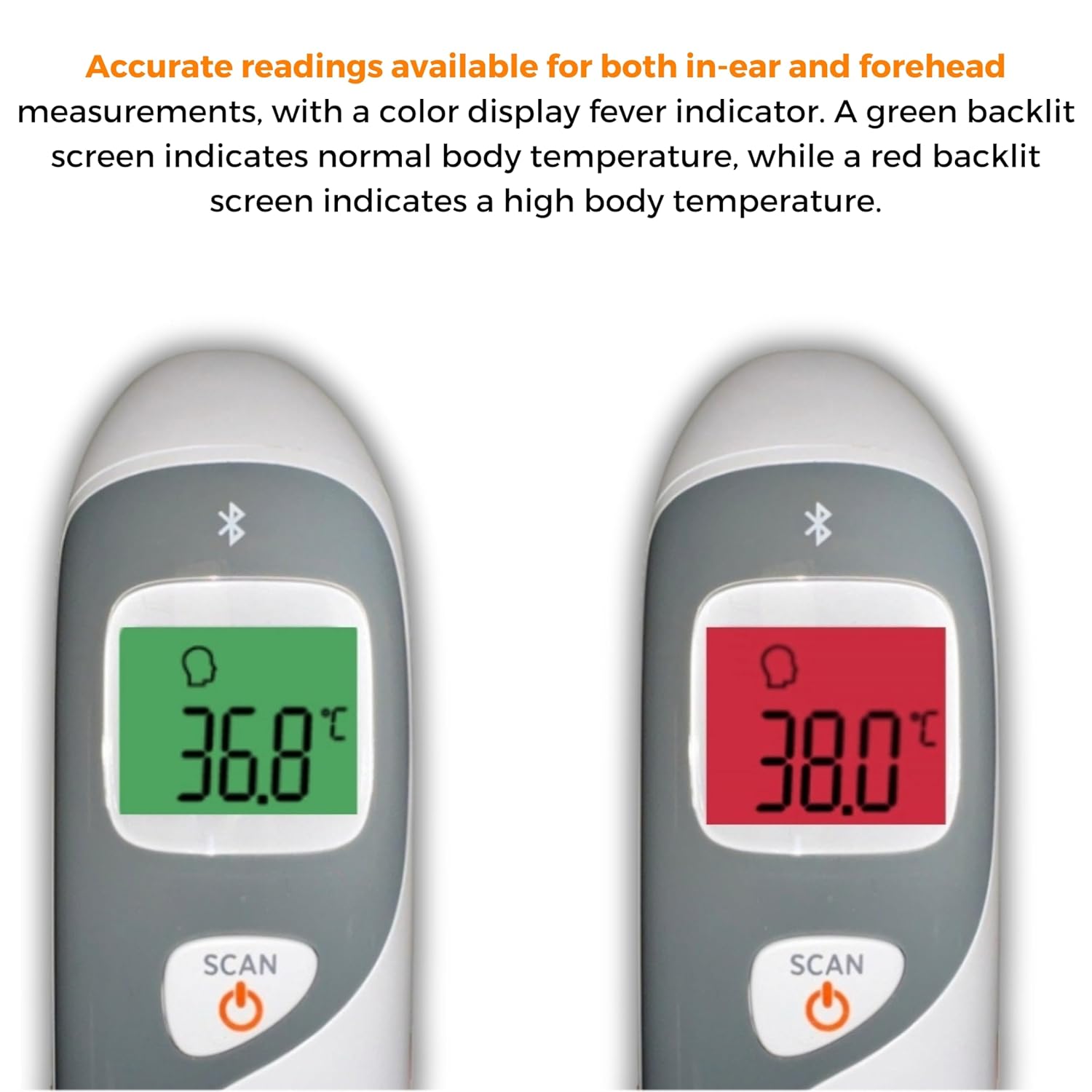
Image: The thermometer's color-changing LCD display indicating normal (green) and high (red) temperatures.
4.5. Atminties iškvietimas
The thermometer stores the last 20 temperature readings. To access these readings, press the MEM/MUTE button while the device is on. Each press will cycle through the stored readings.
5. Bluetooth Connectivity and MOBI Smart App
The MOBI CONNECT Smart DualScan Thermometer can be used independently or paired with your smartphone via Bluetooth for enhanced tracking and features through the MOBI Smart App.
5.1. Programėlės atsisiuntimas ir susiejimas
- Download the "MOBI Smart" app from your device's app store (available on iOS and Android).
- Įsitikinkite, kad jūsų išmaniajame telefone įjungtas „Bluetooth“.
- Open the MOBI Smart App and follow the on-screen instructions to pair your thermometer.
5.2. Programėlės funkcijos
- Automatinis sekimas: Automatically records temperature readings from the thermometer.
- Kelių naudotojų profesionalasfiles: Sukurti ir valdyti profesionaląfiles for each family member to track their health data independently.
- Duomenų registravimas: Add comments to each reading for context.
- Reporting & Graphs: View powerful reports and graphs for daily, weekly, monthly, or yearly temperature trends.
- Eksportavimo parinktys: Export data for sharing with healthcare professionals.
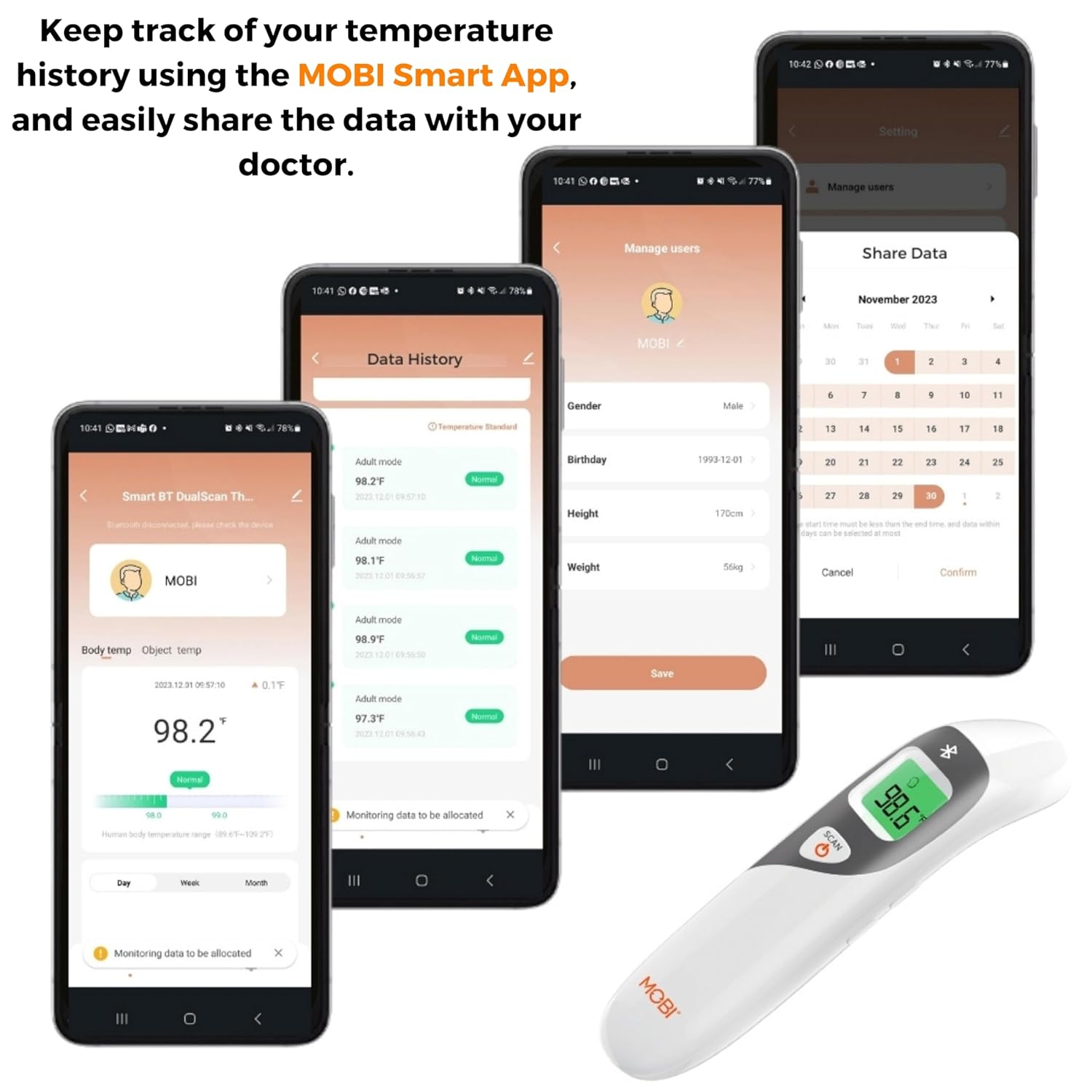
Image: Screenshots of the MOBI Smart App interface, showing data tracking and user management.
5.3. Oficialus produkto vaizdo įrašas
Vaizdo įrašas: pareigūnas viršview of the MOBI Smart DualScan Bluetooth Ear & Forehead Thermometer, demonstrating its features and usage.
6. Priežiūra
6.1. Valymas
To clean the thermometer, wipe it with a soft, damp cloth. Do not immerse the device in water or use abrasive cleaners. Ensure the probe is clean before each use, especially for ear measurements.
6.2. Sandėliavimas
Store the thermometer in its protective pouch in a cool, dry place, away from direct sunlight and extreme temperatures. Remove batteries if the device will not be used for an extended period.
7. Problemų sprendimas
- "Lo" or "Hi" Reading: Indicates a temperature outside the measurable range. Ensure proper placement and try again.
- Netikslūs rodmenys:
- Check for proper probe placement (ear or forehead).
- Ensure the probe is clean.
- Verify the correct mode (Adult/Child/Object) is selected if applicable.
- Allow the thermometer to acclimate to room temperature for 30 minutes if it has been in a significantly different environment.
- „Bluetooth“ ryšio problemos:
- Įsitikinkite, kad jūsų išmaniajame telefone įjungtas „Bluetooth“.
- Restart the thermometer and the MOBI Smart App.
- Ensure the thermometer is within range of your smartphone.
- Nėra ekrano: Patikrinkite akumuliatoriaus įdėjimą ir, jei reikia, pakeiskite baterijas.
8. Specifikacijos
| Modelio numeris | 700026 |
| Maitinimo šaltinis | Maitinamas baterijomis (2 x AAA) |
| Ekrano tipas | LCD su foniniu apšvietimu |
| Ryšys | Bluetooth |
| Matavimo režimai | Ear, Forehead, Room, Object |
| Temperatūros vienetai | Farenheito (°F) / Celsijaus (°C) |
| Atminties prisiminimas | Paskutiniai 20 skaitymų |
| Produkto priežiūra | Nuvalykite Švarus |
| Medžiaga | Plastikiniai |
| Gamintojas | Mobi Technologies Inc. |
9. Garantija ir palaikymas
For warranty information or technical support, please contact Mobi Technologies Inc. directly. Refer to the product packaging or the official MOBI websvetainę, kurioje rasite naujausią kontaktinę informaciją.


