Įvadas
This manual provides detailed instructions for the installation, operation, and maintenance of your HIKVISION DS-7616NXI-K1 16 Channel 8MP 4K Network Video Recorder (NVR). Please read this manual thoroughly before using the product to ensure proper and safe operation. Keep this manual for future reference.
Pakuotės turinys
Išpakuodami patikrinkite, ar yra visi toliau išvardyti daiktai ir ar jie yra geros būklės:
- HIKVISION DS-7616NXI-K1 NVR Main Unit
- Maitinimo adapteris
- USB pelė
- Ethernet kabelis
- SATA kabeliai (HDD prijungimui)
- HDMI Cable (USEWEll HDMI Included)
- Greitos pradžios vadovas

Figure 1: Package Contents. The image displays the NVR unit, power adapter, USB mouse, Ethernet cable, SATA cables, and a quick start guide, all neatly arranged as they would appear upon unboxing.
Produktas baigtasview
Pagrindinės savybės
- Supports up to 16 IP camera inputs.
- Advanced H.265+/H.265/H.264+/H.264 video formats for efficient storage and bandwidth usage.
- Equipped with Motion Detection 2.0 for enhanced security.
- Up to 160 Mbps incoming bandwidth to support multiple high-resolution cameras.
- AcuSense technology for intelligent analysis and reduced false alarms.
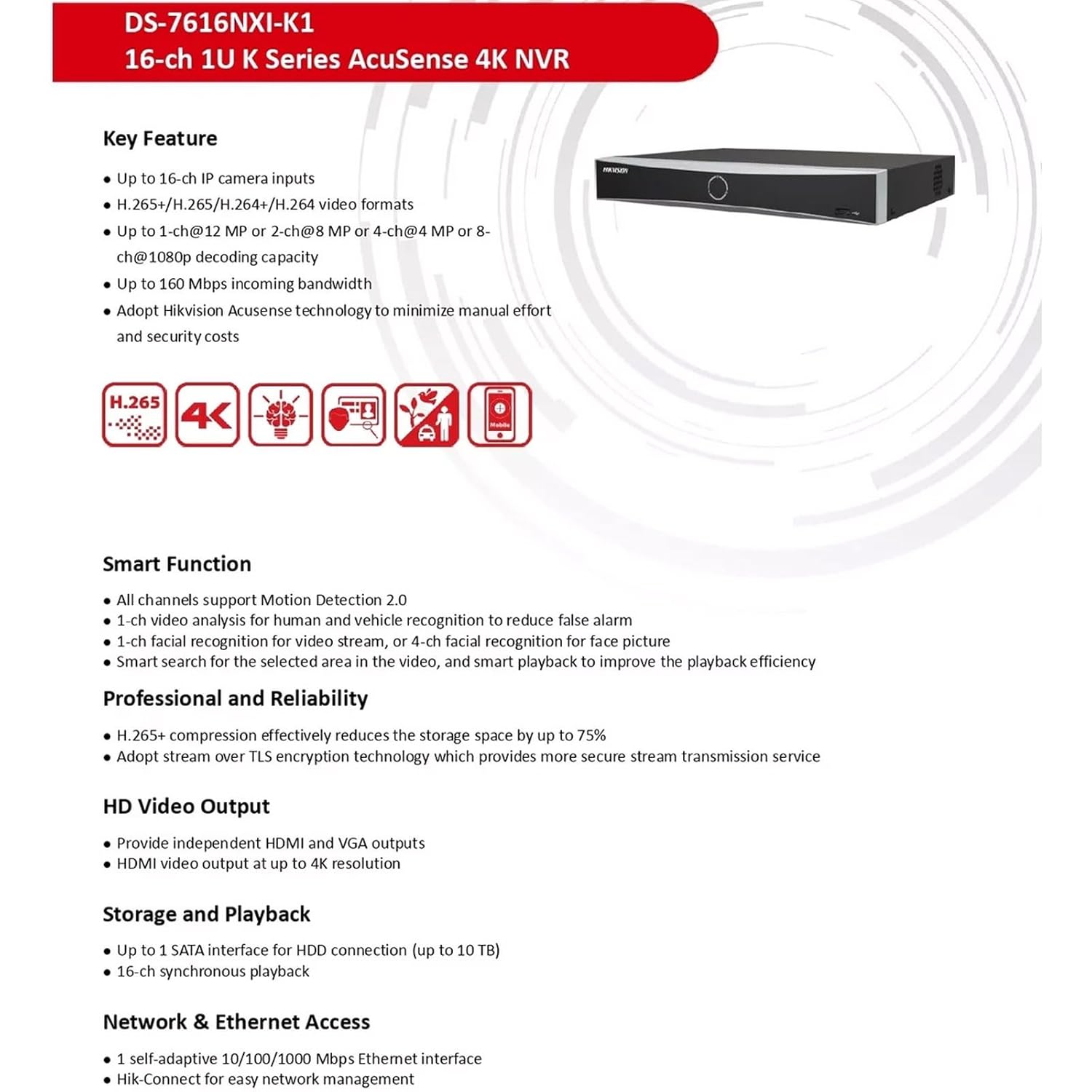
Figure 2: Key Features. This image highlights the main capabilities of the NVR, such as H.265+ compression, 4K resolution support, AcuSense technology, and various smart functions.
Fizinė sąsaja
The NVR features a well-organized rear panel with various ports for connectivity. Refer to the diagram below for a detailed layout.

Figure 3: Physical Interface. This diagram illustrates the rear panel of the NVR, labeling ports such as LAN, Audio In/Out, HDMI, VGA, USB, and Power Supply.
| Nr. | Aprašymas | Nr. | Aprašymas |
|---|---|---|---|
| 1 | LAN tinklo sąsaja | 6 | USB sąsaja |
| 2 | GARSO ĮVEDIS | 7 | Maitinimas |
| 3 | GARSO IŠĖJIMAS | 8 | Maitinimo jungiklis |
| 4 | HDMI sąsaja | 9 | GND |
| 5 | VGA sąsaja |

Figure 4: NVR Front and Rear ViewŠis paveikslėlis aiškiai parodo view of the NVR's front panel with its minimalist design and the rear panel showcasing all connectivity options.
Sąranka
Follow these steps to set up your HIKVISION NVR:
- Kietojo disko diegimas (neprivaloma): If a hard drive is not pre-installed, open the NVR casing, connect the SATA power and data cables to the hard drive, and secure it within the NVR. Close the casing.
- Prijungti ekraną: Connect a monitor to the NVR's HDMI or VGA output port using the provided HDMI cable or a VGA cable.
- Prijungti pelę: Prijunkite USB pelę prie vieno iš NVR USB prievadų.
- Tinklo prisijungimas: Connect the NVR to your local network using an Ethernet cable. Ensure your network has internet access for remote viewypatybes.
- Maitinimas: Connect the power adapter to the NVR and then to a power outlet. Turn on the NVR using the power switch on the rear panel.
- Pradinė konfigūracija: Follow the on-screen prompts to complete the initial setup, including setting up a password, network settings, and hard drive initialization.
- Prijunkite IP kameras: Connect your IP cameras to the same network as the NVR. The NVR will automatically search for and add compatible cameras. For non-PoE cameras, ensure they are powered separately and connected to the network.
Naudojimo instrukcijos
Once the NVR is set up, you can begin monitoring and managing your surveillance system.
Tiesiogiai View ir Įrašymas
- Prisijunkite prie tiesioginės transliacijos view interface from the connected monitor or via the Hik-Connect app/web sąsaja.
- Configure recording schedules and motion detection settings for each camera through the NVR's menu.
AcuSense Features
The NVR's AcuSense technology enhances security by providing intelligent detection capabilities:
- Judesio aptikimas 2.0: Reduces false alarms caused by environmental factors (e.g., rain, leaves) by accurately classifying human and vehicle targets.
- Veido atpažinimas: Supports face picture comparison and facial detection for specific applications.
- Perimetro apsauga: Utilizes deep learning algorithms to reduce false alarms in intrusion detection and line crossing scenarios.
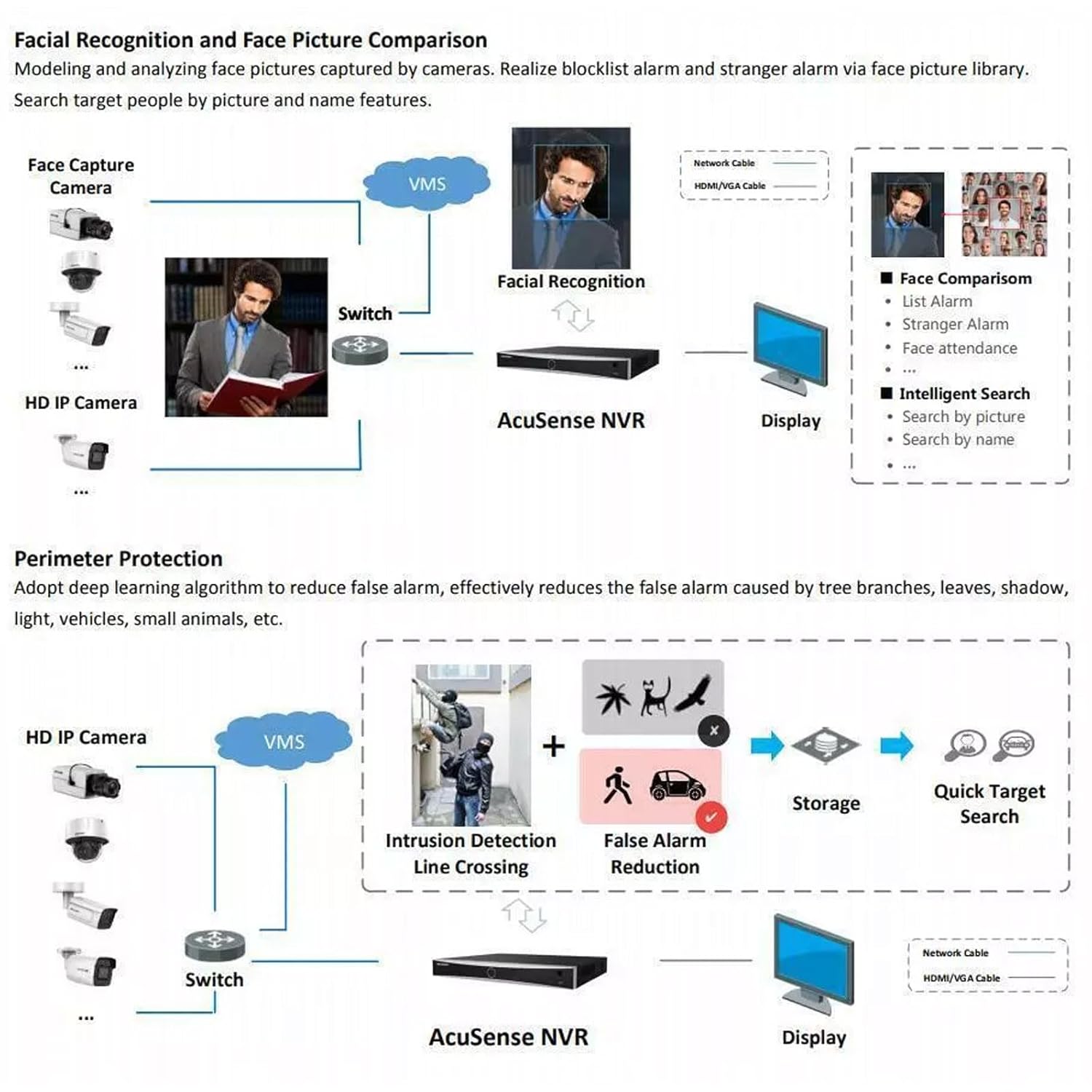
Figure 5: AcuSense Detection Capabilities. This image visually explains how AcuSense technology works for facial recognition and perimeter protection, showing the integration with cameras and the NVR.
Nuotolinė prieiga
Utilize the Hik-Connect P2P function for easy remote management and live viewing from your mobile device or web naršyklė.
Priežiūra
Regular maintenance ensures optimal performance and longevity of your NVR system.
- Valymas: Periodiškai valykite vaizdo įrašymo įrenginio išorę minkštu, sausu skudurėliu. Įsitikinkite, kad ventiliacijos angos nėra dulkės ir neužsikimšusios.
- Firmware atnaujinimai: Patikrinkite oficialią HIKVISION informaciją website for the latest firmware updates. Regularly updating the firmware can improve system stability and add new features.
- Kietojo disko valdymas: Monitor the health of your hard drive(s) through the NVR's system settings. Ensure sufficient storage space is available for recordings.
- Atsarginės kopijos konfigūracija: Regularly back up your NVR's configuration settings to a USB drive or network location.
Trikčių šalinimas
Šiame skyriuje aptariamos dažniausiai pasitaikančios problemos, su kuriomis galite susidurti.
- Nėra vaizdo išvesties: Check all cable connections (HDMI/VGA, power). Ensure the monitor is on and set to the correct input. Restart the NVR.
- Kameros nerodo vaizdo: Verify that IP cameras are powered on and correctly connected to the network. Check network settings on both the NVR and cameras. Ensure cameras are added to the NVR.
- Tinklo ryšio problemos: Confirm the Ethernet cable is securely connected. Check your router/switch status. Verify NVR network settings (IP address, gateway, DNS).
- Hard Drive Detection Issues: If the hard drive is not detected or shows errors, ensure it is properly connected inside the NVR. In some cases, an insufficient power supply to the NVR can cause HDD issues. Consider using a 12V 2A power adapter if the supplied 12V 1.5A adapter proves insufficient for your HDD.
- Klaidingi pavojaus signalai: Adjust the sensitivity and detection zones for motion detection. Utilize AcuSense features (Motion Detection 2.0, Perimeter Protection) to filter out non-human/vehicle events.
Specifikacijos
Detailed technical specifications for the HIKVISION DS-7616NXI-K1 NVR.
| Funkcija | Detalė |
|---|---|
| IP vaizdo įvestis | 16 kanalas |
| Gaunamas pralaidumas | 160 Mbps |
| Siunčiamas pralaidumas | 80 Mbps |
| HDMI išvestis | 1-ch, 4K (3840 × 2160)/30Hz, 2K (2560 × 1440)/60Hz, 1920 × 1080/60Hz, 1600 × 1200/60Hz, 1280 × 1024/60Hz, 1280 × 720/60Hz, 1024 × 768/60Hz |
| VGA išvestis | 1 kanalas, 1920 1080 × 60 1280 / 1024 Hz, 60 1280 × 720 60 / XNUMX Hz, XNUMX XNUMX × XNUMX / XNUMX Hz |
| Dekodavimo formatas | H.265+/H.265/H.264+/H.264 |
| Įrašymo raiška | 12 MP/8 MP/6 MP/5 MP/4 MP/3 MP/1080p/UXGA/720p/VGA/4CIF/DCIF/2CIF/CIF/QCIF |
| Sinchroninis atkūrimas | 16-ch |
| SATA sąsaja | „1 SATA“ sąsaja |
| Atminties talpa | Up to 10 TB per HDD |
| USB sąsaja | Priekinis skydelis: 1 × USB 2.0; Galinis skydelis: 1 × USB 2.0 |
| Tinklo sąsaja | 1 RJ-45 10/100/1000 Mbps self-adaptive Ethernet interface |
| Maitinimo šaltinis | 12 VDC, 1.5 A |
| Energijos suvartojimas | ≤ 10 W (be HDD) |
| Darbinė temperatūra | -10 °C iki 55 °C (14 °F iki 131 °F) |
| Darbinė drėgmė | nuo 10% iki 90% |
| Matmenys (P × G × A) | 320 mm × 240 mm × 48 mm (12.6 coliai × 9.4 colio × 1.9 colio) |
| Svoris | ≤ 1 kg (without HDD), 1.5 kg (Item Weight) |
| Kilmės šalis | Indija |

Figure 6: NVR Dimensions. This technical drawing provides precise measurements of the NVR unit in millimeters.
Oficialus produkto vaizdo įrašas
Video 1: HIKVISION 16 Channel 8MP 4K NVR Overview. This video provides a brief visual introduction to the HIKVISION DS-7616NXI-K1 NVR, showcasing its design, package contents, and key features.
Garantija ir palaikymas
Your HIKVISION DS-7616NXI-K1 NVR comes with a 2 metų garantija, ensuring peace of mind regarding product quality and performance. For technical support, troubleshooting assistance, or warranty claims, please contact HIKVISION customer service or your authorized dealer.
Additionally, extended warranty plans are available for purchase:
- 1 Year Extended warranty by OneAssist
- 2 Year Extended warranty by OneAssist
For further information, visit the official HIKVISION websvetainėje arba peržiūrėkite savo produkto dokumentaciją.


