1. Įvadas
This manual provides detailed instructions for the installation, operation, and maintenance of your ZENEC Z-E3776 multimedia system. Please read this manual thoroughly before using the device to ensure proper operation and to maximize its features. The Z-E3776 is designed to integrate seamlessly into compatible vehicle cockpits, offering advanced infotainment and connectivity options.
2. Pagrindinės savybės
- 9-inch (22.9 cm) capacitive touchscreen display.
- Wireless Android Auto and Apple CarPlay support.
- Integrated DAB+ dual tuner and FM radio.
- Du USB prievadai garso ir vaizdo atkūrimui.
- HDMI įvestis.
- Three camera inputs with audio mic.
- Bluetooth system for hands-free calling and music streaming (A2DP).
- BT-SRC mode for wireless audio streaming to external Bluetooth speakers.
- Expandable navigation system (optional navigation packages required).
- Direct steering wheel remote control support.
3. Transporto priemonių suderinamumas
The ZENEC Z-E3776 is compatible with the following vehicle models:
- Fiat Ducato III (Type 250, 2006-2021; Series 8/9*, 2021-2024; Series 2*, from 2024)
- Citroën Jumper II (Type 250, 2006-2024; Series 2*, from 2024)
- Peugeot Boxer II (Type 250, 2006-2024; Series 2*, from 2024)
- Opel Movano C (2021-2024; Series 2*, from 2024)
- Toyota Proace Max* (from 2024)
*Note: For models marked with an asterisk, the N-XFDUC8 mounting kit may be required for proper installation.
4. Pakuotės turinys
Išpakuodami įsitikinkite, kad yra visi šie daiktai:
- ZENEC Z-E3776 multimedijos sistema
- External Hands-Free Microphone
- GPS + Bluetooth Antenna
- 2 x USB kabeliai
- LFB Adapter (Steering Wheel Remote Control Adapter)
- Connection Cable (with LIN bus support)
- 2 x Remote Controls (including Maxi-Remote)
- Montavimo įranga
5. Sąranka ir diegimas
Installation of the Z-E3776 should ideally be performed by a qualified professional to ensure correct wiring and integration with your vehicle's systems. Incorrect installation can lead to damage to the device or vehicle electronics.
5.1. Patikrinimai prieš montavimą
- Prieš pradėdami montuoti, įsitikinkite, kad automobilio uždegimas išjungtas, o akumuliatorius atjungtas.
- Patikrinkite, ar yra visas pakuotės turinys.
- Consult your vehicle's specific wiring diagrams if necessary.
5.2. Įrenginio montavimas
The Z-E3776 is designed for a precise fit in compatible vehicle dashboards. Use the provided mounting hardware to secure the unit. Ensure proper ventilation around the unit.

5.1 paveikslas: The ZENEC Z-E3776 multimedia system seamlessly integrated into a compatible vehicle's dashboard, showcasing its large display and control buttons.
5.3. Laidų jungtys
Connect the power, speaker, antenna, USB, HDMI, and camera cables as per the wiring diagram provided in the separate installation guide (not included in this user manual). Pay close attention to the steering wheel remote control adapter (LFB) and LIN bus connections for full functionality.
5.4. Pradinės sąrankos vedlys
Upon first power-on, the unit will guide you through an initial setup wizard. This includes language selection and basic system configurations.

5.2 paveikslas: The initial setup wizard screen, prompting the user to select a language for the system interface.
6. Naudojimo instrukcijos
The Z-E3776 features an intuitive interface controllable via its capacitive touchscreen, tactile buttons, and a volume knob.

6.1 paveikslas: The main interface of the Z-E3776, displaying multiple active sources simultaneously, including navigation, Bluetooth, and USB audio.
6.1. Pagrindinė operacija
- Maitinimo įjungimas/išjungimas: Paspauskite ir palaikykite garsumo rankenėlę.
- Garsumo valdymas: Rotate the volume knob.
- Šaltinio pasirinkimas: Use the touch buttons on the left side of the screen or the physical buttons below the screen (HOME, TUN, NAV, CAM, VOICE, FAV, BT) to switch between audio/video sources and functions.
- Jutiklinio ekrano gestai: Swipe, tap, and pinch-to-zoom (where applicable, e.g., navigation) are supported.
6.2. Wireless Android Auto / Apple CarPlay
The Z-E3776 supports wireless connectivity for both Android Auto and Apple CarPlay, allowing seamless integration of your smartphone's features.
- Įsitikinkite, kad jūsų išmaniajame telefone įjungti „Wi-Fi“ ir „Bluetooth“.
- On the Z-E3776, navigate to the "Smartphone" or "CarPlay/Android Auto" section.
- Follow the on-screen prompts to pair your device. Once paired, your phone's compatible apps will appear on the Z-E3776 display.
- Control functions via the touchscreen, Apple Siri, or Google Assistant.

6.2 paveikslas: The Z-E3776 displaying both Android Auto and Apple CarPlay interfaces, highlighting its smartphone integration capabilities.
6.3. Audio Features (DAB+, FM, USB, Bluetooth)
The system offers a variety of audio playback options:
- DAB+ radijas: Access digital radio stations with superior sound quality. Use the "TUN" button to select the tuner and switch to DAB+.
- FM radijas: Tune into traditional FM broadcasts.
- USB atkūrimas: Connect USB storage devices to the two USB ports for audio and video file playback. The system supports various formats.
- „Bluetooth“ garso transliacija (A2DP): Pair your smartphone or other Bluetooth-enabled devices to stream music wirelessly.
- BT-SRC Mode: This unique feature allows you to stream audio from the Z-E3776 to external Bluetooth speakers, useful for outdoor listening. Control via the ZENEC SP-REM smartphone app.
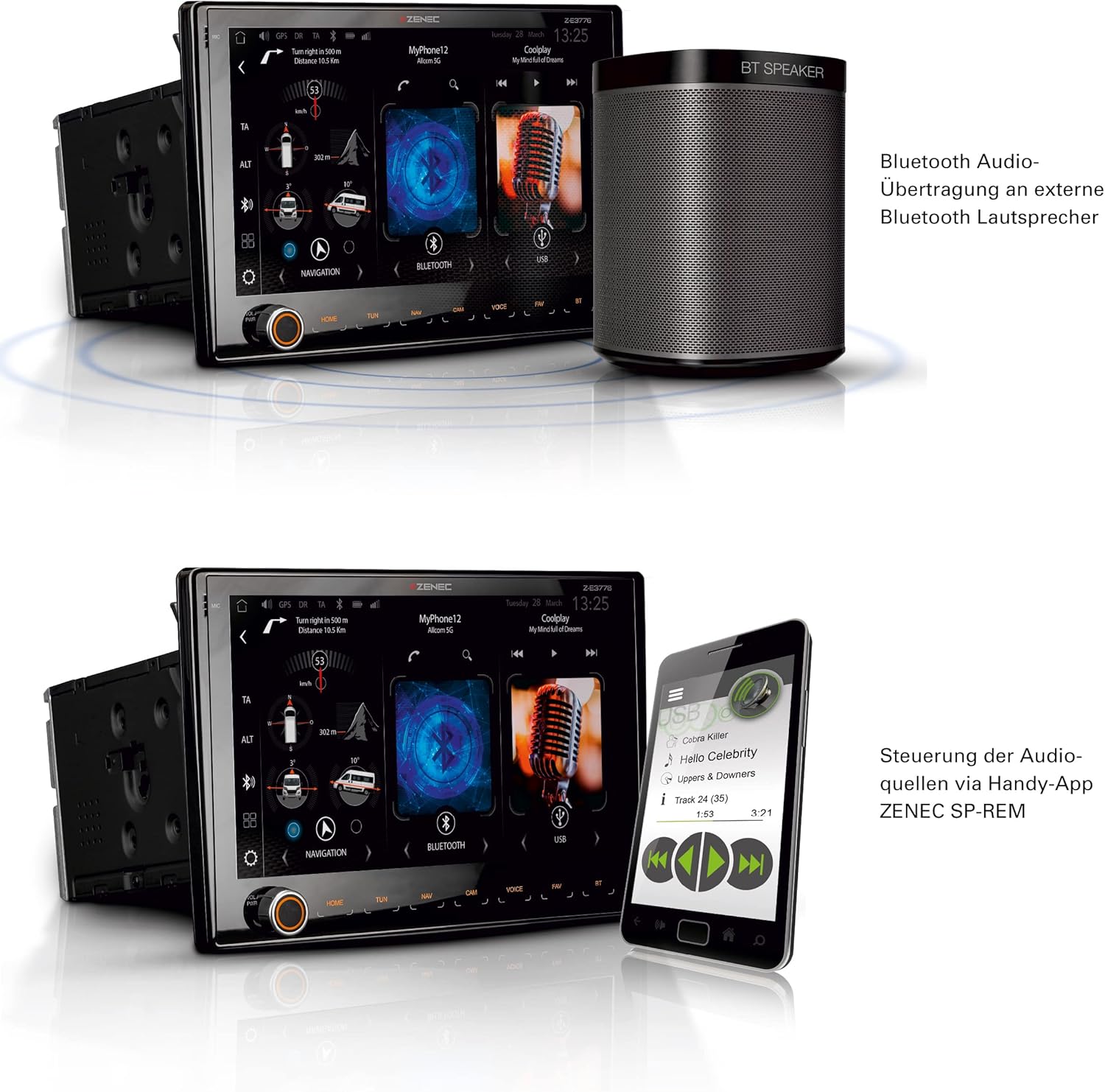
6.3 paveikslas: The Z-E3776 showcasing its BT-SRC mode, allowing audio to be wirelessly transmitted to an external Bluetooth speaker, along with smartphone app control.
6.4. Kameros įėjimai
The Z-E3776 supports up to three camera inputs, which can be configured for various views (e.g., rear, front, side). Use the "CAM" button to switch between camera views.

6.4 paveikslas: The Z-E3776's multi-view camera interface, offering various display modes for connected cameras, such as wide view and split screen options.
6.5. Navigation (Expandable)
The Z-E3776 can be expanded into a full-fledged navigation system by purchasing optional navigation packages:
- Z-EMAP76PC-NNG3: Car navigation version (ASIN B0D5Y8974L).
- Z-EMAP76MH-TT3: Motorhome/RV navigation version (ASIN B0C6QTQBCF). This version includes a comprehensive Camping P.O.I. database, FREEONTOUR/Send-To-Car function, and vehicle-specific profile settings (e.g., height, weight) for optimized routing.
Both packages include maps for over 40 EU countries and extensive Points of Interest (P.O.I.) databases.

6.5 paveikslas: Baigėsiview of the navigation expansion options for the Z-E3776, detailing features like selectable map color schemes, 3D building representation, and RV-specific routing profiles.
7. Priežiūra
Proper maintenance ensures the longevity and optimal performance of your Z-E3776 multimedia system.
- Ekrano valymas: Naudokite minkštą, nepūkuotą šluostę, specialiai skirtą elektroniniams ekranams. Nenaudokite abrazyvinių valiklių ar tirpiklių. Švelniai nuvalykite ekraną, kad pašalintumėte dulkes ir pirštų atspaudus.
- Bendras valymas: Nuvalykite įrenginio išorę minkšta,amp cloth. Avoid getting liquids inside the unit.
- Programinės įrangos atnaujinimai: Periodically check the Zenec website for available firmware updates. Keeping your software up-to-date ensures the best performance, new features, and bug fixes.
- Aplinkos sąlygos: Venkite įrenginio ilgalaikio laikymo tiesioginiuose saulės spinduliuose, itin aukštose temperatūrose ar drėgmės.
8. Problemų sprendimas
This section addresses common issues you might encounter with your Z-E3776. For more complex problems, please contact Zenec support or a qualified service technician.
| Problema | Galima priežastis | Sprendimas |
|---|---|---|
| Nėra galios | Atsilaisvinęs maitinimo laidas, perdegęs saugiklis, automobilio akumuliatoriaus problema. | Check power cables and fuses. Ensure vehicle battery is charged. |
| Nėra garso | Volume too low, mute activated, speaker wiring issue, incorrect source selected. | Padidinkite garsumą. Patikrinkite nutildymo būseną. Patikrinkite garsiakalbių jungtis. Pasirinkite tinkamą garso šaltinį. |
| „Bluetooth“ ryšys nepavyksta | Telefone / įrenginyje išjungtas „Bluetooth“, įrenginys ne susiejimo režime, trukdžiai. | Ensure Bluetooth is on. Put device in pairing mode. Move closer to unit. Restart both devices. |
| Android Auto/CarPlay Not Working | Wi-Fi/Bluetooth issues, phone not compatible, app not updated. | Check Wi-Fi/Bluetooth. Ensure phone OS and apps are updated. Try reconnecting. |
| Prastas radijo signalo priėmimas (DAB+/FM) | Antenna not properly connected, weak signal area, damaged antenna. | Check antenna connection. Try tuning to different stations. Consider a stronger antenna if in a poor signal area. |
9. Specifikacijos
| Funkcija | Detalė |
|---|---|
| Ekranas | 9 colių (22.9 cm) talpinis jutiklinis ekranas |
| Ryšys | Wireless Android Auto, Wireless Apple CarPlay, Wi-Fi, Bluetooth, 2x USB, HDMI |
| Derintuvas | DAB+ Dual Tuner, FM Radio (RDS) |
| Kameros įėjimai | 3 (with audio mic support) |
| Garso išvesties režimas | Bluetooth (BT-SRC), 2.0 Surround Sound Channel Configuration |
| Valdymo tipas | Touchscreen, Buttons, Android App, iOS App |
| Gamintojas | zenec |
| Modelio numeris | Z-E3776 (ASIN: B0C6QFD1FP) |
10. Garantija ir palaikymas
The ZENEC Z-E3776 comes with a 2 metų gamintojo garantijaPrašome išsaugoti pirkimo įrodymą garantiniams reikalavimams.
For technical support, service, or further inquiries, please contact your authorized Zenec dealer or visit the official Zenec website. Information regarding spare parts availability and software updates can also be found on the manufacturer's official channels.
Pastaba: Software updates are guaranteed until information becomes available. Spare parts availability information is currently unavailable.


