Įvadas
Ačiū, kad pirkoteasing The Voice Legend Wireless Bluetooth Speaker. This portable speaker is designed to deliver clear audio with a vibrant LED light show, making it perfect for various settings. It features Bluetooth connectivity for seamless music streaming, FM radio, hands-free calling, and support for USB and Micro SD playback. Its durable and lightweight design ensures portability and ease of use.
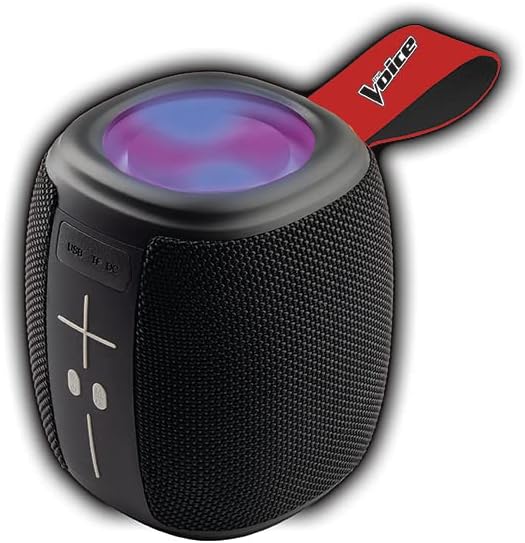
Image: The Voice Legend Wireless Bluetooth Speaker, showcasing its compact design and top-mounted LED light panel.
Kas yra dėžutėje
Patikrinkite siuntos turinį, kad įsitikintumėte, jog yra visi reikalingi daiktai:
- 1x The Voice Legend Bluetooth Speaker
- 1x USB-C įkrovimo laidas
- 1x naudojimo instrukcija

Image: A visual representation of the package contents, including the speaker, USB-C charging cable, and the user manual.
Produkto savybės
- Belaidis Bluetooth ryšys: Easily connect to your smartphone, tablet, or laptop from up to 30 feet away.
- Ryškus LED šviesos šou: Features multiple color modes for a dynamic visual experience, suitable for parties or ambient lighting.
- Nešiojamas ir lengvas dizainas: Compact dimensions (4.49 x 4.49 x 5.16 inches) and light weight (1.4 pounds) with a handy carrying strap for easy transport.
- FM radijas: Įsijunkite mėgstamiausias radijo stotis.
- Skambinimas laisvų rankų įranga: Built-in microphone allows for clear speakerphone calls.
- Kelios atkūrimo parinktys: Supports music playback via USB and Micro SD card slots.
- Įkraunama baterija: Vienu įkrovimu užtikrina iki 4 valandų grojimo laiko.
- Oversize Controls: Easy-to-use large buttons for volume and playback control.
- Tikrojo belaidžio stereo (TWS) funkcionalumas: Connect two The Voice Legend speakers for an enhanced stereo sound experience.
- Atsparus vandeniui: Sukurta atlaikyti purslus ir nedidelį lietų.
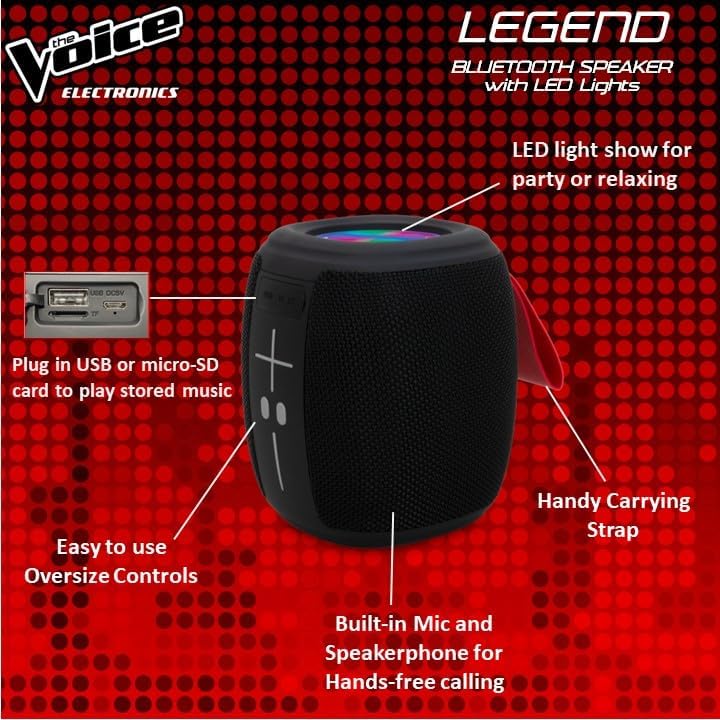
Vaizdas: Išsamus view of the speaker's side, pointing out the oversized controls, USB and Micro-SD card slots, built-in microphone for hands-free calling, and the handy carrying strap.
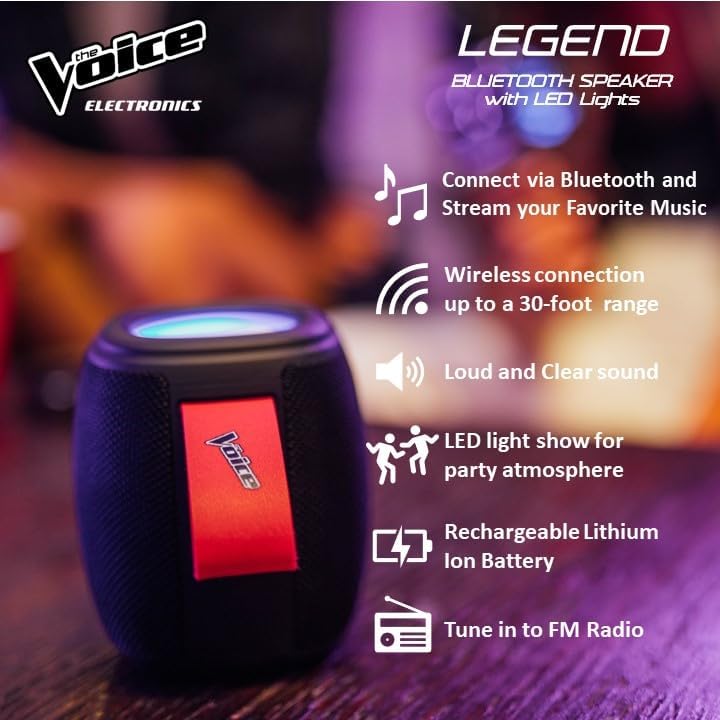
Image: Infographic showcasing key features like Bluetooth connectivity, 30-foot wireless range, loud and clear sound, LED light show, rechargeable lithium-ion battery, and FM radio tuning.

Image: Demonstrating the speaker's lightweight and durable nature, and how to activate the LED light show for different ambiances.
Sąranka
1. Įkraukite garsiakalbį
Before first use, fully charge the speaker. Connect the provided USB-C charging cable to the speaker's DC 5V port and the other end to a USB power adapter (not included) or a computer USB port. The charging indicator light will show charging status and turn off when fully charged. A full charge provides approximately 4 hours of playtime.
2. Įjungimas/išjungimas
Press and hold the power button (usually marked with a circle or power symbol) for a few seconds to turn the speaker ON or OFF. A sound prompt will indicate the power status.
3. „Bluetooth“ poravimas
- Ensure the speaker is powered ON and in Bluetooth pairing mode. A blue LED light will flash rapidly, indicating it's ready to pair.
- Savo įrenginyje (išmaniajame telefone, planšetiniame kompiuteryje ir kt.) eikite į „Bluetooth“ nustatymus.
- Ieškokite "The Voice Legend" in the list of available devices.
- Select "The Voice Legend" to connect. Once connected, the blue LED light will stop flashing and remain solid, and you will hear a confirmation sound.
Video: An official product video demonstrating the features and ease of use of The Voice Legend Bluetooth Speaker, including its LED light show and portability.
Naudojimo instrukcijos
1. Muzikos atkūrimas („Bluetooth“ režimas)
- Once paired, open your music app on your device and start playing.
- Naudokite + ir - buttons on the speaker to adjust volume. Press and hold for volume control.
- Trumpai paspauskite + mygtuką, norėdami pereiti prie kito takelio.
- Trumpai paspauskite - mygtuką, norėdami pereiti prie ankstesnio takelio.
- Press the Play/Pause button (often marked with a play/pause symbol) to pause or resume playback.
2. FM radijo režimas
- Press the Mode button (often marked "M") to switch to FM Radio mode.
- The speaker will automatically scan and save available radio stations.
- Naudokite + ir - mygtukai, skirti naršyti tarp išsaugotų stočių.
- For better reception, try repositioning the speaker.
3. Atkūrimas iš USB / Micro SD kortelės
- Insert a USB drive or Micro SD card (with pre-loaded MP3 audio files) į atitinkamą lizdą.
- The speaker will automatically detect the media and begin playback.
- Use the playback controls (volume, next/previous track, play/pause) as in Bluetooth mode.
4. Skambinimas laisvų rankų įranga
- Kai prisijungus per „Bluetooth“ kas nors gaunate skambutį, muzika pristabdoma.
- Norėdami atsiliepti į skambutį, paspauskite mygtuką „Groti / pristabdyti“.
- Norėdami baigti skambutį, dar kartą paspauskite mygtuką „Groti / pristabdyti“.
- Norėdami atmesti įeinantį skambutį, paspauskite ir palaikykite paleidimo/pauzės mygtuką.
5. LED šviesos valdymas
The speaker features a dynamic LED light show. Press the dedicated light button (if available, or refer to specific button functions in the included manual) to cycle through different light modes or turn the lights off. There are typically 4 different color modes.
6. Tikrojo belaidžio stereo (TWS) susiejimas
To achieve a true stereo sound experience, you can pair two The Voice Legend speakers together:
- Ensure both speakers are powered ON and not connected to any Bluetooth device.
- On one speaker (this will be your primary speaker), press and hold the TWS pairing button (refer to the included manual for exact button location, often a dedicated button or a long press on a multi-function button).
- Pagrindinis garsiakalbis ieškos antrinio garsiakalbio. Prijungus išgirsite patvirtinimo garsą.
- Dabar prijunkite įrenginį prie pagrindinio garsiakalbio per „Bluetooth“, kaip aprašyta skyriuje „„Bluetooth“ susiejimas“. Garsas bus grojamas stereo garsu per abu garsiakalbius.

Image: Two The Voice Legend speakers shown side-by-side, illustrating their True Wireless Functionality (TWS) for connecting and streaming stereo audio.
Priežiūra
- Valymas: Garsiakalbį valykite minkštu, sausu skudurėliu. Nenaudokite abrazyvinių valiklių ar tirpiklių.
- Saugykla: Garsiakalbį laikykite vėsioje, sausoje vietoje, toliau nuo tiesioginių saulės spindulių ir ekstremalių temperatūrų.
- Akumuliatoriaus priežiūra: Norėdami pailginti baterijos veikimo laiką, venkite dažnai visiškai ją iškrauti. Reguliariai įkraukite garsiakalbį, net jei ilgą laiką jo nenaudojate.
- Atsparumas vandeniui: While waterproof, avoid submerging the speaker in water for prolonged periods. Ensure charging ports are dry before charging.
Trikčių šalinimas
| Problema | Galima priežastis | Sprendimas |
|---|---|---|
| Speaker does not turn ON. | Senka baterija. | Visiškai įkraukite garsiakalbį. |
| Negalima susieti su Bluetooth įrenginiu. | Garsiakalbis neįjungtas susiejimo režimu; įrenginio „Bluetooth“ išjungtas; per toli nuo garsiakalbio. | Ensure speaker is flashing blue LED. Turn device Bluetooth off/on. Move device closer (within 30 ft). |
| Nėra garso ar iškreipto garso. | Per mažas garsumas; neprijungtas garsiakalbis; garso šaltinio problema. | Padidinkite garsiakalbio ir įrenginio garsumą. Iš naujo susiekite „Bluetooth“. Patikrinkite garso šaltinį. |
| FM Radio static/poor reception. | Silpnas signalas. | Reposition the speaker to find a stronger signal. |
| Cannot play from USB/Micro SD. | Neteisinga file format; card/drive not inserted correctly. | Užtikrinti files are MP3. Reinsert card/drive. |
Specifikacijos
- Modelio pavadinimas: The Voice Legend
- Garsiakalbio tipas: Nešiojamas belaidis garsiakalbis
- Ryšio technologija: Bluetooth
- Belaidžio ryšio technologija: Bluetooth
- „Bluetooth“ diapazonas: Iki 30 pėdų (9.14 metrų)
- Garso išvesties režimas: Stereofonija (su TWS)
- Didžiausia garsiakalbio išėjimo galia: 3 vatų
- Baterijos veikimo laikas: Iki 4 valandų
- Maitinimo šaltinis: Maitinamas baterijomis
- Įtraukti komponentai: Rechargeable battery, Built-in microphone
- Atsparus vandeniui: Taip
- Kontrolės metodas: Valdymas balsu
- Gaminio matmenys: 4.49 x 4.49 x 5.16 colio
- Prekės svoris: 1.4 svaro
- UPC: 841133120667
- Gamintojas: Balsas
Garantija ir palaikymas
The Voice Legend Wireless Bluetooth Speaker comes with a Ribota garantija. Please refer to the warranty card included in your package for specific terms and conditions, including coverage period and details on how to obtain service.
For technical support, troubleshooting assistance, or warranty claims, please contact The Voice customer service. Contact information can typically be found on the product packaging or on the official The Voice Electronics websvetainę.
Prašome išsaugoti pirkimo įrodymą garantijos tikslais.


