Įvadas
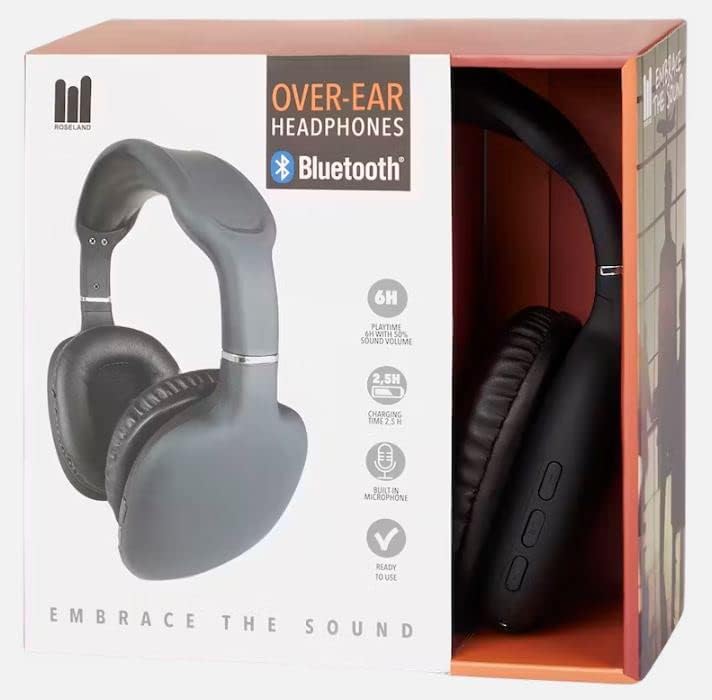
Thank you for choosing Roseland Over-Ear Bluetooth Headphones. These wireless headphones are designed to provide an optimal audio experience with comfort and convenience. Featuring soft ear cushions and an integrated microphone, they are perfect for listening to music and making calls on the go. This manual provides essential information on setting up, operating, maintaining, and troubleshooting your headphones.
Produktas baigtasview

Sąranka
1. Ausinių įkrovimas
Before first use, fully charge your headphones. Connect the included charging cable to the charging port on the headphones and the other end to a USB power source (e.g., computer USB port, wall adapter). The charging indicator light will show the charging status. A full charge takes approximately 2.5 valandos.
2. Įjungimas/išjungimas
- To power on: Press and hold the Power button until the indicator light flashes.
- Norėdami išjungti: paspauskite ir palaikykite maitinimo mygtuką, kol užges indikatoriaus lemputė.
3. „Bluetooth“ poravimas
The Roseland headphones use Bluetooth 5.0 for stable and efficient connection.
- Įsitikinkite, kad ausinės yra išjungtos.
- Paspauskite ir palaikykite maitinimo mygtuką maždaug 5–7 sekundes, kol indikatoriaus lemputė pakaitomis mirksės raudonai ir mėlynai, rodydama susiejimo režimą.
- Išmaniajame telefone ar kitame „Bluetooth“ įrenginyje eikite į „Bluetooth“ nustatymus.
- Ieškokite "Roseland Casque Bluetooth" or a similar name in the list of available devices.
- Select the headphones to connect. Once connected, the indicator light will turn solid blue or flash slowly.
- Jei prašoma slaptažodžio, įveskite „0000“.
Note: The headphones will automatically try to reconnect to the last paired device when powered on.
Naudojimo instrukcijos
Basic Controls (Buttons on the side)
- Maitinimo mygtukas: Power on/off, Play/Pause music, Answer/End calls.
- Garsumo padidinimas (+): Padidinti garsumą, Kitas takelis (ilgas paspaudimas).
- Sumažinti garsumą (-): Sumažinti garsumą, Ankstesnis takelis (ilgas paspaudimas).
Muzikos atkūrimas
- Leisti / pristabdyti: Vieną kartą paspauskite maitinimo mygtuką.
- Kitas takelis: Ilgai paspauskite garsumo didinimo (+) mygtuką.
- Ankstesnis takelis: Ilgai paspauskite garsumo mažinimo (-) mygtuką.
- Reguliuoti garsumą: Trumpai paspauskite garsumo didinimo (+) arba garsumo mažinimo (-) mygtukus.
Telefono skambučiai
Integruotas mikrofonas leidžia skambinti laisvų rankų įranga.
- Atsiliepti į skambutį: Kai skambinate, vieną kartą paspauskite maitinimo mygtuką.
- Baigti skambutį: Skambučio metu vieną kartą paspauskite maitinimo mygtuką.
- Atmesti skambutį: Kai skambinate, ilgai paspauskite maitinimo mygtuką.
- Perrink paskutinį numerį: Dukart paspauskite maitinimo mygtuką.
Baterijos veikimo laikas
The headphones provide approximately 6 valandos žaidimo laiko on a single charge, depending on volume level and usage.
Dėvėjimo patogumas
The soft, memory foam earcups are designed for superior comfort during extended listening sessions. They provide a circum-aural fit, enveloping your ears for an immersive sound experience. For optimal comfort and ear health, it is recommended to remove the headphones every 2-3 valandas to allow your ears to rest.
Priežiūra
- Valymas: Ausinėms valyti naudokite minkštą, sausą šluostę. Nenaudokite abrazyvinių valiklių ar tirpiklių.
- Saugykla: Ausines laikykite vėsioje, sausoje vietoje, toliau nuo tiesioginių saulės spindulių ir ekstremalių temperatūrų.
- Atsparumas vandeniui: Šios ausinės yra nėra atsparus vandeniui. Avoid exposure to water, rain, or excessive moisture. While they are sweat-resistant, prolonged exposure to heavy sweat should be avoided.
- Įkrovimas: Always use the provided charging cable or a certified equivalent.
Trikčių šalinimas
- Ausinės neįsijungia: Įsitikinkite, kad ausinės yra visiškai įkrautos.
- Nepavyksta susieti su įrenginiu:
- Įsitikinkite, kad jūsų įrenginyje įjungtas „Bluetooth“.
- Įsitikinkite, kad ausinės yra susiejimo režime (mirksi raudonai ir mėlynai).
- Perkelkite ausines arčiau savo įrenginio.
- Išjunkite ir įjunkite ausines ir savo įrenginį.
- Jei įrenginyje išsaugota per daug ankstesnių „Bluetooth“ ryšių, juos ištrinkite.
- Nėra garso arba garsas per mažas:
- Patikrinkite garsumo lygį tiek ausinėse, tiek prijungtame įrenginyje.
- Įsitikinkite, kad ausinės yra tinkamai suporuotos.
- Pabandykite leisti garsą iš kitos programos ar šaltinio.
- Prasta garso kokybė:
- Kad išvengtumėte trukdžių, priartėkite prie prijungto įrenginio.
- Ensure there are no physical obstructions between the headphones and the device.
- Check if the audio source quality is good.
- Įkrovimo problemos:
- Įsitikinkite, kad įkrovimo laidas yra patikimai prijungtas.
- Išbandykite kitą USB prievadą arba maitinimo adapterį.
Specifikacijos
| Prekės ženklas | Rozlandas |
| Modelio numeris | GE015877 |
| Ryšio technologija | Belaidis ryšys („Bluetooth 5.0“) |
| Stilius | Už ausies (apskritimo formos) |
| Ausų išdėstymas | Supra-Aural |
| Spalva | Juoda |
| Medžiaga | Plastikiniai |
| Baterijos veikimo laikas (žaidimo laikas) | apytiksliai 6 valandas |
| Įkrovimo laikas | apytiksliai 2.5 valandas |
| Dažnių diapazonas | 20 Hz–20 000 Hz |
| Valdymo tipas | Garsumo valdymas |
| Ypatingos savybės | Lightweight, Sweat-resistant, Built-in Microphone |
| Atsparumo vandeniui lygis | Neatsparus vandeniui |
| Suderinami įrenginiai | Išmanieji telefonai |
| Rekomenduojami naudojimo būdai | Sport, Running, Calls, Music Listening |
| Įtraukti komponentai | Įkrovimo kabelis |
Garantija ir palaikymas
Specific warranty information for the Roseland Over-Ear Bluetooth Headphones (Model: GE015877) is not available in the provided product details. Please refer to the product packaging or the retailer's website for any applicable warranty terms.
For technical support or further assistance, please contact the manufacturer, ZD Trading, or your point of purchase. Contact details are typically found on the product packaging or the manufacturer's official websvetainę.


