Įvadas
Thank you for choosing the KERDOM Ergonomic Office Chair Model 977. This manual provides essential information for the safe and efficient use of your new office chair. Please read these instructions carefully before assembly and use, and retain them for future reference.

Image 1: The KERDOM Ergonomic Office Chair Model 977, showcasing its design and mesh backrest.
Sąranka ir surinkimas
The KERDOM Ergonomic Office Chair Model 977 is designed for straightforward assembly. All necessary accessories and tools are included in the package. Assembly typically takes approximately 15 minutes.
Generalinės asamblėjos žingsniai:
- Unpack all components and verify against the parts list provided in the included physical manual.
- Pritvirtinkite ratukus prie kėdės pagrindo.
- Insert the gas lift cylinder into the center of the chair base.
- Assemble the seat and backrest components according to the detailed diagrams in the physical manual.
- Pritvirtinkite surinktą sėdynę ir atlošą prie dujinio pakėlimo cilindro.
- Install the headrest and armrests.
- Prieš naudodami įsitikinkite, kad visi varžtai yra tvirtai priveržti.
For detailed, step-by-step visual instructions, please refer to the assembly guide included in your product packaging. If you encounter any difficulties, please contact customer support.
Naudojimo instrukcijos
Your KERDOM Ergonomic Office Chair Model 977 offers multiple adjustment features to customize your seating experience for optimal comfort and support.
1. Kėdės aukščio reguliavimas
- To adjust the chair height, locate the lever under the seat on the right side.
- To raise the chair, lift the lever while taking your weight off the seat.
- To lower the chair, lift the lever while seated.
- The chair height is adjustable by approximately 10 cm.
2. Atlošo atlošas ir fiksavimas
- The chair features a rocking mechanism with three lockable positions: 90° (upright), 105° (relaxed), and 130° (deep recline).
- To recline, pull the lever located under the seat on the left side. Lean back to your desired angle.
- To lock the backrest in position, push the lever back in.
- To adjust the tilt tension, rotate the round knob located under the seat at the front. Turn clockwise to increase tension, counter-clockwise to decrease.

Image 2: Illustration of the chair's recline function, showing 90°, 115°, and 135° positions, along with tilt tension adjustment and lock lever.
3. Galvos atramos reguliavimas
- The headrest can be adjusted vertically by approximately 8.5 cm.
- It also features a tilt adjustment of up to 15° (or 30° as shown in some visuals) to support your neck and head comfortably.
- Gently push or pull the headrest to adjust its height and angle.

Image 3: Visual guide for adjusting the headrest height (up and down 8.5 cm) and tilt angle (45° rotation shown).
4. Juosmens atramos reguliavimas
- The lumbar support is adjustable in both height and depth to conform to your lower back curve.
- To adjust height, locate the knob on the backrest and slide it up or down (approx. 8 cm range).
- To adjust depth, rotate the knob to move the lumbar support forward or backward (approx. 2.5 cm range).

4 pav.: Išsamus view of the lumbar support adjustment mechanism, illustrating 8 cm vertical and 2.5 cm horizontal adjustment.
5. Porankio reguliavimas
- The 3D armrests can be adjusted in multiple directions for personalized comfort.
- Aukščio reguliavimas: Press the button on the side of the armrest and slide it up or down (approx. 7 cm range).
- Forward/Backward Adjustment: Slide the armrest pad forward or backward (approx. 6 cm range).
- Pasukimas: Pivot the armrest pad inward or outward (approx. 15° rotation).

Image 5: Visual representation of the armrest's 3D adjustment capabilities, including height, forward/backward, and rotational movement.
6. Pasukimo funkcija
- The chair is equipped with a 360° swivel function, allowing for easy rotation and movement around your workspace.
Priežiūra
Regular maintenance helps prolong the life and appearance of your KERDOM office chair.
- Valymas: Wipe down surfaces with a soft, damp šluoste. Tinklelio ir audinio paviršiams valyti, jei reikia, naudokite švelnų muilo tirpalą ir nusausinkite. Venkite stiprių cheminių medžiagų ar abrazyvinių valiklių.
- Patikra: Periodically check all screws and bolts to ensure they are tight. Retighten as needed to prevent wobbling or instability.
- Ratukai: Kad ratukai sklandžiai riedėtų, laikykite juos švarius, kad ant jų neliktų plaukų ir šiukšlių.
Trikčių šalinimas
Jei kyla problemų dėl kėdės, žr. šiuos įprastus sprendimus:
- Kėdė nestabili: Ensure all assembly screws are securely tightened. Check that the gas lift is properly seated in the base.
- Chair height adjustment not working: Verify that the gas lift lever is fully engaged. If the issue persists, the gas lift may need replacement.
- Atlošas neatlenkiamas arba neužsifiksuoja: Check that the recline lever is functioning correctly and not obstructed. Ensure the tilt tension knob is not overtightened.
- Ratukai sukasi nelygiai: Clean any debris (hair, dust) from the caster wheels.
For issues not covered here, or if troubleshooting steps do not resolve the problem, please contact KERDOM customer support.
Specifikacijos
| Funkcija | Detalė |
|---|---|
| Prekės ženklas | KERDOM |
| Modelio numeris | 977 |
| Spalva | Juoda |
| Medžiaga | Nylon (Mesh, Frame), High-Density Foam (Seat) |
| Gaminio matmenys (I x P x A) | 68 x 28.5 x 56 cm (apytiksliai 26.8 x 11.2 x 22 colio) |
| Prekės svoris | 17 kilogramo (maždaug 37.5 svarai) |
| Didžiausia apkrova | 150 kilogramo (maždaug 330 svarai) |
| Kėdės aukščio reguliavimas | apytiksliai 10 cm |
| Atlošo atlošo kampai | 90°, 105°, 130° (lockable) |
| Galvos atramos reguliavimas | Approx. 8.5 cm height, 15-30° tilt |
| Juosmens atramos reguliavimas | Approx. 8 cm height, 2.5 cm depth |
| Porankio reguliavimas | 3D (approx. 7 cm height, 6 cm forward/backward, 15° rotation) |
| Pasukamas | 360° |
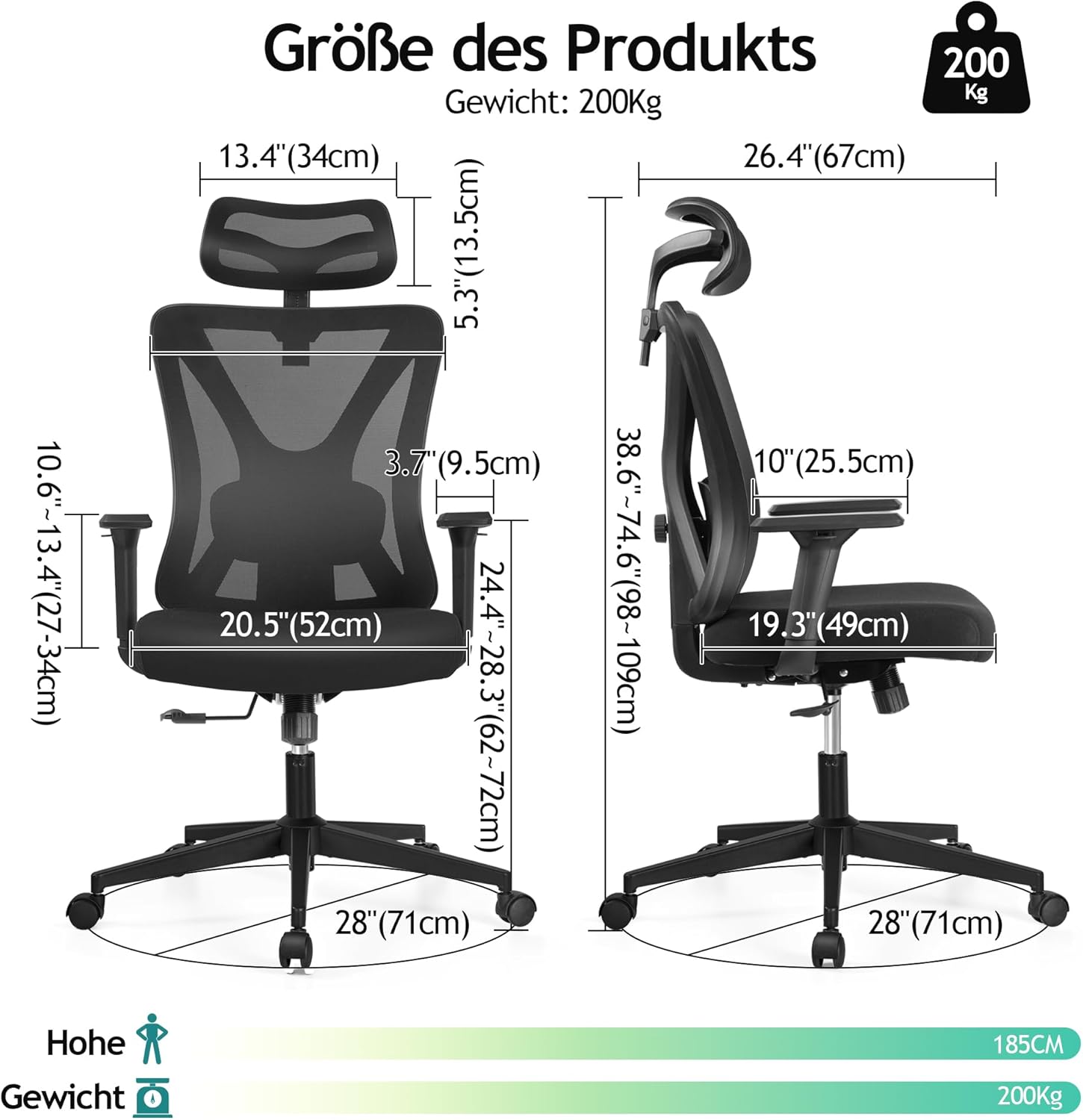
Image 6: Diagram illustrating the key dimensions of the KERDOM Ergonomic Office Chair Model 977.
Garantija ir palaikymas
KERDOM is committed to providing high-quality products and customer satisfaction. While specific warranty details are typically provided with your purchase documentation, we offer comprehensive support for our products.
If you encounter any problems with your KERDOM Ergonomic Office Chair Model 977, require assistance with assembly, or have questions regarding its operation or maintenance, please do not hesitate to contact our customer support team. Our representatives are available to assist you.
Please refer to your purchase receipt or the KERDOM official websvetainėje rasite kontaktinę informaciją ir išsamias garantijos sąlygas.