1. Produktas baigtasview
The CURT Tire LINC Auto Advanced TPMS (Tire Pressure Monitoring System) is designed to monitor your trailer's tire pressure and temperature in real-time. This system helps prevent issues caused by underinflated or overinflated tires, enhancing towing safety and convenience. It integrates with the CURT OneControl® app on your smartphone, providing real-time notifications and eliminating the need for separate in-vehicle monitors.
The system utilizes advanced repeater technology to ensure a strong and consistent connection, allowing monitoring of up to 20 tires simultaneously with additional sensors. Its portable design allows for use with multiple trailers.

1.1 paveikslas: CURT Tire LINC Auto TPMS components and app interface. This image shows the main repeater unit, four tire sensors, and a smartphone displaying the OneControl app with tire pressure and temperature readings.

1.2 paveikslas: Key features of the CURT Tire LINC Auto TPMS. This graphic highlights real-time monitoring, push notifications for hazardous conditions, repeater technology for signal strength, and easy DIY installation.

1.3 paveikslas: The portable design of the Tire LINC Auto TPMS. This image illustrates the system's ability to be used with multiple trailers, represented by three trailer icons.
2. Kas yra dėžutėje
The CURT 57009 Tire LINC Auto TPMS package includes the following components:
- Tire LINC Auto TPMS Repeater and Dock Assembly
- Four (4) Tire LINC Sensors
- Mounting hardware (if applicable, not explicitly listed but implied for dock assembly)
Additional sensors and an Alert Indicator are available separately.
3. Sąranka ir diegimas
Follow these steps to set up your CURT Tire LINC Auto TPMS:
- Install the Repeater: Securely mount the Tire LINC repeater to its dock assembly in a suitable location on your trailer or RV. Ensure it has a clear line of sight or minimal obstruction to the tire sensors and your smartphone.
- Power the Repeater: Plug the repeater into a power source. Refer to the specific power requirements in the specifications section.
- Atsisiųskite programą: Download and install the CURT OneControl® app on your iOS or Android smartphone. The app is essential for system configuration and monitoring.
- Attach Sensors: Screw the Tire LINC sensors onto the valve stems of your trailer tires. Ensure they are tightened securely to prevent air leaks.
- Suporuoti su programa: Open the OneControl® app and follow the on-screen instructions to link your Tire LINC system. This typically involves pairing the repeater and then associating each sensor with its respective tire position within the app.
- Suasmeninkite nustatymus: Within the app, you can personalize your preferred tire pressure and temperature ranges. The system will alert you if readings fall outside these set thresholds.

3.1 paveikslas: The CURT OneControl® Auto app logo. This image indicates the required mobile application for operating the Tire LINC system, compatible with iOS and Android devices.
4. Operacija
Once set up, the CURT Tire LINC Auto TPMS operates continuously to monitor your trailer tires. Here’s how to use it:
- Stebėjimas realiuoju laiku: Open the CURT OneControl® app on your smartphone to view real-time tire pressure and temperature readings for all connected tires.
- Pranešimai: The system will send push notifications to your smartphone if any tire's pressure or temperature deviates from your personalized thresholds. Address these alerts promptly to prevent potential issues.
- Multi-Tire Monitoring: The system supports monitoring up to 20 tires. If you have a multi-axle trailer or multiple trailers, ensure all sensors are correctly paired and assigned within the app.
- Clutter-Free Experience: The system uses your smartphone as the display, eliminating the need for additional monitors on your vehicle's dashboard.
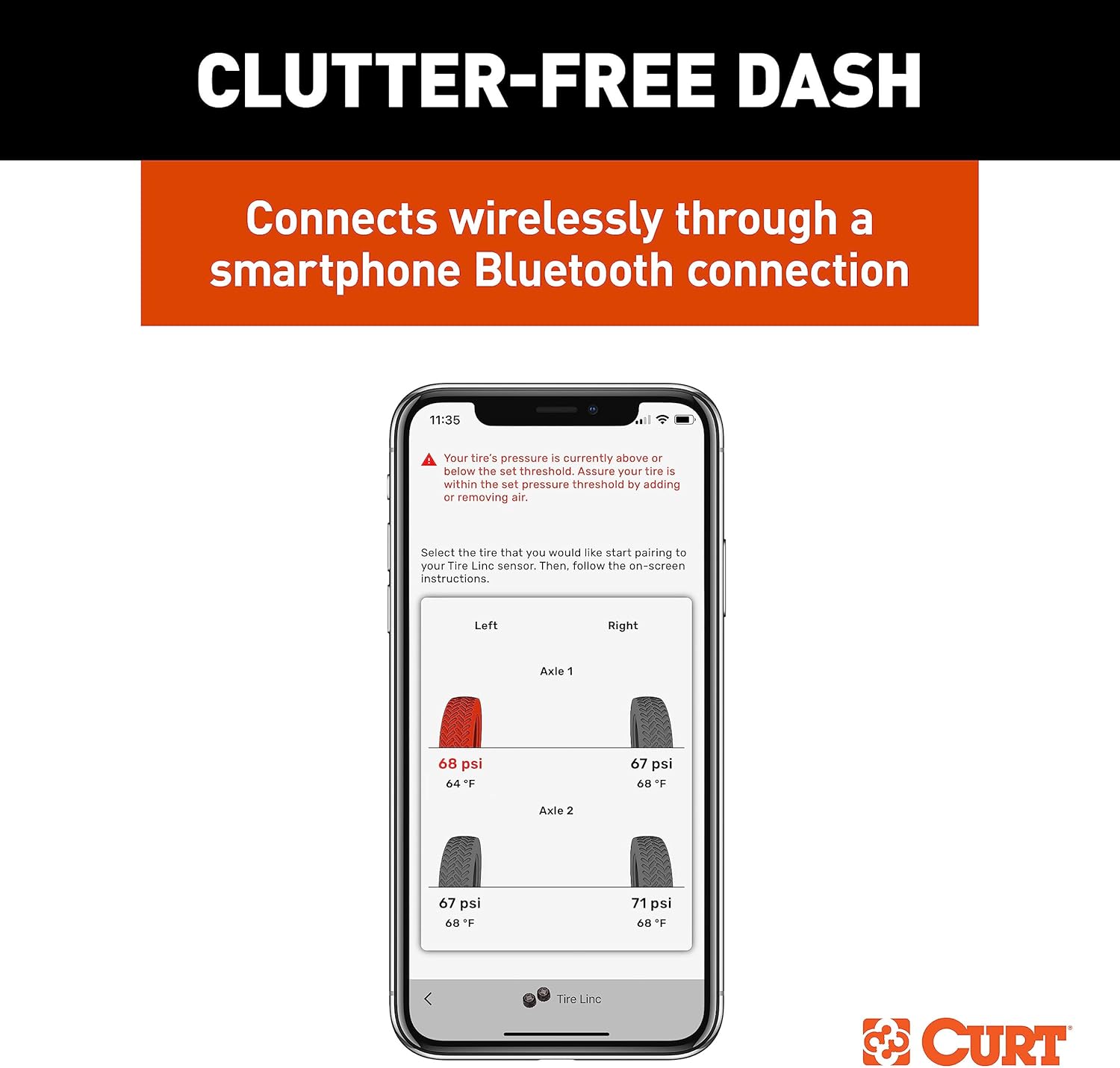
4.1 paveikslas: Smartphone displaying the OneControl app. This image shows the app interface with real-time tire pressure and temperature readings for multiple axles, indicating a low-pressure alert.

4.2 paveikslas: Illustration of multi-tire monitoring capability. This image depicts trailer tires with signal waves, signifying the system's ability to monitor up to 20 tires simultaneously (additional sensors required).
5. Priežiūra
Proper maintenance ensures the longevity and reliable performance of your Tire LINC Auto TPMS:
- Baterijos veikimo laikas: The system features a rechargeable lithium battery providing up to 60 hours of active use. Ensure the repeater is charged as needed.
- Valymas: Periodically clean the repeater and sensors with a damp audinys. Venkite stiprių cheminių medžiagų.
- Patvarumas: The system components are designed with IP67 rated construction, making them dustproof and waterproof up to one meter. While durable, avoid submerging the unit for extended periods.
- Jutiklio patikrinimas: Regularly check that sensors are securely attached to valve stems.
- Programinės įrangos atnaujinimai: Keep the CURT OneControl® app updated to the latest version for optimal performance and new features.

5.1 paveikslas: Battery longevity information. This image displays a battery icon with a lightning bolt, indicating a rechargeable lithium battery capable of up to 60 hours of active use.

5.2 paveikslas: Durability features. This image shows two water drop icons, representing the IP67 rating for dustproof and waterproof construction up to one meter.
6. Problemų sprendimas
If you encounter issues with your Tire LINC Auto TPMS, refer to the following common problems and solutions:
| Problema | Galima priežastis | Sprendimas |
|---|---|---|
| Sensors not linking/syncing with the app. |
|
|
| Inaccurate pressure/temperature readings. |
|
|
| Pranešimų negauta. |
|
|
7. Specifikacijos
Key technical specifications for the CURT 57009 Tire LINC Auto TPMS:
- Modelio numeris: 57009
- Prekinis ženklas: CURT
- Gaminio matmenys: 10.25 x 6.13 x 3 inches (Repeater and Dock)
- Prekės svoris: 1.6 svaro
- Baterija: Rechargeable Lithium (up to 60 hours active use)
- Patvarumo įvertinimas: IP67 (Dustproof, Waterproof up to 1 meter)
- Monitoring Capacity: Up to 20 tires (with additional sensors)
- Programų suderinamumas: CURT OneControl® app (iOS and Android)

7.1 paveikslas: Approximate dimensions of the Tire LINC Auto TPMS repeater. This diagram provides measurements for the repeater unit, including length, width, and height.
8. Garantija ir palaikymas
For warranty information, technical assistance, or to purchase additional sensors and accessories, please contact CURT customer support. Refer to the official CURT websvetainėje rasite naujausią kontaktinę informaciją ir garantijos politiką.
CURT Websvetainė: www.curtmfg.com


