1. Įvadas
The FIFINE M8 Wireless Lavalier Microphone System provides a convenient and high-quality audio solution for various recording needs. This system includes two wireless microphones and a single USB-C receiver, designed for compatibility with Android phones, tablets, iPhone 15 (USB-C), and laptops. It features clear condenser microphone technology, stable 2.4G wireless transmission, and an omnidirectional polar pattern for comprehensive sound capture. This manual provides detailed instructions for setup, operation, and maintenance to ensure optimal performance.
2. Pakuotės turinys
Prašome patikrinti, ar pakuotėje yra visi reikalingi daiktai:
- Wireless Microphone (Transmitter) x 2
- USB-C imtuvas x 1
- USB-A to USB-C Charging Cable (0.98ft) x 1
- Naudotojo vadovas x 1

Vaizdas: Viršview of the FIFINE M8 Wireless Lavalier Microphone System, showing the two microphones and the USB-C receiver.
3. Sąrankos instrukcijos
3.1 Imtuvo prijungimas
- Locate the USB-C port on your recording device (smartphone, tablet, or laptop).
- Insert the USB-C Receiver firmly into the device's USB-C port. Ensure a secure connection.
- The receiver's indicator light will illuminate, indicating it is powered on and ready for pairing.
3.2 Powering On and Automatic Pairing
- Press and hold the power button on each Wireless Microphone (Transmitter) for a few seconds until its indicator light turns on.
- The microphones will automatically attempt to pair with the connected receiver. This process typically occurs within a few seconds.
- Once successfully paired, the indicator lights on both the microphones and the receiver will show a stable blue light (or as indicated in the product's specific LED behavior).
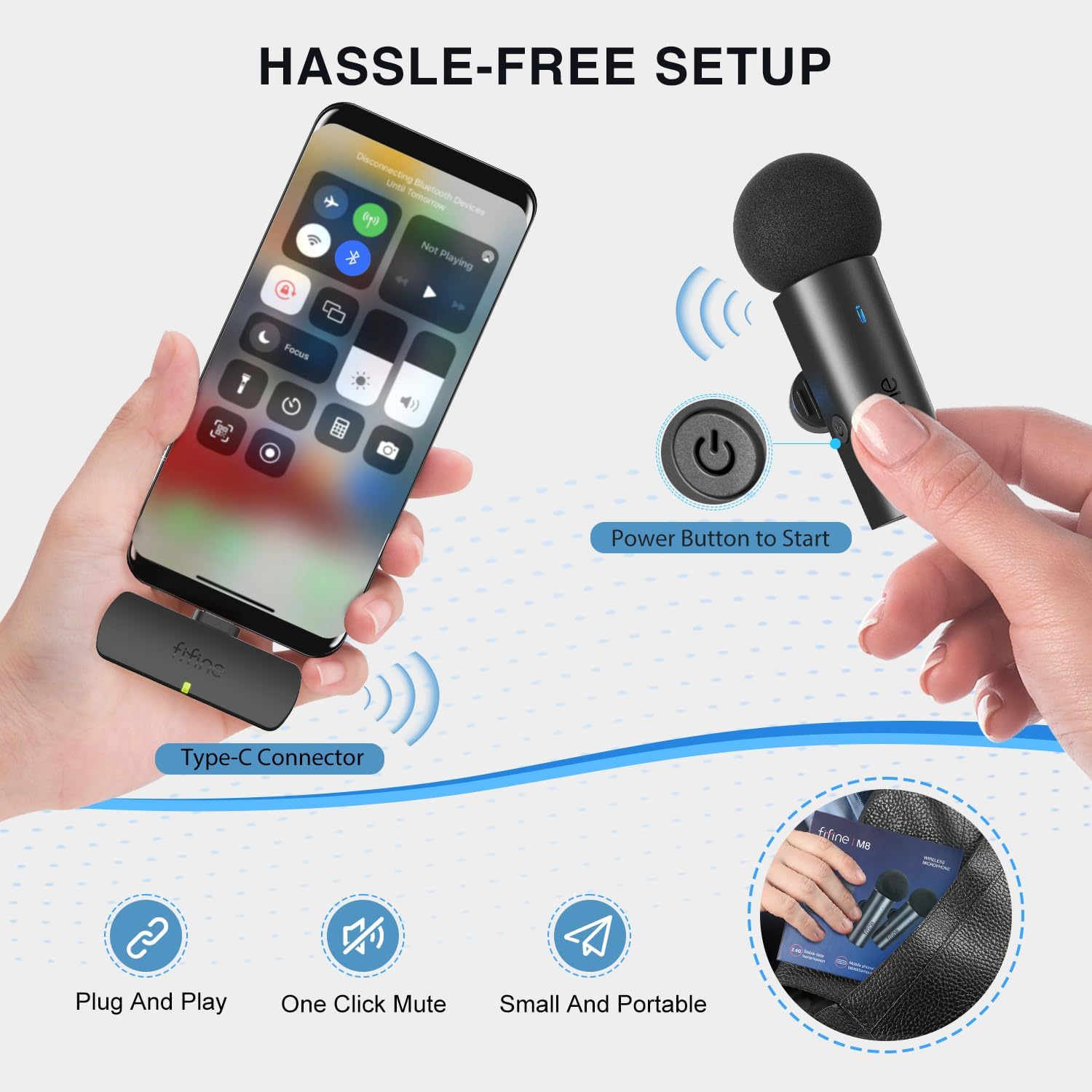
Image: Illustration of the simple plug-and-play setup process, highlighting the USB-C receiver connection and microphone power button.

Image: Demonstrates the auto-pairing and synchronization feature of the dual wireless microphones with a recording device.
4. Naudojimo instrukcijos
4.1 Maitinimo įjungimas/išjungimas
- To power on: Press and hold the power button on the microphone until the indicator light illuminates.
- To power off: Press and hold the power button on the microphone until the indicator light turns off.
4.2 Nutildymo funkcija
- To mute: Briefly press the power button on the microphone during operation. The indicator light may change color or flash to indicate mute status.
- To unmute: Briefly press the power button again.
4.3 Įkrovimas
- Connect the provided USB-A to USB-C charging cable to the charging port on the microphone.
- Kitą laido galą prijunkite prie USB maitinimo šaltinio (pvz., kompiuterio, sieninio adapterio).
- Indikatoriaus lemputė rodys įkrovimo būseną (pvz., raudona, kai kraunama, žalia, kai visiškai įkrauta).
- The microphones can be used while charging, allowing for extended recording sessions.

Image: Demonstrates the long-lasting battery feature, indicating 6-7 hours of operation and the option to record while charging.
4.4 Naudojimo scenarijai
The FIFINE M8 system is versatile and suitable for various applications:
- Vaizdo įrašymas: Ideal for vlogging, YouTube content creation, and general video production.
- Interviews: Capture clear audio from two subjects simultaneously.
- Internetiniai susitikimai / konferencijos: Enhance voice clarity for virtual communication.
- Muzikos įrašas: Suitable for capturing vocals or instruments with clarity.

Vaizdas: pvzamples of different scenarios where the FIFINE M8 system can be used, such as online meetings, video courses, and music recording.
5. Audio Features and Wireless Performance
5.1 Clear Sound Capture
- Omnidirectional Pattern: Mikrofonai pasižymi visakrypčiu poliariniu modeliu, vienodai fiksuojančiu garsą iš visų krypčių, todėl idealiai tinka tarptautiniam naudojimui.views and general recording where sound sources may move.
- Krištolo skaidrumo garsas: Equipped with a condenser microphone, the system delivers high-fidelity audio, capturing vocal nuances with clarity.
- Aplinkos triukšmo mažinimas: Integrated technology helps to minimize unwanted background noise, focusing on the primary sound source.

Image: Visual representation of the microphone's omnidirectional sound capture, crystal clear audio, and noise reduction capabilities.
5.2 Stable Wireless Transmission
- The system utilizes stable 2.4G wireless technology, providing a reliable connection between the microphones and the receiver.
- It offers an operating range of up to 65.6 feet (20 meters) in open environments, ensuring flexibility during recording.

Image: Illustrates the wireless range and stable 2.4G technology for low-latency audio transmission.
6. Priežiūra
- Valymas: Use a soft, dry cloth to clean the microphones and receiver. Avoid using liquid cleaners or solvents.
- Saugykla: Sistemą laikykite vėsioje, sausoje vietoje, apsaugotoje nuo tiesioginių saulės spindulių ir ekstremalių temperatūrų.
- Akumuliatoriaus priežiūra: For optimal battery life, avoid fully discharging the microphones frequently. Charge them regularly, especially if not used for extended periods.
- Tvarkymas: Atsargiai elkitės su komponentais, kad nepažeistumėte jų kritimo ar smūgio.
7. Problemų sprendimas
| Problema | Galima priežastis | Sprendimas |
|---|---|---|
| Nėra garso išvesties | Receiver not properly connected; Microphones not powered on or paired; Device audio input not selected. | Ensure receiver is fully inserted. Power on microphones. Check device settings to confirm external microphone is selected as input. |
| Prasta garso kokybė / statinis triukšmas | Interference; Microphone too far from receiver; Low microphone battery. | Move away from other wireless devices. Reduce distance between microphone and receiver. Charge microphones. |
| Mikrofonas nesusiejamas | Microphone or receiver not powered on; Out of range. | Ensure both are powered on. Bring microphone closer to receiver. Restart both devices. |
| Trumpas baterijos veikimo laikas | Microphone not fully charged; Battery degradation over time. | Ensure microphones are fully charged before use. Consider recording while charging for extended sessions. |
8. Specifikacijos
| Funkcija | Detalė |
|---|---|
| Mikrofono formos faktorius | Lavalier |
| Maitinimo šaltinis | Laidinis elektrinis (įkrovimui) |
| Baterijos tipas | Ličio jonų (2 komplekte) |
| Signalo ir triukšmo santykis | 78 dB |
| Aparatinės įrangos platforma | Nešiojamasis kompiuteris, išmanusis telefonas, planšetinis kompiuteris |
| Kanalų skaičius | 1 |
| Prekės svoris | 5.3 uncijos (0.15 kilogramo) |
| Pakuotės matmenys | 4.69 x 4.61 x 1.65 colio |
| Ryšio technologija | USB (2.4G Wireless) |
| Jungties tipas | USB-C |
| Ypatingos savybės | Battery Indicator Light, Clip, Mute Function, Noise Reduction |
| Suderinami įrenginiai | Išmanusis telefonas, nešiojamas kompiuteris, planšetinis kompiuteris |
| Polinis raštas | Visakryptis |
| Modelio numeris | M8 |
| Spalva | Juoda |
9. Garantija ir palaikymas
FIFINE products are designed for reliability and performance. For specific warranty information, please refer to the warranty card included with your product or visit the official FIFINE website. If you encounter any issues or require technical assistance, please contact FIFINE customer support through their official channels. Keep your purchase receipt for warranty claims.


