Įvadas
Thank you for choosing the TAB ErasePro H6 Portable Carpet Cleaner. This user manual provides essential information for the safe and efficient operation, maintenance, and troubleshooting of your new appliance. Please read this manual thoroughly before first use and keep it for future reference.
Svarbi saugos informacija
Naudodami elektros prietaisus, visada laikykitės pagrindinių saugos priemonių, kad sumažintumėte gaisro, elektros smūgio ar sužalojimo riziką.
- Prieš naudodami prietaisą perskaitykite visas instrukcijas.
- Naudokite tik taip, kaip aprašyta šiame vadove. Naudokite tik gamintojo rekomenduojamus priedus.
- Nemerkite prietaiso į vandenį ar kitus skysčius.
- Nenaudokite su pažeistu laidu ar kištuku. Jei prietaisas neveikia taip, kaip turėtų, buvo numestas, sugadintas, paliktas lauke arba įmestas į vandenį, grąžinkite jį į techninės priežiūros centrą.
- Neleisti naudoti kaip žaislo. Būtinas didelis dėmesys, kai naudojasi vaikai arba jie yra šalia jų.
- Use only non-foaming cleaning solutions specifically designed for carpet cleaners.
- Ensure tanks are properly secured before operation.
- Do not tilt the machine or use it upside down.
Pakuotės turinys
Patikrinkite, ar pakuotėje yra visi reikalingi daiktai:
- TAB ErasePro H6 Portable Carpet Cleaner Unit
- PowerBrush Attachment
- Extend Hose with cleaning head
- C tipo įkrovimo laidas

Image: The TAB ErasePro H6 Portable Carpet Cleaner shown with its main unit, PowerBrush, and extendable hose attachment.

Image: Close-up of the extendable hose and its cleaning head, which are included with the cleaner.
Produktas baigtasview
Familiarize yourself with the main components of your TAB ErasePro H6:
- Pagrindinis blokas: Houses the motor, battery, and control panel.
- Švaraus vandens bakas (350 ml): Talpina šviežią vandenį ir valymo tirpalą.
- Nešvaraus vandens bakas (260 ml): Surenka nešvarų vandenį ir šiukšles.
- PowerBrush: Integrated brush head for agitating and lifting stains.
- Extend Hose: For cleaning hard-to-reach areas.
- LED skaitmeninis ekranas: Shows battery level, hose connection status, and brush switch status.

Image: Close-up of the cleaner's LED digital display, indicating battery level, spray function, hose connection, and power brush status.
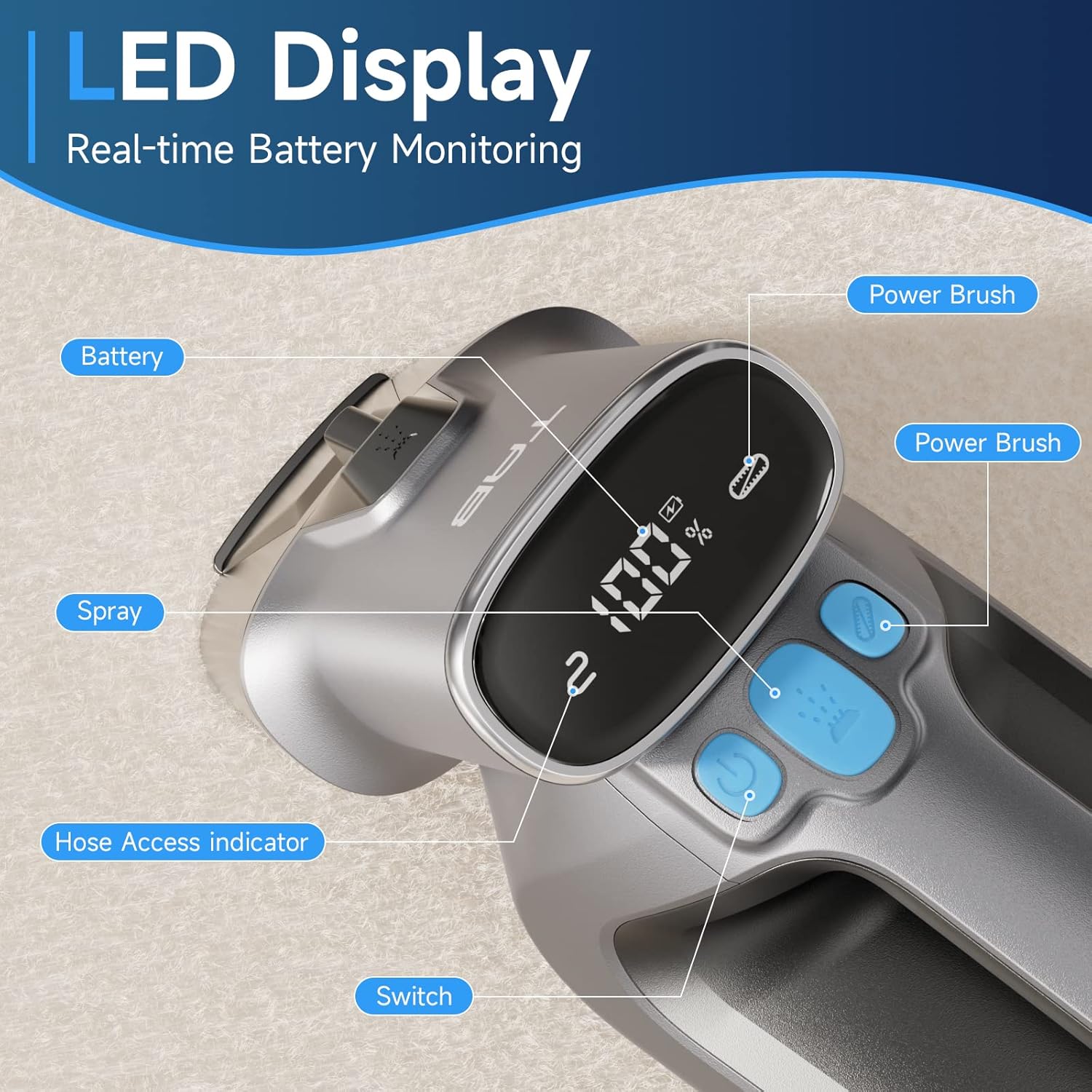
Image: Diagram showing the separate 350ml clean water tank and 260ml dirty water tank, highlighting their removable design.
Sąranka
Akumuliatoriaus įkrovimas
Before first use, fully charge the appliance. The LED display will show the battery percentage.
- Locate the Type-C charging port on the cleaner.
- Connect the provided Type-C charging cable to the port and a 5V/2A adapter (not included).
- The LED display will show charging progress. A full charge provides up to 20 minutes of runtime.

Image: Close-up of the Type-C charging port on the cleaner, with the charging cable connected.
Švaraus vandens bako užpildymas
- Nuimkite švaraus vandens baką nuo pagrindinio įrenginio.
- Open the tank cap and fill with clean water. You may add a non-foaming cleaning solution as recommended by the solution manufacturer. Do not overfill.
- Securely close the cap and reinsert the tank into the cleaner until it clicks into place.
Naudojimo instrukcijos
Bendra operacija
- Ensure the clean water tank is filled and the dirty water tank is empty and properly installed.
- Paspauskite maitinimo mygtuką, kad įjungtumėte valiklį.
- To activate the PowerBrush, press the dedicated PowerBrush button. The brush will rotate to agitate stains.
- To spray cleaning solution, press the spray button.
- Move the cleaner slowly over the stained area, allowing the PowerBrush and suction to work.

Image: The PowerBrush mechanism shown in operation, highlighting its high-speed automatic washing action for better cleaning.

Image: The cleaner demonstrating its strong suction power on a carpet, suitable for various fabric surfaces like mattresses and sofas.
Įvairių paviršių valymas
- Kilimai ir kilimėliai: Use the main PowerBrush head directly on the carpet. For deep stains, pre-treat the area if necessary.
- Upholstery & Car Interiors: For delicate fabrics or hard-to-reach spots, attach the Extend Hose. Ensure the hose is securely connected; the LED display will indicate proper connection.
- Naminių gyvūnėlių dėmės: The PowerBrush is effective for agitating and lifting pet messes. Apply cleaning solution, scrub gently, and then suction up the dirty liquid.

Image: The cleaner being used to remove a pet stain from a carpet, illustrating its effectiveness for quick spot cleaning.

Image: A user demonstrating the use of the extended hose to clean curtains, showcasing its ability to reach various areas.

Image: The cordless cleaner being used to clean a car seat, emphasizing its portability and 20-minute run time for on-the-go cleaning.
Official Product Video: Usage Demonstration
Video: This official product video demonstrates the TAB ErasePro H6 Portable Carpet Cleaner in action, showing its effectiveness on various stains and surfaces, including the PowerBrush and extended hose features. It also illustrates the ease of use and maintenance.
Priežiūra
Talpyklų ištuštinimas ir valymas
For optimal performance and hygiene, empty and clean both water tanks after each use.
- Nuimkite nešvaraus vandens baką nuo pagrindinio įrenginio.
- Open the tank and dispose of the dirty water. Rinse the tank thoroughly with clean water.
- Remove the clean water tank and rinse it if any cleaning solution residue remains.
- Allow both tanks to air dry completely before reassembling.

Image: A visual representation of the clean and dirty water tanks, indicating their positions on the cleaner for easy removal and cleaning.
Cleaning the PowerBrush
Regularly inspect and clean the PowerBrush to prevent hair and debris buildup.
- Detach the PowerBrush head from the main unit.
- Remove any tangled hair or debris from the brush bristles.
- Nuplaukite šepetėlį po tekančiu vandeniu.
- Allow the PowerBrush to air dry completely before reattaching.

Vaizdas: Stambus planas view of the detachable PowerBrush component, showing its bristles for effective cleaning and ease of maintenance.
Trikčių šalinimas
If you encounter issues with your TAB ErasePro H6, refer to the table below for common problems and solutions.
| Problema | Galima priežastis | Sprendimas |
|---|---|---|
| Siurblys neįsijungia. | Baterija išsikrovusi arba jos įkrova maža. | Iki galo įkraukite akumuliatorių. |
| Nepurškiama arba purškiama silpnai. | Clean water tank is empty or improperly installed. Nozzle is clogged. | Refill clean water tank. Reinstall tank correctly. Clean the spray nozzle. |
| Prastas siurbimas. | Dirty water tank is full. Dirty water tank is improperly installed. Suction nozzle is blocked. | Empty dirty water tank. Reinstall tank correctly. Clear any blockages from the suction nozzle. |
| PowerBrush not rotating. | PowerBrush button not pressed. Brush is jammed by debris. | Press the PowerBrush button. Remove any hair or debris from the brush. |
| Cleaner leaks. | Water tanks are not properly sealed or installed. | Ensure tank caps are securely closed and tanks are correctly seated in the unit. |
Specifikacijos
| Funkcija | Specifikacija |
|---|---|
| Prekės ženklas | TAB |
| Modelio pavadinimas | H6-3 |
| Ypatinga funkcija | Nešiojamas kilimų valiklis |
| Filtro tipas | Putos |
| Švaraus vandens bako talpa | 0.35 litro (350 ml) |
| Nešvaraus vandens bako talpa | 0.26 litro (260 ml) |
| Baterijos galiatage | 2200 miliamp_valandos |
| Vykdymo laikas | Iki 20 minučių |
| Rekomenduojami naudojimo būdai | Carpet, Upholstery, Stairs, Car |
| Formos faktorius | Rankinis |
| Triukšmo lygis | 80 dB |
| Prekės svoris | 4.4 svaro |
| Pakuotės matmenys | 17.28 x 13.07 x 6.69 colio |
Garantija ir palaikymas
Your TAB ErasePro H6 Portable Carpet Cleaner comes with a standard manufacturer's warranty. For detailed warranty information, product support, or to purchase replacement parts, please visit the official TAB websvetainėje arba susisiekite su klientų aptarnavimo tarnyba per savo pardavėją.
Dėl papildomos pagalbos žr. kontaktinę informaciją, pateiktą kartu su pirkimo dokumentais.


