1. Įvadas
Welcome to the user manual for your Hoppstar Expert Digital Camera. This manual provides essential information on how to set up, operate, and maintain your camera, ensuring a fun and creative experience for young photographers. Please read this manual carefully before using the camera and keep it for future reference.
The Hoppstar Expert is designed specifically for children, offering a user-friendly interface, durable construction with interchangeable silicone covers, and a range of exciting features including a selfie camera, video recording, picture frames, photo filters, and face detection.
2. Saugos informacija
- This product is intended for children aged 3 years and older. Adult supervision is recommended during use.
- Saugokite fotoaparatą nuo vandens ar per didelės drėgmės.
- Avoid dropping the camera or subjecting it to strong impacts, even with the protective silicone cover.
- Keep small parts, such as memory cards, out of reach of very young children to prevent choking hazards.
- Use only the charging cable provided or a compatible USB charger.
- Nebandykite patys ardyti ar taisyti kameros. Kilus problemų, kreipkitės į klientų aptarnavimo tarnybą.
3. Pakuotės turinys
Pažymėkite langelį prie šių elementų:
- Hoppstar Expert Digital Camera
- Instrukcijų vadovas
- USB įkrovimo laidas
- Lanyard/Strap
- USB-C į USB-A adapteris
- USB-C to Micro-USB Adapter
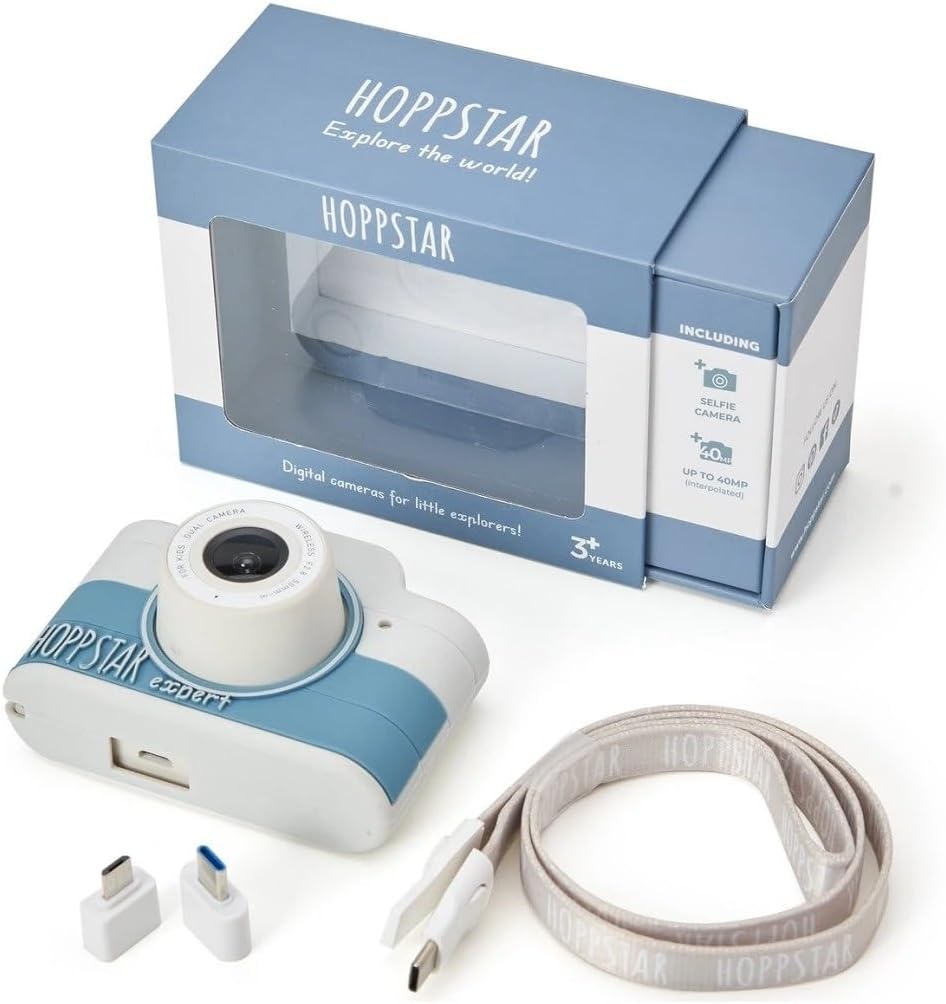
Image: Hoppstar Expert camera shown with its retail packaging, USB charging cable, lanyard, and two USB adapters.
4. Produktas baigtasview
Priekyje View

Image: The front of the Hoppstar Expert camera, featuring the main lens, flash, and the 'Hoppstar Expert' branding on the blue and white body.
- Pagrindinis objektyvas: For taking standard photos and videos.
- Flash/Light: Suteikia apšvietimą esant silpnam apšvietimui.
- Mikrofonas: Užfiksuoja garsą vaizdo įrašymo metu.
Galinis View

Image: The back of the Hoppstar Expert camera, displaying the LCD screen and the control buttons on either side.
- LCD ekranas: Displays menus, live viewir atkūrimas.
- Selfie kamera: Located above the screen for self-portraits.
- Valdymo mygtukai: Navigation, OK, Menu, and other function buttons.
5. Sąranka
5.1 Kameros įkrovimas
Before first use, fully charge the camera's internal battery. Connect the provided USB charging cable to the camera's USB port and to a USB power source (e.g., computer, wall adapter). The charging indicator light will show the charging status and turn off when fully charged.
5.2 Atminties kortelės įdėjimas
The Hoppstar Expert comes with 16 GB of internal storage. If you wish to expand storage, locate the memory card slot (usually on the side or bottom) and insert a compatible microSD card (not included) until it clicks into place. Ensure the camera is powered off before inserting or removing the card.
5.3 Įjungimas / išjungimas
Press and hold the Power button (usually located on the top or side) for a few seconds to turn the camera on or off.
6. Naudojimo instrukcijos
6.1 Pagrindiniai valdikliai
- Gerai mygtukas: Confirms selections in menus, takes photos, or starts/stops video recording.
- Naršymo mygtukai: Used to move through menu options (Up, Down, Left, Right).
- Meniu mygtukas: Accesses the camera's settings and feature options.
- Režimo mygtukas: Perjungia fotografavimo, vaizdo įrašymo ir atkūrimo režimus.
6.2 Fotografavimas
In photo mode, frame your shot using the LCD screen. Press the OK button to capture a photo. The camera supports both front and selfie cameras. To switch between cameras, navigate to the camera settings in the menu or use a dedicated button if available.
6.3 Vaizdo įrašų įrašymas
Switch to video mode. Press the OK button once to start recording and press it again to stop. Videos are saved to the internal memory or inserted memory card.
6.4 Using Creative Features
The Hoppstar Expert includes several creative features:
- Picture Frames: Apply fun borders to your photos. Access this feature through the camera's menu.
- Photo Filters: Change the look and feel of your photos with various color and effect filters.
- Veido atpažinimas: The camera can automatically detect faces in the frame, assisting with focus.
Explore these options within the camera's menu settings to enhance your photos and videos.
7. Priežiūra
- Valymas: Use a soft, dry cloth to clean the camera body and screen. For the lens, use a specialized lens cleaning cloth. Do not use liquid cleaners.
- Silikoninis dangtelis: The interchangeable silicone cover can be removed and cleaned with mild soap and water if necessary. Ensure it is completely dry before reattaching.
- Akumuliatoriaus priežiūra: Norėdami pailginti baterijos veikimo laiką, venkite jos dažnai visiškai iškrauti. Reguliariai įkraukite fotoaparatą, net jei jo ilgą laiką nenaudojate.
- Saugykla: Fotoaparatą laikykite vėsioje, sausoje vietoje, toliau nuo tiesioginių saulės spindulių ir ekstremalių temperatūrų.
8. Problemų sprendimas
Kamera neįsijungia
- Įsitikinkite, kad akumuliatorius įkrautas. Prijunkite fotoaparatą prie maitinimo šaltinio ir bandykite dar kartą.
- Paspauskite ir palaikykite maitinimo mygtuką ilgiau (5–10 sekundes).
Prasta vaizdo / vaizdo kokybė
- Įsitikinkite, kad objektyvas yra švarus ir be dėmių ar dulkių.
- Check lighting conditions. Optimal results are achieved in well-lit environments.
- Ensure the camera is held steady during capture.
Camera Freezes/Unresponsive
- Try resetting the camera by pressing the reset button (if available, often a small pinhole) or by holding the Power button until it turns off and then restarting.
Cannot Save Photos/Videos
- Check if the internal memory or inserted memory card is full. Delete unnecessary filearba įdėkite naują kortelę.
- Ensure the memory card is properly inserted and not corrupted.
If you encounter issues not listed here or if troubleshooting steps do not resolve the problem, please contact Hoppstar customer support.
9. Specifikacijos
| Funkcija | Specifikacija |
|---|---|
| Prekės ženklo pavadinimas | Hoppstar |
| Modelio pavadinimas | Hoppstar Expert Yale |
| Modelio numeris | 76893 |
| Spalva | Jeilis |
| Pakuotės matmenys | 14.3 x 8.7 x 5.1 cm |
| Nepertraukiamo fotografavimo greitis | 30 kadrų per sekundę |
| Integruoti komponentai | Camera + Instruction Manual |
| Modelio metai | 2023 |
| Filmo spalva | Spalva |
| Ekspozicijos valdymo tipas | Automatinis |
| Užrakto tipas | Elektroninė |
10. Garantija ir palaikymas
The Hoppstar Expert Digital Camera comes with a standard manufacturer's warranty. Please refer to the warranty information provided with your purchase or visit the official Hoppstar websvetainėje, kurioje rasite išsamią informaciją apie garantijos sąlygas.
For technical support, product inquiries, or warranty claims, please contact Hoppstar customer service through their official websvetainėje arba kontaktinę informaciją, pateiktą jūsų pirkimo dokumentuose.


