Produktas baigtasview
The TechniSat DIGITRADIO 4 IR is a versatile stereo internet radio designed for high-quality audio reception and playback. It supports DAB+, FM, and internet radio, offering a wide range of national and regional programs. The device features Bluetooth audio streaming, allowing playback from smartphones and tablets, and includes a USB port for MP3 file playback. Equipped with two 10W ELAC speakers and a clear 3.5-inch TFT color display, it delivers excellent sound and user experience. Control is intuitive via rotary knobs, remote control, or a smartphone application.
Pakuotės turinys
- DIGITRADIO 4 IR Stereo Internet Radio (Black)
- Telescopic antenna with mounting tool
- Maitinimo adapteris
- Nuotolinio valdymo pultas su baterijomis (2 x AAA)
- Vartotojo vadovas
Įrenginio funkcijos ir valdikliai
Familiarize yourself with the main components and controls of your DIGITRADIO 4 IR.

Vaizdas: Priekyje view of the TechniSat DIGITRADIO 4 IR radio, showing the central display, two large rotary knobs for volume/standby and select/snooze, and several control buttons (Mode, Menu, Fav, Scan, Play/Pause, Skip tracks).
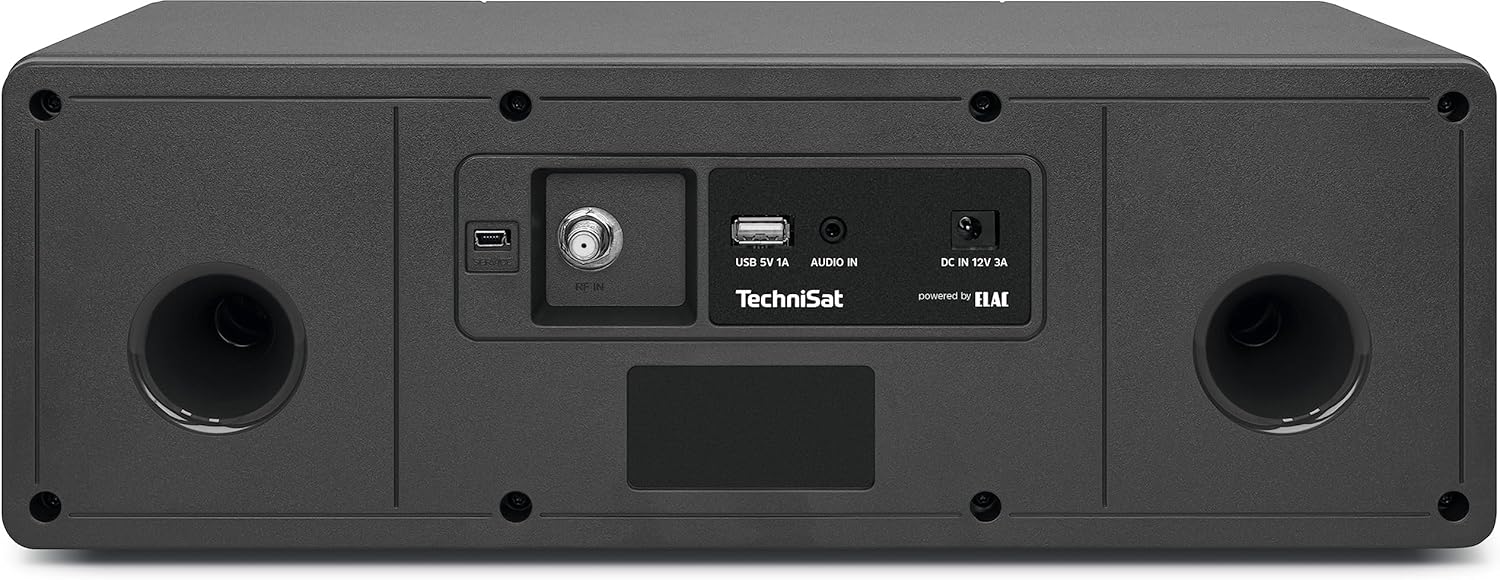
Vaizdas: Galinis view of the TechniSat DIGITRADIO 4 IR radio, highlighting the connection ports: RF IN for antenna, USB 5V 1A, AUDIO IN (AUX), and DC IN 12V 3A power input. Two bass reflex ports are also visible.

Vaizdas: The remote control for the TechniSat DIGITRADIO 4 IR radio, featuring buttons for power, EQ, scan, alarm, sleep timer, playback controls, menu navigation, volume, and a numeric keypad for direct station access.
Sąranka
- Išpakavimas: Atsargiai išimkite visus komponentus iš pakuotės.
- Antenos jungtis: Connect the telescopic antenna to the RF IN port on the rear of the device. Extend the antenna for optimal reception.
- Maitinimo jungtis: Connect the power adapter to the DC IN 12V 3A port on the rear of the radio, then plug it into a wall outlet.
- Pradinės sąrankos vedlys: Upon first power-on, the radio will guide you through an initial setup wizard. Follow the on-screen instructions to set language, time, date, and network connection.
- Tinklo ryšys („Wi-Fi“): Select your Wi-Fi network from the list and enter the password. A stable internet connection is required for internet radio and streaming services.
Naudojimo instrukcijos
Maitinimo įjungimas/išjungimas ir budėjimo režimas
Paspauskite GARSUMAS / BUDĖJIMO REŽIMAS rotary knob to switch the device on or off. In standby mode, the display shows the time and date.
Režimo pasirinkimas
Paspauskite REŽIMAS button on the front panel or remote control to cycle through available modes: DAB+, FM, Internet Radio, Bluetooth, USB, and AUX In.
DAB+ radijas
- Pasirinkite DAB+ režimą.
- Radijas automatiškai ieškos prieinamų DAB+ stočių.
- Naudokite PASIRINKTI / ATIDĖTI rotary knob or the </> mygtukais nuotolinio valdymo pulte, norėdami naršyti po stotis.
- Paspauskite PASIRINKTI / ATIDĖTI rankenėlė arba OK on the remote to select a station.
- Norėdami išsaugoti mėgstamą stotį, paspauskite ir palaikykite FAV mygtuką, tada pasirinkite iš anksto nustatytos stoties numerį.
FM radijas
- Pasirinkite FM režimą.
- Paspauskite NUSKAITYTI button to automatically search for FM stations.
- Rankinis derinimas naudojant PASIRINKTI / ATIDĖTI rotary knob or the </> mygtukai.
- Norėdami išsaugoti mėgstamą stotį, paspauskite ir palaikykite FAV mygtuką, tada pasirinkite iš anksto nustatytos stoties numerį.
Interneto radijas
- Ensure the radio is connected to your Wi-Fi network.
- Pasirinkite internetinio radijo režimą.
- Browse stations by location, genre, or search.
- Paspauskite PASIRINKTI / ATIDĖTI rankenėlė arba OK on the remote to select a station.
- Norėdami išsaugoti mėgstamą stotį, paspauskite ir palaikykite FAV mygtuką, tada pasirinkite iš anksto nustatytos stoties numerį.
„Bluetooth“ garso srautas
- Select Bluetooth mode on the radio. The display will show "Pairing".
- Įjunkite „Bluetooth“ savo išmaniajame telefone arba planšetiniame kompiuteryje ir ieškokite galimų įrenginių.
- Select "DIGITRADIO 4 IR" from the list to pair.
- Susiejus, galite transliuoti garsą iš savo įrenginio į radiją.
USB atkūrimas
- Įdėkite USB diską, kuriame yra MP3 fileį USB prievadą, esantį radijo imtuvo gale.
- Pasirinkite USB režimą.
- Use the controls to navigate and play your music files.
AUX įvestis
- Connect an external audio source (e.g., an MP3 player) to the AUX IN port on the rear of the radio using a 3.5mm audio cable (not included).
- Pasirinkite AUX režimą.
- Audio from the connected device will play through the radio's speakers.
Alarm Clock and Sleep Timer
Access alarm and sleep timer settings via the MENIU button or dedicated buttons on the remote control. Follow the on-screen prompts to configure these functions.
Ekrano nustatymai
Adjust display brightness for operating and standby modes through the MENIU settings. The radio also features an auto-dimming function.
Priežiūra
To ensure the longevity and optimal performance of your DIGITRADIO 4 IR, follow these maintenance guidelines:
- Valymas: Radijo imtuvo išorę valykite minkštu, sausu skudurėliu. Nenaudokite abrazyvinių valiklių, vaško ar tirpiklių.
- Ekrano priežiūra: Gently wipe the display with a soft, lint-free cloth. Avoid pressing hard on the screen.
- Vėdinimas: Įsitikinkite, kad ventiliacijos angos nėra užblokuotos, kad išvengtumėte perkaitimo.
- Aplinka: Keep the radio away from direct sunlight, heat sources, dust, and moisture.
Trikčių šalinimas
If you encounter issues with your DIGITRADIO 4 IR, refer to the following common solutions:
- Nėra galios: Ensure the power adapter is securely connected to both the radio and a working power outlet.
- Nėra garso: Check the volume level. Ensure the correct audio source mode is selected. If using AUX or Bluetooth, verify the external device's volume and connection.
- Prastas radijo signalas (DAB+/FM): Extend and adjust the telescopic antenna. Try repositioning the radio to improve signal strength.
- Internet Radio Connection Issues: Verify your Wi-Fi network connection. Ensure the Wi-Fi password is entered correctly. Restart your Wi-Fi router and the radio.
- „Bluetooth“ poravimo problemos: Ensure the radio is in Bluetooth pairing mode. Delete "DIGITRADIO 4 IR" from your device's Bluetooth list and attempt to pair again.
- Connect App Not Recognizing Radio: If using a companion app, try restarting your smartphone or tablet if the app fails to connect to the radio.
- USB atkūrimo problemos: Ensure the USB drive is formatted correctly (FAT32) and contains supported MP3 audio files.
Specifikacijos
| Funkcija | Detalė |
|---|---|
| Prekės ženklas | TechniSat |
| Modelio numeris | 0000/3957 |
| Spalva | Juoda |
| Ryšio technologija | Auxiliary, Bluetooth, USB, Wi-Fi |
| Ypatingos savybės | Access to music services (Spotify, Amazon Music, Klassikradio Select, Calm Radio), USB interface with charging function and MP3 playback, FM Radio, Bluetooth audio streaming (reception), Favorite memory (30 DAB+ / 30 FM / 30 Internet) |
| Suderinami įrenginiai | Ausinės, išmanusis telefonas, planšetinis kompiuteris |
| Gaminio matmenys | 38 L x 18.5 W x 13.5 A cm |
| Tiuningo technologija | DAB+ |
| Palaikomos radijo dažnių juostos | DAB+, FM, Internet |
| Maitinimo šaltinis | Su laidu elektra |
| Įtraukti komponentai | Power adapter, Telescopic antenna with mounting tool, DIGITRADIO 4 IR, User manual, Remote control with batteries |
Garantijos ir palaikymo informacija
For detailed warranty information, please refer to the warranty card included with your product or visit the official TechniSat website. Please note that spare parts availability for this product is currently unavailable, and information regarding guaranteed software updates is not provided.
For technical support or service inquiries, please contact TechniSat customer service through their official channels.


