1. Įvadas
Thank you for choosing the iFFALCON 43-inch 4K Ultra HD Smart QLED Google TV, model iFF43Q73. This manual provides essential information for the safe and efficient use of your television. Please read it thoroughly before operating the device and retain it for future reference.
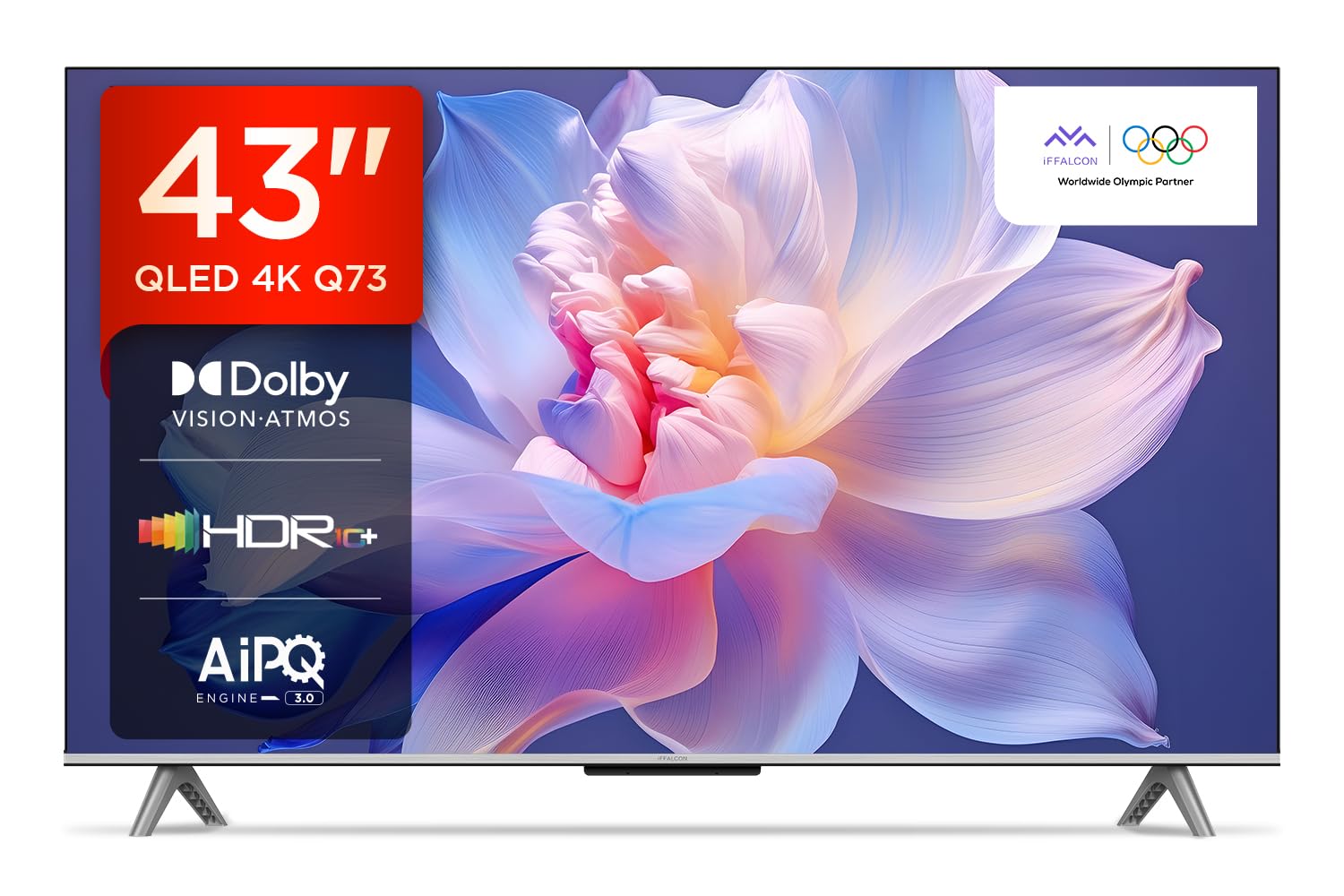
Vaizdas: priekis view of the iFFALCON 43-inch 4K Ultra HD Smart QLED Google TV.
2. Saugos informacija
Visada laikykitės šių saugos nurodymų, kad išvengtumėte elektros smūgio, gaisro ar televizoriaus sugadinimo:
- Saugokite televizorių nuo lietaus ar drėgmės.
- Užtikrinkite tinkamą vėdinimą; neužblokuokite ventiliacijos angų.
- Naudokite tik gamintojo nurodytus priedus/priedus.
- Atjunkite televizorių nuo elektros tinklo žaibuojant arba kai jis ilgą laiką nenaudojamas.
- Visus techninės priežiūros darbus patikėkite kvalifikuotam techninės priežiūros personalui.
3. Kas yra dėžutėje
Išpakuodami patikrinkite, ar yra visi daiktai:
- 1N LED televizorius
- 1N garso kabelis
- 1N stovas (montuojamas ant stalo)
- 1N vartotojo vadovas
- 1N nuotolinio valdymo pultas
- 1N garantijos kortelė
- 2N AAA baterijos (nuotolinio valdymo pultui)
4. Sąranka
4.1 Fizinis įrengimas
Your iFFALCON TV can be installed on a table stand or wall-mounted. Ensure the installation surface is stable and can support the TV's weight.

Image: The iFFALCON TV placed on a media console, illustrating a typical table-top setup.
Stalo montavimas:
- Atsargiai padėkite televizorių ekranu žemyn ant minkšto, lygaus paviršiaus.
- Attach the provided stand legs to the designated slots on the bottom of the TV using the screws included.
- Prieš atsargiai keldami televizorių į vertikalią padėtį, įsitikinkite, kad stovas yra tvirtai pritvirtintas.
Montavimas ant sienos:
For wall mounting, a compatible VESA wall mount kit (not included) is required. Follow the instructions provided with your wall mount kit. Professional installation is recommended.

Image: The iFFALCON TV displayed as wall-mounted in a modern living room setting.
4.2 Pradinis įjungimas ir konfigūravimas
- Prijunkite maitinimo laidą prie televizoriaus, o tada – prie elektros lizdo.
- Į nuotolinio valdymo pultą įdėkite pateiktas AAA baterijas.
- Norėdami jį įjungti, paspauskite nuotolinio valdymo pulto arba televizoriaus maitinimo mygtuką.
- Vykdykite ekrane pateikiamus nurodymus, kad atliktumėte pradinę sąranką, įskaitant kalbos pasirinkimą, tinklo ryšį („Wi-Fi“ arba eterneto) ir prisijungimą prie „Google“ paskyros.
5. Televizoriaus valdymas
5.1 Nuotolinis valdymas
Išmanusis nuotolinio valdymo pultas suteikia greitą prieigą prie įvairių funkcijų ir transliacijos paslaugų.

Image: The iFFALCON smart remote control, highlighting dedicated buttons for Netflix, Prime Video, YouTube, and TCL Channel, along with Google Assistant functionality.
5.2 „Google TV“ sąsaja
Your TV runs on Google TV, offering a personalized experience with content recommendations and easy access to apps.

Image: The Google TV home screen displaying various streaming apps and content recommendations.

Image: A visual representation of the Google TV platform, emphasizing its user-friendly interface.
Pagrindinės funkcijos:
- Laisvų rankų valdymas balsu: Use "Ok Google" to search for content, control smart home devices, and get information.
- Google Watchlist: Add movies and TV shows to a unified watchlist from various services.
- „Google Kids“: Access curated content suitable for children.
- Google Meet: Conduct video calls directly from your TV (requires compatible camera, not included).

Image: A user interacting with the TV using the "Ok Google" voice command to check the weather.

Image: The Google Watchlist feature shown across both a mobile device and the TV screen.

Image: The Google Kids interface, displaying child-friendly content and shows.

Image: A video call in progress using Google Meet on the iFFALCON TV.
6. Ryšys
The iFFALCON iFF43Q73 offers multiple connectivity options for external devices and networks.

Paveikslėlis: detalus view of the TV's side panel, illustrating the various input and output ports.
- HDMI prievadai (3): Connect set-top boxes, Blu-ray players, and gaming consoles. HDMI 3 supports eARC/ARC for enhanced audio return.
- USB prievadas (1): Skirta USB atminties įrenginiams prijungti, kad būtų galima leisti mediją.
- LAN (eternetas): Laidiniam interneto ryšiui.
- Ausinių išvestis: Skirta ausinėms arba išoriniams garsiakalbiams prijungti.
- Skaitmeninė garso išvestis (optinė): Skirta prijungti prie garso juostų arba namų kino sistemų.
- Antenos / kabelio įėjimas: Antenos arba kabelinės televizijos signalo prijungimui.
- AV įvesties adapteris: Skirta senesniems įrenginiams prijungti naudojant kompozicinį vaizdo ir stereo garsą.
- „Wi-Fi“: Built-in for wireless internet access.
- Bluetooth: Skirta belaidžiams priedams, pvz., ausinėms ar žaidimų valdikliams, prijungti.

Image: An illustration of an HDMI 2.1 cable connecting to the TV, highlighting its advanced capabilities.

Image: A laptop screen being cast to the iFFALCON TV, demonstrating low latency casting functionality.
7. Ekrano funkcijos
Patirkite stulbinančius vaizdus su pažangiomis ekrano technologijomis.

Paveikslėlis: Viršview of the iFFALCON TV's key display and audio features, including QLED, Dolby Vision Atmos, HDR10+, MEMC, High Brightness, DTS:X, Gaming in Dolby Vision, Game Master, and Edgeless Design.
- QLED ekranas: Quantum Dot technology delivers vibrant colors and improved brightness.
- 4K itin aukštos kokybės (3840 x 2160) raiška: Provides four times the resolution of Full HD for incredible detail.
- „Dolby Vision“ ir HDR10+: Advanced HDR formats for enhanced contrast, brightness, and color accuracy.
- 4K HDR profesionalas: Optimizes HDR content for a superior viewpatirtį.
- AIPQ 3.0 Engine: AI-powered picture quality engine for intelligent optimization of color, contrast, and clarity.
- MEMC (judesio įvertinimas, judesio kompensavimas): Reduces motion blur and makes fast-moving scenes smoother.
- High Brightness (300 nits): Ensures clear visibility even in well-lit rooms.
- 178 laipsnių pločio Viewpakreipimo kampas: Consistent picture quality from various viewpozicijų.

Image: An illustration demonstrating the layers and technology behind a QLED display.

Image: The Dolby Vision logo displayed over a vibrant, colorful abstract image, representing enhanced visual quality.

Image: The HDR10+ logo positioned next to an image of a colorful, explosive visual effect, symbolizing dynamic range.

Image: A split image demonstrating the difference between standard and high brightness, showing a more vivid landscape on the right.

Image: A comparison showing a skier with motion blur (Without MEMC) versus a clear image (With MEMC), illustrating the motion compensation technology.
8. Garso funkcijos
Immersive sound experience with integrated speaker boxes.
- 30 vatų išėjimo galia: Powerful audio for clear sound.
- MS12Z with Dolby Atmos: Perteikia daugiamačio garso skambesį, kuris juda aplink jus.
- DTS virtualus:X: Creates an immersive audio experience without the need for additional speakers.
- Integruotos garsiakalbių dėžutės (apatinė pusė): Optimized speaker placement for enhanced sound delivery.

Image: An illustration of the Dolby Atmos sound experience, showing sound waves emanating from the TV and surrounding the viewer.

Image: A visual representation of Dolby Atmos audio filling a living room, with sound waves surrounding the TV.

Image: The DTS:X logo with an illustration of dolphins jumping out of water, depicting immersive sound.

Image: A visual representation of DTS:X audio, showing sound waves emanating from the TV and surrounding a viewer on a couch.
9. Žaidimų funkcijos
Pagerinkite savo žaidimų patirtį naudodami specialias funkcijas.
- Žaidimo meistras: A suite of features designed for gamers.
- Gaming in Dolby Vision: Experience games with enhanced visuals and dynamic range.
- ALLM (automatinis mažos delsos režimas): Automatiškai perjungia televizorių į mažo delsos režimą, kai aptinkama žaidimų konsolė, taip sumažinant įvesties delsą.
- Žaidimų juosta: Quick access to game-related settings and information during gameplay.

Image: The Game Master feature displayed on the TV screen, showing icons for Game Bar, ALLM, and Aiming Aid.

Image: A gaming scene displayed on the TV with the 'Gaming in Dolby Vision' logo, indicating enhanced visual quality for games.

Image: The Game Master logo with icons for Game Bar, ALLM, and Aiming Aid, illustrating the gaming optimization features.

Image: The Game Bar interface displayed at the bottom of the TV screen during gameplay, showing options like HGIG, StatsBar, Boost, and Toolbox.

Image: A split screen comparison of a racing game with ALLM Mode OFF (left) and ALLM Mode ON (right), demonstrating reduced input lag.
10. Priežiūra
Tinkama priežiūra užtikrina jūsų televizoriaus ilgaamžiškumą ir veikimą.
- Ekrano valymas: Naudokite minkštą, nepūkuotą šluostę, specialiai skirtą elektronikai. Nenaudokite abrazyvinių valiklių ar tirpiklių.
- Rėmo valymas: Wipe with a soft, dry cloth. For stubborn marks, a slightly damp galima naudoti šluostę, po to – sausą šluostę.
- Vėdinimas: Ensure the TV's ventilation openings are clear of dust and obstructions.
- Maitinimo laidas: Reguliariai tikrinkite maitinimo laidą, ar nėra pažeidimų.
11. Problemų sprendimas
Dažniausiai pasitaikančias problemas ir jų sprendimus rasite šiame skyriuje.
| Problema | Galima priežastis | Sprendimas |
|---|---|---|
| Nėra galios | Power cord disconnected, no power from outlet. | Patikrinkite maitinimo laido jungtį. Išbandykite lizdą su kitu įrenginiu. |
| Nėra vaizdo, bet yra garsas | Incorrect input source, faulty cable. | Patikrinkite teisingą įvesties šaltinį. Patikrinkite HDMI/AV kabelio jungtis. |
| Nėra garso, bet vaizdas yra | Volume muted, external audio device issue. | Unmute volume. Check audio settings. Ensure external audio devices are connected correctly. |
| Nuotolinio valdymo pultas neveikia | Išsikrovusios baterijos, kliūtis, nuotolinio valdymo pultas nesuporuotas. | Pakeiskite baterijas. Pašalinkite kliūtis. Jei taikoma, iš naujo susiekite „Bluetooth“ nuotolinio valdymo pultą. |
| Wi-Fi ryšio problemos | Neteisingas slaptažodis, maršrutizatoriaus problema, signalo trukdžiai. | Iš naujo įveskite „Wi-Fi“ slaptažodį. Paleiskite maršrutizatorių iš naujo. Perkelkite televizorių arčiau maršrutizatoriaus arba sumažinkite trukdžius. |
12. Specifikacijos
Detailed technical specifications for the iFFALCON 43-inch 4K Ultra HD Smart QLED Google TV.

Image: A diagram illustrating the dimensions and weight of the iFFALCON 43-inch TV, both with and without the stand.
| Funkcija | Detalė |
|---|---|
| Modelis | iFF43Q73 |
| Ekrano dydis | 43 colių (108 cm) |
| Ekrano technologija | QLED |
| Rezoliucija | 4K Ultra HD (3840 2160 x XNUMX XNUMX) |
| Atnaujinimo dažnis | 60 Hz |
| Operacinė sistema | Google TV |
| Procesorius | 64 bitų keturių branduolių procesorius |
| RAM | 2 GB |
| Sandėliavimas | 16 GB |
| Garso išvestis | 30 vatų |
| Garso technologija | Dolby Atmos, DTS Virtual:X |
| Ryšys | 3 HDMI Ports, 1 USB Port, Wi-Fi, Bluetooth, Ethernet |
| Energijos suvartojimas (įjungus) | 130 vatų |
| Gaminio matmenys (su stovu) | 8 x 95.7 x 60.3 cm |
| Prekės svoris (su stovu) | 6.7 kg |
13. Garantija ir palaikymas
Jūsų iFFALCON televizorius pateikiamas su 2 metų garantija provided by the manufacturer from the date of purchase. For warranty claims, please use your Amazon e-invoice as proof of purchase.
For technical support or service inquiries, please refer to the contact information provided on the warranty card or visit the official iFFALCON support websvetainę.


