1. Produktas baigtasview
The ION Audio Highlander is a high-powered, all-weather portable Bluetooth speaker designed to deliver rich sound and deep bass even at high volumes. Its durable construction makes it suitable for various environments, ensuring your music can accompany you wherever you go.
Pagrindinės funkcijos:
- High-Power Audio: Delivers 120 Watts of speaker maximum output power for impactful sound.
- Žemų dažnių stiprinimas: Enhances low frequencies for maximum impact.
- Įjungtas „Bluetooth 5.0“: Allows wireless streaming and control of your music from compatible devices.
- IPX5 atsparus vandeniui: Designed to withstand splashes and rain, making it safe for outdoor use.
- Rechargeable 50-Hour Battery: Provides extended playtime on a single charge.
- Įmontuotos rankenos ir ratukai: Facilitates easy transportation.
2. Pakuotės turinys
Įsitikinkite, kad jūsų siuntinyje yra visi toliau išvardyti daiktai:
- ION Audio Highlander Portable Speaker
- Maitinimo kabelis
3. Sąrankos vadovas
3.1 Akumuliatoriaus įkrovimas
Before first use, fully charge the Highlander speaker. The battery life is approximately 50 hours, but initial charging may take several hours.
- Connect the included power cable to the power input on the back of the Highlander speaker.
- Kitą maitinimo laido galą prijunkite prie standartinio sieninio lizdo.
- The charging indicator light will illuminate. The light will change or turn off once charging is complete.
3.2 Įjungimas / išjungimas
To power the speaker on or off, locate the power button on the control panel.
- Norėdami įjungti: Press and hold the Power button for a few seconds until the display illuminates.
- Norėdami išjungti: Press and hold the Power button again for a few seconds until the display turns off.
3.3 Bluetooth poravimas
Follow these steps to connect your Bluetooth device to the Highlander speaker:
- Ensure the Highlander speaker is powered on and in Bluetooth mode. The Bluetooth indicator on the display will flash, indicating it's ready to pair.
- On your Bluetooth device (smartphone, tablet, laptop), go to its Bluetooth settings.
- Ieškokite available devices. Select "ION Highlander" from the list.
- Once paired, the Bluetooth indicator on the speaker will stop flashing and remain solid. You can now play audio through the speaker.
- To disconnect, turn off Bluetooth on your device or select "Forget This Device" in your device's Bluetooth settings.
4. Naudojimo instrukcijos
4.1 Valdymo skydas baigtasview
The top panel of the Highlander speaker features various controls for managing audio playback and settings.

- Maitinimo mygtukas: Įjungia arba išjungia garsiakalbį.
- Garsumo rankenėlė: Reguliuoja bendrą garsumo lygį.
- Bluetooth mygtukas: Įjungia „Bluetooth“ susiejimo režimą.
- Žemųjų dažnių stiprinimo mygtukas: Įjungia arba išjungia žemųjų dažnių sustiprinimo funkciją.
- Ekranas: Shows current mode, battery status, and other information.
4.2 Adjusting Volume and Bass Boost
- Apimtis: Rotate the main volume knob clockwise to increase volume and counter-clockwise to decrease it.
- Žemų dažnių stiprinimas: Press the "Bass Boost" button to enhance the bass output. Press it again to return to normal audio.
4.3 Perkeliamumo funkcijos
The Highlander is designed for easy transport:
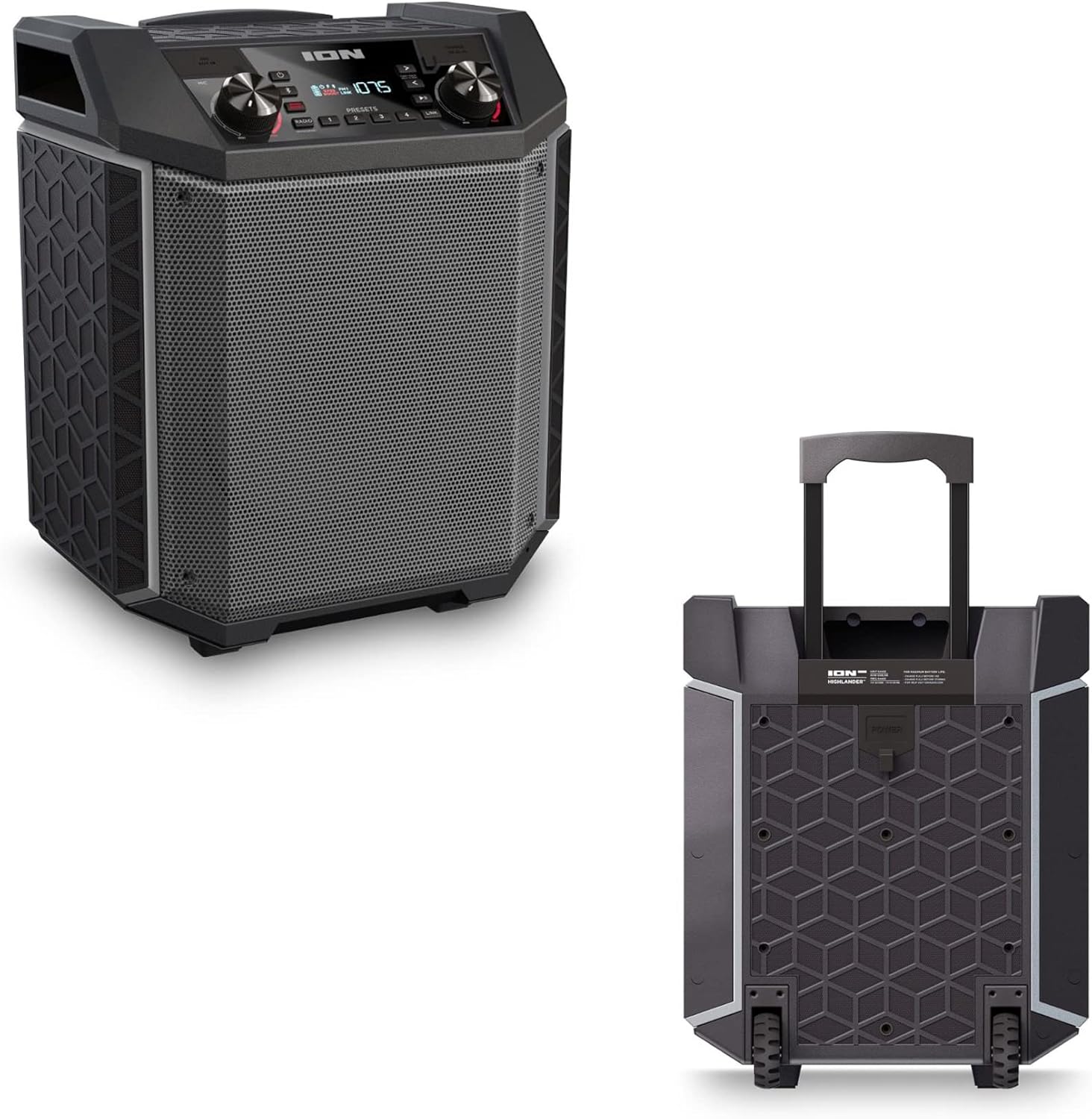

- Ištraukiama rankena: Pull up the integrated handle to roll the speaker like luggage.
- Ratai: Use the built-in wheels for smooth movement across various surfaces.
4.4 Atsparumas vandeniui (IPX5)
The Highlander speaker is IPX5 water-resistant, meaning it can withstand splashes of water from any direction. It is suitable for use by the pool or in light rain.

Svarbu: Do not submerge the speaker in water. Ensure all port covers are securely closed when exposed to water.
5. Priežiūra
5.1 Valymas
- Always power off the speaker and disconnect it from the power source before cleaning.
- Išoriniams paviršiams valyti naudokite minkštą, sausą šluostę.
- Esant sunkiai įsisenėjusiems nešvarumams, švelniai dampNuvalykite šluostę vandeniu. Venkite naudoti stiprias chemines medžiagas, tirpiklius ar abrazyvinius valiklius.
- Do not spray cleaning liquids directly onto the speaker.
5.2 Saugykla
- Garsiakalbį laikykite vėsioje, sausoje vietoje, toliau nuo tiesioginių saulės spindulių ir ekstremalių temperatūrų.
- If storing for an extended period, ensure the battery is partially charged (around 50%) to maintain battery health. Recharge every few months if not in use.
5.3 Akumuliatoriaus priežiūra
- Venkite dažnai visiškai iškrauti akumuliatorių.
- Saugokite bateriją nuo per didelio karščio ar šalčio.
- If the battery performance significantly degrades, contact customer support for assistance.
6. Problemų sprendimas
If you encounter issues with your Highlander speaker, refer to the table below for common problems and solutions.
| Problema | Galimas sprendimas |
|---|---|
| Garsiakalbis neįsijungia. |
|
| Negalima susieti su Bluetooth įrenginiu. |
|
| Nėra garso arba garsas per mažas. |
|
| Garso iškraipymas. |
|
7. Specifikacijos
| Funkcija | Detalė |
|---|---|
| Modelio pavadinimas | Highlanderis |
| Prekės ženklas | JONŲ |
| Garsiakalbio tipas | Lauke |
| Ryšio technologija | Bluetooth 5.0 |
| Maitinimo šaltinis | Maitinamas baterijomis |
| Baterijos veikimo laikas | 50 valandų |
| Atsparumo vandeniui lygis | IPX5 (atsparus vandeniui) |
| Didžiausia garsiakalbio išėjimo galia | 120 vatų |
| Gaminio matmenys | 19.5 "D x 19.5" P x 14" A |
| Prekės svoris | 23.2 svaro |
| Medžiaga | Water-resistant plastic or rubber, with a black coating |
| Įtraukti komponentai | Maitinimo kabelis |
| UPC | 657768542732 |
8. Garantija ir palaikymas
The ION Audio Highlander speaker comes with a Limited Warranty. For specific details regarding warranty coverage, duration, and terms, please refer to the warranty information provided with your purchase or visit the official ION Audio websvetainę.
For technical support, troubleshooting assistance beyond this manual, or warranty claims, please contact ION Audio customer support through their official channels. Keep your proof of purchase handy when contacting support.


