1. Produktas baigtasview
The Skechers Alta Digital Chronograph Watch (Model SR2140) is a versatile timepiece designed for an active lifestyle. It features a digital display, chronograph (stopwatch) functionality, alarm, hourly chime, and an EL backlight for low-light conditions. This watch is water-resistant up to 30 meters (100 feet), making it suitable for splashes or brief immersion, but not for swimming or showering.
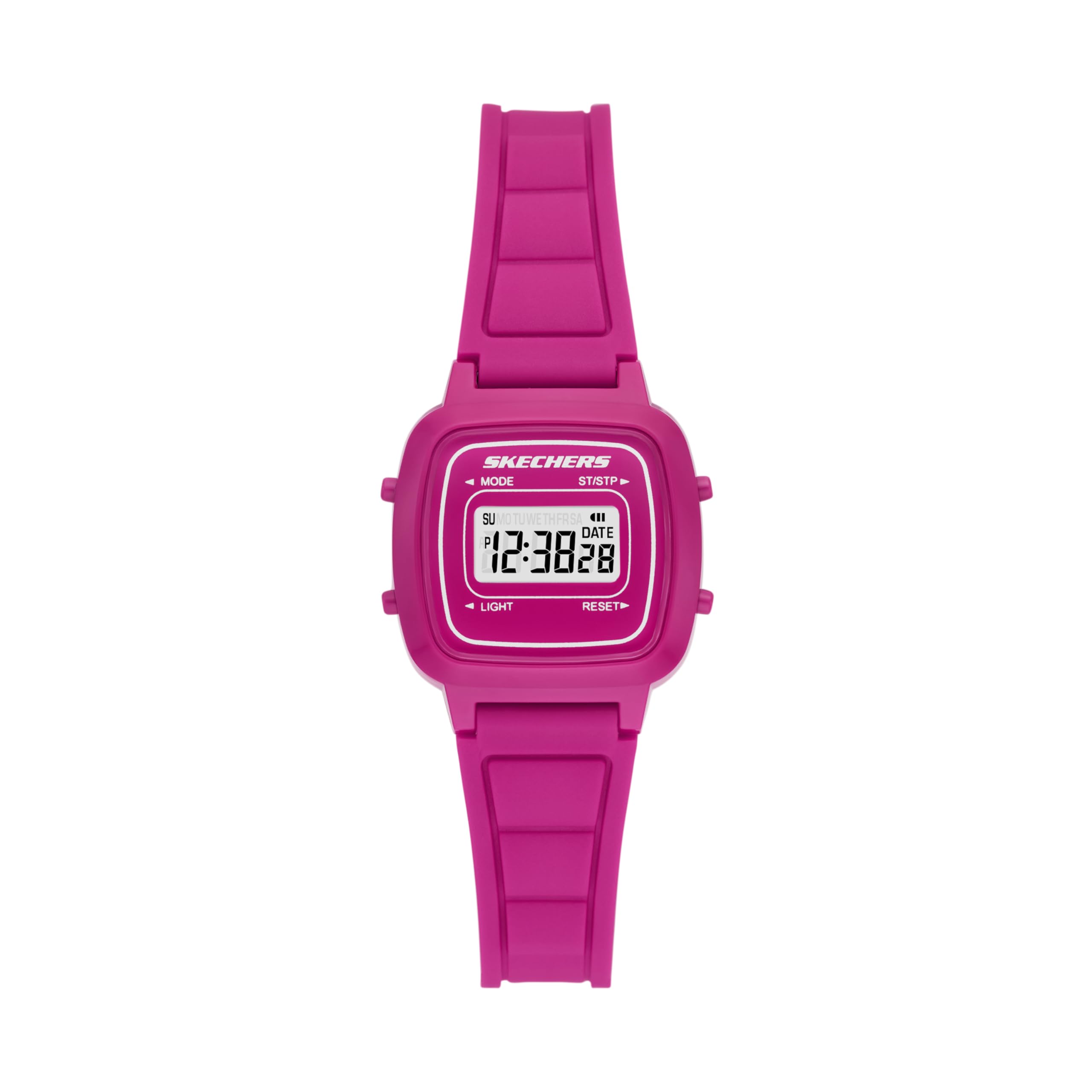
1 pav.: priekis view of the Skechers Alta Digital Chronograph Watch, showcasing the digital display and overall design.

2 pav. Išsamus view of the watch face, indicating the functions of each button: MODE, ST/STP (Start/Stop), LIGHT, and RESET.
Pagrindinės funkcijos:
- Digital time display with 12/24 hour selectable format.
- Chronograph (stopwatch) function.
- Kasdienis žadintuvas ir hourly varpelis.
- EL Backlight for visibility in low light.
- Calendar display.
- Atsparumas vandeniui iki 30 metrų (3 atm).
- Durable polycarbonate case and silicone band.
2. Sąranka ir pradinė konfigūracija
2.1 Mygtukų funkcijos
Mygtukų vietas žr. 2 paveiksle.
- MODE: Cycles through display modes (Time, Alarm, Stopwatch).
- ST/STP (paleisti/sustabdyti): Starts/stops stopwatch, adjusts settings in setting mode.
- ŠVIESA: Įjungia EL foninį apšvietimą.
- NUSTATYTI: Resets stopwatch, cycles through options in setting mode.

3 pav.: šonas view of the watch, highlighting the two control buttons on the right side of the case.
2.2 Laiko ir datos nustatymas
- Įprastame laiko ekrane paspauskite REŽIMAS Tris kartus paspauskite mygtuką, kad įjungtumėte laiko nustatymo režimą. Pradės mirksėti sekundžių skaitmenys.
- Paspauskite RESET mygtuką, kad perjungtumėte nustatymų parinktis: Sekundės → Valandos → Minutės → Mėnuo → Data → Savaitės diena.
- Naudokite ST / STP mygtuką, kad sureguliuotumėte mirksinčią reikšmę.
- Paspauskite REŽIMAS button once to exit setting mode and return to the normal time display.
2.3 12/24 valandų formato pasirinkimas
Laiko nustatymo režime (mirksi sekundės) paspauskite ST / STP button to toggle between 12-hour and 24-hour formats. An "A" or "P" indicator will appear for 12-hour format (AM/PM).
3. Naudojimo instrukcijos
3.1 Foninio apšvietimo naudojimas
Paspauskite ŠVIESA button (bottom left) to illuminate the display for a few seconds. This feature is useful in dark environments.
3.2 Chronometro (chronografo) naudojimas
- Įprastame laiko ekrane paspauskite REŽIMAS vieną kartą, kad įjungtumėte chronometro režimą. Ekrane bus rodoma „00:00:00“.
- Paspauskite ST / STP mygtuką, kad paleistumėte chronometrą.
- Paspauskite ST / STP mygtuką dar kartą, kad sustabdytumėte chronometrą.
- To resume timing, press ST / STP vėl.
- Norėdami chronometrą nustatyti į nulį, paspauskite RESET mygtuką, kai chronometras sustabdytas.
- Paspauskite REŽIMAS mygtuką, kad grįžtumėte į įprastą laiko rodymą.
3.3 Žadintuvo nustatymas ir naudojimas
- Įprastame laiko ekrane paspauskite REŽIMAS du kartus paspauskite mygtuką, kad įjungtumėte žadintuvo nustatymo režimą. Pradės mirksėti valandų skaitmenys.
- Paspauskite ST / STP mygtuką, norėdami reguliuoti valandas.
- Paspauskite RESET mygtuką, kad pasirinktumėte minučių skaitmenis.
- Paspauskite ST / STP mygtuką norėdami sureguliuoti minutes.
- Paspauskite REŽIMAS mygtuką, kad išeitumėte iš žadintuvo nustatymo režimo.
To turn the alarm ON/OFF: In normal time display, press and hold the RESET mygtuką, tada paspauskite ST / STP mygtuką. Atsiras / išnyks aliarmo piktograma, rodanti jo būseną.
3.4 murly varpelis
Norėdami pasukti hourly chime ON/OFF: In normal time display, press and hold the REŽIMAS mygtuką, tada paspauskite RESET button. All days of the week will appear/disappear to indicate the chime status.
4. Priežiūra ir priežiūra
4.1 Atsparumas vandeniui
The Skechers Alta Digital Watch is water-resistant to 3 ATM (30 meters or 100 feet). This means it can withstand splashes, rain, or brief immersion in water. It is ne suitable for swimming, diving, or showering, as prolonged exposure to water pressure or hot water can compromise the seals.
4.2 Akumuliatoriaus keitimas
The watch uses 1 Lithium Ion battery (included). When the display becomes dim or functions become erratic, the battery may need replacement. Battery replacement should ideally be performed by a qualified watch technician to ensure proper sealing and water resistance. Attempting to replace the battery yourself may void the warranty and compromise water resistance.
4.3 Valymas
Norėdami išvalyti laikrodį, švelniai nuvalykite jį minkšta šluoste.amp cloth. Avoid using harsh chemicals, solvents, or abrasive cleaners, as these can damage the case or strap. Ensure the watch is dry before storing or wearing.

4 pav.: galinis view of the watch, showing the stainless steel case back and the buckle closure on the silicone band.
5. Problemų sprendimas
- Ekranas blankus arba tuščias: The battery may be low or depleted. Replace the battery as described in Section 4.2.
- Laikas neteisingas: Re-set the time and date following the instructions in Section 2.2. Ensure the 12/24 hour format is correctly set.
- Mygtukai nereaguoja: Ensure the watch is not in a locked mode (if applicable, though this model typically does not have a lock). If the issue persists, the battery may be low, or there might be an internal malfunction.
- Vanduo laikrodyje: Immediately cease use and take the watch to a qualified technician. Water ingress can cause severe damage.
6. Specifikacijos
| Funkcija | Detalė |
|---|---|
| Modelio numeris | SR2140 |
| Korpuso dydis | 27 mm |
| Juostos dydis | 12 mm |
| Judėjimas | Skaitmeninis |
| Atsparumas vandeniui | 3 bankomatai (30 metrų / 100 pėdų) |
| Baterijos tipas | 1 ličio jonų baterija (pridedama) |
| Bylos medžiaga | Polikarbonatas |
| Juostos medžiaga | Silikonas |
| Kilmės šalis | Kinija |
| Siuntinio matmenys | 10.2 x 7.9 x 7.5 cm |
| Prekės svoris | 18 g |

Figure 5: Case size guide, illustrating different watch dimensions for reference.
7. Informacija apie garantiją
Skechers watches typically come with a limited manufacturer's warranty covering defects in materials and workmanship. The specific terms and duration of the warranty may vary by region and retailer. Please retain your proof of purchase for warranty claims. For detailed warranty information, refer to the warranty card included with your product or visit the official Skechers websvetainę.
8. Pagalba klientams
If you encounter any issues or have questions regarding your Skechers Alta Digital Chronograph Watch that are not covered in this manual, please contact Skechers customer support. You can usually find contact information on the official Skechers websvetainėje arba per pardavėją, iš kurio įsigijote laikrodį.


