Įvadas
This manual provides comprehensive instructions for the setup, operation, maintenance, and troubleshooting of your ENDORFY Krux Qara 60% Mechanical Keyboard. Please read this manual thoroughly before using the product to ensure proper functionality and longevity.
Produktas baigtasview
The ENDORFY Krux Qara 60% is a compact mechanical gaming keyboard designed for performance and portability. It features Outemu Red Mechanical Switches, zone RGB backlighting, and a durable construction.
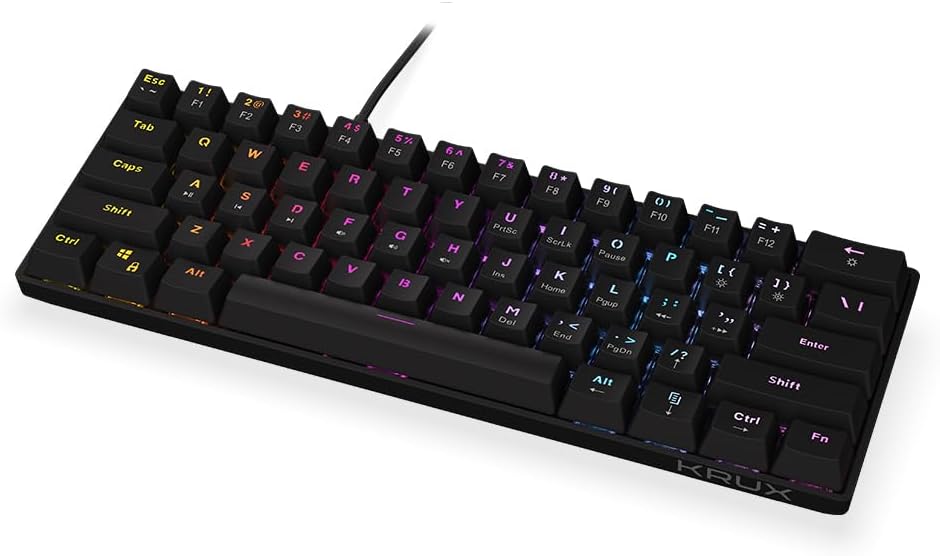
1 paveikslas: Priekyje view of the ENDORFY Krux Qara 60% Mechanical Keyboard, showcasing its compact 60% layout and vibrant RGB zone backlighting. The keyboard features black keycaps with white legends.

2 paveikslas: Top-down perspective of the keyboard, highlighting the keycap layout and the integrated USB-A cable connection point at the top center.

3 paveikslas: Galinis view of the keyboard, showing the product label with model information (KRX0137) and certification marks. The two adjustable feet are visible in their folded position.
Pakuotės turinys
Prieš tęsdami sąranką, įsitikinkite, kad yra visi reikalingi daiktai:
- ENDORFY Krux Qara 60% Mechanical Keyboard
- USB cable (integrated)
- Vartotojo vadovas (šis dokumentas)
Sąranka
- Išpakavimas: Atsargiai išimkite klaviatūrą ir jos priedus iš pakuotės.
- Ryšys: Connect the integrated USB-A cable from the keyboard to an available USB port on your computer (PC, Linux, Mac).
- Tvarkyklės diegimas: The keyboard is plug-and-play and typically does not require additional drivers for basic functionality. Your operating system should automatically recognize the device.
- Vieta: Place the keyboard on a stable, flat surface. You may adjust the keyboard height using the foldable feet located on the underside for ergonomic comfort.

4 paveikslas: Šoninė view illustrating the keyboard's profile and the adjustable feet in their extended position, providing an elevated typing angle.
Naudojimo instrukcijos
Pagrindinis funkcionalumas
The keyboard functions as a standard QWERTY input device. All alphanumeric keys, symbols, and basic modifiers (Shift, Ctrl, Alt) operate as expected.
Funkcinių klavišų deriniai (Fn sluoksnis)
Due to its 60% compact layout, many standard keyboard functions are accessed via the Fn key in combination with other keys. The secondary functions are typically printed on the front or side of the keycaps.
- Fn + Number Row (F1-F12): Accesses F1 through F12 functions. For example, fn+1 for F1.
- Fn + P, [, ]: Multimedia controls (Play/Pause, Previous Track, Next Track).
- Fn + ;, ', /: Volume controls (Mute, Volume Down, Volume Up).
- Fn + Shift dešinėn: Arrow keys (Up, Down, Left, Right).
- Fn + M, <, >: Home, End, PgUp, PgDn.
- Fn + I, K, L: Insert, Home, Page Up.
- Fn + U, J, H: Print Screen, Scroll Lock, Pause Break.
Foninio apšvietimo valdymas
The keyboard features zone RGB backlighting. Use the following combinations to control the lighting:
- Fn + \|: Perjunkite foninio apšvietimo režimus.
- Fn + Enter: Sureguliuokite foninio apšvietimo ryškumą.
- Fn + dešinysis „Ctrl“: Pakeiskite foninio apšvietimo spalvą.
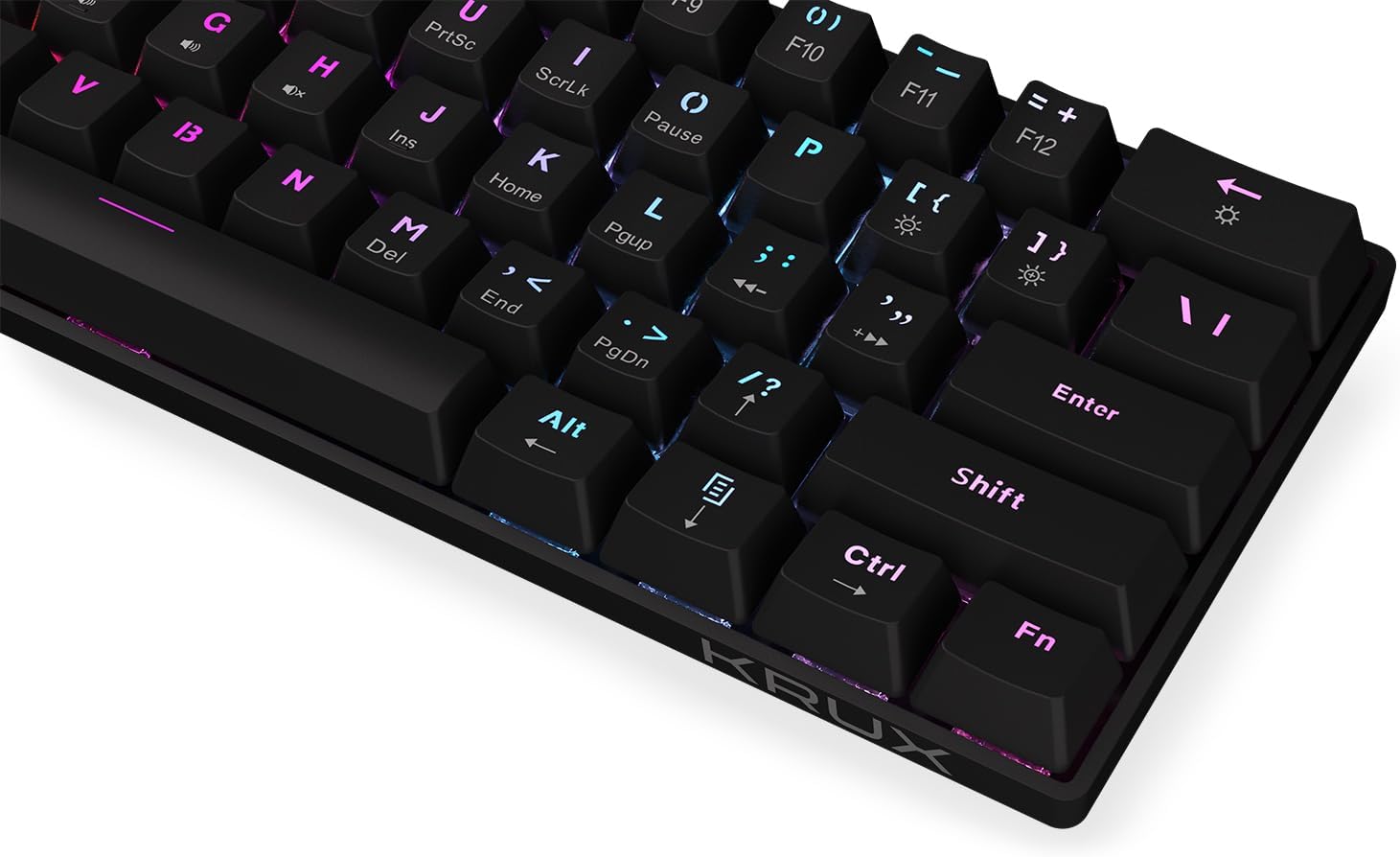
5 paveikslas: Iš arti view of the keycaps, demonstrating the RGB backlighting effect and the secondary functions printed on the front of some keys.
Priežiūra
Regular maintenance helps prolong the life of your keyboard:
- Valymas: Use a soft, dry cloth to wipe the surface of the keyboard. For dust and debris between keycaps, use compressed air. Avoid liquid cleaners directly on the keyboard.
- Išsiliejimai: In case of liquid spills, immediately disconnect the keyboard from your computer. Turn it upside down to drain liquid and allow it to dry completely before reconnecting. Do not use a hairdryer as excessive heat can damage components.
- Saugykla: Klaviatūrą laikykite vėsioje, sausoje vietoje, apsaugotoje nuo tiesioginių saulės spindulių ir ekstremalių temperatūrų.
Trikčių šalinimas
| Problema | Galima priežastis | Sprendimas |
|---|---|---|
| Klaviatūra nereaguoja | Atsilaisvinęs USB ryšys, sugedęs USB prievadas, sistemos klaida. | Įsitikinkite, kad USB laidas yra tvirtai prijungtas. Išbandykite kitą USB prievadą. Paleiskite kompiuterį iš naujo. |
| Raktai neregistruojami arba įvedami du kartus | Dulkės/šiukšlės po klaviatūros dangteliu, jungiklio gedimas. | Suslėgtu oru nuvalykite sritį aplink pažeistą klavišą. Jei problema išlieka, susisiekite su palaikymo tarnyba. |
| Foninis apšvietimas neveikia arba yra nepastovus | Backlight setting, software glitch. | Paspauskite Fn + Enter to adjust brightness. Cycle through modes with Fn + \|. Restart computer. |
| Fn key combinations not working | Incorrect key combination, software conflict. | Refer to the "Operating Instructions" section for correct combinations. Ensure no conflicting software is running. |
Specifikacijos
- Modelis: 0137 KRX
- Klaviatūros tipas: 60% Mechanical Gaming Keyboard
- Jungikliai: „Outemu“ raudoni mechaniniai jungikliai
- Foninis apšvietimas: Zone RGB
- Ryšys: Laidinis USB-A
- Matmenys: 29.1 x 10.1 x 3.9 cm (11.46 x 3.98 x 1.54 colio)
- Svoris: 506 g (1.11 svaro)
- Suderinamos operacinės sistemos: Windows 10, Mac OS X 10.12 Sierra, Linux
- Įtraukti komponentai: USB cable (integrated)
Garantija ir palaikymas
For warranty information and technical support, please refer to the official KRUX websvetainėje arba susisiekite su vietiniu pardavėju. Išsaugokite pirkimo įrodymą, jei prireiktų pateikti garantinį prašymą.
Gamintojas: Krux
Websvetainė: www.krux.tech (Note: This is a placeholder link, please refer to the official manufacturer's website for accurate support information.)


