Įvadas
This manual provides instructions for the setup, operation, and maintenance of your OttLite Wake Up Light with White Noise Sound Machine. This device combines a sunrise simulation alarm clock, a white noise sound machine, and a versatile color-changing light to enhance your daily routine.
Saugos informacija
- Prieš naudodami perskaitykite visas instrukcijas.
- Šis gaminys skirtas naudoti tik patalpose.
- Naudokite tik pateiktą maitinimo adapterį.
- Saugokite prietaisą nuo vandens ar per didelės drėgmės.
- Laikyti vaikams nepasiekiamoje vietoje.
- Nebandykite patys ardyti ar taisyti įrenginio. Kreipkitės į kvalifikuotus techninės priežiūros darbuotojus.
Pakuotės turinys
- OttLite Wake Up Light with White Noise Sound Machine
- USB maitinimo laidas
- Vartotojo vadovas
Produktas baigtasview
Familiarize yourself with the components of your OttLite Wake Up Light.

Vaizdas: priekis view of the OttLite Wake Up Light, displaying the time and connected to a USB charging pad.

Vaizdas: Šoninė view of the OttLite Wake Up Light, showing the various control buttons and the USB port.
Pagrindiniai valdikliai:
- Laiko rodymas: Skaitmeninio laikrodžio ekranas.
- Šviesos skydelis: Provides white and color-changing illumination.
- Valdymo mygtukai: Located on the side for setting time, alarms, light modes, and sounds.
- USB įkrovimo prievadas: Skirta išoriniams įrenginiams įkrauti.
Sąranka
- Išpakuoti: Atsargiai išimkite visus komponentus iš pakuotės.
- Maitinimo jungtis: Connect the provided USB power cable to the device and plug the adapter into a standard wall outlet. The device will power on and the time display will activate.
- Vieta: Place the Wake Up Light on a stable, flat surface, such as a bedside table, ensuring it is within reach of a power outlet.
Naudojimo instrukcijos
1. Laikrodžio nustatymas
- Press the 'Time Set' button (often indicated by a clock icon).
- Norėdami reguliuoti valandas ir minutes, naudokite mygtukus „+“ ir „-“.
- Press 'Time Set' again to confirm each setting.
- Toggle between 12-hour and 24-hour format using the dedicated button or by cycling through time settings.
2. Wake-Up Light & Alarm Function
The sunrise simulation gradually increases light intensity before your set alarm time.

Image: A user interacting with the Wake Up Light as it emits a warm, sunrise-like glow.
- Nustatyti zadintuva: Press the 'Alarm Set' button (bell icon). Use '+' and '-' to set the desired wake-up time.
- Saulėtekio modeliavimas: The light will begin to brighten 30 minutes before the set alarm time, gradually increasing to full brightness.
- Wake-Up Sounds: Choose from 7 pre-set sounds (nature sounds, FM radio, traditional alarm) by pressing the 'Sound' button. Adjust volume with '+' and '-'.
- Snaudimo funkcija: Press the 'Snooze' button (often a large button on top or front) to temporarily pause the alarm for a few minutes.
3. Sleep Aid & Sunset Simulation
Utilize the white noise and sunset simulation for a calming environment.
- Baltas triukšmas: Activate the white noise sound machine by pressing the 'White Noise' button. Adjust volume as needed.
- Saulėlydžio modeliavimas: Set the light to gradually dim over 15, 30, or 60 minutes. Refer to the specific button for 'Sunset' or 'Sleep Timer' and cycle through options.
4. Lighting Functions
The device offers various lighting options for ambiance and utility.
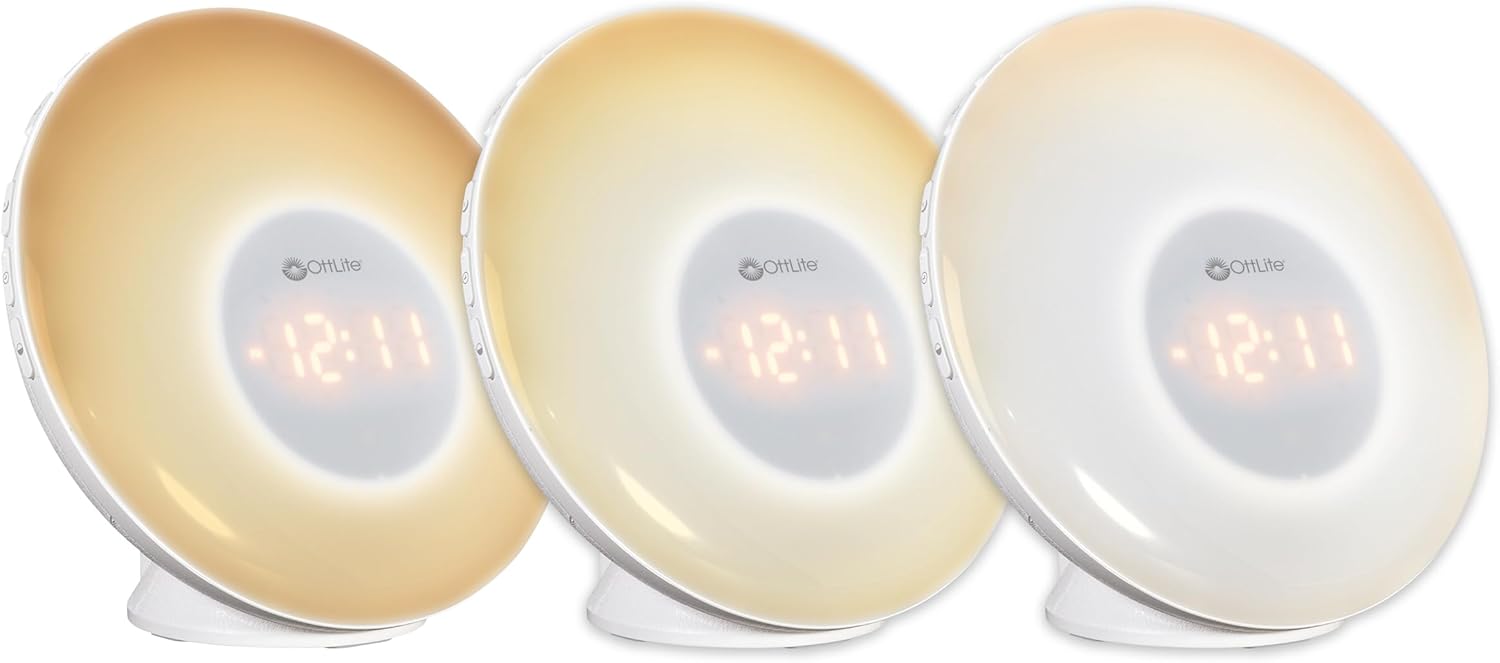
Image: Three units demonstrating the adjustable white light temperatures.

Image: Multiple units showcasing the range of color-changing options.
- Balta šviesa: Press the 'Light' button to activate soft white light. Adjust brightness using '+' and '-' buttons (three brightness levels available).
- Spalvos keitimas: Press the 'RGB' button to cycle through a spectrum of colors.
- Fixed Color: While in color-changing mode, press the 'RGB' button again to pause on your desired color.
5. USB įkrovimo prievadas
A convenient USB port is integrated for charging your devices.

Image: A smartphone being charged via the USB port on the Wake Up Light.
- Locate the USB port (5V, 1A output) on the side or back of the unit.
- Connect your device's USB charging cable to this port.
- Ensure the Wake Up Light is powered on for the USB port to function.
Priežiūra
- Valymas: Disconnect the power before cleaning. Wipe the device with a soft, dry cloth. Do not use abrasive cleaners or solvents.
- Saugykla: Kai prietaisas ilgą laiką nenaudojamas, laikykite jį vėsioje, sausoje vietoje, apsaugotoje nuo tiesioginių saulės spindulių.
Trikčių šalinimas
| Problema | Galima priežastis | Sprendimas |
|---|---|---|
| Įrenginys neįsijungia. | Power cable not connected properly or power outlet is not active. | Ensure the power cable is securely connected to the device and the wall outlet. Test the outlet with another device. |
| Alarm does not sound or light does not activate. | Žadintuvas nenustatytas arba garsumas per mažas. | Verify alarm settings and ensure the alarm is activated. Increase alarm volume. |
| High-pitched buzzing sound when light is on. | Potential internal component noise at certain brightness levels. | Try adjusting the brightness level. If the issue persists and is disruptive, contact customer support. |
| Difficulty setting the alarm or other functions. | Unfamiliarity with button layout or sequence. | Refer to the 'Operating Instructions' section carefully. Practice setting functions when not under time pressure. |
| USB įkrovimo prievadas neveikia. | Device not powered on or cable issue. | Ensure the Wake Up Light is powered on. Try a different USB cable or device to rule out cable/device issues. |
Specifikacijos
| Funkcija | Detalė |
|---|---|
| Modelio numeris | WU300Z-SHPR |
| Gaminio matmenys | 4 "D x 6.75" P x 6.7" A |
| Prekės svoris | 1.23 svaro |
| Maitinimo šaltinis | Su laidu elektra (120 voltų kintamoji srovė) |
| Šviesos šaltinio tipas | LED |
| Ypatingos savybės | Color Changing, Dimmable, Sunrise Simulation, Sunset Simulation, White Noise, USB Charging Port |
| USB išvestis | 5V, 1A |
| Medžiaga | Plastikiniai |
| Naudojimas viduje / lauke | Naudoti tik patalpose |
Garantija ir palaikymas
„OttLite“ produktai sukurti siekiant kokybės ir ilgaamžiškumo. Informacijos apie garantiją ar techninės pagalbos ieškokite prie pirkinio pridėtoje garantijos kortelėje arba apsilankykite oficialioje „OttLite“ svetainėje. websvetainę. Išsaugokite pirkimo čekį garantiniams reikalavimams.
Dėl papildomos pagalbos kreipkitės į „OttLite“ klientų aptarnavimo tarnybą.


