Įvadas
This manual provides essential information for the safe and efficient operation of your TECNO Pova 5 Pro 5G smartphone. Please read it thoroughly before using your device to ensure optimal performance and longevity.

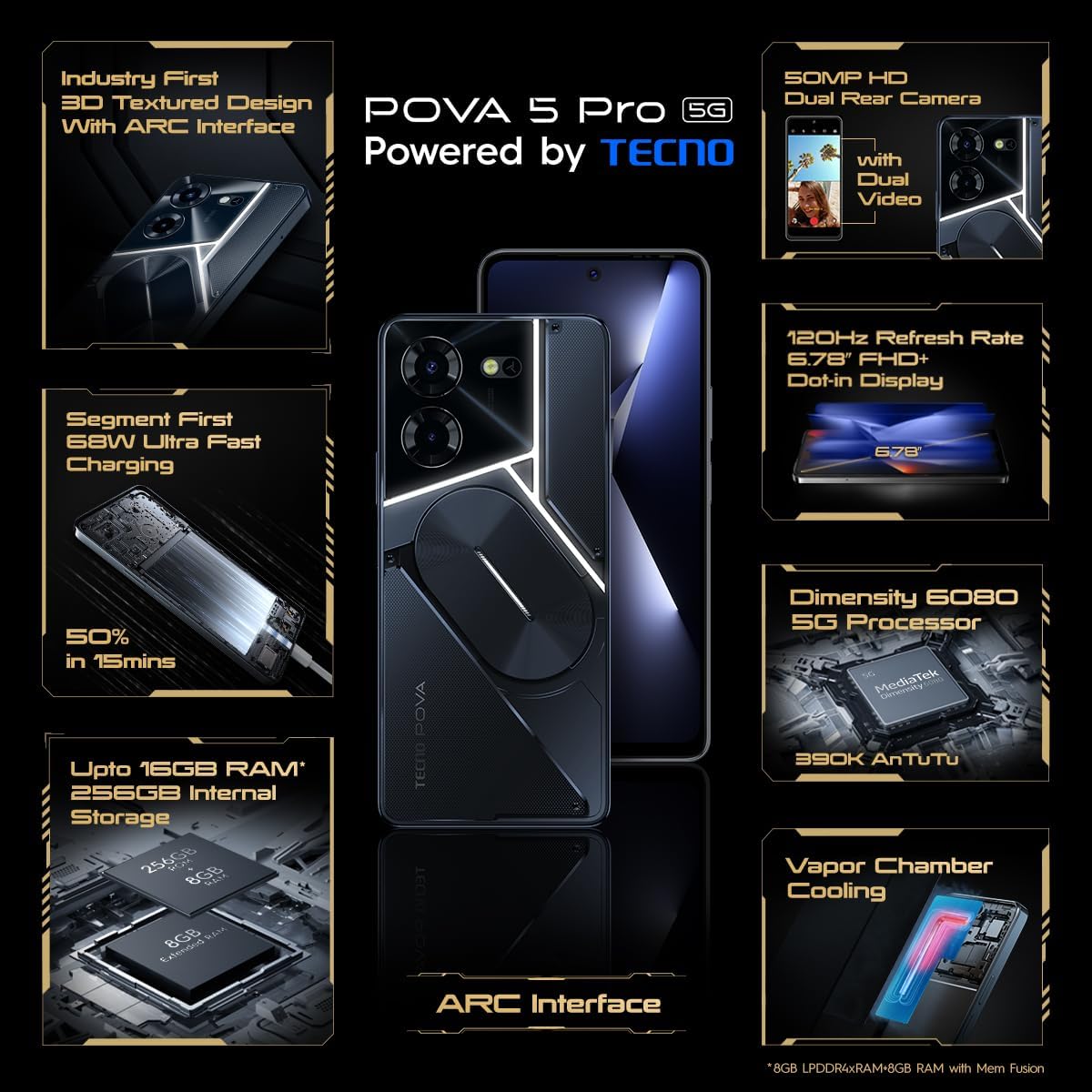
Image: The TECNO Pova 5 Pro 5G smartphone, showcasing its design and key feature of 68W Ultra Fast Charging.
Kas yra dėžutėje
Patikrinkite, ar pakuotėje yra visi daiktai:
- Išmanusis telefonas
- 68 W maitinimo adapteris
- C tipo kabelis
- TPU dangtelis
- SIM išstūmimo įrankis

Image: A flat lay of the TECNO Pova 5 Pro 5G packaging contents, showing the smartphone, 68W power adapter, USB-C cable, TPU protective cover, and the SIM ejector tool.
Sąranka
Pradinė sąranka
- Įdėkite SIM / SD kortelę: Locate the SIM tray on the side of the device. Use the provided SIM ejector tool to open the tray. Insert your Nano-SIM card(s) and/or microSD card into the designated slots. Ensure the tray is fully reinserted.
- Maitinimas: Press and hold the Power button (located on the right side) until the TECNO logo appears.
- Vykdykite ekrane pateikiamus nurodymus: The device will guide you through initial setup, including language selection, Wi-Fi connection, Google account setup, and security settings.
Įrenginio įkrovimas
The TECNO Pova 5 Pro 5G supports 68W Ultra Fast Charging.
- Prijunkite C tipo laidą prie telefono apačioje esančio įkrovimo prievado.
- Kitą laido galą prijunkite prie 68 W maitinimo adapterio.
- Įkiškite maitinimo adapterį į sieninį lizdą.
- A full charge typically takes approximately 45 minutes, with 50% charge achievable in about 15 minutes.
Paveikslėlis: Skaidrus frontas view of the TECNO Pova 5 Pro 5G smartphone, highlighting its display and front camera.
Prietaiso valdymas
Pagrindinė navigacija
- Jutiklinis ekranas: Palieskite, kad pasirinktumėte, braukite, kad slinktumėte, suspauskite, kad priartintumėte.
- Maitinimo mygtukas: Paspauskite, kad pažadintumėte / užmigdytumėte ekraną. Paspauskite ir palaikykite, kad išjungtumėte arba paleistumėte iš naujo.
- Garsumo mygtukai: Reguliuokite medijos, skambučio arba skambėjimo tono garsumą.
Kameros naudojimas
The device features a 50MP AI Dual Rear Camera and a 16MP Selfie Camera.
- Atidarykite programėlę „Kamera“ iš pagrindinio ekrano arba programėlių stalčiaus.
- Pasirinkite norimą režimą (fotografavimas, vaizdo įrašymas, portretas ir kt.).
- Palieskite užrakto mygtuką, kad fotografuotumėte arba pradėtumėte / sustabdytumėte vaizdo įrašymą.
- Utilize AI enhancements for optimized scene recognition and image quality.
ARC Interface and Notifications
The TECNO Pova 5 Pro 5G features a unique multi-color ARC interface with backlighting.
- The ARC interface provides customizable light effects for notifications, incoming calls, gaming, and music playback.
- Access settings to personalize the light patterns and colors for different alerts.

Paveikslėlis: Galinė dalis view of the TECNO Pova 5 Pro 5G, showcasing its distinctive 3D textured design and the illuminated ARC interface.

Paveikslėlis: detalus view of the TECNO Pova 5 Pro 5G's ARC interface, illustrating the multi-color backlighting feature.
Priežiūra
- Akumuliatoriaus priežiūra: To prolong battery life, avoid exposing the device to extreme temperatures. Do not fully discharge the battery regularly.
- Valymas: Ekraną ir korpusą valykite minkštu, nepūkuotu audiniu. Venkite naudoti stiprias chemines medžiagas ar abrazyvines medžiagas.
- Programinės įrangos atnaujinimai: Regularly check for and install system updates to ensure optimal performance, security, and access to new features. Navigate to Settings > System > System update.
- Saugyklos valdymas: Periodiškai valykite nereikalingus fileir programėles, kad būtų palaikoma pakankamai vietos saugykloje ir įrenginio greitis.
Trikčių šalinimas
- Įrenginys neįsijungia: Ensure the battery is charged. Connect the device to the charger for at least 15 minutes before attempting to power on again. If the issue persists, perform a forced restart by holding the Power button for 10-15 seconds.
- Įkrovimo problemos: Verify that the charging cable and adapter are securely connected and undamaged. Try using a different outlet.
- Programėlės užstrigimas / užstrigimas: Uždarykite probleminę programėlę ir vėl ją atidarykite. Jei problema išlieka, išvalykite programėlės talpyklą ir duomenis skiltyje „Nustatymai“ > „Programos“. Kraštutiniu atveju pašalinkite programėlę ir įdiekite ją iš naujo.
- Prastas tinklo ryšys: Check if Airplane Mode is off. Restart the device. If using mobile data, ensure your SIM card is properly inserted and your data plan is active.
- Perkaitimas: Avoid using the device in direct sunlight or during intensive tasks for extended periods. Close background applications.
Specifikacijos
| Funkcija | Specifikacija |
|---|---|
| Modelio pavadinimas | Pova 5 Pro 5G |
| Operacinė sistema | Android 13.0 |
| Procesorius | Dimensity 6080 (2.4 GHz Octa-Core) |
| RAM | 8 GB (expandable up to 16 GB with Memory Fusion) |
| Vidinė saugykla | 256 GB (UMCP) |
| Ekranas | 6.78-inch FHD+ Dot-in Display |
| Atnaujinimo dažnis | 120 Hz |
| Galinė kamera | 50 MP dviguba kamera su dirbtiniu intelektu |
| Priekinė kamera | 16 MP Selfie Camera |
| Baterija | 5000 mAh ličio polimeras |
| Įkrovimas | 68W Ultra Fast Charging |
| Matmenys | 16.9 x 7.7 x 16.9 cm |
| Svoris | 214 gramų |
| Ryšys | 5G (10 bands supported), NFC, Bluetooth 5.1 |

Image: An internal diagram or view of the TECNO Pova 5 Pro 5G, illustrating its vapor chamber cooling system for efficient heat dissipation.
Garantija ir palaikymas
Your TECNO Pova 5 Pro 5G comes with a manufacturer's warranty. Please refer to the warranty card included in your product packaging for specific terms and conditions.
For technical support, service, or warranty claims, please contact TECNO customer service. TECNO maintains a large service network with over 1200 service centers in India.
You can find more information and support resources by visiting the official Tecno store on Amazon: Tecno Store


