Įvadas
This manual provides instructions for the setup, operation, maintenance, and troubleshooting of your CHARGEWORX CX5278 4-in-1 Wireless Charging Alarm Clock. This device is designed to charge up to three devices simultaneously, including a smartphone, smartwatch, and earbuds, while also functioning as a digital alarm clock with a reflective display.
Pagrindinės funkcijos:
- Simultaneous charging for smartwatch, smartphone, and earbuds.
- Fast 15W wireless charging capability.
- Three customizable alarm settings.
- Built-in charging indicator.
- Reflective screen that also functions as a mirror.
1. Sąranka
1.1 Išpakavimas ir pirminė apžiūra
Atsargiai išimkite visus komponentus iš pakuotės. Patikrinkite, ar yra šie daiktai:
- CHARGEWORX CX5278 4-in-1 Wireless Charging Alarm Clock unit
- USB-C įkrovimo laidas
- Vartotojo vadovas (šis dokumentas)
Inspect the unit for any visible damage. If any components are missing or damaged, contact customer support.
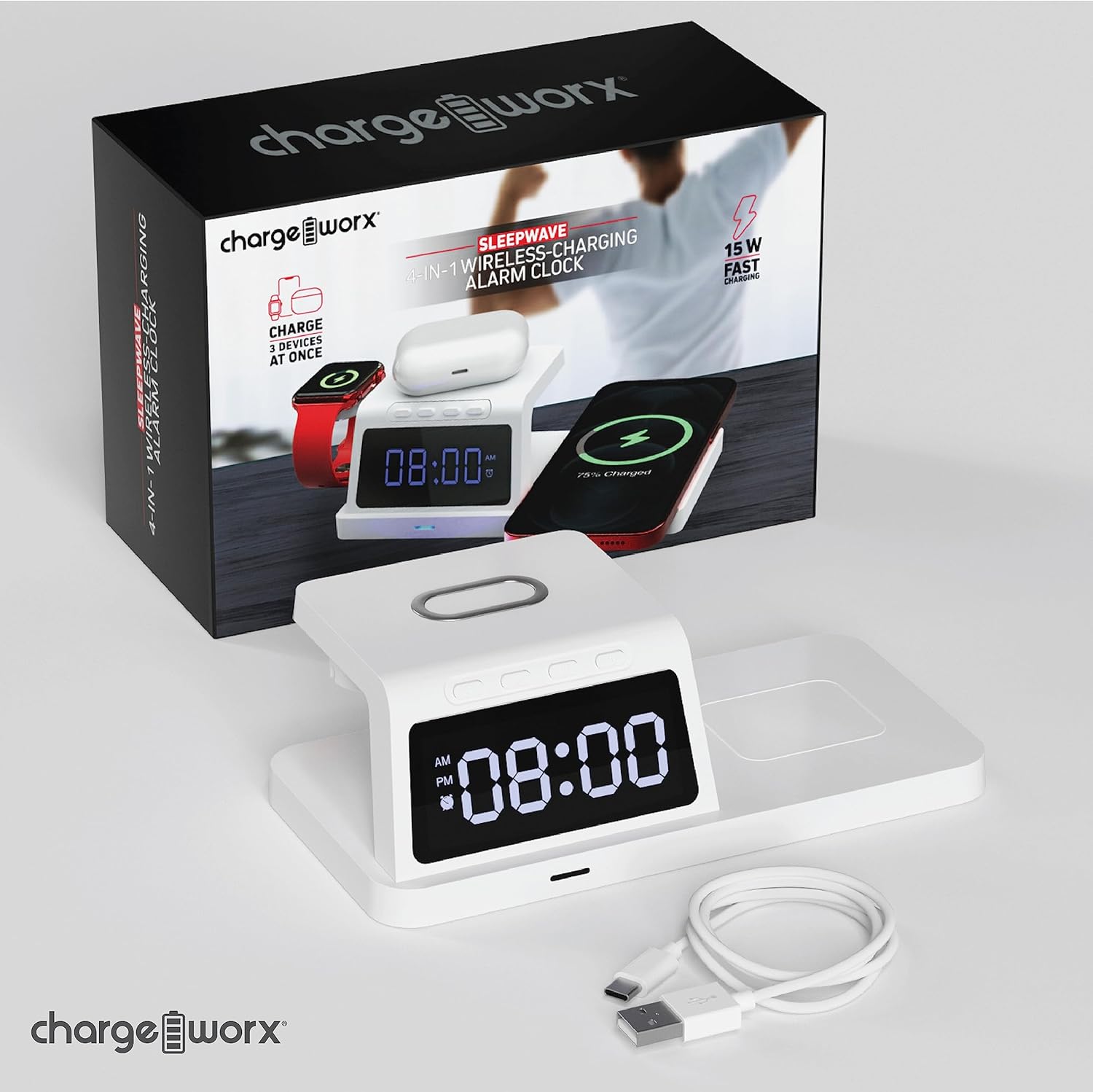
Image: The CHARGEWORX CX5278 unit shown with its retail packaging and included USB-C charging cable.
1.2 Maitinimo jungtis
- Connect the provided USB-C cable to the power input port on the back of the alarm clock.
- Connect the other end of the USB-C cable to a compatible USB power adapter (not included). A 15W or higher power adapter is recommended for optimal charging performance.
- Plug the power adapter into a wall outlet. The digital display will illuminate, indicating the device is powered on.

Image: The charging alarm clock placed on a nightstand, connected to a wall outlet via its power adapter and cable.
1.3 Laiko nustatymas
Refer to the control buttons located on the top of the unit.
- Paspauskite ir palaikykite Laikas nustatytas button (often indicated by a clock icon) until the hour digits begin to flash.
- Naudokite + ir - mygtukais nustatykite valandas. Atkreipkite dėmesį į AM/PM indikatorių.
- Paspauskite Laikas nustatytas dar kartą paspauskite mygtuką, kad pereitumėte prie minučių skaitmenų.
- Naudokite + ir - mygtukai minutėms reguliuoti.
- Paspauskite Laikas nustatytas button one more time to confirm the time and exit time setting mode.
2. Naudojimo instrukcijos
2.1 Signalų nustatymas
The device supports up to three independent alarms (Alarm 1, Alarm 2, Alarm 3).
- Paspauskite Signalizacijos rinkinys button (often indicated by an alarm clock icon) once to select Alarm 1. The alarm icon and hour digits for Alarm 1 will flash.
- Naudokite + ir - mygtukus, kad nustatytumėte 1 žadintuvo valandas.
- Paspauskite Signalizacijos rinkinys button again to move to the minute digits for Alarm 1.
- Naudokite + ir - mygtukus, kad nustatytumėte 1 žadintuvo minutes.
- Paspauskite Signalizacijos rinkinys button a third time to confirm Alarm 1 and move to Alarm 2 setting, or press the Laikas nustatytas mygtuką, kad išeitumėte.
- Repeat steps 1-5 for Alarm 2 and Alarm 3 as needed.
- Norėdami įjungti arba išjungti žadintuvą, paspauskite Signalizacija įjungta/išjungta mygtuką (arba Signalizacijos rinkinys button briefly after setting) until the corresponding alarm indicator appears or disappears on the display.
When an alarm sounds, press any button to snooze for 9 minutes, or press and hold the Signalizacija įjungta/išjungta mygtuką, kad išjungtumėte dienos žadintuvą.
2.2 Belaidis įkrovimas
The CX5278 features dedicated wireless charging areas for your smartphone, smartwatch, and earbuds.
- Išmaniojo telefono įkrovimas: Place your Qi-compatible smartphone horizontally on the elevated charging pad. Ensure the phone is centered on the pad for optimal charging. The charging indicator on the device will illuminate to confirm charging.
- Išmaniojo laikrodžio įkrovimas: Place your compatible smartwatch on the dedicated magnetic charging stand on the left side of the unit. The watch should snap into place and begin charging.
- Ausinių įkrovimas: Place your wireless charging compatible earbuds case on the flat charging area on the right side of the unit. Ensure the case is centered.
The device provides up to 15W fast charging for compatible smartphones. Charging indicators will confirm when a device is actively charging.

Image: The charging station actively charging a smartphone on the main pad, a smartwatch on the side stand, and wireless earbuds on the flat pad.
2.3 Reflective Display
The digital display features a reflective surface. In addition to showing the time and alarm status, it can be used as a mirror for quick checks.
3. Priežiūra
3.1 Valymas
To clean the device, ensure it is unplugged from the power source. Use a soft, dry, lint-free cloth to wipe the surfaces. For stubborn marks, a slightly damp cloth can be used, followed by a dry cloth. Avoid using abrasive cleaners, solvents, or aerosol sprays, as these can damage the finish or internal components.
3.2 Saugykla
When not in use for extended periods, store the device in a cool, dry place away from direct sunlight and extreme temperatures. It is recommended to keep the original packaging for storage.
4. Problemų sprendimas
| Problema | Galima priežastis | Sprendimas |
|---|---|---|
| Device not powering on / Display is off. | Nėra maitinimo jungties arba sugedęs adapteris / laidas. | Ensure the USB-C cable is securely connected to both the unit and a working power adapter. Try a different power outlet or adapter. |
| Wireless charging not working for a device. | Device not Qi-compatible, not properly aligned, or foreign objects present. |
|
| Išmanusis laikrodis neįkraunamas. | Smartwatch not properly seated or incompatible. | Ensure the smartwatch is correctly placed on the magnetic stand. Some smartwatches may require specific charging modules not integrated into this unit. |
| Alarm not sounding or difficult to set. | Alarm not activated or incorrect setting procedure. | Review Section 2.1 "Setting Alarms" to ensure the alarm is correctly set and activated (alarm icon visible on display). |
| Ekranas blankus arba sunkiai įskaitomas. | Brightness setting or environmental lighting. | Check if there's a brightness adjustment button (refer to device controls). Ensure the room lighting is not too bright, overpowering the display. |
5. Specifikacijos
| Funkcija | Detalė |
|---|---|
| Modelio numeris | CX5278 |
| Prekės ženklas | CHARGEWORX |
| Spalva | Baltas |
| Ekrano tipas | Skaitmeninis |
| Ypatingos savybės | Alarm, Charging Indicator, Wireless Charging |
| Gaminio matmenys | 7.37 colio pločio x 2.44 colio aukščio |
| Maitinimo šaltinis | Electrical (via USB-C) |
| Medžiaga | Akrilnitrilo butadieno stirenas (plastikas) |
| Prekės svoris | 6.9 uncijos |
| Belaidžio įkrovimo išvestis | Up to 15W (for compatible devices) |
6. Informacija apie garantiją
CHARGEWORX products are designed and manufactured to the highest quality standards. This product is covered by a limited warranty from the date of purchase. For specific warranty terms and conditions, please refer to the warranty card included with your product or visit the official CHARGEWORX websvetainėje. Išsaugokite pirkimo įrodymą garantiniams reikalavimams.
7. Pagalba klientams
If you encounter any issues or have questions regarding your CHARGEWORX CX5278 4-in-1 Wireless Charging Alarm Clock that are not addressed in this manual, please contact CHARGEWORX customer support. You can typically find contact information on the product packaging, the official CHARGEWORX websvetainėje arba per savo mažmenininką.
Norėdami gauti daugiau informacijos, apsilankykite CHARGEWORX Store on Amazon.

