Įvadas
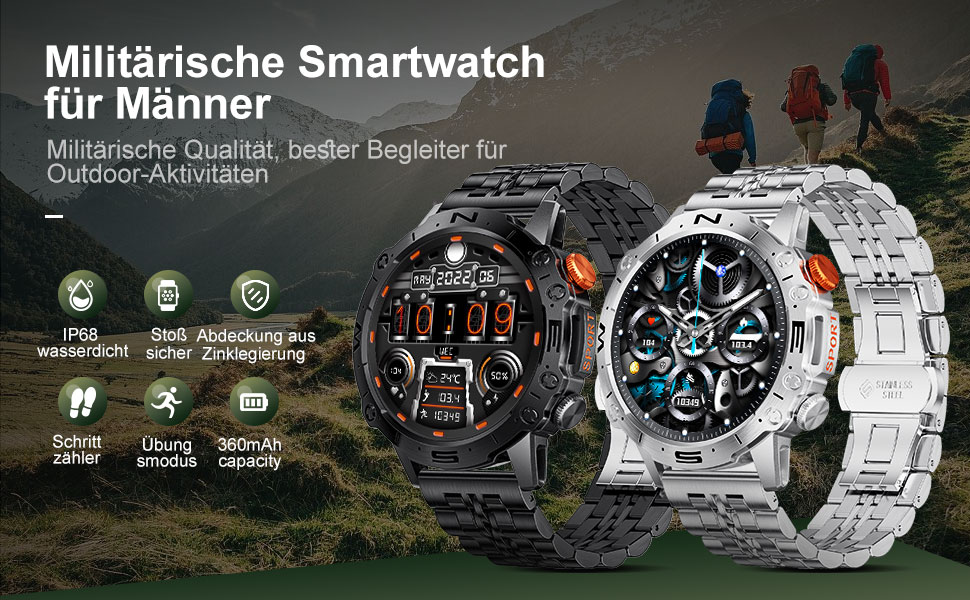
This manual provides detailed instructions for the setup, operation, and maintenance of your LIGE ST19-A Smartwatch. Designed for durability and functionality, this smartwatch features a 1.43-inch AMOLED touchscreen, Bluetooth calling, comprehensive health monitoring, and multiple sports modes. Please read this manual carefully to ensure proper use and to maximize your device's potential.
1. Sąranka
1.1 Išmaniojo laikrodžio įkrovimas
Before first use, fully charge your LIGE ST19-A Smartwatch. Use the provided magnetic charging cable.
- Connect the magnetic end of the charging cable to the charging contacts on the back of the smartwatch.
- Prijunkite laido USB galą prie standartinio USB maitinimo adapterio (rekomenduojama 5 V / 1 A) arba kompiuterio USB prievado.
- The watch display will indicate charging status. A full charge typically takes 2-3 hours.
- Once fully charged, the watch offers approximately 3-7 days of working time and up to 30 days of standby time.
1.2 Programėlės diegimas ir įrenginių susiejimas
Norėdami atrakinti visas išmaniojo laikrodžio funkcijas, turite įdiegti specialią programėlę savo išmaniajame telefone ir susieti įrenginius.
- Įjungti Bluetooth: Išmaniajame telefone eikite į nustatymus ir įsitikinkite, kad įjungtas „Bluetooth“.
- Atsisiųskite programą: Scan the QR code provided in the watch's packaging or search for "FitCloudPro" in your smartphone's app store (Google Play Store for Android, Apple App Store for iOS). Alternatively, you can visit šią nuorodą for download options.
- Įdiegti ir atidaryti: Install the "FitCloudPro" app and open it.
- Pridėti įrenginį: In the app, navigate to the "Device" or "Add Device" section. The app will search for available devices. Select "ST19-A" from the list to initiate pairing.
- Patvirtinkite susiejimą: Follow the on-screen prompts on both your phone and smartwatch to confirm the pairing request.
- Įgalinti pranešimus: Grant the necessary permissions for the app to display notifications from your phone on the smartwatch.
- „Bluetooth“ skambučio funkcija: After successful connection, you can enable or disable the call function on the watch. If the connection is successful, you can add/answer calls and play music.

2. Naudojimo instrukcijos
2.1 Pagrindinė navigacija
- Jutiklinis ekranas: Braukite kairėn, dešinėn, aukštyn arba žemyn, kad naršytumėte meniu ir funkcijas. Palieskite, kad pasirinktumėte.
- Šoniniai mygtukai: The smartwatch features physical buttons for quick access to functions or to return to the home screen. Refer to the watch's interface for specific button assignments.
2.2 Bluetooth skambučiai
Once paired with your smartphone, you can make and receive calls directly from your smartwatch.
- Skambinimas: Access the dialer on your watch or select a contact from your synced phonebook.
- Skambučių priėmimas: When a call comes in, the watch will display the caller ID. You can answer or decline the call directly from your wrist.
- The watch includes a microphone and speaker for hands-free communication.

2.3 Išmanieji pranešimai
Receive instant notifications for incoming calls, text messages, and alerts from various social media applications directly on your wrist.
- Ensure notification permissions are granted in the "FitCloudPro" app for desired applications.
- Supported apps include Line, Messenger, Facebook, Twitter, Kakao Talk, Skype, and WhatsApp.

2.4 Sveikatos stebėjimas
The smartwatch provides 24-hour real-time monitoring of various health metrics.
- Širdies ritmo stebėjimas: Nuolat stebi jūsų širdies ritmą visą dieną.
- Kraujo spaudimo matavimas: Pateikia kraujospūdžio rodmenis.
- Kraujo deguonies (SpO2) stebėjimas: Matuoja jūsų kraujo prisotinimo deguonimi lygį.
- Miego stebėjimas: Analizuoja jūsų miego modelius, įskaitant gilų miegą, lengvą miegą ir pabudimo laiką.
- Pedometras: Counts your daily steps, distance, and estimated calorie burn.
- Kvėpavimo treniruotės: Vadovaujami kvėpavimo pratimai, padedantys valdyti stresą.
Note: Health data provided by this device is for reference only and should not be used for medical diagnosis or treatment. Consult a medical professional for health concerns.

2.5 sporto režimų
The smartwatch supports over 100 sports modes to track your workout data accurately.
- Select your desired sport mode from the watch's menu to begin tracking.
- The watch records data such as duration, distance, calories burned, and heart rate during your activity.
- Examples of supported activities include walking, running, cycling, swimming, and various gym exercises.

2.6 Papildomos funkcijos
- Orų ekranas: Get real-time weather updates directly on your watch face.
- Muzikos valdymas: Control music playback on your smartphone (play, pause, skip tracks) from your wrist.
- Visada rodomas (AOD): The 1.43-inch AMOLED screen supports an Always On Display feature, providing continuous time visibility.
- AI balso asistentas: Interact with your smartwatch using voice commands for various tasks.


3. Priežiūra
- Valymas: Reguliariai valykite laikrodžio ekraną ir dirželį minkštu, sausu skudurėliu. Jei reikia, naudokite šiek tiek drėgnąamp šluoste ir kruopščiai nusausinkite. Venkite stiprių cheminių medžiagų ar abrazyvinių medžiagų.
- Atsparumas vandeniui: The LIGE ST19-A Smartwatch is IP68 rated, meaning it is resistant to dust and can withstand immersion in water up to 1.5 meters for 30 minutes. It is suitable for daily use, hand washing, and rain exposure. However, it is not recommended for hot showers, saunas, or diving, as steam and hot water can compromise the seals.
- Akumuliatoriaus priežiūra: Norėdami pailginti baterijos veikimo laiką, venkite dažnai visiškai iškrauti laikrodį. Įkraukite jį, kai baterijos įkrovos lygis žemas. Kai nenaudojate laikrodžio ilgesnį laiką, laikykite jį vėsioje, sausoje vietoje.
- Venkite ekstremalių temperatūrų: Do not expose the watch to extreme hot or cold temperatures, as this can damage the battery and internal components.
4. Problemų sprendimas
| Problema | Galimas sprendimas |
|---|---|
| Laikrodis neįsijungia | Įsitikinkite, kad laikrodis yra visiškai įkrautas. Prijunkite jį prie įkroviklio bent 30 minučių. |
| Nepavyksta susieti su išmaniuoju telefonu |
|
| Jokių pranešimų negauta |
|
| Netikslūs sveikatos duomenys |
|
| Trumpas baterijos veikimo laikas |
|
5. Specifikacijos
| Funkcija | Detalė |
|---|---|
| Modelio pavadinimas | ST19-A |
| Prekės ženklas | LIGE |
| Ekrano dydis | 1.43 colių |
| Ekrano tipas | AMOLED jutiklinis ekranas |
| Ryšio technologija | Bluetooth |
| Baterijos talpa | 360 mAh (ličio jonų) |
| Įprastas naudojimo laikas | 3-7 dienas |
| Budėjimo laikas | Maždaug 30 dienų |
| Atsparumas vandeniui | IP68 (Dustproof, Water resistant up to 1.5m for 30 min) |
| Ypatingos savybės | Voice Call, Music Player, Heart Rate Monitor, Activity Tracker, Blood Pressure Monitor, Blood Oxygen Monitor, Sleep Monitor, GPS (integrated) |
| Suderinamumas | Android, iOS |
| Svoris | 290 g |
6. Garantija ir palaikymas
LIGE prioritizes customer satisfaction. Your LIGE ST19-A Smartwatch comes with the following support:
- 30 dienų grąžinimas: If any issues arise during use, you are eligible for a refund within 30 days of purchase.
- 2-Year Repair Service: A 2-year repair service is provided after the sale for manufacturing defects.
- For any problems or inquiries, please contact LIGE customer support. Your satisfaction is important to us.


