1. Įvadas
This manual provides detailed instructions for the setup, operation, and maintenance of your Victrola Montauk Vinyl Record Player, Model VM-135-FNT. This belt-driven turntable system offers three playback speeds, integrated Bluetooth connectivity, and includes matching stereo speakers for a complete audio experience. Please read this manual thoroughly before use to ensure proper functionality and longevity of your product.

Figure 1: Victrola Montauk Vinyl Record Player with included stereo speakers.
2. Kas yra dėžutėje
- Victrola Montauk Turntable Unit
- Stereo Bluetooth Speakers (2 units)
- Nuimamas dulkių dangtelis
- Maitinimo adapteris
- RCA Output Cable
- 3.5 mm Aux-in kabelis
- Instrukcijų vadovas

Figure 2: All components included in the Victrola Montauk package.
3. Sąrankos instrukcijos
- Išpakuokite komponentus: Atsargiai išimkite visus daiktus iš pakuotės. Įsitikinkite, kad yra visi išvardyti komponentai.
- Place Turntable and Speakers: Position the turntable on a stable, level surface. Place the stereo speakers on either side of the turntable, ensuring they are within reach of the speaker cables.
- Install Drive Belt and Platter: Gently place the sub-platter onto the spindle. Carefully loop the drive belt around the motor pulley and the sub-platter. Then, place the main platter on top of the sub-platter.
- Balance Tone Arm: Install the counterweight onto the rear of the tone arm. Adjust the counterweight by rotating it until the tone arm is balanced and floats horizontally. Refer to the detailed instructions in the included manual for precise balancing.
- Install Dust Cover: Attach the removable dust cover to the hinges at the back of the turntable unit.
- Prijunkite garsiakalbius: Connect the included speaker cables from the turntable's speaker outputs to the input terminals on the back of each stereo speaker. Ensure correct polarity (red to red, black to black).
- Prijunkite maitinimą: Plug the power adapter into the DC IN port on the back of the turntable, then plug the adapter into a wall outlet.
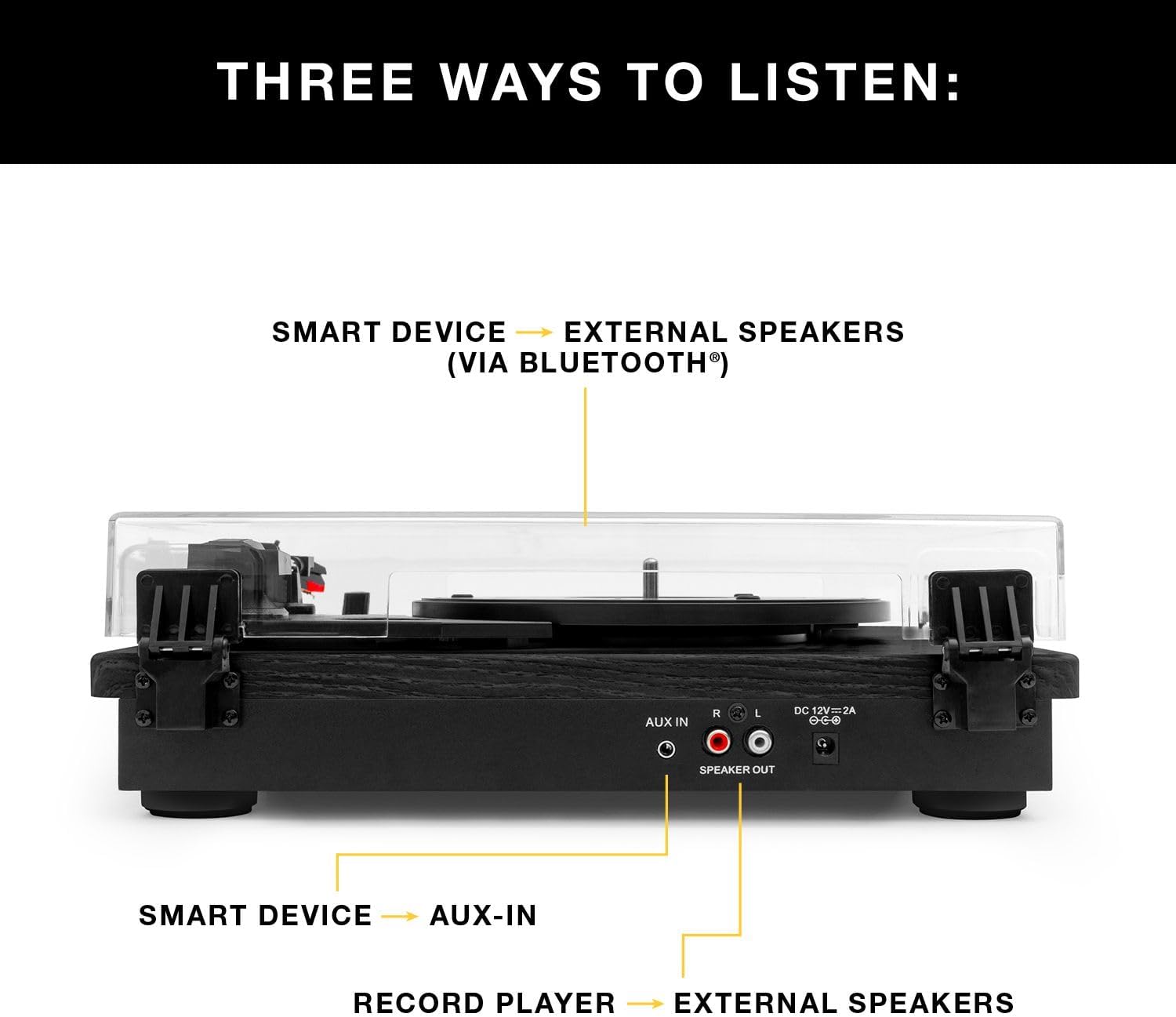
3 pav.: galinis view of the turntable showing audio output and power connections.
4. Naudojimo instrukcijos
4.1 Vinilinių plokštelių grojimas
- Maitinimas: Įjunkite patefoną naudodami maitinimo jungiklį.
- Pasirinkite greitį: Choose the appropriate speed (33 1/3, 45, or 78 RPM) for your record using the speed selector switch.
- Vietos įrašas: Atsargiai padėkite vinilo plokštelę ant plokštelės.
- Tono svirties padėtis: Release the tone arm lock. Gently lift the tone arm using the cueing lever and position the stylus over the desired track on the record.
- Apatinis tono svirties mechanizmas: Slowly lower the cueing lever to gently place the stylus onto the record. Playback will begin automatically.
- Reguliuoti garsumą: Use the volume knob on the turntable to adjust the sound level.
- Baigti atkūrimą: At the end of the record, the tone arm will automatically return to its rest position (if auto-stop is enabled). Alternatively, manually lift the tone arm using the cueing lever and return it to its rest.

Figure 4: Detail of the stylus and record during playback.
4.2 „Bluetooth“ atkūrimas
- Suaktyvinkite „Bluetooth“: Switch the turntable to Bluetooth mode. The Bluetooth indicator will flash, indicating it's ready for pairing.
- Suporuoti įrenginį: On your smart device (phone, tablet, etc.), enable Bluetooth and select
Susiję dokumentai - VM-135-FNT

„Victrola Montauk VM-135“ patefonas: naudojimo instrukcija ir naudojimo instrukcija
Išsamus „Victrola Montauk VM-135“ patefono nustatymo, naudojimo ir priežiūros vadovas. Sužinokite apie „Bluetooth“ ryšį, adatų keitimą, saugą ir garantiją.
„Victrola VM-135 Montauk“ patefonų sistema: naudojimo instrukcija
Šioje naudojimo instrukcijoje pateikiama išsami informacija apie „Victrola VM-135 Montauk“ patefonų sistemą, įskaitant saugos reikalavimus, sąranką, plokštelių naudojimą, „Bluetooth“ ir „Aux-in“, specifikacijas, patefono išdėstymą, adatų keitimą ir garantiją.
„Victrola V50-200“ 50-ųjų retro „Bluetooth“ patefonų grotuvas ir multimedijos centras. Naudotojo vadovas.
Išsamus „Victrola V50-200 50s“ retro „Bluetooth“ patefono ir multimedijos centro naudotojo vadovas. Sužinokite apie jo 3 greičių patefoną, CD grotuvą, AM/FM radiją, „Bluetooth“ transliaciją ir vinilo įrašymo į MP3 funkcijas, taip pat sąrankos ir saugos instrukcijas.
„Victrola VM-137 Kingfield“ patefonas su „Bluetooth“ garsiakalbiais – naudotojo vadovas
Išsamus „Victrola VM-137 Kingfield“ patefono naudotojo vadovas, kuriame išsamiai aprašomas nustatymas, naudojimas, adatų keitimas, „Bluetooth“ ir AUX įvesties ryšys, specifikacijos, saugos instrukcijos ir informacija apie garantiją.
„Victrola Avery“ 3 viename patefonas (VTA-320B) Naudotojo vadovas
„Victrola Avery 3-in-1“ patefono (VTA-320B modelis) naudotojo vadovas, kuriame išsamiai aprašomas universalaus garso atkūrimo nustatymas, naudojimas, priežiūra, trikčių šalinimas, specifikacijos ir informacija apie garantiją.
„Victrola VPT-800“ automatinio patefono naudojimo instrukcija
Šiame vadove pateikiamos išsamios instrukcijos, kaip nustatyti, naudoti ir prižiūrėti „Victrola VPT-800“ automatinį patefoną. Sužinokite apie išpakavimą, plokštelės montavimą, garsiakalbių prijungimą per „Bluetooth“ arba RCA, plokštelių grojimą, adatos keitimą, dažniausiai pasitaikančių problemų šalinimą ir gaminio specifikacijas.