Įvadas
This manual provides detailed instructions for the installation, operation, and maintenance of your Go Tech CMMK-01 Wireless Keyboard and Mouse Kit. Please read this manual carefully before using the product to ensure correct usage and prolong the lifespan of your device.
The Go Tech CMMK-01 Wireless Keyboard and Mouse Kit offers practicality and comfort, eliminating the need for wires on your desktop. Featuring high-performance wireless frequency, it operates at a maximum wireless distance of approximately 10 meters.
Pakuotės turinys
- 1x Go Tech CMMK-01 Wireless Keyboard
- 1x Go Tech CMMK-01 Wireless Mouse
- 1x Wireless USB Receiver (usually located inside the mouse or in the battery compartment)
- 1x Naudotojo vadovas (šis dokumentas)
Pradinė sąranka
1. Akumuliatoriaus įdėjimas
The keyboard and mouse are powered by batteries (not included). Check the battery compartments for correct polarity.
- Klaviatūra: Open the battery compartment on the underside of the keyboard and insert the batteries as indicated.
- Pelė: Open the battery compartment on the underside of the mouse and insert the batteries as indicated. The wireless USB receiver may be stored in this compartment.
2. USB imtuvo prijungimas
The kit uses a single USB receiver to connect both the keyboard and mouse to your computer.
- Locate the wireless USB receiver. It is usually stored in the mouse's battery compartment.
- Connect the USB receiver to an available USB port on your compatible computer, laptop, or tablet.
- The operating system should automatically recognize and install the drivers. Please wait a few seconds.
- Turn on the keyboard and mouse (if there is an on/off switch).
Your keyboard and mouse should now be ready for use. If they do not work immediately, try moving the mouse and pressing some keys to activate them.

1 paveikslas: Baigėsiview of the Go Tech CMMK-01 Wireless Keyboard and Mouse Kit, showing the ABNT2 keyboard and ergonomic mouse.
Operacija
Klaviatūra
The Go Tech CMMK-01 keyboard features 107 keys with an ABNT2 standard layout, ideal for the Brazilian Portuguese language. It offers a comfortable and efficient typing experience.
- ABNT2 Layout: Includes the "Ç" key and other characteristics of the Brazilian layout.
- Funkciniai klavišai (F1–F12): May have multimedia or shortcut functions when combined with the Fn key (if applicable, check the keyboard for icons).
- LED indikatoriai: Typically for Num Lock, Caps Lock, and Scroll Lock.
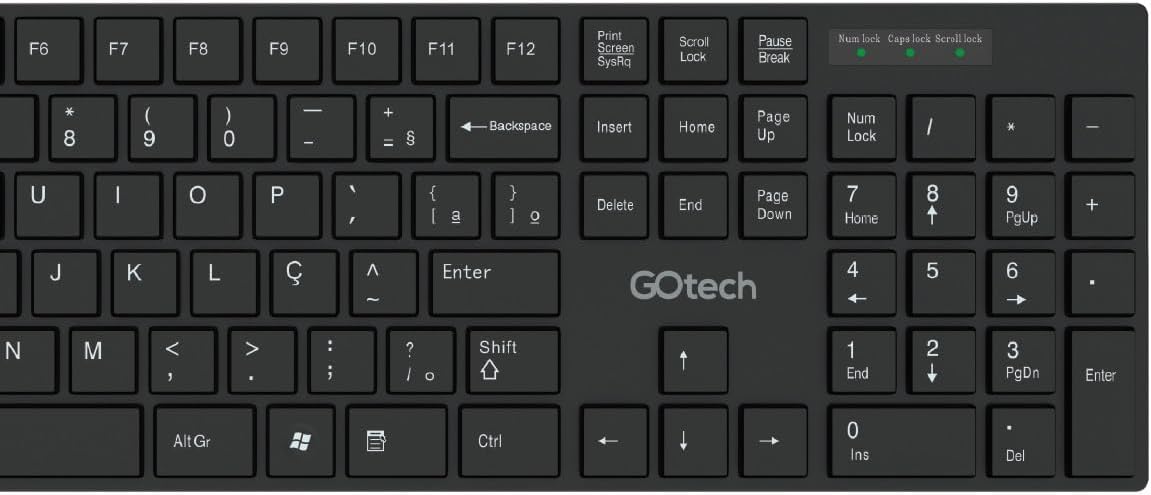
2 paveikslas: Detail of the Go Tech CMMK-01 keyboard, highlighting the ABNT2 layout and function keys.
Pelė
The Go Tech CMMK-01 wireless mouse features an ergonomic design with 3 buttons and a scroll wheel, providing precise and comfortable navigation. Its estimated lifespan is approximately 3 million clicks.
- Mygtukai: Left button, right button, and scroll wheel which can also function as a third button.
- Optinis jutiklis: Tiksliam sekimui ant įvairių paviršių.
- Energijos taupymo rėžimas: The mouse may enter sleep mode after a period of inactivity to save battery. Move it or click to reactivate.

3 paveikslas: Į viršų view of the Go Tech CMMK-01 wireless mouse, showing the buttons and scroll wheel.
belaidis diapazonas
The kit operates with a maximum wireless distance of approximately 10 meters. Performance may vary depending on the environment and the presence of interference.
Priežiūra
Valymas
- Turn off the keyboard and mouse before cleaning.
- Lengvai naudokite minkštą skudurėlį dampened with water or a mild electronics cleaner.
- Venkite naudoti stiprių cheminių medžiagų ar abrazyvinių valiklių.
- For the keyboard, use compressed air to remove dust and debris between the keys.
Baterijos keitimas
When the performance of the keyboard or mouse begins to decline, or if they stop responding, the batteries likely need to be replaced. Follow the battery installation instructions in the "Initial Setup" section. Dispose of used batteries responsibly.
Trikčių šalinimas
| Problema | Sprendimas |
|---|---|
| Klaviatūra / pelė nereaguoja |
|
| Lag or connection interruptions |
|
| Mouse not tracking correctly |
|
Techninės specifikacijos
| Funkcija | Detalė |
|---|---|
| Prekės ženklas | GOTECH |
| Modelis | CMMK-01 |
| Spalva | Juoda |
| Ryšio technologija | Bevielis |
| belaidis diapazonas | Maždaug 10 metrai |
| Maitinimo šaltinis | Battery-powered (3V for keyboard, 3V for mouse) |
| Vienetų skaičius | 2 (Keyboard and Mouse) |
| Keyboard - Number of Keys | 107 Raktai |
| Keyboard - Layout Standard | ABNT2 |
| Keyboard - Dimensions (Width x Height x Depth) | 380 mm x 115 mm x 10 mm |
| Mouse - Buttons | 3 + Scroll |
| Mouse - Lifespan | Approx. 3 Million clicks |
| Mouse - Dimensions (Height x Width x Depth) | 110 mm x 55 mm x 18 mm |
| Suderinami įrenginiai | Personal Computer, Laptop, Tablet |
Garantijos ir palaikymo informacija
Currently, no specific detailed warranty or support information is provided with this product. For warranty or technical support inquiries, please contact your reseller or visit the official GOTECH webnaujausios informacijos svetainė.
Išsaugokite pirkimo įrodymą, jei prireiktų pateikti pretenziją dėl garantijos.


