1. Įvadas
This manual provides essential information for setting up, operating, and maintaining your HUAWEI Watch FIT Special Edition. Please read this manual thoroughly to ensure proper use and to maximize the device's features. Keep this manual for future reference.
2. Kas yra dėžutėje
- HUAWEI Watch FIT Special Edition (with strap)
- Įkrovimo lopšys
- Įkrovimo kabelis
- Greitos pradžios vadovas
- Saugos informacija
3. Pradinė sąranka
3.1 Įrenginio įkrovimas
Before first use, fully charge your HUAWEI Watch FIT Special Edition. Connect the charging cradle to a power adapter using the provided charging cable, then place the watch onto the cradle, ensuring the charging contacts align. The watch screen will indicate charging status.

Vaizdas: priekis view of the HUAWEI Watch FIT Special Edition, showing the display and strap. This image represents the device during initial setup or general use.
3.2 „HUAWEI Health“ programėlės atsisiuntimas ir diegimas
The HUAWEI Health app is required to manage your watch and access all its features. Scan the QR code provided in the Quick Start Guide or search for "HUAWEI Health" in your smartphone's app store (compatible with Android and iOS). Download and install the application.
3.3 Susiejimas su išmaniuoju telefonu
Open the HUAWEI Health app on your smartphone. Navigate to 'Devices' > 'Add' > 'Smartwatch' and select your HUAWEI Watch FIT Special Edition from the list of available devices. Follow the on-screen instructions to complete the pairing process.

Image: Visual guide for setting up the HUAWEI Health App, showing steps for downloading, pairing, and updating the device.
3.4 Programinės aparatinės įrangos atnaujinimas
After pairing, it is recommended to check for and install any available firmware updates. In the HUAWEI Health app, go to 'Personal' > 'Check for updates'. This ensures your watch has the latest features and performance improvements.
4. Naudojimo instrukcijos
4.1 Pagrindinė navigacija
- Jutiklinis ekranas: Braukite aukštyn, žemyn, kairėn arba dešinėn, kad naršytumėte meniu ir pranešimus. Palieskite, kad pasirinktumėte elementus.
- Šoninis mygtukas: Press to wake the screen, return to the home screen, or open the app list. Press and hold to power on/off or restart the device.
4.2 Laikrodžio ciferblatų keitimas
You can customize your watch face directly on the device or through the HUAWEI Health app. On the watch, press and hold the current watch face, then swipe left or right to browse available options. Tap to select a new watch face.

Image: A HUAWEI Watch FIT Special Edition on a wrist, showcasing a unique watch face design.
5. Sveikatos stebėjimo funkcijos
The HUAWEI Watch FIT Special Edition offers comprehensive health tracking capabilities:
- Širdies ritmo stebėjimas: Utilizes HUAWEI TruSeen™ 5.0 technology for continuous and accurate heart rate tracking.
- SpO2 stebėjimas: Matuoja kraujo prisotinimo deguonimi lygį.
- Miego stebėjimas: HUAWEI TruSleep™ provides detailed analysis of sleep stagir kokybė.
- Streso stebėjimas: Tracks stress levels and offers breathing exercises to help manage stress.
- Veiklos stebėjimas: Records steps, distance, calories burned, and supports multiple sports modes.

Image: The watch display showing various personal health metrics, including SpO2, heart rate, and stress levels.
6. GPS funkcionalumas
The integrated GPS allows for precise tracking of your outdoor activities, such as running or cycling, without needing to carry your smartphone. The watch records your route, speed, and distance, which can be viewed in detail on the HUAWEI Health app.
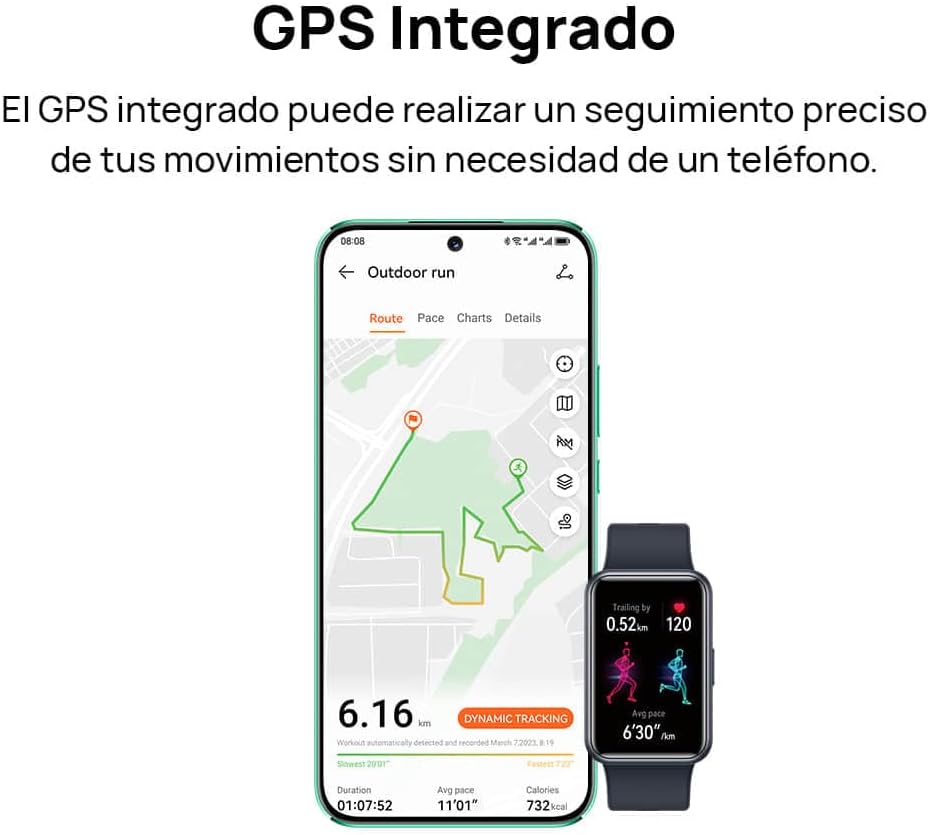
Image: A smartphone screen displaying a tracked outdoor run route, alongside the HUAWEI Watch FIT Special Edition showing activity data.
7. Pranešimai ir ryšys
Stay connected with your HUAWEI Watch FIT Special Edition. It supports incoming call notifications and quick message replies directly from your wrist. The watch connects to your smartphone via Bluetooth and is compatible with both Android and iOS devices.

Image: Two HUAWEI Watch FIT Special Edition devices showing an incoming call notification and a quick message reply interface.

Image: A smartphone displaying the HUAWEI Health app interface, illustrating the watch's compatibility with both Android and iOS operating systems.
8. Baterijos veikimo laikas ir įkrovimas
The HUAWEI Watch FIT Special Edition is designed for extended battery life. Actual battery performance may vary based on usage patterns and settings. To charge, use the provided charging cradle and cable. Ensure the watch is placed correctly on the cradle for optimal charging.
9. Priežiūra
9.1 Laikrodžio valymas
Reguliariai valykite laikrodį ir dirželį, kad išvengtumėte odos sudirginimo ir išlaikytumėte jo veikimą. Naudokite minkštą, sausą šluostę.amp šluoste nuvalykite laikrodžio korpusą ir dirželį. Venkite naudoti stiprias chemines medžiagas ar abrazyvines medžiagas. Prieš kraunant įsitikinkite, kad įkrovimo kontaktai yra švarūs ir sausi.
9.2 Atsparumas vandeniui
The HUAWEI Watch FIT Special Edition has a water resistance rating. Refer to the product specifications for details on its water resistance capabilities. Avoid using the watch in hot water, saunas, or steam rooms, as this may compromise its water resistance.

Image: The back of the HUAWEI Watch FIT Special Edition, showing the optical heart rate sensors and regulatory markings.
10. Problemų sprendimas
If you encounter issues with your HUAWEI Watch FIT Special Edition, try the following steps:
- Laikrodis neįsijungia: Įsitikinkite, kad laikrodis yra visiškai įkrautas. Prijunkite jį prie įkroviklio bent 10 minučių.
- Nepavyksta susieti su telefonu: Ensure Bluetooth is enabled on your phone and the watch. Restart both devices and try pairing again. Check if the HUAWEI Health app is updated to the latest version.
- Netikslūs sveikatos duomenys: Įsitikinkite, kad laikrodis tvirtai uždėtas ant riešo – ne per stipriai ar per laisvai. Nuvalykite jutiklius laikrodžio gale.
- Pranešimai negauti: Check notification settings in the HUAWEI Health app and your phone's system settings to ensure permissions are granted.
- Ekranas nereaguoja: Restart the watch by pressing and holding the side button until the restart option appears, then confirm. If unresponsive, force restart by holding the button for a longer duration (e.g., 10-15 seconds).
11. Specifikacijos
| Funkcija | Specifikacija |
|---|---|
| Prekės ženklas | HUAWEI |
| Modelio numeris | 55020BEE-ES |
| Operacinė sistema | HUAWEI LiteOS |
| Ekrano dydis | 1.64 colių |
| Ryšys | Bluetooth |
| Ypatingos savybės | Professional health management, multiple sports modes |
| Suderinami įrenginiai | Smartphone (Android and iOS) |
| Baterijos sudėtis | Ličio jonų |
| Įkraunama baterija | Taip |
| GPS | Integruotas GPS |
| Forma | Stačiakampis |
| Atminties talpa | 4 GB |
| Baterijos talpa | 900 milijonųampvalandos (mAh) |
12. Garantija ir palaikymas
Informacijos apie garantiją ieškokite prie gaminio pridėtoje garantijos kortelėje arba apsilankykite oficialioje HUAWEI svetainėje. website. For technical support, troubleshooting assistance, or service inquiries, please contact HUAWEI customer support through their official channels.


