Įvadas
This manual provides detailed instructions for the setup, operation, and maintenance of your PDP Afterglow Wave Wireless Headset. Designed for an immersive audio experience, this headset is compatible with Xbox Series X|S, Windows 10/11 PC, PlayStation PS5/PS4, and various Bluetooth-enabled devices.

Image: The PDP Afterglow Wave Wireless Headset, showcasing its black design and customizable RGB lighting on the earcups.
Produkto savybės
- Pritaikomas RGB apšvietimas: Personalize your headset with millions of color combinations and lighting effects via the free PDP Control Hub app.
- Patogus dizainas: Features soft, memory foam ear cushions and swivel earcups for extended gaming sessions and comfortable storage.
- Įtraukiantis garsas: Equipped with 50mm drivers for clear highs and deep lows.
- Patogus valdymas: On-ear volume controls and a game/chat balance dial for quick audio adjustments.
- Triukšmą slopinantis mikrofonas: Provides clear communication, with a flip-to-mute function for privacy.
- Universalus ryšys: Connects wirelessly via a low-latency USB dongle to consoles or via Bluetooth to mobile devices.
- Platus suderinamumas: Officially licensed for Xbox, and compatible with Windows 10/11 PC, PlayStation consoles (PS5/PS4), and most Bluetooth devices.
- Ilgas baterijos veikimo laikas: Iki 16 valandų grojimo vienu įkrovimu.
Sąrankos instrukcijos
1. Ausinių įkrovimas
Before initial use, fully charge the headset. Connect the included USB charging cable to the headset's charging port and to a powered USB port (e.g., console, PC, USB wall adapter). The headset's RGB lights will pulse during charging and should turn solid when fully charged. A full charge typically takes approximately 8 hours and provides up to 16 hours of battery life.
Image: The headset highlighting its 16-hour battery life for extended gaming sessions.
2. Connecting to Xbox/PC (Wireless Dongle)
- Insert the USB wireless dongle into an available USB port on your Xbox console or PC.
- Power on the headset by pressing and holding the Power button until the lights illuminate.
- The headset and dongle should automatically pair. A solid light on the dongle and headset indicates a successful connection.
- Adjust volume using the on-ear controls.
Image: The headset emphasizing its cross-compatibility with various gaming platforms and Bluetooth devices.
3. Connecting via Bluetooth (Mobile Devices, PS5/PS4)
- Įsitikinkite, kad laisvų rankų įranga išjungta.
- Press and hold the Bluetooth button on the headset until the indicator light begins to flash, indicating pairing mode.
- On your device (e.g., smartphone, tablet, PlayStation console), navigate to Bluetooth settings and select "Afterglow Wave" from the list of available devices.
- Once connected, the headset's Bluetooth indicator light will become solid.
Naudojimo instrukcijos
Ausinių valdikliai
- Maitinimo mygtukas: Paspauskite ir palaikykite, kad įjungtumėte / išjungtumėte. Trumpai paspauskite, kad patikrintumėte akumuliatoriaus būseną.
- Garsumo rinkimas: Rotate to adjust the overall audio volume.
- Game/Chat Balance Dial: Adjusts the balance between game audio and chat audio.
- Režimo mygtukas: Cycles through different RGB lighting effects. Press and hold to turn RGB lights on/off.
- Mikrofonas: Flip the microphone boom up to mute. Flip down to unmute.
Image: Close-up of the headset's noise-canceling microphone, illustrating the flip-to-mute feature.
PDP Control Hub App
Download the free PDP Control Hub app from the Microsoft Store (for Xbox/PC) or your device's app store (for mobile) to customize your headset:
- Modify RGB lighting zones and effects.
- Adjust audio settings and equalizer presets.
- Update headset firmware.
Image: Diagram showing the customizable RGB lighting zones on the headset, managed via the PDP Control Hub app.
Priežiūra
- Valymas: Use a soft, dry cloth to clean the headset. Avoid abrasive cleaners or solvents.
- Saugykla: Store the headset in a cool, dry place away from direct sunlight and extreme temperatures. The swivel earcups allow for a flat storage position.
- Akumuliatoriaus priežiūra: To prolong battery life, avoid fully discharging the headset frequently. Charge regularly, even if not in use for extended periods.
- Atsparumas vandeniui: Šios ausinės nėra atsparios vandeniui. Venkite sąlyčio su skysčiais.
Trikčių šalinimas
| problema | Galimas sprendimas |
|---|---|
| No audio or low volume |
|
| Mikrofonas neveikia |
|
| Headset disconnects randomly or poor signal |
|
| RGB lemputės neveikia |
|
Specifikacijos
| Funkcija | Detalė |
|---|---|
| Modelio pavadinimas | „Afterglow Wave“ belaidės ausinės |
| Modelio numeris | 049-032-BK |
| Ryšys | Wireless (USB Dongle), Bluetooth |
| Bluetooth versija | 4.0 |
| Bluetooth diapazonas | 20 pėdų |
| Garso tvarkyklės dydis | 50 mm dinaminės tvarkyklės |
| Varža | 32 omai |
| Baterijos veikimo laikas | Iki 16 valandų |
| Įkrovimo laikas | Maždaug 8 valandos |
| Mikrofonas | Noise-Canceling, Flip-to-Mute |
| Valdikliai | On-ear Volume, Game/Chat Balance, Mode Button (RGB) |
| Suderinamumas | Xbox Series X|S, Windows 10/11 PC, PlayStation PS5/PS4, Bluetooth devices |
| Svoris | 1.19 svaro (apie 0.54 kg) |
| Medžiaga | Polikarbonatas (PC) |
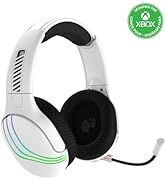
Image: The headset highlighting its 50mm drivers for immersive audio quality.
Informacija apie garantiją
PDP products are covered by a manufacturer's warranty. For specific details regarding your PDP Afterglow Wave Wireless Headset warranty period and terms, please refer to the official PDP websvetainėje arba susisiekite su jų klientų aptarnavimo tarnyba. Išsaugokite pirkimo įrodymą garantiniams reikalavimams.
Palaikymas
For further assistance, technical support, or to download the PDP Control Hub app, please visit the official PDP websvetainė:
You can also find FAQs and additional resources on their support pages.


