1. Baigėsiview
The Rokid Max AR Glasses offer a cinema-grade entertainment experience, whether you are at home, traveling, or anywhere you desire. These glasses are designed for comfort and versatility, allowing you to enjoy a large virtual display for various activities.
Key features include a 215-inch FHD 1080P OLED display with a 50° field of view, a 120Hz refresh rate, and 600 Nits perceived brightness, ensuring vibrant visuals for videos and games. They provide professional-grade acoustics for an immersive listening experience. The design prioritizes comfort with adjustable nose pads and an ultra-lightweight build of only 75g, featuring a carefully calibrated front-to-back balance.

Rokid Max AR Glasses in use, displaying a large virtual screen.
2. Kas įskaičiuota
Your Rokid Max AR Glasses package includes the following items:
- Rokid Max AR Glasses
- Dėklas nešiojimui
- USB-C į USB-C laidas
- Multiple sizes of Nose Pads
- Mikropluošto valymo šluostė
- User Manuals (for glasses and optional Station 2 controller)
- Vinyl Stickers
For a visual guide to the unboxing process and included accessories, please refer to the video below:
Vaizdo įrašas: išpakavimas ir viskasview of Rokid Max AR Glasses and accessories.
3. Sąranka
To begin using your Rokid Max AR Glasses, connect them to a compatible device using the provided USB-C to USB-C cable. The curved end of the cable connects to the temple of the glasses, and the other end connects to your device (e.g., mobile phone, laptop, gaming system).
If your device does not have a USB-C connector that supports video output, a compatible video hub (sold separately by Rokid) may be required. For optimal functionality with the optional Rokid Station 2 controller, ensure you download the mobile app and register your device.
Video: Connecting and setting up Legion Glasses Gen 2, similar process for Rokid Max.
4. Operating the Glasses
The Rokid Max AR Glasses are designed for intuitive operation. The frames feature built-in speakers and touch controls for easy interaction. Sensors detect when the glasses are worn or removed, automatically managing display activity.
On the right temple of the glasses, you'll find selection buttons (+/-) to adjust brightness or volume. A long press on the selection button can manually turn off the screen. The glasses also support a 120Hz refresh rate for smooth visuals, which can be adjusted in your connected device's display settings.

Rokid Max AR Glasses showcasing a smooth 120 Hz refresh rate.
For an enhanced viewing experience, magnetic light-blocking shields can be attached to the front of the glasses to increase immersion, especially during gaming.
Rokid Max AR Glasses offering a unified entertainment experience.
5. Koregavimai
The Rokid Max AR Glasses are designed for a personalized and comfortable fit:
- Nosies pagalvėlės: The width and height of the nose pads can be freely adjusted to fit the shape of your nose and head, ensuring the image is displayed completely in the center of your view. If the bottom of the image is blocked, increase the width between the nose pads to lower the glasses. If the top is blocked, decrease the width to raise them.
- Trumparegystės koregavimas: The glasses feature adjustment knobs that allow you to fine-tune each lens individually, providing sharp images and fonts. This is particularly useful for users with near-sightedness, with an adjustment range from 0.00D to -6.00D.

Rokid Max AR Glasses with myopia adjustment feature.
6. Suderinamumas
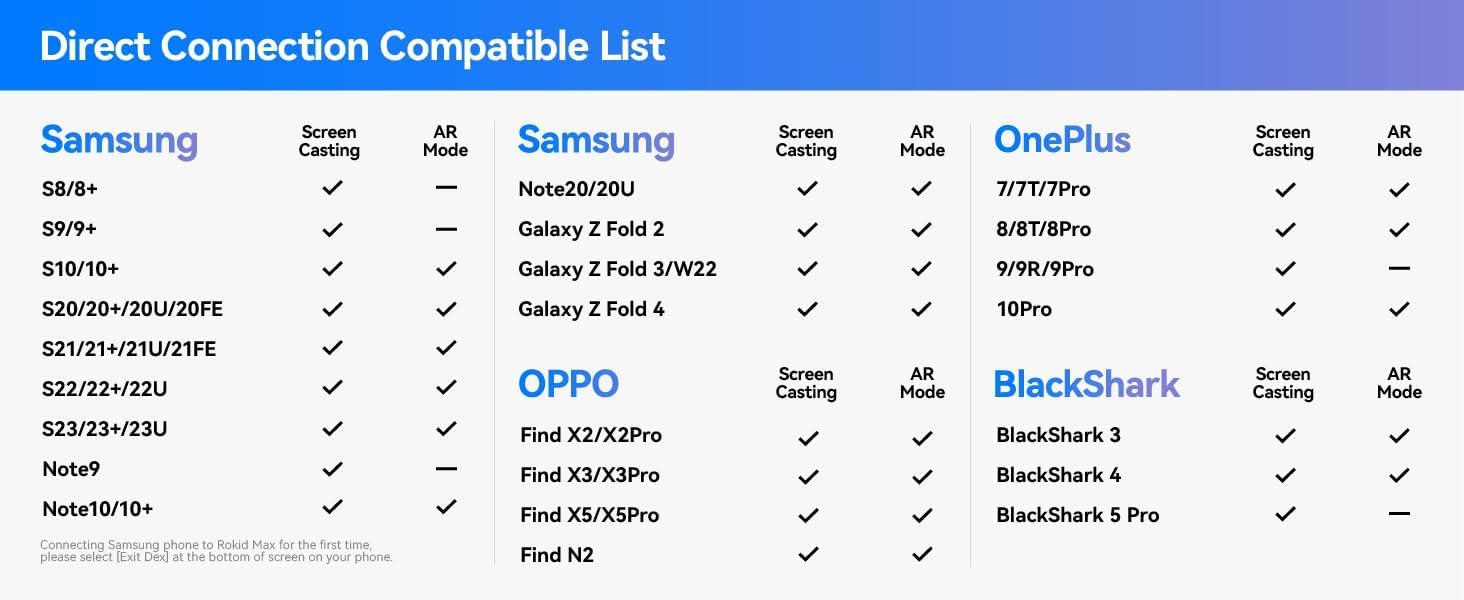
Rokid Max AR Glasses are compatible with a wide range of devices that support USB-C video output. For consoles like Switch, Steam Deck, PS, and Xbox, adaptors may be required for connection. Direct connection is supported for many mobile phones and laptops.
Refer to the compatibility lists below for directly supported devices:

Compatibility list for Samsung, OPPO, OnePlus, and BlackShark devices.
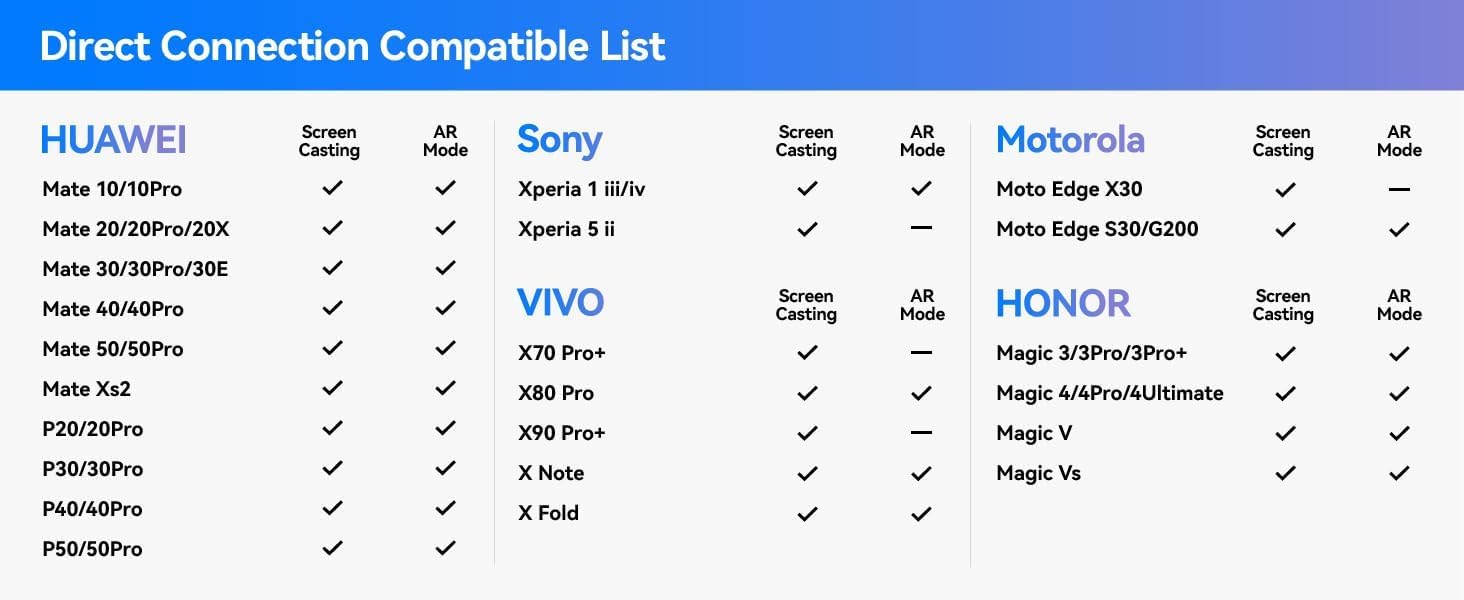
Compatibility list for HUAWEI, Sony, Motorola, and HONOR devices.
7. Specifikacijos
| Funkcija | Specifikacija |
|---|---|
| Modelio numeris | RA201 |
| Prekės ženklas | Rokidas |
| Ekrano tipas | FHD 1080P OLED |
| Laukas View (FoV) | 50° |
| Atnaujinimo dažnis | 120 Hz |
| Perceived Brightness | 600 nitų |
| Myopia Adjustment | 0.00D to -6.00D |
| Svoris | 75 g (2.65 uncijos) |
| Jungties tipas | C tipo USB |
| Suderinami įrenginiai | PlayStation, Switch, Steam Deck, Phones, Tablets, Laptops (via adaptors where needed) |
| Specifiniai naudojimo būdai | Gaming, Multimedia Consumption |
| Pakuotės matmenys | 8.19 x 4.25 x 4.09 colio |
| Pasiekiama pirmoji data | 1 m. rugpjūčio 2023 d |
8. Priežiūra
To ensure the longevity and optimal performance of your Rokid Max AR Glasses, follow these maintenance guidelines:
- Valymas: Use the provided microfiber cleaning cloth to gently wipe the lenses and frames. Avoid using abrasive materials or harsh chemicals that could scratch or damage the surfaces.
- Saugykla: When not in use, store the glasses in their hard-shell carrying case to protect them from dust, scratches, and accidental impacts.
- Tvarkymas: Handle the glasses with care. Avoid dropping them or subjecting them to excessive force.
- Temperatūra: Do not expose the glasses to extreme temperatures or direct sunlight for prolonged periods.
9. Problemų sprendimas
If you encounter any issues with your Rokid Max AR Glasses, consider the following troubleshooting steps:
- Fuzzy or Unclear Display: Ensure all protective films have been removed from the lenses (including inner and outer surfaces). Adjust the myopia dials on the top of the glasses to match your vision.
- Nėra ekrano: Verify that the USB-C cable is securely connected to both the glasses and the compatible device. Ensure your device supports video output via USB-C, or use a compatible video hub if necessary.
- Komforto problemos: Adjust the nose pads to find a comfortable fit that centers the display in your view.
- Garso problemos: Check the volume settings on the glasses using the +/- buttons and on your connected device.
For more detailed troubleshooting or technical assistance, please visit the manufacturer's website or use the help option within the mobile application.
10. Garantija ir palaikymas
The Rokid Max AR Glasses come with a 30-day return policy and a 1-year warranty from the manufacturer. For warranty claims, technical support, or additional information, please refer to the official Rokid websvetainėje arba susisiekite tiesiogiai su jų klientų aptarnavimo tarnyba.


