Įvadas
This manual provides detailed instructions for the WOLFANG GA300 Action Camera. It covers setup, operation, maintenance, and specifications to ensure optimal performance and user experience. The GA300 is designed to capture high-quality video and photos in various environments, including underwater, with advanced stabilization and versatile features.
Kas yra dėžutėje
The WOLFANG GA300 Action Camera package includes the following items:
- 1x WOLFANG GA300 Action Camera
- 1x nuotolinio valdymo pultas
- 2x 1350 mAh baterija
- 1x vandeniui atsparus korpusas
- 1x dviračių stovas
- 5x kalnas
- 2x 2-sided tape
- 2x Šalmo laikiklis
- 4x tvarsčiai
- 5x laikikliai
- 1x USB laidas
- 1x objektyvo audinys
- 1x Greitos nuorodos vadovas
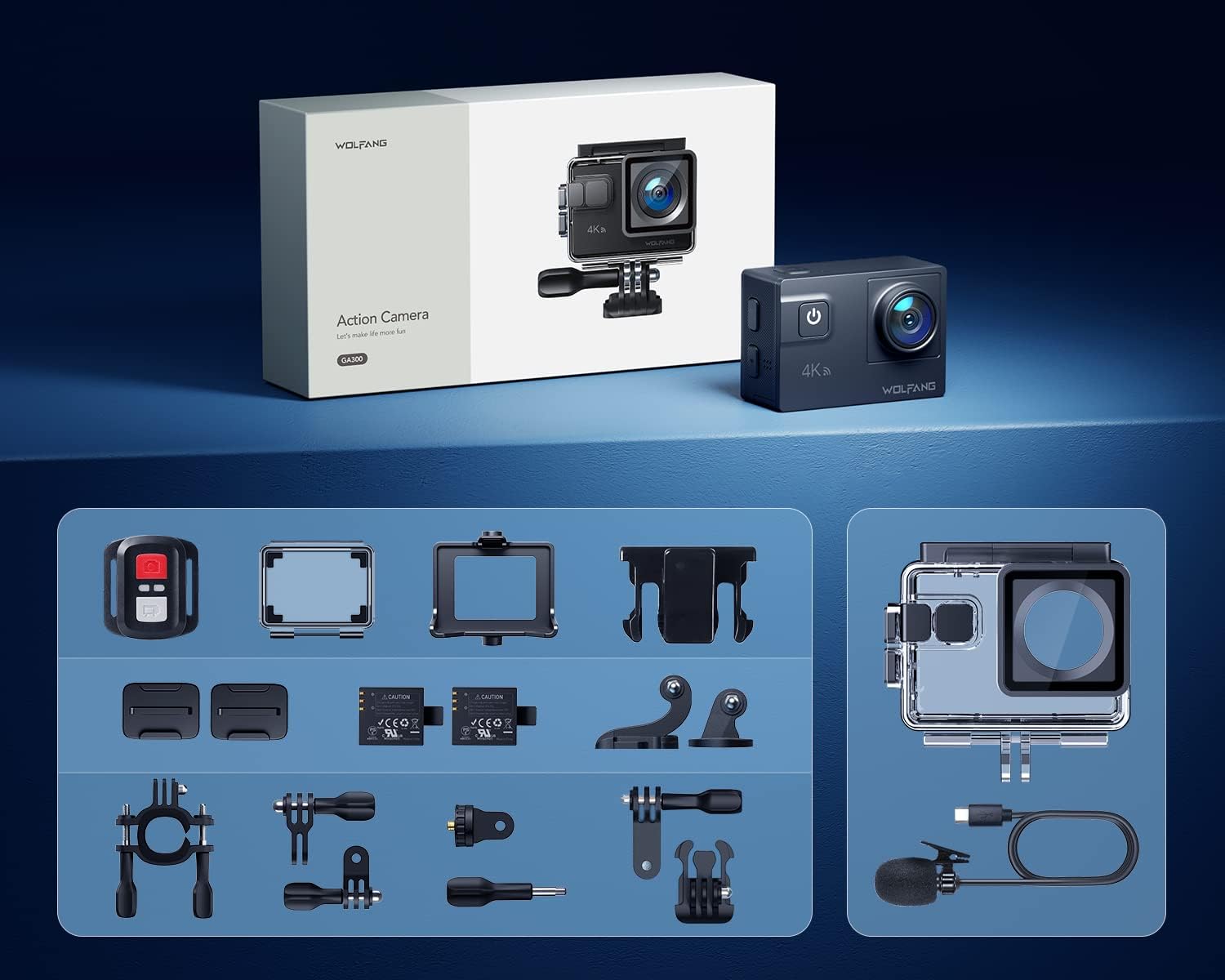
Image: All components included in the WOLFANG GA300 Action Camera kit, neatly laid out.
Produktas baigtasview
The WOLFANG GA300 Action Camera features a compact design with intuitive controls and multiple connectivity options.
Fotoaparato komponentai
- Priekinis ekranas: For live preview and status indicators.
- Rear Touchscreen (2-inch): Meniu naršymui, nustatymų reguliavimui ir atkūrimui.
- Maitinimo / režimo mygtukas: To power on/off and switch between modes.
- Užrakto / Gerai mygtukas: To start/stop recording or take photos.
- USB-C prievadas: Įkrovimui ir duomenų perdavimui.
- Mini HDMI prievadas: Vaizdo išvesčiai į išorinius ekranus.
- Mikrofono įvestis: For connecting the external microphone.
- „Micro SD“ kortelės lizdas: Supports up to 128GB cards (32GB included).
- Baterijų skyrius: Houses the removable 1350mAh battery.

Image: The WOLFANG GA300 camera, showcasing its compact size and key accessories.
Sąranka
1. Baterijos įdėjimas
Open the battery compartment cover located at the bottom of the camera. Insert a fully charged 1350mAh battery, ensuring the contacts align correctly. Close the cover securely.
2. „Micro SD“ kortelės įdėjimas
Locate the Micro SD card slot on the side of the camera. Insert a compatible Micro SD card (Class 10 or higher, up to 128GB) with the contacts facing the correct direction until it clicks into place.
3. Fotoaparato įkrovimas
Connect the camera to a USB power source using the provided USB-C cable. The charging indicator will illuminate. A full charge typically takes a few hours. Two batteries are included, each providing approximately 90 minutes of recording time.
4. Vandeniui atsparaus dėklo pritvirtinimas
For underwater use or protection against dust and impact, place the camera inside the waterproof case. Ensure the case is properly sealed before use. The case allows the camera to be waterproof up to 40 meters.

Image: The WOLFANG GA300 in its waterproof housing, demonstrating its 40M waterproof capability.
5. Laikiklių tvirtinimas
Utilize the various included mounts (bicycle stand, helmet mounts, general mounts) to secure your camera for different activities. Ensure all mounts are firmly attached to prevent accidental detachment.

Image: A person on a mountain bike with the camera mounted, illustrating helmet mount usage.
Fotoaparato valdymas
1. Maitinimo įjungimas/išjungimas
Paspauskite ir palaikykite maitinimo / režimo mygtuką, kad įjungtumėte arba išjungtumėte fotoaparatą.
2. Jutiklinio ekrano naudojimas
Navigate through menus and settings by swiping and tapping on the 2-inch rear touchscreen. The responsive touchscreen allows for easy operation.
3. Vaizdo įrašymas
Select video mode from the menu. Press the Shutter/OK button to start recording. Press again to stop. The camera supports 4K at 60FPS, 1080P at 120FPS, and 720P at 240FPS for various recording needs.
4. Nuotraukų fotografavimas
Switch to photo mode. Press the Shutter/OK button to take a 24MP photo.
5. Nuotolinio valdymo pulto naudojimas
The included remote control allows you to start/stop video recording and take photos from a distance of up to 10 meters.
6. „Wi-Fi“ ryšys ir programėlė
Enable Wi-Fi on the camera and connect it to your smartphone via the IBK Cam app. This allows for live preview, remote control, and easy transfer of media to your device.

Image: The camera's live view displayed on a smartphone, demonstrating Wi-Fi connectivity.
7. Specialiosios funkcijos
- Sulėtintai: Užfiksuokite greitą veiksmą sulėtintai.
- Laikotarpis: Condense long events into short, dynamic videos.
- Kadrų režimas: Fotografuokite kelias nuotraukas greitai iš eilės.
- Nardymo režimas: Enhances underwater footage by correcting color balance.

Paveikslėlis: Vizualinis pavyzdysamples of Time Lapse, Loop Recording, Slow Motion, and Long Exposure modes.
8. Reguliuojamas View Kampinis objektyvas
The camera features an adjustable view angle lens, allowing you to switch between Wide, Medium, and Narrow fields of view kad atitiktų jūsų šaudymo poreikius.

Image: The adjustable view angle feature, demonstrating different perspectives from Wide to Narrow.
9. 6-Axis EIS Stabilization & 8x Zoom
The advanced 6-axis Electronic Image Stabilization (EIS) ensures your videos remain smooth and stable, even during dynamic activities. The 8x zoom function allows for precise control over shooting distance and capturing distant details.
Priežiūra
- Vandeniui atsparus dėklas: Regularly inspect the waterproof case for any damage or debris on the seal. Clean with fresh water after saltwater use and allow to air dry.
- Objektyvo priežiūra: Use the provided lens cloth to gently clean the camera lens and waterproof case lens. Avoid abrasive materials.
- Baterijos saugykla: Baterijas laikykite vėsioje, sausoje vietoje. Ilgalaikiam laikymui įkraukite baterijas maždaug iki 50 % talpos.
- Bendras valymas: Nuvalykite fotoaparato korpusą minkštu, sausu skudurėliu. Venkite naudoti stiprias chemines medžiagas.
Trikčių šalinimas
- Kamera neįsijungia: Įsitikinkite, kad akumuliatorius yra visiškai įkrautas ir tinkamai įdėtas. Pabandykite naudoti antrą pridedamą akumuliatorių.
- Įrašymo problemos: Check if the Micro SD card is properly inserted and has sufficient free space. Ensure the card is Class 10 or higher.
- Prasta garso kokybė: If using the external microphone, ensure it is securely plugged into the correct port. Check camera settings to confirm external mic is selected.
- „Wi-Fi“ ryšio problemos: Restart both the camera and your smartphone. Ensure the IBK Cam app is up to date.
- Vandens nutekėjimas: Immediately remove the camera from the waterproof case. Inspect the case for cracks or damage to the rubber seal. Do not use the case if damaged.
Specifikacijos
| Funkcija | Specifikacija |
|---|---|
| Prekės ženklas | VOLFANGAS |
| Modelio numeris | GA300 |
| Vaizdo įrašymo raiška | 4K 60FPS, 4K 30FPS, 2.7K 30FPS, 1080P 120FPS, 1080P 60FPS, 1080P 30FPS, 720P 240FPS, 720P 120FPS, 720P 60FPS |
| Nuotraukų raiška | 24 MP |
| Atsparus vandeniui gylis | 40M (with included case) |
| Vaizdo stabilizavimas | 6-Axis EIS |
| Padidinti | 8x |
| Ekrano dydis | 2 Inches (Touchscreen) |
| Ryšys | Wi-Fi, USB-C, Mini HDMI |
| Sandėliavimas | Micro SD (up to 128GB, 32GB included) |
| Baterijos | 2x 1350mAh Lithium Ion (included) |
| Prekės svoris | 1.19 svaro |
| Gaminio matmenys | 2.36 x 1.65 x 0.98 colio |
Oficialūs produktų vaizdo įrašai
WOLFANG GA300 Audio Test
Video: An audio test demonstrating the sound recording capabilities of the WOLFANG GA300 Action Camera, including both internal and external microphone performance.
WOLFANG Action Camera 4K 60FPS 24MP Review
Vaizdo įrašas: išsamus aprašymasview of the WOLFANG GA300 Action Camera, highlighting its 4K 60FPS video and 24MP photo capabilities, along with other features.


