1. Įvadas
Thank you for choosing the MOFII Wired Retro Typewriter Keyboard. This manual provides essential information for the proper setup, operation, and maintenance of your new keyboard. Please read these instructions carefully before use and retain them for future reference.
2. Saugos informacija
- Saugokite klaviatūrą nuo skysčių ar per didelės drėgmės.
- Venkite ekstremalių temperatūrų.
- Do not attempt to disassemble or repair the keyboard yourself. Contact qualified service personnel if needed.
- Laikyti vaikams nepasiekiamoje vietoje.
3. Pakuotės turinys
Įsitikinkite, kad jūsų siuntinyje yra visi daiktai:
- MOFII Wired Retro Typewriter Keyboard
- Valymo šepetys
4. Sąranka
4.1 Klaviatūros prijungimas
The MOFII Wired Keyboard features a simple plug-and-play design, requiring no additional drivers for most operating systems.
- Locate an available USB-A port on your computer (PC, Laptop, Desktop, Chromebook).
- Plug the USB-A cable from the keyboard into the USB-A port on your computer.
- The keyboard should be automatically recognized and ready for use within a few seconds.

Image: The keyboard connected to a laptop via its USB cable, demonstrating the plug-and-play functionality.
4.2 Klaviatūros kampo reguliavimas
For enhanced typing comfort, the keyboard includes foldable feet to adjust its tilt angle.
- To raise the keyboard, gently pull out the two foldable feet located on the underside of the keyboard.
- To return the keyboard to a flat position, fold the feet back into their recessed slots.

Paveikslėlis: Šoninė pusė view of the keyboard demonstrating the adjustable tilt angle provided by its foldable feet.
4.3 Suderinamumas
The MOFII Wired Keyboard is compatible with a wide range of operating systems:
- Windows XP / Vista / 7/8/10/11
- Mac OS (Note: Some multimedia functions may not be available with Mac OS)
5. Naudojimo instrukcijos
5.1 Pagrindinis spausdinimas
The keyboard features a standard 104-key full-size layout with round, retro-style keycaps. Simply begin typing after connecting the keyboard to your computer.
5.2 Multimedijos funkcijos
The keyboard includes 11 multimedia shortcut combinations accessible via the Fn key. Press and hold the Fn key, then press the corresponding F-key (F1-F12) to activate the desired function.
| Derinys | Funkcija |
|---|---|
| Fn + F1 | Media Player |
| Fn + F2 | Sumažinti garsumą |
| Fn + F3 | Padidinti garsumą |
| Fn + F4 | Nutildyti |
| Fn + F5 | Play / Suspend |
| Fn + F6 | Ankstesnis takelis |
| Fn + F7 | Leisti / pristabdyti |
| Fn + F8 | Kitas takelis |
| Fn + F9 | El. paštas |
| Fn + F10 | Web Pradžia |
| Fn + F11 | Ekrano užraktas |
| Fn + W | WASD and Arrow Key Swapping |
| Fn + Win | Lock/Unlock Windows Key and APP Key |

Image: Visual representation of the multimedia function keys and their corresponding actions.
5.3 Indikacinės lemputės
The keyboard features indicator lights for various statuses:
- Keypad Lock Indicator: Šviečia, kai aktyvi skaitmeninė klaviatūra.
- Caps Lock indikatorius: Šviečia, kai aktyvus „Caps Lock“ režimas.
- Laimėjimo užrakto indikatorius: Illuminates when the Windows key is locked.

Paveikslėlis: detalus view highlighting the three indicator lights on the keyboard.
6. Priežiūra
6.1 Klaviatūros valymas
To maintain optimal performance and appearance, regularly clean your keyboard.
- Use the included cleaning brush to remove dust, crumbs, and other debris from between the keycaps.
- For surface cleaning, gently wipe the keycaps and keyboard body with a soft, damp audinys. Venkite stiprių cheminių medžiagų.

Image: The keyboard with a few keycaps detached, illustrating the removable keycap design and the cleaning brush for maintenance.
7. Problemų sprendimas
7.1 Klaviatūra nereaguoja
- Įsitikinkite, kad USB laidas yra tvirtai prijungtas tiek prie klaviatūros, tiek prie kompiuterio USB prievado.
- Pabandykite prijungti klaviatūrą prie kito kompiuterio USB prievado.
- Iš naujo paleiskite kompiuterį.
7.2 Multimedia Keys Not Functioning on Mac OS
As noted in the compatibility section, some multimedia functions may not be fully supported on Mac OS due to system differences. This is expected behavior.
7.3 Erratic Key Input
If you experience incorrect key input or keys getting stuck internally, especially after reconnecting the cable:
- Disconnect the keyboard's USB cable from the computer.
- Wait a few seconds, then reconnect the USB cable firmly. This often resolves temporary communication issues.
8. Specifikacijos
| Funkcija | Detalė |
|---|---|
| Prekės ženklas | MOFII |
| Modelis | Wired Keyboard (B0CDWQCVGG) |
| Ryšio technologija | USB-A |
| Klaviatūros aprašymas | Multimedia, Full-Size with Numeric Keypad |
| Ypatinga funkcija | Round Key, Retro Style |
| Spalva | Pink Colorful |
| Medžiaga | Silikonas |
| Suderinami įrenginiai | PC, Laptop, Desktop, Chromebook |
| Prekės svoris | 1.85 svaro |
| Pakuotės matmenys | 17.95 x 6.38 x 1.81 colio |
| USB kabelio ilgis | 65 colių (apie 5.4 pėdos) |
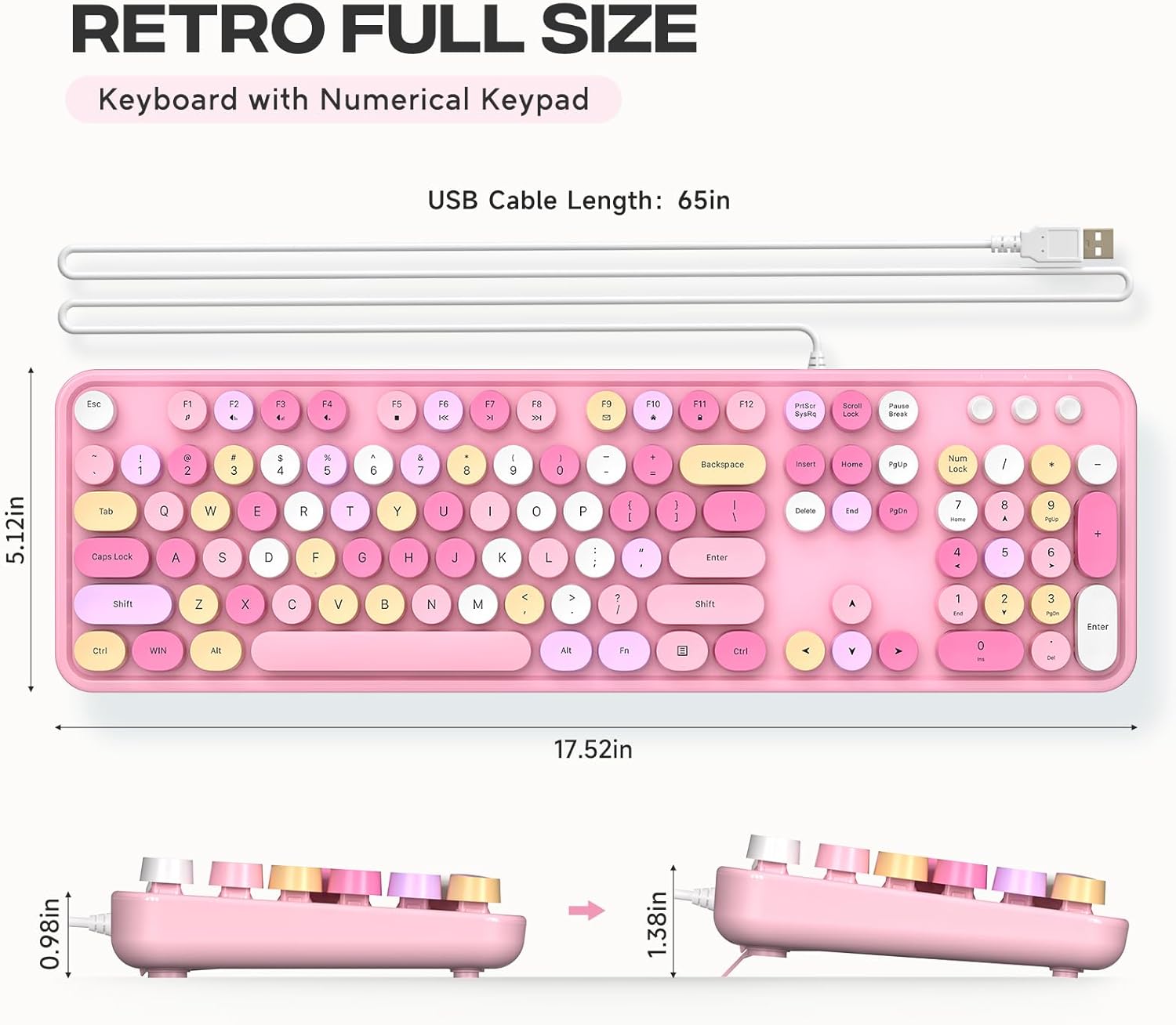
Image: Detailed measurements of the keyboard, including its length, width, and height in both flat and tilted positions.
9. Garantija ir palaikymas
MOFII products are designed for reliability and performance. For specific warranty details and support inquiries, please refer to the product packaging or contact MOFII customer service directly through their official websvetainę arba mažmenininką, iš kurio buvo pirktas produktas.
Please have your product model (B0CDWQCVGG) and purchase information ready when contacting support.


