Svarbios saugos instrukcijos
Read all instructions before using this appliance. To reduce the risk of fire, electrical shock, or injury when using your air conditioner, follow these basic precautions:
- Šis prietaisas turi būti tinkamai įžemintas.
- Never unplug the air conditioner by pulling on the power cord. Always grasp the plug firmly and pull straight out from the receptacle.
- Nespauskite, nelenkite ir nesuriškite maitinimo laido.
- Nenaudokite oro kondicionieriaus su pažeistu maitinimo laidu ar kištuku.
- Su šiuo įrenginiu nenaudokite ilgintuvo ar adapterio.
- Always turn off the air conditioner and unplug it before cleaning or servicing.
- Neužblokuokite oro įsiurbimo ar išmetimo angų.
- Naudokite tik pagal paskirtį, kaip aprašyta šiame vadove.
- Pakavimo medžiagas laikykite vaikams nepasiekiamoje vietoje.
Produktas baigtasview
The RCA 12000 BTU Wi-Fi Air Conditioner is designed to cool rooms up to 550 sq. ft. It features Wi-Fi connectivity, allowing remote control via a smart device. The unit includes multiple operating modes, a digital display, and a 24-hour timer for personalized comfort.
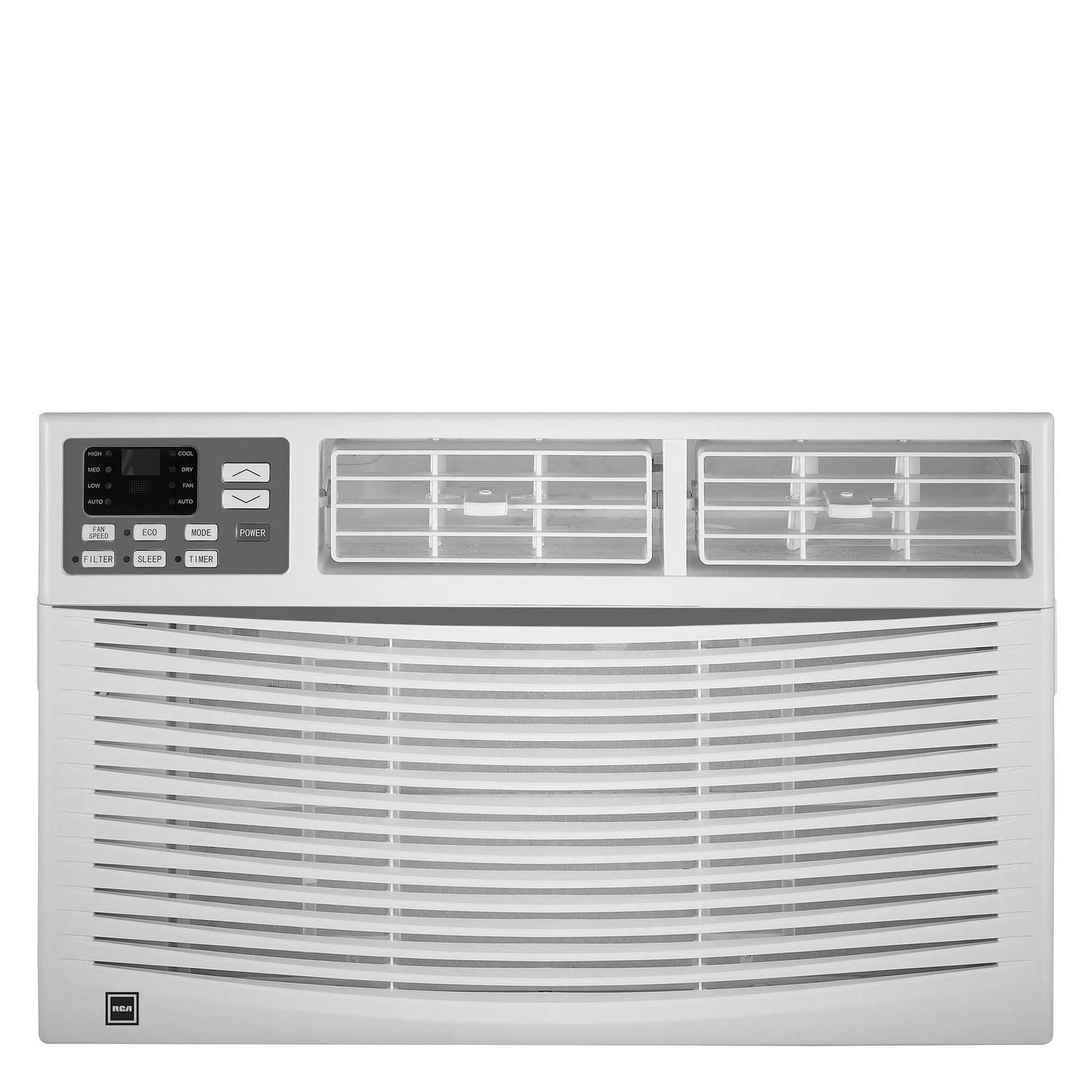
Vaizdas: priekis view of the RCA 12000 BTU Wi-Fi Air Conditioner, showing the control panel and air vents.
Pagrindinės funkcijos:
- 12,000 BTU cooling capacity, suitable for areas up to 550 sq. ft.
- Integrated Wi-Fi for remote control via smart devices.
- Three fan modes for customized airflow.
- Digital display for easy temperature and setting adjustments.
- 24-hour programmable timer.
- Eco mode for energy-efficient operation.
- Filter check reminder for timely maintenance.
- Auto restart function after power outages.
- Includes window installation kit and remote control.
Pakuotės turinys
Verify that all parts are included in the package before installation:
- RCA 12000 BTU Wi-Fi Air Conditioner Unit
- Nuotolinio valdymo pultas su baterijomis
- Window Installation Kit (side panels, top rail, sash lock, foam seals)
- Savininko vadovas
An image showing all included components laid out would typically be found here.
Diegimas ir sąranka
Lango montavimas:
This air conditioner is designed for installation in standard double-hung windows with a minimum height of 16 inches and a width between 26 and 36 inches.
- Paruoškite langą: Įsitikinkite, kad lango anga yra švari ir be jokių kliūčių.
- Pritvirtinkite viršutinį bėgelį: Secure the top rail to the air conditioner unit using the provided screws.
- Šoninių plokščių montavimas: Slide the accordion side panels into the side panel frames on the unit.
- Įdėkite įrenginį į langą: Carefully lift the unit and place it in the window opening, ensuring the bottom rail rests against the window sill.
- Saugus vienetas: Extend the side panels to fill the window opening and secure them with screws. Install the sash lock to prevent the window from being opened from the outside. Apply foam seals to ensure an airtight fit.
- Drenažas: Ensure the unit is slightly tilted outwards to allow for proper condensate drainage.
An image illustrating the step-by-step window installation process would be beneficial here.
„Wi-Fi“ sąranka:
To enable remote control functionality, connect your air conditioner to your home Wi-Fi network.
- Atsisiųsti programą: Download the RCA Home app from your smartphone's app store (iOS or Android).
- Sukurti paskyrą: Atidarykite programėlę ir sukurkite naują vartotojo paskyrą arba prisijunkite, jei jau turite.
- Pridėti įrenginį: Follow the in-app instructions to add a new device. This typically involves putting the air conditioner into pairing mode (refer to the unit's control panel or remote for specific instructions, often a Wi-Fi button press).
- Prisijunkite prie „Wi-Fi“: Select your home Wi-Fi network and enter the password when prompted by the app.
- Patvirtinimas: Once connected, the Wi-Fi indicator on the air conditioner's display will illuminate steadily, and the app will confirm successful pairing.
An image showing the Wi-Fi indicator on the unit's display and a screenshot of the app's pairing screen would be helpful.
Naudojimo instrukcijos
Valdymo skydelis ir nuotolinio valdymo pultas:
The air conditioner can be operated using the control panel on the unit or the included remote control. The remote control offers full functionality from a distance.
An image of the remote control with button labels would be useful here.
Pagrindinė operacija:
- Maitinimo įjungimas/išjungimas: Paspauskite GALIA mygtuką, kad įjungtumėte arba išjungtumėte įrenginį.
- Režimo pasirinkimas: Paspauskite REŽIMAS button to cycle through available modes: Cool, Fan, and Eco.
- Temperatūros reguliavimas: Naudokite UP (▲) ir ŽEMYN (▼) arrows to set the desired temperature. The temperature range is typically 62°F to 86°F (17°C to 30°C).
- Ventiliatoriaus greitis: Paspauskite VENTILIATORIAUS GREITIS mygtuką, kad pasirinktumėte mažą, vidutinį arba didelį ventiliatoriaus greitį.
Išplėstinės funkcijos:
- Laikmatis: Paspauskite LAIKMATIS button to set a delay for the unit to turn on or off. Use the UP/ŽEMYN arrows to adjust the time in 1-hour increments, up to 24 hours.
- Ekologinis režimas: When activated, the unit will cycle the compressor on and off to maintain the set temperature, saving energy. The fan may continue to run during compressor off cycles.
- Miegojimo rezimas: (If available) This mode gradually increases the temperature over several hours to provide comfortable sleeping conditions while saving energy.
- „Wi-Fi“ valdymas: Use the RCA Home app on your smart device to remotely turn the unit on/off, change temperatures, control modes, create custom schedules, and adapt fan speeds.
Priežiūra
Reguliarus techninis aptarnavimas užtikrina optimalų oro kondicionieriaus veikimą ir prailgina jo tarnavimo laiką.
Oro filtro valymas:
The air filter should be cleaned every two weeks or when the 'Filter Check' indicator illuminates.
- Išjunkite įrenginį: Always turn off and unplug the air conditioner before cleaning.
- Pašalinti filtrą: Atidarykite priekinį skydelį ir atsargiai ištraukite oro filtrą.
- Išvalyti filtrą: Wash the filter with warm, soapy water. Rinse thoroughly. For heavily soiled filters, a vacuum cleaner can be used to remove loose dirt before washing.
- Sausas filtras: Allow the filter to air dry completely before reinserting it. Do not expose to direct sunlight or high heat.
- Įdiekite filtrą iš naujo: Įstumkite sausą filtrą atgal į jo angą ir uždarykite priekinį skydelį.
An image demonstrating how to remove and clean the air filter would be helpful.
Bendras valymas:
- Išorė: Nuvalykite spintelę minkšta, d šluosteamp cloth. Do not use harsh chemicals, abrasive cleaners, or waxes.
- Ritės: Periodically check the condenser coils (located at the back of the unit) for dirt and debris. If necessary, gently brush them clean.
Trikčių šalinimas
Before contacting customer service, refer to the following table for common issues and solutions:
| Problema | Galima priežastis | Sprendimas |
|---|---|---|
| Oro kondicionierius neįsijungia. | Nėra elektros; suveikė grandinės pertraukiklis; įrenginys atjungtas nuo elektros tinklo. | Check power cord connection; reset circuit breaker; ensure unit is plugged into a working outlet. |
| Įrenginys neefektyviai vėsina. | Nešvarus oro filtras; užsikimšęs oro įsiurbimo / ištraukimo angos; per didelis kambarys; atidaryti langai / durys. | Clean air filter; clear obstructions; ensure room size is within capacity; close all windows and doors. |
| Viduje laša vanduo. | Unit not tilted properly; clogged drain pan. | Ensure unit is slightly tilted outwards for drainage; clear any blockages in the drain pan. |
| „Wi-Fi“ ryšio problemos. | Neteisingas „Wi-Fi“ slaptažodis; maršrutizatorius per toli; programėlė neatnaujinta. | Verify Wi-Fi password; move unit closer to router or use a Wi-Fi extender; update RCA Home app. |
Specifikacijos
| Funkcija | Detalė |
|---|---|
| Prekės ženklas | RCA |
| Modelio numeris | RACE1206WF |
| Aušinimo talpa | 12,000 XNUMX BTU |
| Aprėpties sritis | Iki 550 kv. |
| Drėgmės pašalinimo greitis | 2 pintos per valandą |
| Minimalus lango aukštis | 16 colių |
| Window Width Range | 26–36 colių |
| Matmenys (IxDxH) | 22 cm x 24 cm x 17 cm (apytiksliai) |
| Prekės svoris | 78 svaro |
| Ryšys | Wi-Fi |
Informacija apie garantiją
This RCA air conditioner comes with a 1 metų ribota gamintojo garantija. Please refer to the warranty card included with your product for full terms and conditions, or visit the official RCA websvetainėje, kur rasite daugiau informacijos.
Pagalba klientams
For technical assistance, troubleshooting beyond this manual, or warranty claims, please contact RCA Customer Support. Contact information can typically be found on the manufacturer's websvetainėje arba garantijos kortelėje, pateiktoje kartu su jūsų produktu.


