1. Įvadas
The Emerson EMT-1200 Multimedia Recorder is designed to effortlessly digitize and preserve your cherished memories by converting various media formats into modern digital files. This manual provides comprehensive instructions for setting up, operating, and maintaining your device.
2. Kas yra dėžutėje
- Emerson EMT-1200 Multimedia Recorder
- Kintamos srovės adapteris
- Greitos pradžios vadovas
- AV kabelis
- Vartotojo vadovas
3. Produktas baigtasview
The Emerson EMT-1200 is a versatile multimedia recorder featuring a 4.3-inch LCD screen, multiple input/output options, and app integration for seamless media conversion and playback.

Image: The Emerson EMT-1200 Multimedia Recorder shown with various media sources like phones, DVDs, and USB drives, highlighting its multi-functionality.
Pagrindinės savybės ir komponentai:
- 4.3 colių LCD ekranas: Dėl išankstinioviewing recordings and navigating menus.
- Garso įvestis (RCA): Red and white ports for stereo audio input.
- Video In (RCA): Yellow port for composite video input.
- HD Out (HDMI): Skirta prijungti išorinius ekranus.
- USB prievadas: Skirta USB diskų prijungimui.
- Kortelės lizdas: Skirta SD kortelėms įdėti.
- DVD/CD Drive: For disc media.
- Maitinimo mygtukas: Norėdami įjungti/išjungti įrenginį.
- Išstūmimo mygtukas: To open/close the disc tray.
- Įrašymo mygtukas: To start/stop recording.
- Navigation Buttons (ENTER, RETURN, UP/DOWN/LEFT/RIGHT): For menu control.

Vaizdas: Viršus view of the Emerson EMT-1200, highlighting the 4.3-inch LCD screen and the central control panel with navigation and function buttons.

Vaizdas: priekis view of the Emerson EMT-1200, showing the Audio In, Video In, HD Out, and USB ports on the left side.

Vaizdas: Šoninė view of the Emerson EMT-1200 with the DVD/CD tray open, ready for disc insertion.
4. Sąranka
- Place the Recorder: Position the EMT-1200 on a clean, stable surface.
- Prijunkite maitinimą: Connect the AC power adapter to the DC IN 5V port on the recorder and plug the adapter into a wall outlet or surge protector.
- Maitinimas: Press the Power button on the device. The Emerson logo will appear on the screen.
Video: This video demonstrates the basic setup process for the Emerson EMT-1200 Multimedia Recorder, including connecting power and initial boot-up.
5. Naudojimo instrukcijos
5.1 Recording from VHS
- Connect VHS Player: Use the AV cable to connect the LINE OUT ports of your VHS player to the AUDIO IN (Red/White) and VIDEO IN (Yellow) ports on the EMT-1200.
- Įdėkite VHS kasetę: Place the VHS tape you wish to record into your VHS player.
- Pasirinkite šaltinį: On the EMT-1200, navigate to the main menu and select "Video -> USB/Card" or "Video -> DVD" depending on your desired output.
- Pradėti įrašymą: Begin playback on your VHS player, then press the REC button on the EMT-1200 to start recording. Press REC again to stop.

Image: The Emerson EMT-1200 connected to a VHS player via AV cables, illustrating the process of converting VHS tapes to digital formats.
Video: This video demonstrates how to record content from a VHS player to the Emerson EMT-1200 Multimedia Recorder.
5.2 Recording from DVD/CD
- Insert Source Disc: Eject the disc tray and insert the DVD or CD you wish to record from. Close the tray.
- Pasirinkite šaltinį: From the main menu, select "CD/DVD -> USB/Card" or "CD/DVD -> Memory" based on your desired storage.
- Pradėti įrašymą: Play the content on the disc, then press the REC button on the EMT-1200 to start recording. Press REC again to stop.
Video: This video guides you through the process of recording content from a DVD to the Emerson EMT-1200 Multimedia Recorder.
Video: This video demonstrates how to record audio from a CD to the Emerson EMT-1200 Multimedia Recorder.
5.3 Recording from USB/SD Card
- Įdėkite saugyklą: Insert a USB drive into the USB port or an SD card into the CARD slot.
- Pasirinkite šaltinį: From the main menu, select "USB/Card -> DVD" or "USB/Card -> CD" to transfer files from your USB/SD to a disc.
- Pradėti įrašymą: Follow the on-screen prompts to select files and initiate the transfer.
Video: This video explains how to record files from a USB drive to a DVD using the Emerson EMT-1200 Multimedia Recorder.
5.4 Perdavimas Files from iOS/Android App
- Atsisiųsti programą: Download the "Friendly Memories" app from the App Store (iOS) or Google Play Store (Android).
- Prisijunkite prie „Wi-Fi“: Power on the EMT-1200. On your smartphone/tablet, go to Wi-Fi settings and connect to the device's Wi-Fi network (e.g., "DVD_SERVER_XXXX"). Enter the password found in your user manual.
- Grant Access: In your phone's settings, ensure the "Friendly Memories" app has access to the photos and videos you wish to transfer.
- Įkelti Files: Open the "Friendly Memories" app, select the files you want to transfer, and choose your desired destination (USB, SD Card, or DVD) on the EMT-1200.

Image: An iPhone displaying the "Friendly Memories" app interface, connected wirelessly to the Emerson EMT-1200 for file perkėlimas.
Video: This video demonstrates how to use the iOS app to transfer files to the Emerson EMT-1200 Multimedia Recorder.
5.5 Media Playback & HD Output
- Prisijungti prie ekrano: Connect an HDMI cable from the HD OUT port on the EMT-1200 to your TV or monitor's HDMI input.
- Pasirinkite įvestį: On your TV/monitor, select the corresponding HDMI input source.
- Select Media Player: On the EMT-1200, navigate to the main menu and select "Media Player".
- Choose Source: Select the source (USB, Card, or CD/DVD) where your media files yra saugomi.
- Leisti mediją: Naršykite ir pasirinkite norimą file žaisti.

Image: The Emerson EMT-1200 connected to a larger TV screen via HDMI, allowing users to view their digitized media on an external display.
Video: This video demonstrates the media player functionality and HD output capabilities of the Emerson EMT-1200 Multimedia Recorder.
6. Nustatymai
Access the "Setup" menu from the main menu to configure various device settings:
- Įrašymo formatas: Choose between MPG (for Blu-ray players) or MP4 (for computers and DVD players).
- DVD Burn Type: Select "Data" for data-only files or "Video" for video format compatible with DVD/Blu-ray players.
- Įrašo kokybė: Adjust the recording quality to High, Medium, or Low. Note that higher quality results in larger file sizes and longer recording times.
- Auto Stop Timer: Set a preset time (e.g., 30 minutes, 60 minutes, 2 hours) for the recording to stop automatically.
- Auto Chapter: Enable this feature to automatically break recordings into chapters at specified intervals (e.g., 5, 10, or 15 minutes).
- Spalvų sistema: Set the video color system (e.g., NTSC).
- OSD kalba: Select the On-Screen Display language (English, Deutsch, Français, Nederlands, Español).
- Datos nustatymas: Adjust the current date.
- Laiko nustatymas: Sureguliuokite dabartinį laiką.
- Numatytieji nustatymai: Iš naujo nustatykite visus gamyklinius nustatymus.
7. Problemų sprendimas
If you encounter issues with your Emerson EMT-1200, please refer to the following common troubleshooting tips:
- Nėra galios: Ensure the AC power adapter is securely connected to both the device and a working power outlet.
- Ekrane nėra signalo: Verify all AV or HDMI cables are correctly connected to both the recorder and the external display. Ensure the correct input source is selected on your TV/monitor.
- Įrašymo problemos: Check that the source media (VHS, DVD, etc.) is playing correctly. Ensure the destination media (USB, SD card, blank DVD) has sufficient space and is compatible with the device.
- Programos ryšio problemos: Confirm your smartphone/tablet is connected to the EMT-1200's Wi-Fi network and the correct password has been entered. Check app permissions for media access.
- Disc Ejection Issues: If a disc does not eject, ensure the device is powered on and press the Eject button firmly. Do not force the disc tray.
For more detailed troubleshooting, please consult the full user manual or visit the Emerson support websvetainę.
8. Specifikacijos
| Funkcija | Detalė |
|---|---|
| Prekės ženklas | Emersonas |
| Modelio pavadinimas | EMT-1200 |
| Ypatinga funkcija | USB Recording (DVR) |
| Rezoliucija | 1280×720 |
| Jungties tipas | Mikro USB |
| Ryšio technologija | USB |
| Prekės svoris | 1 svaro |
| Gaminio matmenys | 6.1 colio ilgio x 1.85 colių pločio x 6.1 colio aukščio |
| Vaizdo išvesties skiriamoji geba | 1080p |
| Suderinami įrenginiai | Televizija, išmanusis telefonas |
| Valdiklio tipas | Mygtukų valdymas |
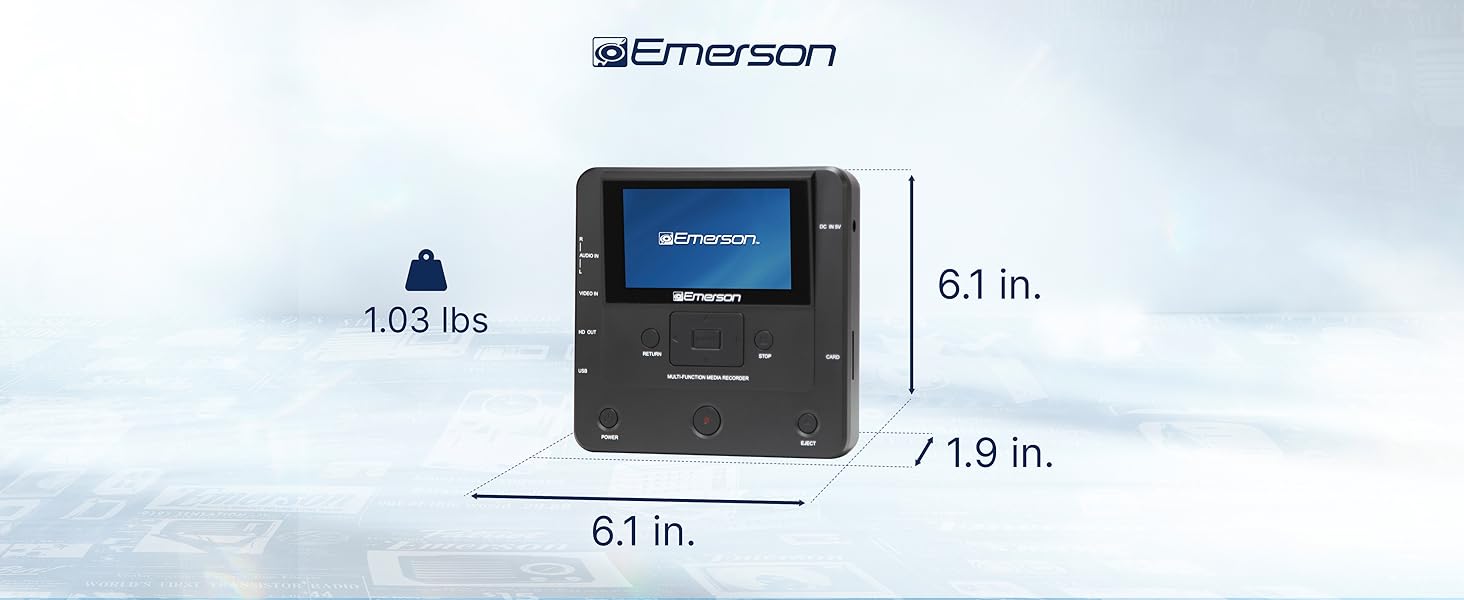
Image: The Emerson EMT-1200 Multimedia Recorder with its dimensions labeled: 6.1 inches Length, 1.9 inches Width, 6.1 inches Height, and a weight of 1.03 pounds.
9. Priežiūra
To ensure the longevity and optimal performance of your Emerson EMT-1200 Multimedia Recorder, follow these maintenance guidelines:
- Valymas: Įrenginio išorę valykite minkštu, sausu skudurėliu. Venkite naudoti skystus valiklius, aerozolius ar tirpiklius.
- Saugykla: Laikykite prietaisą vėsioje, sausoje vietoje, apsaugotoje nuo tiesioginių saulės spindulių ir ekstremalių temperatūrų.
- Disko priežiūra: Handle discs by their edges to avoid fingerprints and scratches. Keep discs in their protective sleeves when not in use.
- Vėdinimas: Įsitikinkite, kad įrenginio ventiliacijos angos nėra užblokuotos, kad jis neperkaistų.
10. Garantija ir palaikymas
Your Emerson EMT-1200 Multimedia Recorder comes with a limited warranty to ensure your satisfaction.
- Garantinis laikotarpis: 1 Year Parts, 90 Days Labor.
- Gamintojas: Naxa Electronics, Inc.
For warranty claims, product updates, extended support documentation, or frequently asked questions, please visit the official Emerson Audio websvetainėje arba susisiekite su klientų aptarnavimo tarnyba.


