1. Svarbi saugos informacija
Prieš naudodami šį gaminį, perskaitykite ir supraskite visas saugos instrukcijas. Išsaugokite šį vadovą ateičiai.
- Maitinimo šaltinis: Naudokite tik nurodytą maitinimo adapterį arba baterijas. Įsitikinkite, kad įtampatage is compatible before plugging in.
- Vanduo ir drėgmė: Do not expose the radio to rain, moisture, or immerse it in water.
- Šiluma: Laikykite radijo imtuvą atokiau nuo šilumos šaltinių, tokių kaip radiatoriai, šildytuvai, viryklės ar kiti prietaisai (įskaitant ampkeltuvai), kurie gamina šilumą.
- Vėdinimas: Do not block any ventilation openings. Ensure proper airflow around the device.
- Valymas: Prieš valydami atjunkite radijo imtuvą nuo maitinimo lizdo. Naudokite tik sausą šluostę.
- Aptarnavimas: Nemėginkite patys aptarnauti šio gaminio. Visą techninę priežiūrą patikėkite kvalifikuotam aptarnavimo personalui.
- Baterijos: When using batteries, ensure correct polarity. Do not mix old and new batteries, or different types of batteries. Remove batteries if the radio will not be used for an extended period.
2. Produktas baigtasview
The Audiocrazy Portable AM FM Radio with Bluetooth (Model AC-BT2210) is a versatile audio device designed for clear reception and convenient playback. It features traditional AM/FM radio tuning, Bluetooth 5.0 connectivity for wireless streaming, and an AUX input for wired connections. The radio can be powered via an AC cord or 4 AA batteries, offering flexibility for both indoor and outdoor use.

2.1 vaizdas: priekis view of the Audiocrazy Portable AM FM Radio, showcasindėl retro dizaino ir pagrindinių valdiklių.
Pagrindinės funkcijos:
- AM/FM imtuvas: Wide frequency range (FM 87-108MHz, AM 520-1710KHz) for easy station capture.
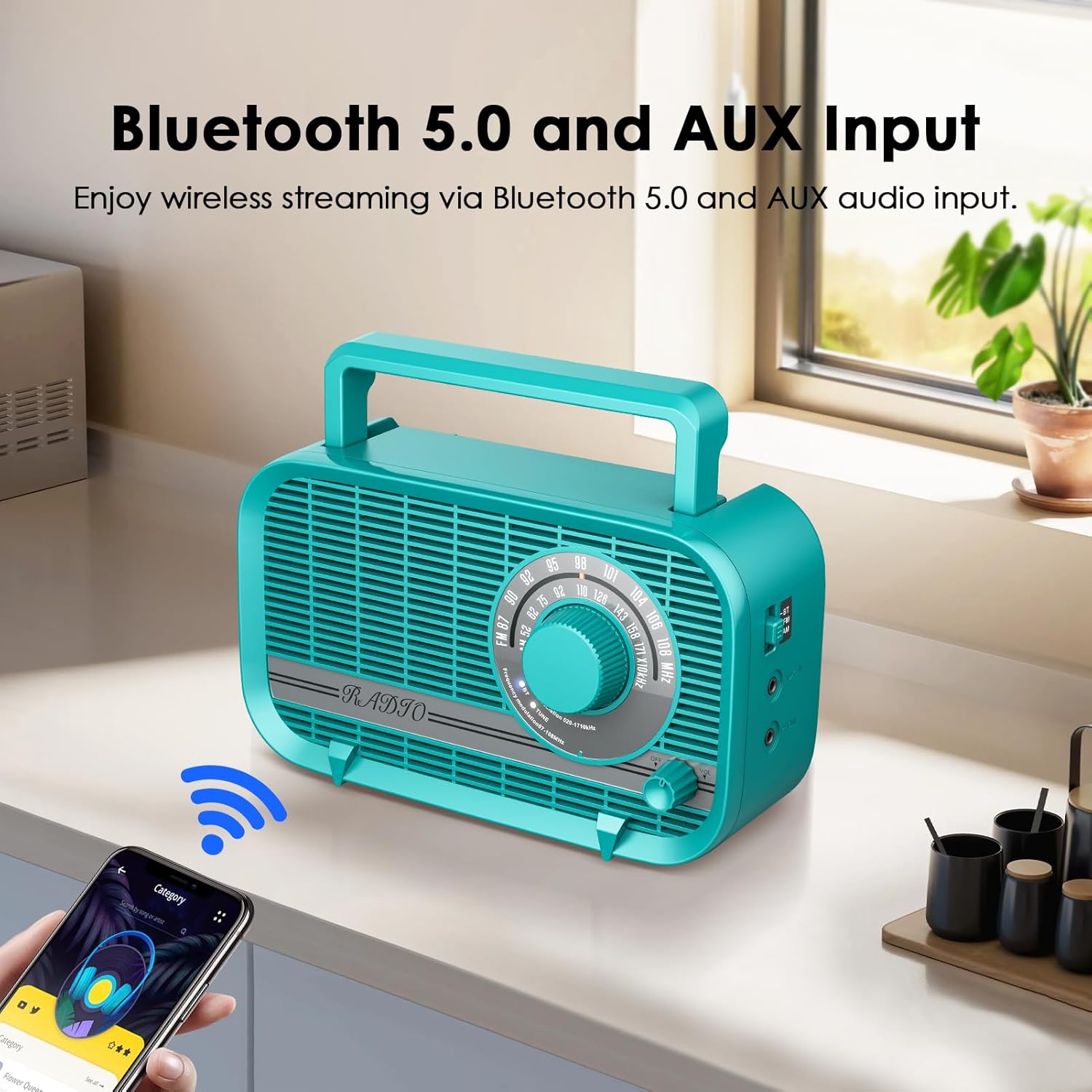
- "Bluetooth 5.0": Seamless wireless connection to smart devices for audio streaming.
- 3 vatų garsiakalbis: Delivers clear and vivid sound quality.
- Headphone/AUX-in Jack: Skirta klausytis privačiai arba prijungti išorinius garso šaltinius.
- Dvigubi maitinimo režimai: Operates with AC power cord (included) or 4 AA batteries (not included).
- Nešiojamas dizainas: Lengvas ir kompaktiškas, su integruota rankena patogiam transportavimui.
3. Pakuotės turinys
Pažymėkite langelį prie šių elementų:
- Audiocrazy Portable AM FM Radio with Bluetooth (Model AC-BT2210)
- Kintamosios srovės maitinimo laidas
- Instrukcijų vadovas (šis dokumentas)

Image 3.1: The included AC power cord for operating the radio.
4. Valdikliai ir funkcijos
Susipažinkite su radijo valdikliais:
- Derinimo ratukas: Located on the front, used to select AM or FM radio frequencies.
- Garsumo rankenėlė: Located on the front, controls the audio output level. Also functions as the power ON/OFF switch.
- Režimo jungiklis: Typically on the side or front, allows switching between AM, FM, and Bluetooth modes.
- Ausinių lizdas: 3.5mm port for connecting headphones for private listening.
- AUX įvesties lizdas: 3.5mm port for connecting external audio devices via an AUX cable.
- Kintamosios srovės įvestis: Port for connecting the AC power cord.
- Baterijų skyrius: Located on the back, holds 4 AA batteries.
- Teleskopinė antena: Ištraukiama antena pagerina FM signalo priėmimą.

Image 4.1: Detail of the large tuning dial and volume knob for easy operation.
4.2 paveikslėlis: Šonas view illustrating the Bluetooth mode switch, headphone jack, and AUX-in port.
5. Sąranka
5.1 Radijo maitinimas
Your radio can be powered by two methods:
- Kintamosios srovės maitinimas:
- Insert the included AC power cord into the AC power input jack on the back of the radio.
- Plug the other end of the power cord into a standard wall outlet (120V AC, 60Hz).
- Baterijos galia:
- Atidarykite baterijų skyriaus dangtelį, esantį radijo imtuvo gale.
- Insert 4 new AA batteries (not included) into the compartment, ensuring correct polarity (+/-).
- Saugiai uždarykite akumuliatoriaus skyriaus dangtelį.
Pastaba: When the AC power cord is connected, the radio will automatically draw power from the AC source, even if batteries are installed. Remove batteries if not using for extended periods to prevent leakage.

Image 5.1: Illustration of the two power supply modes: AC powered and battery operated.
5.2 Antenos reguliavimas
For optimal FM reception, fully extend the telescopic antenna. For AM reception, the radio has a built-in ferrite bar antenna, so antenna adjustment is generally not required, but rotating the radio itself may improve reception.

Image 5.2: The radio with its telescopic antenna extended, indicating improved signal reception.
6. Naudojimo instrukcijos
6.1 Įjungimas / išjungimas ir garsumo valdymas
- Norėdami įjungti radiją ON, rotate the Volume knob clockwise until you hear a click and the radio powers on.
- To adjust the volume, continue rotating the Volume knob clockwise to increase volume, or counter-clockwise to decrease volume.
- Norėdami įjungti radiją IŠJUNGTA, rotate the Volume knob counter-clockwise until you hear a click and the radio powers off.
6.2 AM/FM radijo veikimas
- Turn on the radio using the Volume knob.
- Set the Mode switch to either FM or AM.
- Rotate the Tuning Dial to scan for radio stations. The frequency scale will indicate the current station.
- Adjust the telescopic antenna for FM or reposition the radio for AM to achieve the best reception.
6.3 Bluetooth veikimas
- Įjunkite radiją.
- Nustatykite režimo jungiklį į padėtį BT (Bluetooth). The radio will enter pairing mode, indicated by an audible prompt or flashing indicator light (if available).
- Savo „Bluetooth“ įrenginyje (pvz., išmaniajame telefone, planšetiniame kompiuteryje) įjunkite „Bluetooth“ ir ieškokite galimų įrenginių.
- Select "AC-BT2210" (or similar name) from the list of devices to pair.
- Once paired, you will hear a confirmation sound, and you can now play audio from your device through the radio.
Pastaba: The effective Bluetooth range is approximately 10 meters (33 feet) without obstacles.

Image 6.1: The radio wirelessly connected to a smartphone via Bluetooth, illustrating the streaming capability.
6.4 AUX įvesties naudojimas
- Įjunkite radiją.
- Connect one end of a 3.5mm audio cable (not included) to the AUX-in jack on the radio.
- Kitą garso kabelio galą prijunkite prie išorinio įrenginio (pvz., MP3 grotuvo, CD grotuvo) ausinių lizdo arba garso išvesties.
- Play audio from your external device. The sound will be routed through the radio's speaker.
6.5 Headphone Usage
- Connect a pair of 3.5mm headphones (not included) to the Headphone Jack on the radio.
- The radio's main speaker will automatically mute, and audio will be directed to your headphones.
- Adjust the volume using the Volume knob on the radio.
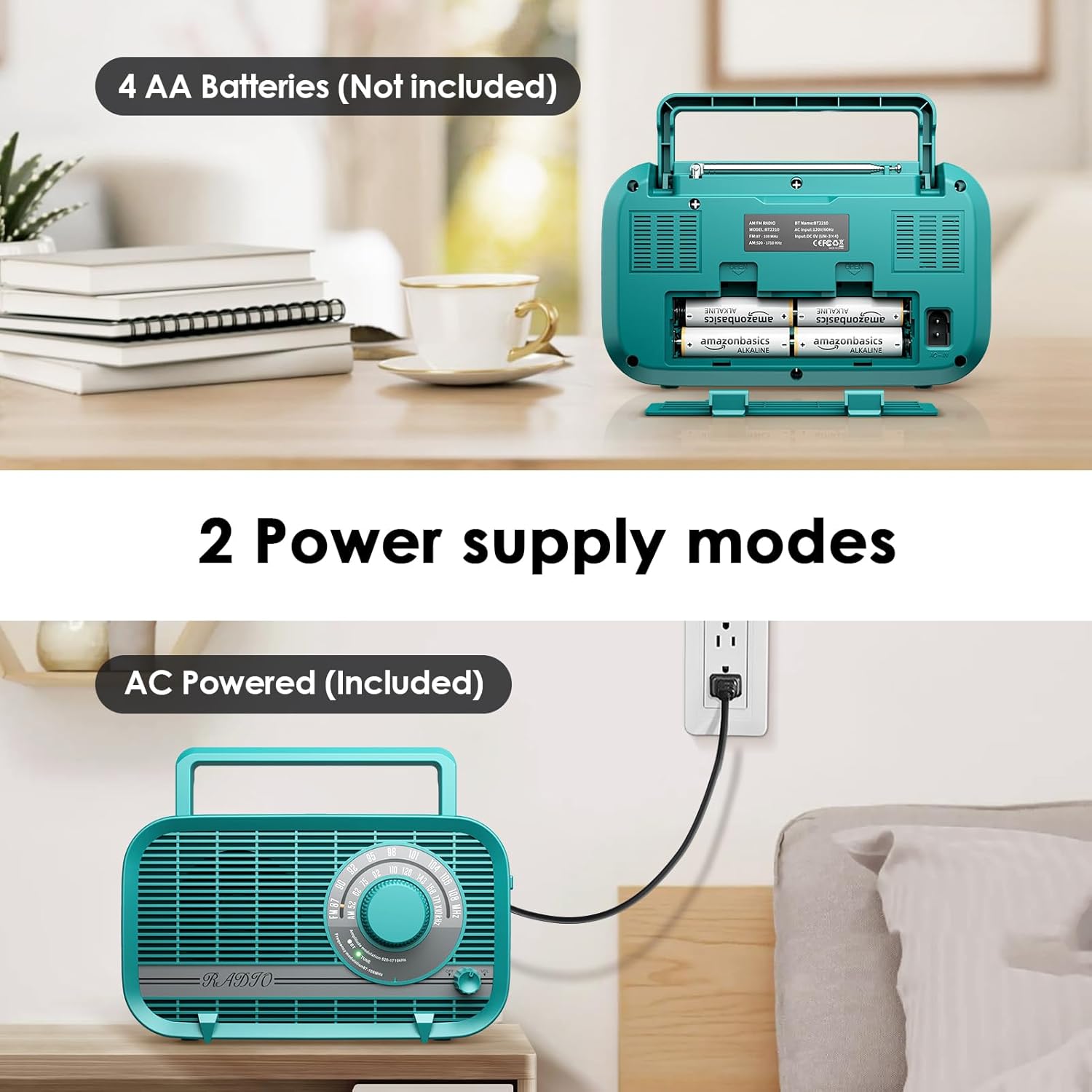
Image 6.2: A user enjoying private listening with headphones connected to the radio's headphone jack.
7. Priežiūra
- Valymas: Radijo imtuvą valykite minkštu, sausu skudurėliu. Nenaudokite abrazyvinių valiklių, vaško ar tirpiklių.
- Saugykla: Jei radijo imtuvą ilgesnį laiką laikysite, išimkite baterijas, kad išvengtumėte pratekėjimo. Laikykite vėsioje, sausoje vietoje, toliau nuo tiesioginių saulės spindulių ir ekstremalių temperatūrų.
- Antenos priežiūra: Su teleskopine antena elkitės atsargiai, kad ji nesulinktų ir nesulūžtų.
8. Problemų sprendimas
| Problema | Galima priežastis | Sprendimas |
|---|---|---|
| Radijas neįsijungia. | No power source; batteries depleted or incorrectly inserted; AC cord not properly connected. | Ensure AC cord is securely plugged in or replace batteries with new ones, checking polarity. |
| Poor radio reception (static/weak signal). | Antenna not extended (FM); radio position (AM); interference from other electronics. | Fully extend the telescopic antenna for FM. Rotate the radio for AM. Move the radio away from other electronic devices. |
| Iš garsiakalbio nėra garso. | Per mažas garsumas; prijungtos ausinės; pasirinktas neteisingas režimas. | Increase volume. Disconnect headphones. Ensure correct mode (AM/FM/BT) is selected. |
| „Bluetooth“ įrenginio nepavyksta susieti. | Radio not in BT mode; device too far; Bluetooth not enabled on external device. | Set radio to BT mode. Ensure external device's Bluetooth is on and within range. Forget device on external device and try pairing again. |
| AUX įvestis neveikia. | AUX cable not connected properly; external device volume too low. | Ensure AUX cable is fully inserted into both the radio and the external device. Increase volume on both the radio and the external device. |
9. Specifikacijos
| Funkcija | Specifikacija |
|---|---|
| Modelio numeris | AC-BT2210 |
| Gaminio matmenys | 8.66"L x 3"W x 5"H (220x75x128 mm) |
| Prekės svoris | 1.96 svaro (0.89 kg) |
| Derintuvo technologija | AM/FM |
| Palaikomos radijo juostos | AM (520–1710 kHz), FM (87–108 MHz) |
| Ryšio technologija | Bluetooth 5.0, AUX-in |
| Garsiakalbio išvestis | 3 vatų |
| Maitinimo šaltinis | AC Powered (Power Cord Included), 4 x AA Batteries (Not Included) |
| Įtraukti komponentai | Maitinimo laidas |
| Gamintojas | Audiocrazy |
10. Garantija ir palaikymas
Audiocrazy products are designed and manufactured to the highest quality standards. For specific warranty information and customer support, please refer to the warranty card included with your purchase or visit the official Audiocrazy website. If you encounter any issues not covered in this manual, please contact Audiocrazy customer service for assistance.


