Įvadas
The COMPUTHERM E280 Wi-Fi Thermostat allows you to control connected heating or cooling devices, such as boilers or air conditioning systems, via your smartphone or tablet over the internet. This thermostat is compatible with any two-wire thermostatic connector and supports both 24V and 230V control circuits. It is particularly useful for managing heating/cooling in homes, apartments, or holiday residences, especially when occupancy schedules are irregular.
Equipped with a connectable floor temperature sensor, the E280 is ideal for controlling underfloor heating systems. It features two potential-free relays that can operate simultaneously, allowing independent control of two devices. This enables the thermostat to manage a pump and a zone valve in addition to the main boiler, facilitating multi-zone heating systems without requiring a separate zone control system.

Image: The Computherm E280 Wi-Fi Thermostat displaying room temperature and set temperature, alongside a smartphone showing the thermostat's control application.
Pakuotės turinys
Atidarius pakuotę, patikrinkite, ar yra visi komponentai ir ar jie nepažeisti.
- Computherm E280 Wi-Fi Thermostat unit
- Grindų temperatūros jutiklis
- Tvirtinimo varžtai ir sieniniai kaiščiai
- Vartotojo vadovas (šis dokumentas)

Image: The Computherm E280 thermostat, its floor sensor, mounting hardware, and printed user manuals as found in the product packaging.
Sąranka ir diegimas
Svarbu: Installation should only be performed by a qualified electrician or heating engineer. Ensure the main power supply is disconnected before commencing any wiring.
1. Termostato montavimas
- Choose a suitable location on an interior wall, away from direct sunlight, drafts, or heat sources, at approximately 1.5 meters (5 feet) from the floor.
- Carefully separate the front panel from the backplate of the thermostat.
- Pažymėkite gręžimo taškus ant sienos, naudodami galinę plokštę kaip šabloną.
- Drill holes, insert wall plugs, and secure the backplate to the wall using the provided screws.
2. Laidų jungtys
The Computherm E280 features two potential-free relays (K1 and K2) for controlling heating/cooling systems and an optional floor sensor.

Paveikslėlis: Galinė dalis view of the Computherm E280 thermostat, detailing the terminal block for electrical connections, including power input, relay outputs (K1 and K2), and the floor sensor input.
- Maitinimo šaltinis (L, N): Connect the live (L) and neutral (N) wires of your 230V AC power supply.
- Relay K1 (COM, NO, NC): This relay is typically used for controlling the main heating/cooling device (e.g., boiler).
- COM: Bendras terminalas.
- NE: Normally Open (connect to this for heating applications where the circuit closes to activate).
- NC: Normally Closed (connect to this for cooling applications where the circuit opens to activate).
- Relay K2 (COM, NO): This relay can be used for an auxiliary device, such as a pump or zone valve.
- COM: Bendras terminalas.
- NE: Paprastai atidarytas.
- Grindų jutiklis: Connect the wires from the external floor temperature sensor to the designated terminals.
3. Galutinis surinkimas
- Once wiring is complete and secure, carefully reattach the front panel of the thermostat to the backplate.
- Restore power to the system. The thermostat display should illuminate.
Naudojimo instrukcijos
The Computherm E280 can be operated directly via its touch buttons or remotely via the dedicated smartphone application.
1. Initial Power-On and Wi-Fi Connection
- After power-on, the thermostat will display the current room temperature and default settings.
- Download the "Computherm" or "Smart Life" app from your smartphone's app store (iOS or Android).
- Follow the in-app instructions to add a new device and connect your E280 thermostat to your 2.4 GHz Wi-Fi network. This typically involves putting the thermostat into pairing mode (refer to the app or thermostat's quick start guide for specific button presses).
2. Basic Thermostat Functions (On-Device)

Paveikslėlis: detalus view of the Computherm E280 thermostat's digital display, showing current room temperature, set temperature, day, and time, along with the touch-sensitive control buttons below the screen.
- Įjungimo mygtukas (⏻): Press to turn the thermostat on or off.
- Režimo mygtukas (↻): Cycle through operating modes (e.g., Heating, Cooling, Auto, Manual).
- Set Button (⏱): Access settings or programming menus.
- Rodyklės aukštyn / žemyn (▲ / ▼): Koreguokite temperatūros nustatymus arba naršykite meniu parinktis.
3. Remote Control via Smartphone App
The smartphone app provides comprehensive control and monitoring capabilities:
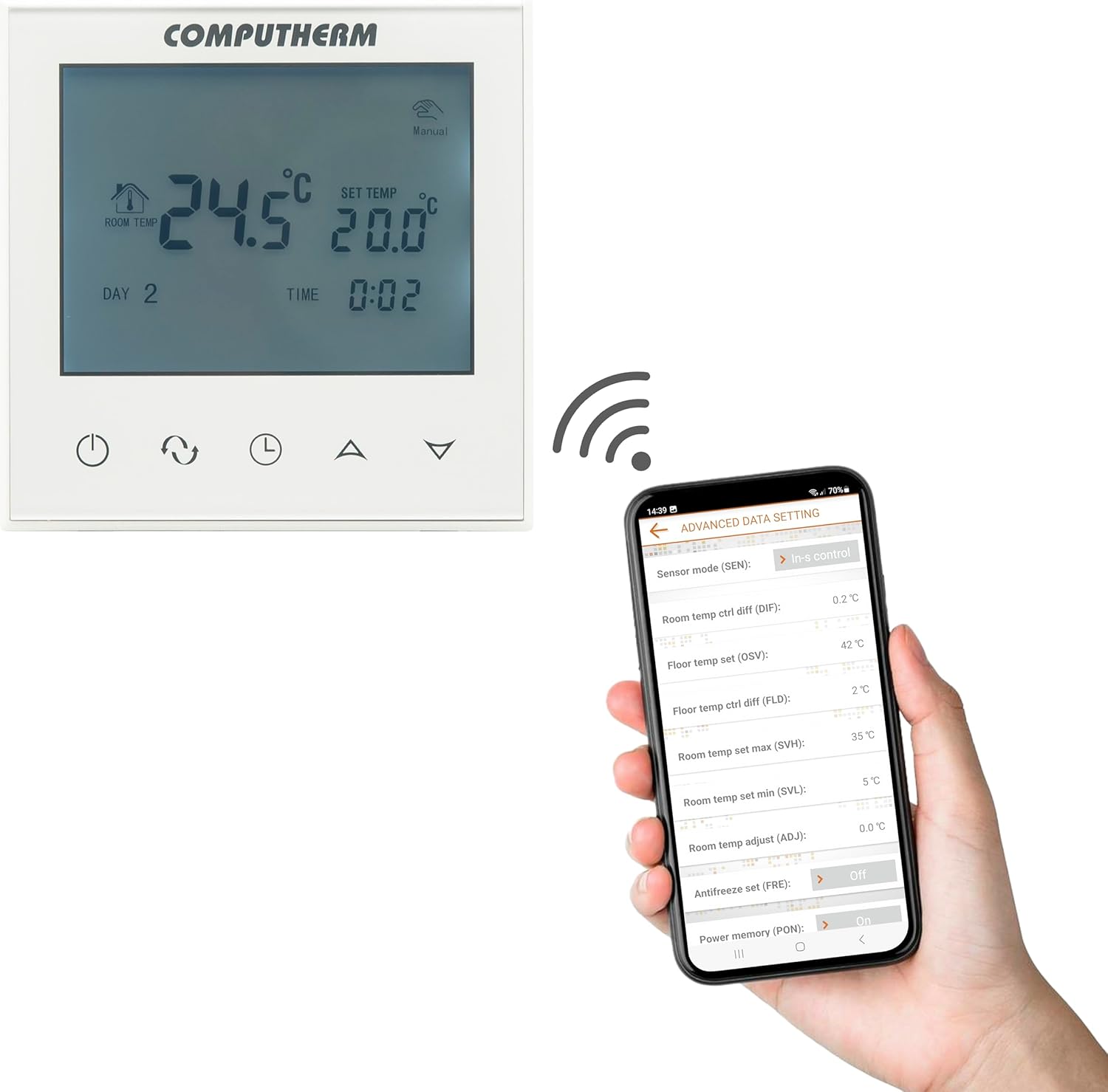
Image: A smartphone screen displaying the advanced settings interface of the Computherm E280 thermostat app, showing options like sensor mode, temperature differentials, and antifreeze settings.
- Temperatūros reguliavimas: Easily change the set temperature from anywhere.
- Planavimas: Create and modify weekly heating/cooling schedules.
- Režimo pasirinkimas: Switch between heating, cooling, and manual modes.
- Išplėstiniai nustatymai: Configure parameters such as temperature calibration, switching sensitivity, floor sensor limits, and antifreeze protection.
- Stebėjimas: View current room and floor temperatures, operating status, and historical data.
Priežiūra
The Computherm E280 thermostat requires minimal maintenance to ensure optimal performance.
- Valymas: Nuvalykite termostato ekraną irasinminkštu, sausu skudurėliu. Venkite naudoti abrazyvinius valiklius, tirpiklius ar cheminius purškalus, nes jie gali pažeisti paviršių ar vidinius komponentus.
- Jutiklio patikrinimas: Periodically ensure that the internal and external (floor) temperature sensors are free from obstructions or debris that could affect accurate readings.
- Programinės įrangos atnaujinimai: Keep the smartphone application updated to the latest version to benefit from new features and performance improvements. The thermostat's firmware may also receive updates via the app.
Trikčių šalinimas
If you encounter issues with your Computherm E280 thermostat, refer to the following common problems and solutions:
| Problema | Galima priežastis | Sprendimas |
|---|---|---|
| Termostato ekranas tuščias. | Nėra maitinimo. | Patikrinkite grandinės pertraukiklį ir laidų jungtis. Įsitikinkite, kad elektra atkurta. |
| Nepavyksta prisijungti prie „Wi-Fi“. | Neteisingas „Wi-Fi“ slaptažodis, 5 GHz tinklas arba silpnas signalas. | Verify Wi-Fi password. Ensure you are connecting to a 2.4 GHz network. Move thermostat closer to router or use a Wi-Fi extender. Restart thermostat and router. |
| Šildymo / vėsinimo sistema nereaguoja. | Incorrect wiring, system turned off, or thermostat in wrong mode. | Check wiring connections (refer to Setup section). Ensure heating/cooling system is powered on. Verify thermostat is in the correct operating mode (e.g., Heating). |
| Netikslūs temperatūros rodmenys. | Sensor obstruction, thermostat location, or calibration issue. | Ensure sensors are clear. Relocate thermostat if exposed to drafts/direct sunlight. Check app for temperature calibration options. |
If the problem persists, please contact Computherm customer support.
Specifikacijos
| Funkcija | Detalė |
|---|---|
| Prekės ženklas | KOMPIUTERIJA |
| Modelio numeris | E280 |
| Spalva | Baltas |
| Medžiaga | Plastikiniai |
| Gaminio matmenys (I x P x A) | 1.7 x 8.6 x 8.6 cm |
| Prekės svoris | 370 gramų |
| ttage | 240 Volts AC (max. 24V DC / 240V AC for relays) |
| Maitinimo šaltinis | Su laidu elektra |
| Ryšio technologija | „Wi-Fi“ (b/g/n) 2.4 GHz |
| Temperature Measurement Range (Internal) | 0 °C - 50 °C (0.1 °C increments) |
| Temperature Measurement Range (Floor Sensor) | 0 °C - 99 °C (0.1 °C increments) |
| Temperatūros matavimo tikslumas | ± 0.5 °C |
| Reguliuojamas temperatūros diapazonas | 5 °C - 99 °C (0.5 °C increments) |
| Perjungimo jautrumas | ± 0.1 °C to ± 1.0 °C (0.1 °C increments) |
| Switchable Current (K1) | 8A (2A inductive load) |
| Switchable Current (K2) | 3A (1A inductive load) |
| Heat Sensor Type (Internal & Floor) | NTC 3950K 10kΩ at 25°C |
| Ypatingos savybės | Programmable, Wi-Fi Control, Floor Sensor Included |
| Specifiniai naudojimo būdai | Radiator, Underfloor Heating |
Garantija ir palaikymas
The Computherm E280 Wi-Fi Thermostat comes with a 2 metų garantija nuo įsigijimo datos. Ši garantija taikoma gamybos defektams ir gedimams įprasto naudojimo metu. Išsaugokite pirkimo įrodymą, jei galėtumėte pateikti pretenzijas dėl garantijos.
For technical support, troubleshooting assistance, or warranty inquiries, please contact your retailer or visit the official Computherm websvetainė kontaktinei informacijai.


