1. Įvadas
Thank you for choosing the Cherry KW 7100 Mini Multi-Device Compact Keyboard. This manual provides essential information for setting up, operating, and maintaining your new keyboard. Designed for versatility and portability, this keyboard offers seamless connectivity across multiple devices.
2. Kas yra dėžutėje
- Cherry KW 7100 Mini Multi-Device Compact Keyboard
- USB-C to USB-A Charging/Connection Cable
- 2x AAA baterijos
- 2.4 GHz Wireless Nano Receiver (stored magnetically in the keyboard)
- Dėklas nešiojimui
- Instrukcijų vadovas

1 pav.: Iš viršaus į apačią view of the Cherry KW 7100 Mini Keyboard.
3. Sąranka
3.1. Akumuliatoriaus įdėjimas
- Raskite baterijų skyrių klaviatūros apačioje.
- Atidarykite akumuliatoriaus skyriaus dangtelį.
- Įdėkite dvi AAA tipo baterijas, užtikrindami teisingą poliškumą (+/-).
- Saugiai uždarykite akumuliatoriaus skyriaus dangtelį.
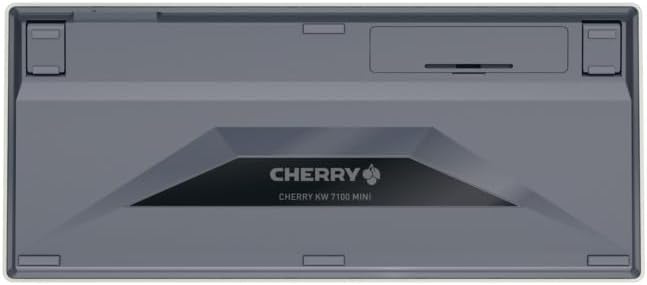
2 pav.: Klaviatūros apačia su baterijų skyriumi.
3.2. Klaviatūros prijungimas
The Cherry KW 7100 Mini supports three connection methods: Bluetooth, 2.4 GHz Wireless, and Wired USB-C.
3.2.1. „Bluetooth“ ryšys (iki 3 įrenginių)
- Įjunkite klaviatūrą naudodami maitinimo jungiklį, esantį šone.
- Press and hold one of the Bluetooth channel keys (F1, F2, or F3) for 3-5 seconds until the corresponding LED indicator blinks rapidly. This indicates pairing mode.
- On your device (laptop, smartphone, tablet), navigate to Bluetooth settings and search for available devices.
- Select "Cherry KW 7100" from the list to pair. The LED will stop blinking and remain solid for a few seconds upon successful connection.
- Repeat for up to two additional devices using the other Bluetooth channel keys (F1, F2, or F3).
3.2.2. 2.4 GHz belaidis ryšys
- Locate the 2.4 GHz wireless nano receiver, typically stored magnetically in a slot on the underside of the keyboard.
- Insert the nano receiver into an available USB-A port on your computer.
- Įjunkite klaviatūrą naudodami maitinimo jungiklį. Klaviatūra turėtų automatiškai prisijungti prie imtuvo.
3.2.3. Laidinis USB-C ryšys
- Connect one end of the provided USB-C cable to the USB-C port on the keyboard.
- Connect the other end of the USB-C cable to an available USB-A port on your computer.
- The keyboard will function as a wired keyboard.
Video 1: Demonstrating the setup and typing experience of the Cherry KW 7100 Mini Keyboard.
4. Klaviatūros valdymas
4.1. Perjungimas tarp prijungtų įrenginių
To switch between paired Bluetooth devices, simply press the corresponding Bluetooth channel key (F1, F2, or F3) that your device is paired to. The keyboard will automatically connect to the selected device.
4.2. Function Keys (FN)
The keyboard features a dedicated FN key, typically located near the right Shift key. This key, in combination with other keys, activates secondary functions such as media controls, screen brightness, and other system commands. Refer to the keycap legends for specific FN key combinations.
4.3. LED indikatoriai
LED indicators on the keyboard provide information about its status:
- Bluetooth Channel LEDs (F1, F2, F3): Indicate the currently active Bluetooth connection or pairing mode.
- Didžiųjų raidžių fiksavimo šviesos diodas: Šviečia, kai aktyvus „Caps Lock“ režimas.
- Akumuliatoriaus būsenos šviesos diodas: Nurodo žemą baterijos lygį.
4.4. Reguliuojamos pėdos
The keyboard is equipped with stable, fold-out feet on the underside. These allow you to adjust the typing angle for improved ergonomics and comfort.
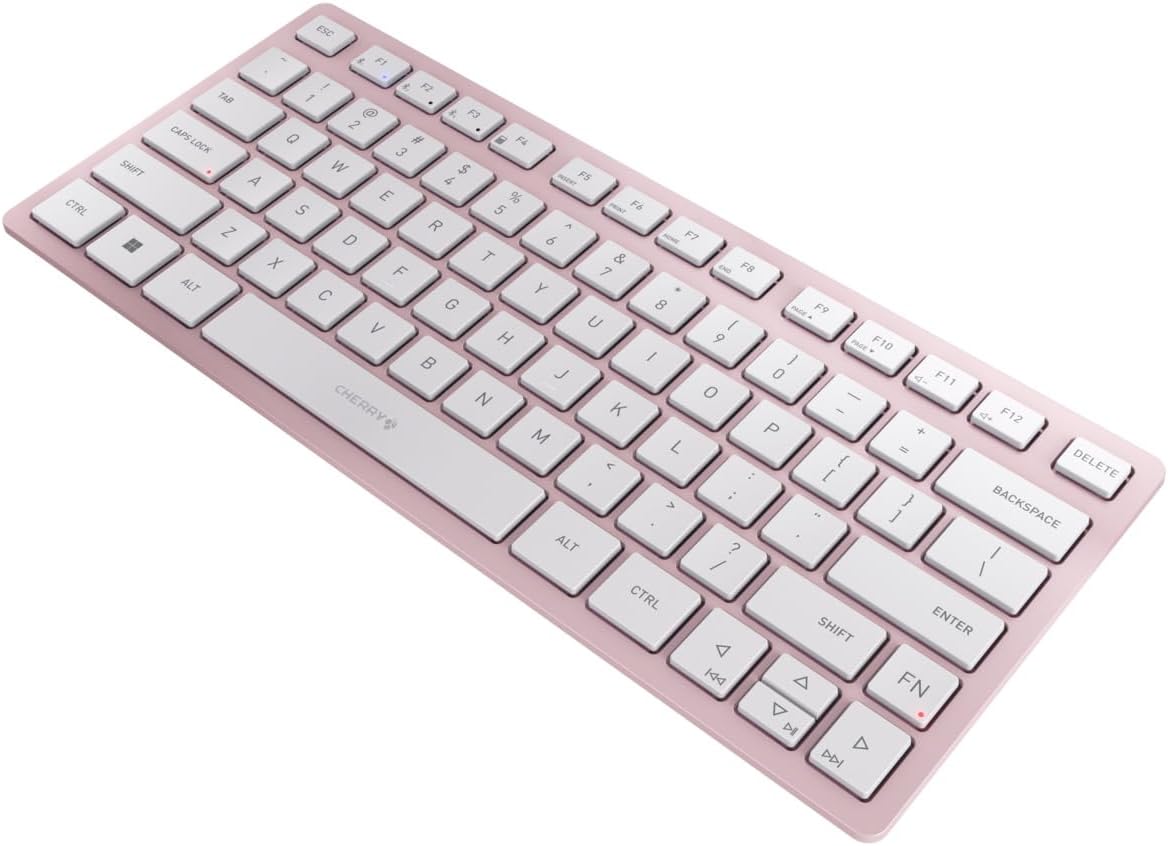
3 pav.: Kampinis view of the keyboard, highlighting its slim profile.

4 pav.: šonas view showing the adjustable feet extended for an ergonomic typing angle.
5. Priežiūra
5.1. Valymas
To clean your keyboard, gently wipe the keycaps and surface with a soft, lint-free cloth. For stubborn dirt, slightly dampen the cloth with water or a mild, non-abrasive cleaning solution. Avoid excessive moisture and do not spray cleaners directly onto the keyboard.
5.2. Sandėliavimas
When not in use, especially during travel, store the keyboard in its included carrying case to protect it from dust, scratches, and minor impacts.

Figure 5: The keyboard stored in its protective carrying case.
6. Problemų sprendimas
6.1. Klaviatūra neprisijungia
- Įsitikinkite, kad klaviatūra įjungta.
- Patikrinkite baterijas ir, jei reikia, pakeiskite.
- For Bluetooth, ensure the correct channel (F1, F2, or F3) is selected and the keyboard is in pairing mode (blinking LED).
- For 2.4 GHz wireless, ensure the nano receiver is securely plugged into a USB-A port.
- Pabandykite prijungti per USB-C laidą, kad atmestumėte belaidžio ryšio problemas.
- Iš naujo paleiskite įrenginį ir bandykite dar kartą susieti.
6.2. Klavišai nereaguoja
- Check the connection as described above.
- Įsitikinkite, kad po raktais nėra įstrigusių šiukšlių.
- Jei naudojate laidinį ryšį, išbandykite kitą USB prievadą arba kabelį.
6.3. Trumpas baterijos veikimo laikas
- Įsitikinkite, kad naudojate naujas, aukštos kokybės AAA baterijas.
- Turn off the keyboard when not in use to conserve battery power.
7. Specifikacijos
| Funkcija | Specifikacija |
|---|---|
| Modelio pavadinimas | KW 7100 |
| Prekės modelio numeris | JK-7100US-19 |
| Prekės ženklas | Vyšnia |
| Ryšio technologija | Bluetooth 5.1 (3 channels), 2.4 GHz Wireless, USB-C Wired |
| Suderinami įrenginiai | Nešiojamasis kompiuteris, išmanusis telefonas, planšetinis kompiuteris |
| Klaviatūros aprašymas | Compact, Multi-Device |
| Pagrindinis mechanizmas | Žirklinis mechanizmas CHERRY SX |
| Maitinimo šaltinis | 2x AAA baterijos |
| Šifravimas | AES-128 |
| Gaminio matmenys | 11.6 x 5.1 x 0.6 colio |
| Prekės svoris | 1.4 svaro |
| Medžiaga | Metalas, Plastikas |
| Spalva | Vyšnių žiedas |
8. Garantija ir palaikymas
This product is covered by Cherry's standard manufacturer warranty. For detailed warranty information, technical support, or service inquiries, please visit the official Cherry websvetainėje arba susisiekite tiesiogiai su jų klientų aptarnavimo tarnyba.
Gamintojas: Vyšnia
Websvetainė: www.cherry.de