Įvadas
Welcome to the user manual for your Infinity Smartwatch, Model NX 10. This device is designed to enhance your daily life with advanced fitness tracking, communication features, and smart notifications. Featuring a vibrant 1.43" AMOLED screen and robust IP68 water resistance, your smartwatch is built for both everyday use and active lifestyles. Please read this manual carefully to ensure proper operation and maintenance of your device.

Figure 1: Infinity Smartwatch NX 10. This image shows the smartwatch from an angled perspective, highlighting its round AMOLED display, black silicone strap, and two side buttons.
Sąranka
1. Išpakavimas ir pradinis įkrovimas
Upon unboxing, ensure all components are present: the Infinity Smartwatch NX 10 and the charging cable.
- Prijunkite magnetinį įkrovimo laidą prie įkrovimo taškų išmaniojo laikrodžio gale.
- Prijunkite laido USB galą prie standartinio USB maitinimo adapterio (nepridedamas) arba kompiuterio USB prievado.
- The watch display will show a charging indicator. Fully charge the device before first use, which typically takes approximately 2 hours.

Figure 2: Smartwatch charging. The image illustrates the smartwatch being charged magnetically, with a green lightning bolt icon on the screen indicating charging status and a "400mAh Battery Capacity" label.
2. Programėlės diegimas ir susiejimas
To unlock the full potential of your Infinity Smartwatch, download and install the companion application, Fit Cloud Pro, savo išmaniajame telefone.
- Scan the QR code provided in the quick start guide (if available) or search for "Fit Cloud Pro" in your smartphone's app store (Google Play Store for Android, Apple App Store for iOS).
- Įdiekite programą.
- Open the Fit Cloud Pro app and follow the on-screen instructions to create an account or log in.
- Įsitikinkite, kad jūsų išmaniajame telefone įjungtas „Bluetooth“.
- In the app, navigate to the device pairing section and search for your smartwatch (e.g., "NX 10" or similar Bluetooth name).
- Select your smartwatch from the list to initiate pairing. Confirm the pairing request on both your phone and the smartwatch if prompted.
- Once paired, the app will synchronize data with your smartwatch, and you can customize settings.
Naudojimo instrukcijos
1. Pagrindinė navigacija
- Jutiklinis ekranas: Swipe left/right to navigate between main screens (e.g., activity, heart rate, weather). Swipe up/down to access quick settings or notifications. Tap to select an option.
- Šoniniai mygtukai: The top button typically acts as a power button (long press) or a back/home button (short press). The bottom button may be customizable or provide quick access to sports modes.

Figure 3: 1.43" AMOLED Screen. This image highlights the vibrant display of the smartwatch, showing a detailed watch face with various data points like time, date, steps, and heart rate.
2. Skambučių skambinimas ir atsiliepimas į juos
Your Infinity Smartwatch supports Bluetooth calling, allowing you to make and receive calls directly from your wrist when connected to your smartphone.
- Norėdami paskambinti: Access the dialer or contacts list on your smartwatch. You can dial a number directly or select a contact to call.
- Norėdami atsiliepti į skambutį: When a call comes in, the smartwatch will display the caller ID. Tap the green answer icon to accept the call or the red icon to decline.

Figure 4: Stay Connected On The Go. This image shows a user interacting with the smartwatch to make a call, illustrating the microphone, dialing, call records, and contacts features.
3. Fizinio pasirengimo ir sveikatos stebėjimas
The smartwatch is equipped with multiple sensors to monitor your health and fitness activities.
- Pedometras: Automatically tracks your steps, distance, and calories burned throughout the day.
- Širdies ritmo stebėjimas: Provides real-time heart rate data. Access this feature from the main menu or set up continuous monitoring in the app.
- Kraujo spaudimo stebėjimas: Offers blood pressure readings. For accurate results, ensure the watch is worn correctly and remain still during measurement. Note: This feature is for reference only and should not be used for medical diagnosis.
- Miego stebėjimas: Seka jūsų miego modelius, įskaitant gilų miegą, lengvą miegą ir pabudimo laiką. View detailed analysis in the Fit Cloud Pro app.
- Sporto režimai: Supports over 100 sports modes, including running, cycling, swimming, and more. Select your desired activity to track specific metrics.

Figure 5: Track Every Move. This image displays the smartwatch tracking a swimming activity, with additional visuals of rock climbing and cycling, indicating its multi-sport tracking capabilities.

Figure 6: More than 110 sports modes. This image shows a variety of colorful icons representing different sports activities supported by the smartwatch, overlaid on a background of a person cycling.
4. Pritaikymas
Personalize your smartwatch experience through the Fit Cloud Pro app.
- Laikrodžių veidai: Choose from a wide range of pre-installed watch faces or download new ones via the app. You can also create custom watch faces using your own photos.
- Pranešimai: Configure which app notifications you wish to receive on your smartwatch (e.g., calls, SMS, social media alerts).
- Pavojaus signalai ir priminimai: Set alarms, sedentary reminders, and hydration reminders through the app.
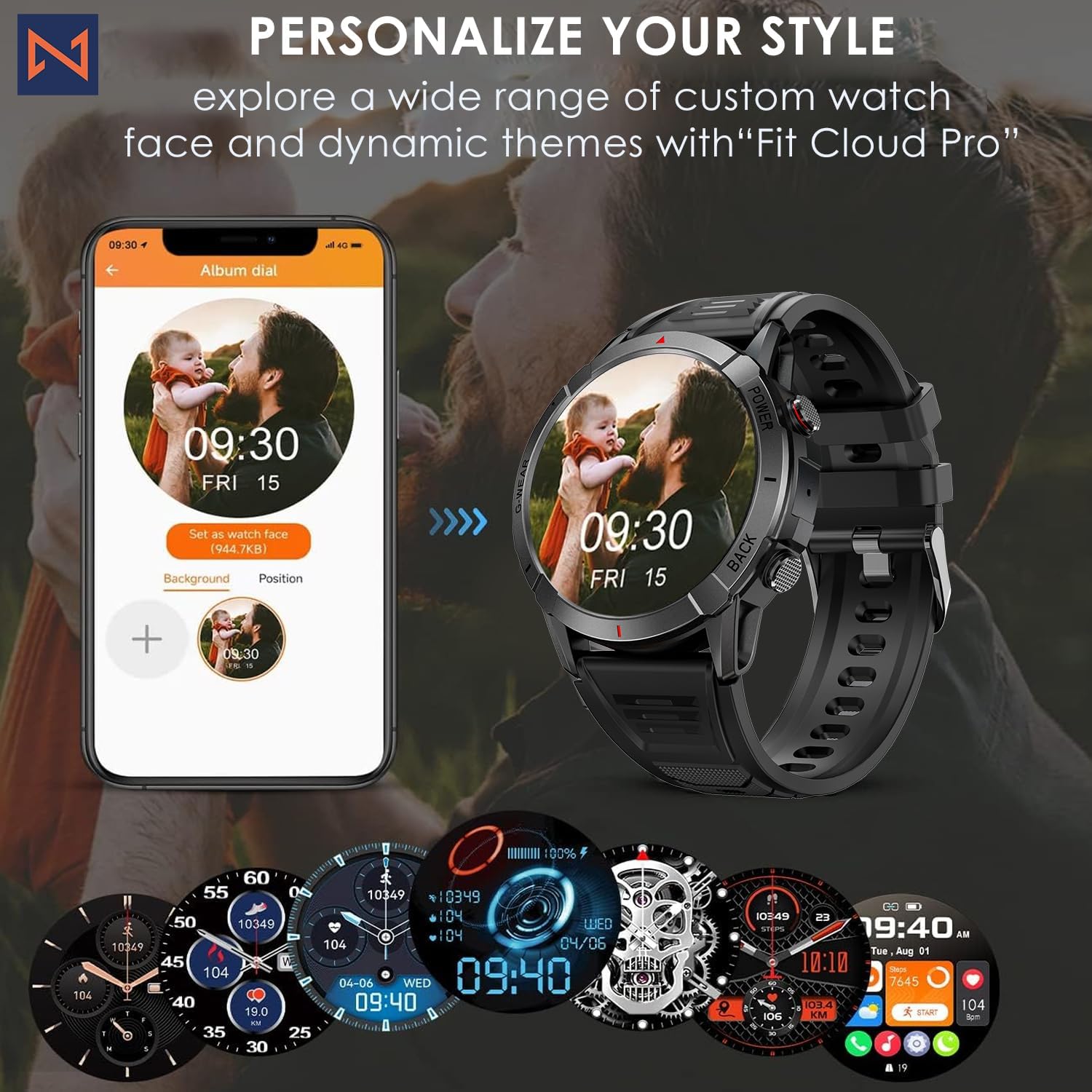
Figure 7: Personalize Your Style. This image demonstrates how to customize watch faces using the "Fit Cloud Pro" app, showing various digital and analog watch face options.
Priežiūra
1. Išmaniojo laikrodžio valymas
Reguliarus valymas padeda išlaikyti jūsų įrenginio išvaizdą ir funkcionalumą.
- Nuvalykite ekraną ir korpusą minkštu, nepūkuotu skudurėliu.
- Įsisenėjusioms dėmėms, dampŠluostę šiek tiek sudrėkinkite vandeniu. Venkite naudoti stiprias chemines medžiagas ar abrazyvines medžiagas.
- Clean the charging contacts periodically to ensure proper connection.
2. Atsparumas vandeniui (IP68)
Your Infinity Smartwatch is rated IP68, meaning it is resistant to dust and can withstand immersion in water up to 1.5 meters for up to 30 minutes.
- Tinka kasdieniam naudojimui, rankų plovimui ir nedideliam lietui.
- Avoid prolonged immersion, hot water, steam, or high-pressure water jets (e.g., showering, sauna, diving).
- If the watch gets wet, dry it thoroughly before charging or operating buttons.

Figure 8: Engineered for Adventure. This image highlights the smartwatch's durability features, including waterproof, dustproof, anti-magnetic, and shockproof capabilities, with corresponding icons.
3. Akumuliatoriaus priežiūra
- Norėdami pailginti baterijos veikimo laiką, venkite ekstremalių temperatūrų.
- Reguliariai kraukite laikrodį; neleiskite baterijai ilgai visiškai išsikrauti.
- Naudokite tik pateiktą įkrovimo laidą.
Trikčių šalinimas
| Problema | Galimas sprendimas |
|---|---|
| Laikrodis neįsijungia | Įsitikinkite, kad laikrodis visiškai įkrautas. Prijunkite jį prie įkroviklio ir palaukite kelias minutes prieš bandydami įjungti. |
| Nepavyksta susieti su išmaniuoju telefonu |
|
| Netikslūs sveikatos duomenys |
|
| Pranešimai negauti |
|
| Trumpas baterijos veikimo laikas |
|
Specifikacijos
| Funkcija | Detalė |
|---|---|
| Modelio numeris | NX 10 |
| Ekranas | 1.43" AMOLED Screen |
| Ekrano raiška | 466x466 HD |
| Baterijos talpa | 400 mAh ličio polimeras |
| Atsparumas vandeniui | IP68 |
| Ryšys | Bluetooth |
| Operacinė sistema | „Android“ (suderinamas su „iOS“) |
| Dirželio medžiaga | 22mm Silicon Belt |
| Ekrano medžiaga | Cinko lydinys |
| Prekės svoris | 1.76 uncijos |
| Atminties talpa | 128 MB |
Garantija ir palaikymas
For warranty information and technical support, please refer to the documentation included with your purchase or visit the official Infinity websvetainę.
Manufacturer: Infiniity
For further assistance, you may contact Infiniity customer service through the contact information provided on their official website or within the Fit Cloud Pro application.


