1. Įvadas
This manual provides detailed instructions for the installation, operation, and maintenance of your Shanrya 12.3-inch Car Stereo Radio Navigation GPS Player. Please read this manual thoroughly before using the product to ensure proper function and to prevent damage. This device is designed to enhance your driving experience with advanced navigation, entertainment, and connectivity features.
2. Saugos informacija
- Profesionalus montavimas rekomenduojamas: Due to the complexity of car electrical systems, professional installation is strongly advised to avoid damage to the unit or your vehicle.
- Vairavimo sauga: Nenaudokite įrenginio taip, kad tai atitrauktų jūsų dėmesį nuo vairavimo. Visada teikite pirmenybę eismo saugumui.
- Maitinimas: Ensure the unit is connected to the correct vehicle power supply (12V DC). Incorrect voltage gali sukelti žalą.
- Temperatūra: Venkite ilgą laiką laikyti įrenginį tiesioginiuose saulės spinduliuose arba itin aukštose temperatūrose.
- Drėgmė: Laikykite įrenginį atokiau nuo vandens ir per didelės drėgmės.
- Valymas: Valymui naudokite minkštą, sausą šluostę. Nenaudokite abrazyvinių valiklių ar tirpiklių.
3. Pakuotės turinys
Patikrinkite, ar pakuotėje yra visi reikalingi daiktai:
- 1 x Main Head Unit (12.3-inch display)
- 1 x Air Vent Assembly
- 1x GPS antena
- 1 x maitinimo laidas
- 2 x USB kabeliai
- 1 x išorinis mikrofonas
- 1 x RCA kabelių rinkinys
- 1 x Naudotojo vadovas (šis dokumentas)
- Other necessary installation accessories (brackets, trim tools, etc.)
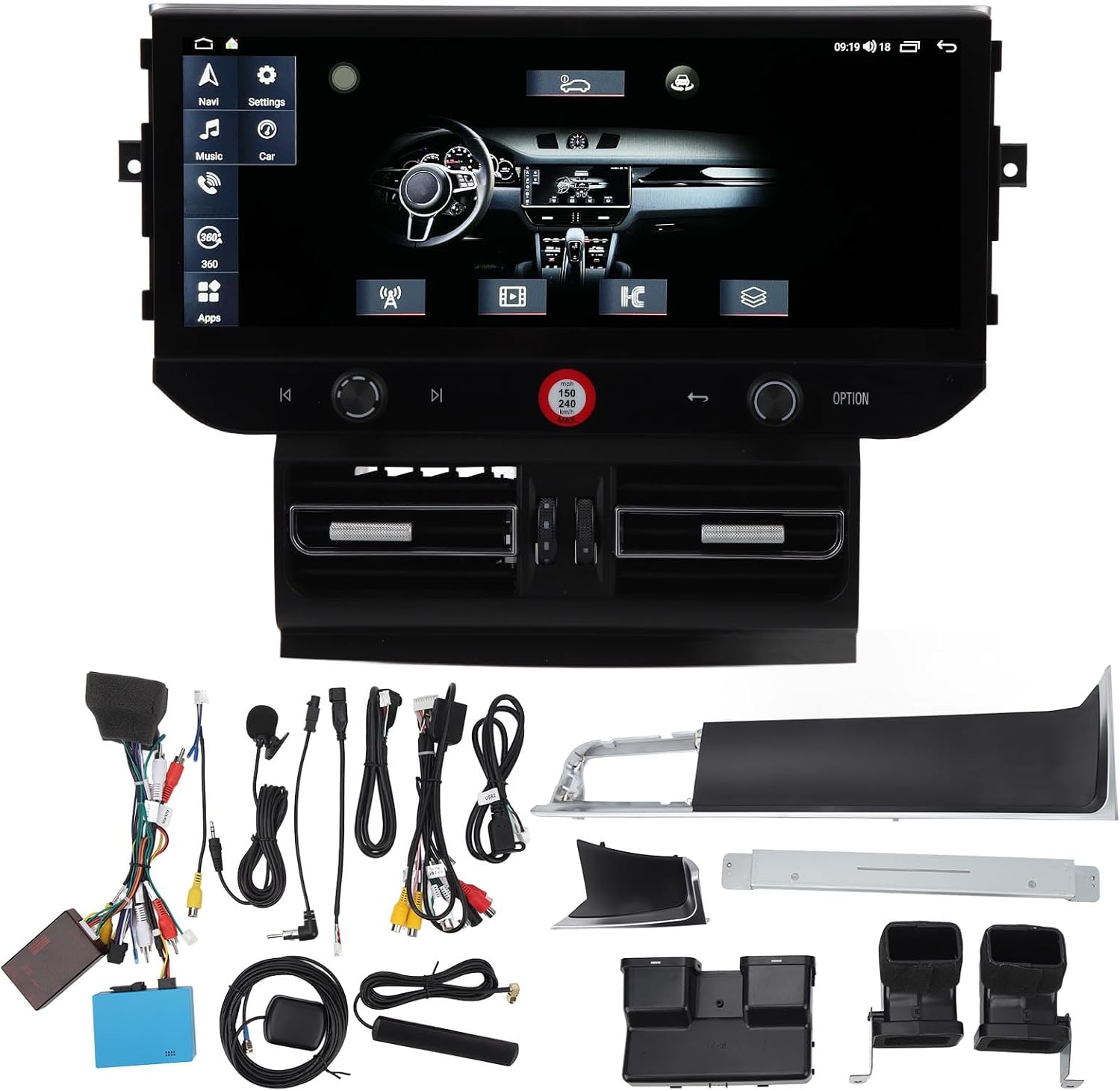
3.1 vaizdas: All components of the Shanrya car stereo system, including the main head unit, wiring harnesses, GPS antenna, USB cables, and other accessories.
4. Produktas baigtasview
Susipažinkite su pagrindiniais komponentais ir jų funkcijomis.
4.1 Main Head Unit

4.1.1 vaizdas: Priekyje view of the Shanrya 12.3-inch car stereo head unit, showing the large display and integrated controls.
- 12.3 colių jutiklinis ekranas: High-resolution display for navigation, media, and applications.
- Valdymo rankenėlės: Located on the lower bezel for volume, tuning, and menu navigation.
- Fiziniai mygtukai: For quick access to functions like navigation, music, car settings, and apps.
4.2 Air Vent Assembly

4.2.1 vaizdas: Close-up of the integrated air vents and controls located directly below the main screen.
- Integrated Air Vents: Designed to seamlessly replace the original vehicle air vents.
- Klimato kontrolė: May include integrated controls for vehicle climate functions, depending on the specific vehicle model.
5. Diegimo vadovas (sąranka)
Šiame skyriuje pateikiama bendra informacijaview of the installation process. Due to variations in vehicle models and electrical systems, professional installation is highly recommended.
5.1 Patikrinimai prieš montavimą
- Įsitikinkite, kad automobilio uždegimas išjungtas, o akumuliatorius atjungtas.
- Confirm compatibility with your vehicle model (Macan LHD 2014-2016).
- Gather all necessary tools (trim removal tools, screwdrivers, wire cutters, etc.).
5.2 Removal of Original Unit
- Carefully remove the existing car stereo and air vent assembly using appropriate trim removal tools.
- Disconnect all wiring harnesses from the original unit.
5.3 Laidų jungtys
- Connect the provided power harness to the vehicle's wiring. Ensure all connections are secure.
- Prijunkite GPS anteną ir nukreipkite ją į vietą su laisvu view dangaus (pvz., prietaisų skydelis).
- Connect USB cables and route them to a convenient location for external devices.
- Prijunkite išorinį mikrofoną, kad galėtumėte skambinti laisvų rankų įranga.
- Connect any other auxiliary inputs/outputs as required (e.g., reverse camera, external ampgyvybingesni).
5.4 Mounting the New Unit
- Integrate the new air vent assembly and main head unit into the dashboard opening.
- Pritvirtinkite įrenginį naudodami pateiktus tvirtinimo laikiklius ir varžtus.
- Ensure all cables are neatly tucked away and not pinched.

5.4.1 vaizdas: The Shanrya car stereo unit seamlessly installed in a Macan dashboard, demonstrating its fit and appearance.
5.5 Po įrengimo
- Vėl prijunkite automobilio akumuliatorių.
- Turn on the ignition and test all functions of the unit (power, audio, navigation, Bluetooth, etc.).
- Sureguliuokite nustatymus pagal poreikį.
6. Naudojimo instrukcijos
6.1 Įjungimas / išjungimas ir garsumas
- Maitinimas: The unit typically powers on automatically with the vehicle's ignition.
- Išjungti: The unit powers off with the vehicle's ignition. A long press on the power button (if available) may put it into standby.
- Garsumo valdymas: Use the dedicated knob or touchscreen controls to adjust the audio volume.
6.2 Navigacija
- Tap the 'Navi' icon on the main screen to access the navigation application.
- Įveskite savo kelionės tikslą naudodami ekraninę klaviatūrą.
- Follow the voice prompts and visual directions for your route.
6.3 „Bluetooth“ 5.0 Ryšys
- Eikite į „Nustatymai“ > „Bluetooth“.
- Įjunkite „Bluetooth“ savo mobiliajame įrenginyje ir ieškokite galimų įrenginių.
- Select the car stereo from the list and pair. Confirm the pairing code if prompted.
- Prisijungę galite skambinti / priimti skambučius ir transliuoti garsą.

6.3.1 vaizdas: A user interacting with the car stereo's touchscreen, demonstrating the on-screen dialer for Bluetooth calls.
6.4 Belaidis „CarPlay“ / „Android Auto“
- Ensure your iPhone or Android device has CarPlay/Android Auto enabled.
- Connect your device via Bluetooth or USB (for initial setup or wired connection).
- The unit should automatically detect and launch CarPlay/Android Auto.
- Access phone contacts, navigation, music, and voice assistants directly from the car stereo screen.

6.4.1 vaizdas: The car stereo display showing the CarPlay interface, allowing access to mobile phone features.
6.5 Radio and Media Playback
- Radijas: Select the 'Radio' application to access FM/AM stations. Use the scan function or manual tuning.
- Muzika / vaizdo įrašas: Play media from USB drives, Bluetooth streaming, or internal storage via the 'Music' or 'Video' applications.
7. Savybės ir funkcijos
- 12.3-inch High-Definition Display: Provides a clear and expansive view visoms funkcijoms.
- Integruota GPS navigacija: Supports various navigation apps for accurate routing.
- "Bluetooth 5.0": For stable and fast wireless connection to mobile devices for calls and audio streaming.
- Belaidis „CarPlay“ ir „Android Auto“: Seamless integration with smartphones for enhanced functionality.
- Panoramic Image Support: May refer to support for 360-degree camera systems (if installed separately).
- Multimedijos atkūrimas: Supports various audio and video formats from multiple sources.
- Steering Wheel Control Integration: Suderinamas su esamais vairo valdikliais patogumui.
8. Priežiūra
- Ekrano valymas: Use a soft, lint-free cloth specifically designed for electronics screens. Do not spray cleaners directly onto the screen.
- Programinės įrangos atnaujinimai: Periodically check for software updates from the manufacturer or seller to ensure optimal performance and access to new features. Updates are typically performed via USB.
- Bendra priežiūra: Avoid placing heavy objects on the unit or exposing it to sharp objects that could scratch the screen.
9. Problemų sprendimas
Jei kyla problemų, žr. toliau pateiktas dažniausiai pasitaikančias problemas ir sprendimus:
| Problema | Galima priežastis | Sprendimas |
|---|---|---|
| Nėra galios | Loose wiring, blown fuse, vehicle battery issue. | Check all power connections. Inspect vehicle fuses. Ensure vehicle battery is charged. |
| Nėra garso | Per mažas garsumas, netinkamas garso šaltinis, garsiakalbio laidų problema. | Padidinkite garsumą. Pasirinkite tinkamą garso šaltinį. Patikrinkite garsiakalbių jungtis. |
| GPS neveikia | GPS antena neprijungta arba blogai pastatyta, nėra palydovo signalo. | Įsitikinkite, kad GPS antena yra tvirtai prijungta ir turi aiškų view dangaus. |
| „Bluetooth“ poravimo problemos | Bluetooth not enabled, device not discoverable, incorrect pairing code. | Ensure Bluetooth is on for both devices. Make device discoverable. Re-enter pairing code. |
| Jutiklinis ekranas nereaguoja | Programinės įrangos triktis, ekrano pažeidimas. | Restart the unit (if possible). If issue persists, contact support. |
Jei šie sprendimai neišsprendžia problemos, susisiekite su klientų aptarnavimo tarnyba.
10. Specifikacijos
- Ekrano dydis: 12.3 colių
- Ekrano tipas: Jutiklinis ekranas
- Ryšys: Bluetooth 5.0, USB
- Navigacija: Integruotas GPS
- Išmaniojo telefono integracija: Belaidis „CarPlay“, „Android Auto“
- Suderinamumas: Macan LHD 2014-2016
- Maitinimas: 12V DC (Vehicle specific)
- Atmintis / saugykla: (6+128G) - 6GB RAM, 128GB Internal Storage
11. Garantija ir palaikymas
Dėl garantijos informacijos ir techninės pagalbos žr. pirkimo metu pateiktus dokumentus arba susisiekite tiesiogiai su pardavėju. Išsaugokite pirkimo kvitą kaip pirkimo įrodymą.


