Produktas baigtasview
The Artillery Sidewinder X3 Plus is a high-performance 3D printer designed for both hobbyists and professionals, offering a large build volume and advanced features for efficient and precise 3D printing.

1 paveikslas: Priekyje view of the Artillery Sidewinder X3 Plus 3D Printer, showcasing its robust frame and integrated control panel.
Pagrindinės savybės
- Large Build Size: 300mm × 300mm × 400mm (11.8in × 11.8in × 15.7in) for greater creative freedom.
- Ultra-Quiet High-Speed Printing: Achieves speeds up to 300 mm/s with 0.1 mm precision.
- Upgraded 300°C High-Temperature Nozzle: Supports various filaments including PLA, TPU, PETG, ABS, and Nylon, with automatic nozzle cleaning.
- 49-Point Auto Bed Leveling: Ensures quick and accurate leveling of the build platform.
- Dual-Gear Direct Extruder: Provides powerful extrusion and smoother filament feeding for improved print quality.
- Tęsti spausdinimą funkcija: Detects filament runout/breakage or power loss and resumes printing after recovery.
- Dual Z-axes & Dual Motors: Ensures stability and higher printing accuracy through coordinated movement.

2 paveikslas: Illustration demonstrating the large print volume of the Sidewinder X3 Plus, capable of accommodating substantial models.
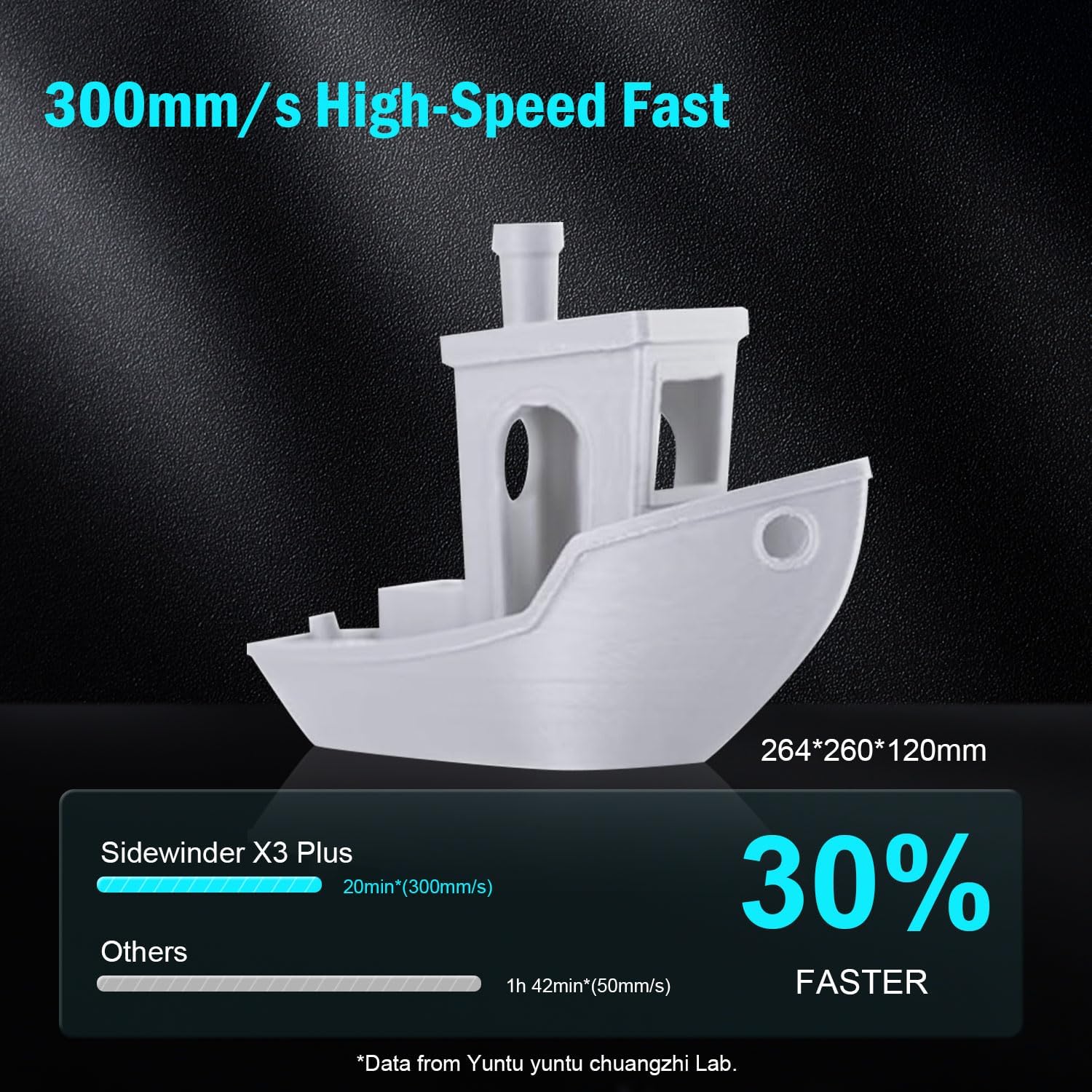
3 paveikslas: Visual representation of the Sidewinder X3 Plus's high-speed printing capability, showing a printed boat model.

4 paveikslas: Iš arti view of the all-metal hotend and automatic cleaning nozzle, highlighting its high-temperature capabilities.

5 paveikslas: Diagram illustrating the 49-point smart auto-leveling system on the print bed, simplifying the leveling process.
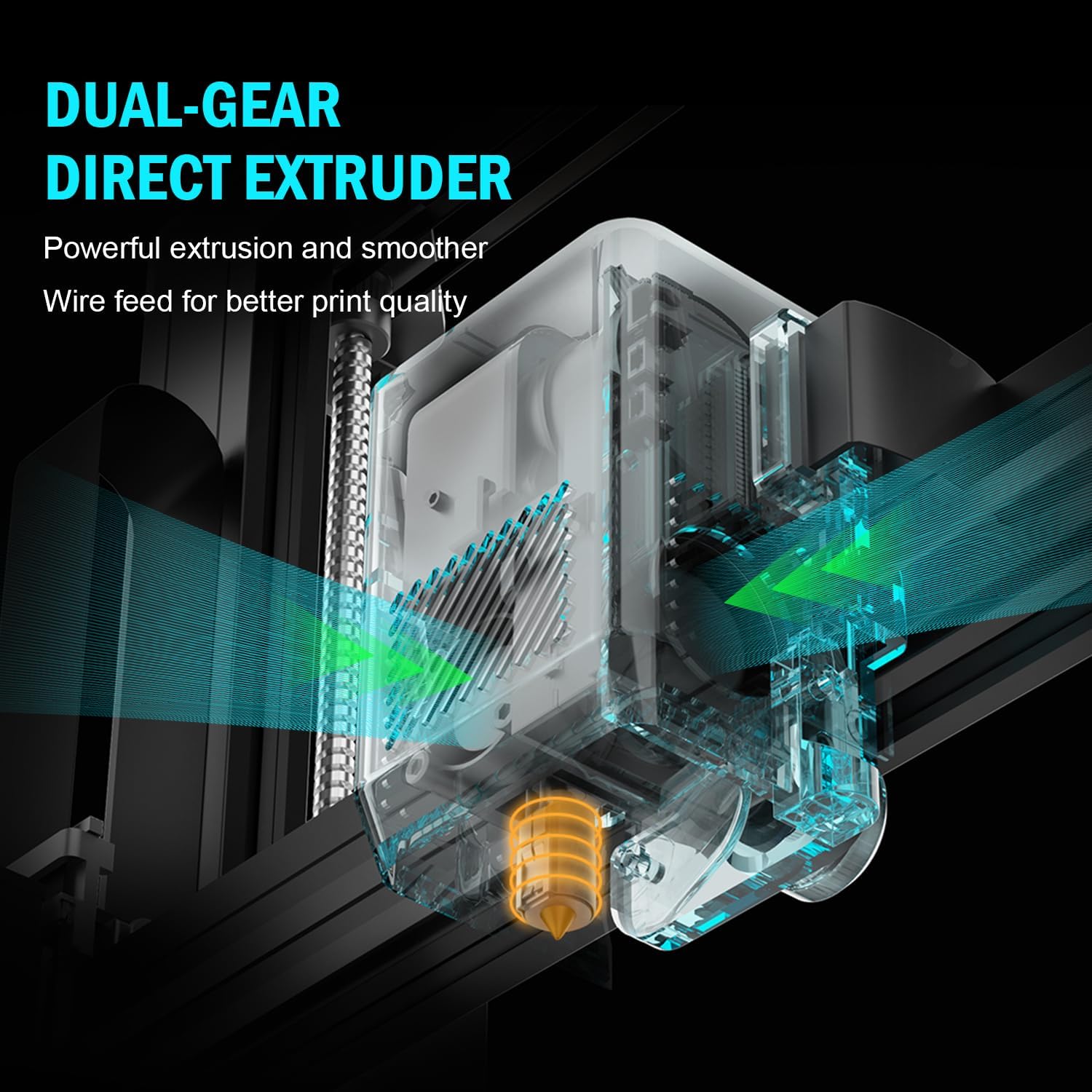
6 paveikslas: Vidinis view of the dual-gear direct extruder, showing the gears that ensure consistent filament flow.

7 paveikslas: Depiction of the dual Z-axes and dual motors system, highlighting their role in enhancing print stability and precision.
Sąrankos vadovas
The Artillery Sidewinder X3 Plus is designed for quick assembly. Follow these general steps for initial setup:
- Išpakavimas: Atsargiai išimkite visus komponentus iš pakuotės. Patikrinkite, ar yra visos pakavimo sąraše išvardytos dalys.
- Pagrindo surinkimas: Place the printer base on a stable, level surface.
- Portalo įrengimas: Attach the gantry (Z-axis frame) to the base. Ensure all screws are securely fastened.
- Laidų jungtys: Connect all necessary cables, including power, motor, and sensor cables, according to the labels.
- Filamento laikiklis: Mount the filament holder.
- Pradinis įjungimas: Prijunkite maitinimo laidą ir įjunkite spausdintuvą.
- Automatinis niveliavimas: Perform the 49-point auto bed leveling procedure as prompted by the printer's interface. This is crucial for successful first prints.

8 paveikslas: Visual guide showing the four main steps for assembling the Artillery Sidewinder X3 Plus, indicating a straightforward setup process.
Naudojimo instrukcijos
Įkeliama gija
- Ensure the hotend is preheated to the appropriate temperature for your filament type (e.g., 200°C for PLA).
- Įkiškite kaitinimo siūlelį į ekstruderio įleidimo angą.
- Push the filament until it is gripped by the extruder gears and begins to feed through the hotend.
- Confirm filament is extruding smoothly from the nozzle.
Spausdinimo paleidimas
- Prepare your 3D model using slicing software (e.g., Cura, PrusaSlicer) and save it as a G-code file to a USB drive or SD card.
- Insert the USB drive/SD card into the printer's designated slot.
- Navigate the printer's touchscreen interface to select the desired G-code file.
- Confirm print settings and initiate the print. The printer will automatically preheat and begin printing.

9 paveikslas: Image showing the 4.3-inch touchscreen interface of the Sidewinder X3 Plus, demonstrating user interaction for print control.
Removing a Print
- Allow the print bed to cool down completely after the print finishes.
- Gently flex the PEI magnetic print platform to detach the printed object. Avoid using excessive force or sharp tools to prevent damage to the print surface.
Priežiūra
Regular maintenance ensures optimal performance and longevity of your Artillery Sidewinder X3 Plus.
- Išvalykite spausdinimo lovą: After each print, clean the print surface with isopropyl alcohol to remove any residue and ensure good adhesion for future prints.
- Purkštukų valymas: The printer features an automatic cleaning nozzle. However, inspect the nozzle periodically for clogs or wear. If necessary, perform a cold pull or replace the nozzle.
- Lubricate Z-axis Lead Screws: Apply a small amount of lithium grease or similar lubricant to the Z-axis lead screws every few weeks, depending on usage, to ensure smooth vertical movement.
- Patikrinkite diržus ir skriemulius: Periodically inspect the X and Y axis belts for proper tension and wear. Ensure pulleys are clean and move freely.
- Firmware atnaujinimai: Check the official Artillery websvetainėje, kurioje pateikiami visi galimi programinės įrangos atnaujinimai, kad jūsų spausdintuve būtų įdiegtos naujausios funkcijos ir ištaisytos klaidos.
Įprastų trikčių šalinimas
| Problema | Galima priežastis | Sprendimas |
|---|---|---|
| Filamentas neišsispaudžia | Užsikimšęs antgalis, susivėlusi siūlelio siūlelio dalis, neteisinga temperatūra. | Clean the nozzle, check filament path, verify hotend temperature. |
| Prastas sukibimas su lova | Neišlygintas spausdinimo paviršius, nešvarus spausdinimo paviršius, neteisinga spausdinimo paviršiaus temperatūra. | Atlikite automatinį niveliavimą, nuvalykite spausdinimo pagrindą izopropilo alkoholiu, sureguliuokite pagrindo temperatūrą. |
| Sluoksnio keitimas | Atsilaisvinę diržai, variklio problemos, per didelis spausdinimo greitis. | Check and tighten X/Y axis belts, inspect motor connections, reduce print speed. |
| Printer is excessively loud | Loose components, fan noise, worn bearings. | Inspect for loose screws, check fan operation, lubricate moving parts. |
| "Thermal runaway detected" error | Faulty thermistor, loose wiring to hotend/bed, heater cartridge issue. | Immediately power off the printer. Check all wiring connections to the hotend and heated bed. Contact support if issue persists. |
| "Error: home Y failed" or similar homing errors | Obstructed endstop switch, loose motor cable, faulty sensor. | Check for obstructions, ensure all motor and endstop cables are securely connected. Restart printer. |
Techninės specifikacijos
| Funkcija | Detalė |
|---|---|
| Gaminio matmenys | 20 x 19.4 x 25.6 colio (508 x 493 x 650 mm) |
| Prekės svoris | 36.6 svaro (16.6 kg) |
| Sukurti tūrį | 300 x 300 x 400 mm (11.8 x 11.8 x 15.7 colio) |
| Spausdinimo greitis | Iki 300 mm/s |
| Purkštuko temperatūra | Max 300°C |
| Lovos išlyginimas | 49 taškų automatinis lovos išlyginimas |
| Ekstruderio tipas | Dviejų pavarų tiesioginis ekstruderis |
| Palaikomos gijos | PLA, TPU, PETG, ABS, Nylon |
| Ryšys | USB, SD kortelė |
| Medžiaga | Metalas |
| Spalva | Juoda |
Garantija ir palaikymas
For warranty information and technical support, please refer to the official Artillery websvetainėje arba susisiekite tiesiogiai su jų klientų aptarnavimo tarnyba. Išsaugokite pirkimo kvitą kaip pirkimo įrodymą garantijos pretenzijoms.
Gamintojas: Artilerija
Oficialus Websvetainė: www.artillery3d.com (Pastaba: tai yra vietos žymeklis URL, prašome kreiptis į faktinį gamintojo webpalaikymo svetainė.)


