1. Svarbi saugos informacija
Prieš naudodami televizorių, atidžiai perskaitykite visas saugos ir naudojimo instrukcijas. Išsaugokite šias instrukcijas ateičiai.
- Maitinimo šaltinis: Televizorių junkite tik prie tokio tipo maitinimo šaltinio, kuris nurodytas ant etiketės.
- Vėdinimas: Užtikrinkite tinkamą vėdinimą. Neužblokuokite jokių ventiliacijos angų.
- Vanduo ir drėgmė: Saugokite televizorių nuo lietaus ar drėgmės. Nenaudokite šalia vandens.
- Valymas: Unplug the TV from the wall outlet before cleaning. Use a soft, dry cloth. Do not use liquid or aerosol cleaners.
- Vieta: Pastatykite televizorių ant stabilaus, lygaus paviršiaus. Venkite jo tiesioginiuose saulės spinduliuose arba šalia šilumos šaltinių.
- Žaibas: Atjunkite televizorių nuo elektros tinklo žaibuojant arba kai jis ilgą laiką nenaudojamas.
2. Pakuotės turinys
Patikrinkite, ar jūsų televizoriaus pakuotėje yra visi toliau išvardyti daiktai:
- coocaa ROKU 50R5G 50-inch UHD Smart LED TV
- Nuotolinio valdymo pultas su baterijomis
- TV stovas (2 vnt.)
- Stovo varžtai
- Maitinimo kabelis
- Greitos pradžios vadovas (šis vadovas)
3. Sąranka
3.1 Išpakavimas ir stovo montavimas
Carefully remove the TV from its packaging. It is recommended to have two people for this process. Place the TV face down on a soft, clean surface to prevent screen damage.
Norėdami sumontuoti televizoriaus stovą:
- Sulygiuokite kiekvieną stovo dalį su atitinkamais lizdais televizoriaus apačioje.
- Pritvirtinkite stovus pridėtais varžtais. Įsitikinkite, kad jie tvirtai priveržti.
Alternatively, for wall mounting, consult a professional installer and use a VESA-compatible wall mount (not included).

This image illustrates the coocaa Roku TV seamlessly integrated into a modern living room environment, mounted on a light blue wall. The TV is positioned above a minimalist wooden TV cabinet, demonstrating a typical installation scenario.
3.2 Maitinimo prijungimas ir pradinė sąranka
- Prijunkite maitinimo laidą prie televizoriaus maitinimo įvesties, o tada – prie sieninio lizdo.
- Paspauskite maitinimo mygtuką ant nuotolinio valdymo pulto arba televizoriaus.
- Follow the on-screen instructions to complete the initial Roku OS setup, including language selection, country, and channel scanning for the triple tuner (satellite, cable, or antenna).
3.3 Tinklo jungtis
To access Smart TV features and streaming services, connect your TV to the internet:
- „Wi-Fi“: During initial setup or via the Settings menu, select 'Network' and then 'Wireless'. Choose your Wi-Fi network from the list and enter the password.
- LAN (eternetas): Connect an Ethernet cable from your router to the LAN port on the back of the TV. The TV will automatically detect the wired connection.
4. Televizoriaus valdymas
4.1 Roku OS Home Screen
The Roku OS home screen provides quick access to all your entertainment. It combines linear TV and streaming services into one intuitive interface.

This image shows the coocaa Roku TV from the front, powered on and displaying its intuitive home screen. The screen features icons for popular streaming services like Netflix, Disney+, Apple TV, and live TV options, alongside inputs for cable box and game console. A '2023 Heimkino Innovation Award' badge is visible on the bottom left bezel.
- Srautinio perdavimo kanalai: Access popular apps like Netflix, Disney+, and Apple TV.
- Tiesioginė TV: Watch broadcast television via the integrated triple tuner.
- Įėjimai: Easily switch between connected devices (e.g., game console, cable box).
- Paieška: Use the cross-channel search to find content by title, actor, or genre.
4.2 Nuotolinio valdymo pulto naudojimas
The user-friendly remote control provides all necessary functions:
- Naršymo skydelis: Use the arrow buttons to navigate menus and select items.
- Gerai mygtukas: Patvirtinkite pasirinkimus.
- Namų mygtukas: Return to the Roku OS home screen.
- Atgal mygtukas: Grįžkite į ankstesnį ekraną.
- Momentinis pakartojimas: Replay the last few seconds of video.
- Greitos prieigos mygtukai: Specialūs mygtukai populiarioms transliacijos paslaugoms.
- Paieška balsu: Use the voice search feature for hands-free control (if supported by remote model).
4.3 Įvesties šaltiniai
Connect external devices to your TV using the available ports:
- HDMI: The TV features three HDMI inputs for connecting devices like Blu-ray players, game consoles, or set-top boxes.
- USB: One USB port is available for media playback or Timeshift functions.
- Skaitmeninė garso išvestis: Skirta prijungti prie išorinių garso sistemų.
4.4 Išmaniojo televizoriaus funkcijos
Your coocaa Roku TV offers a wide range of smart features:
- Srautinio perdavimo paslaugos: Access pre-installed apps like Netflix, Disney+, Apple TV, and more.
- Balso asistento palaikymas: Compatible with Apple AirPlay, Apple Home, Alexa, and Google Home for integrated smart home control.
- „Roku“ mobilioji programėlė: Control your TV, use voice search, and listen to audio via headphones using the free Roku app for iOS and Android devices.
4.5 Garso ir vaizdo nustatymai
Optimizuokite savo viewpatirtis:
- Vaizdo režimai: Select from various picture modes (e.g., Standard, Movie, Sport) or customize brightness, contrast, and color settings.
- HDR palaikymas: Enjoy enhanced contrast and color with HDR10 and HLG content.
- Garso režimai: Choose sound modes (e.g., Standard, Music, Speech) or adjust equalizer settings for optimal audio.
5. Priežiūra
5.1 Televizoriaus valymas
Norėdami išlaikyti televizoriaus išvaizdą ir veikimą:
- Prieš valydami televizorių išjunkite jį iš elektros tinklo.
- Ekraną ir korpusą nuvalykite minkštu, sausu, nepūkuotu skudurėliu.
- Įsisenėjusioms dėmėms lengvai nuvalykiteampen the cloth with water. Never spray cleaner directly onto the TV.
- Nenaudokite abrazyvinių valiklių, vaškų ar tirpiklių.
5.2 Programinės įrangos naujiniai
Your Roku TV automatically checks for and installs software updates when connected to the internet. These updates provide new features, performance improvements, and bug fixes. Ensure your TV remains connected to the internet for timely updates.
6. Problemų sprendimas
Jei kyla problemų dėl televizoriaus, žr. šiuos dažniausiai pasitaikančius sprendimus:
| Problema | Galimas sprendimas |
|---|---|
| Nėra galios | Patikrinkite, ar maitinimo laidas tvirtai prijungtas prie televizoriaus ir sieninio lizdo. Išbandykite kitą lizdą. |
| Nėra vaizdo, bet yra garsas | Įsitikinkite, kad pasirinktas teisingas įvesties šaltinis. Patikrinkite kabelio jungtis su išoriniais įrenginiais. |
| Nėra garso, bet yra vaizdas | Patikrinkite garsumo lygį ir nutildymo būseną. Įsitikinkite, kad išorinės garso sistemos yra tinkamai prijungtos ir įjungtos. |
| Nepavyksta prisijungti prie „Wi-Fi“ | Verify your Wi-Fi password. Restart your router and modem. Move the TV closer to the router or use a wired connection. |
| Nuotolinio valdymo pultas neveikia | Pakeiskite baterijas. Įsitikinkite, kad tarp nuotolinio valdymo pulto ir televizoriaus nėra jokių kliūčių. |
7. Specifikacijos
Detailed technical specifications for the coocaa ROKU 50R5G TV:

This image displays the official product data sheet (Produktdatenblatt) for the coocaa 50R5G television. It provides comprehensive technical specifications, including energy efficiency class, power consumption, screen resolution, panel technology, and guaranteed software/spare parts availability, as per EU regulations.
| Parametras | Vertė |
|---|---|
| Prekės ženklas | kakavos |
| Model Name / Item Model Number | 50R5G |
| Operacinė sistema | Roku OS |
| Ekrano dydis | 50 colių (126 cm) |
| Ekrano technologija | LED skystųjų kristalų ekranas |
| Rezoliucija | 3840 x 2160 pikselių (4K UHD) |
| Krašto santykis | 16:9 |
| Refresh Rate (Standard) | 50 Hz |
| Ryšys | Wi-Fi, LAN (Ethernet), 3x HDMI, 1x USB |
| Ypatingos savybės | Integrated Speaker, HDR10, HLG, Triple Tuner |
| Palaikomos interneto paslaugos | Netflix, Disney+, Apple TV, Prime Video, RTL+ |
| Produkto matmenys (P x A x G) | 110 cm x 65 cm x 9 cm (apytiksliai) |
| Energijos vartojimo efektyvumo klasė (SDR) | G |
| Energijos suvartojimas (SDR) | 70.0 W / 70 kWh/1000h |
| Energijos vartojimo efektyvumo klasė (HDR) | G |
| Energijos suvartojimas (HDR) | 103 W / 103 kWh/1000h |
| Garantuoti programinės įrangos / programinės įrangos atnaujinimai | 8 years (from end of market placement) |
| Garantuotas atsarginių dalių tiekimas | 7 years (from end of market placement) |
| Garantuotas produkto palaikymas | 7 metai |
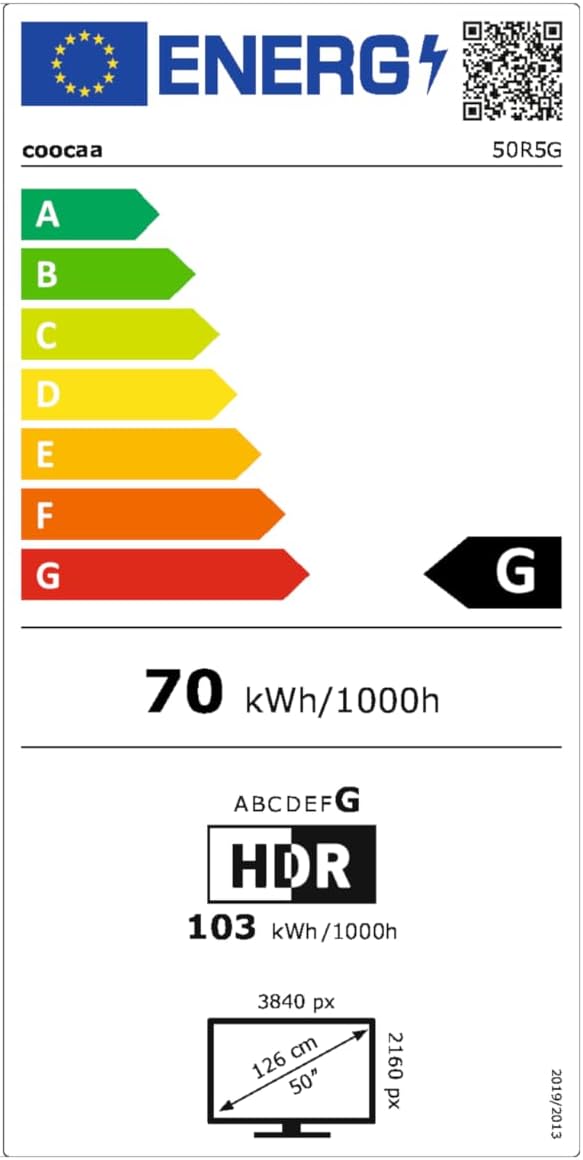
This image presents the EU Energy Label for the coocaa 50R5G TV. It indicates an energy efficiency class of 'G' for both Standard Dynamic Range (SDR) and High Dynamic Range (HDR) content, with power consumption values of 70 kWh/1000h for SDR and 103 kWh/1000h for HDR. The label also shows the screen size of 50 inches (126 cm) and resolution of 3840x2160 pixels. A QR code is included for accessing the EPREL database: EPREL duomenų bazės nuoroda
8. Garantija ir palaikymas
Your coocaa ROKU 50R5G TV comes with a manufacturer's warranty. Please refer to the official product documentation for specific terms and conditions.
- General Warranty Period: 2 metai nuo pirkimo dienos.
- Produkto palaikymas: Garantuojama 7 metams.
- Atsarginės dalys: Guaranteed availability for 7 years after the product is no longer placed on the market.
- Programinės įrangos atnaujinimai: Guaranteed for 8 years after the product is no longer placed on the market.
For technical assistance or warranty claims, please contact coocaa customer support through their official websvetainę arba mažmenininką, iš kurio buvo pirktas produktas.


