1. Įvadas
This manual provides essential instructions for the safe and efficient operation of your eKids Disney Wish Karaoke Machine, Model WH-555. Please read this manual thoroughly before using the device and retain it for future reference.

1.1 vaizdas: priekis view of the eKids Disney Wish Karaoke Machine with its wired microphone.
2. Saugos informacija
Norėdami užtikrinti saugų darbą, laikykitės šių atsargumo priemonių:
- Do not expose the unit to extreme temperatures, direct sunlight, or moisture.
- Nemerkite įrenginio į vandenį ar kitus skysčius.
- Įkrovimui naudokite tik pateiktą USB laidą.
- Laikykite įrenginį atokiau nuo šilumos šaltinių, tokių kaip radiatoriai, šildytuvai, viryklės ar kiti prietaisai (įskaitant ampkeltuvai), kurie gamina šilumą.
- Nebandykite ardyti ar modifikuoti įrenginio. Visus techninės priežiūros darbus patikėkite kvalifikuotiems techninės priežiūros darbuotojams.
- This product is intended for use by children under adult supervision.
3. Pakuotės turinys
Patikrinkite, ar pakuotėje yra visi reikalingi daiktai:
- eKids Disney Wish Karaoke Machine (Model WH-555)
- Laidinis mikrofonas
- USB įkrovimo laidas
4. Produktas baigtasview
Familiarize yourself with the various parts and controls of your karaoke machine.
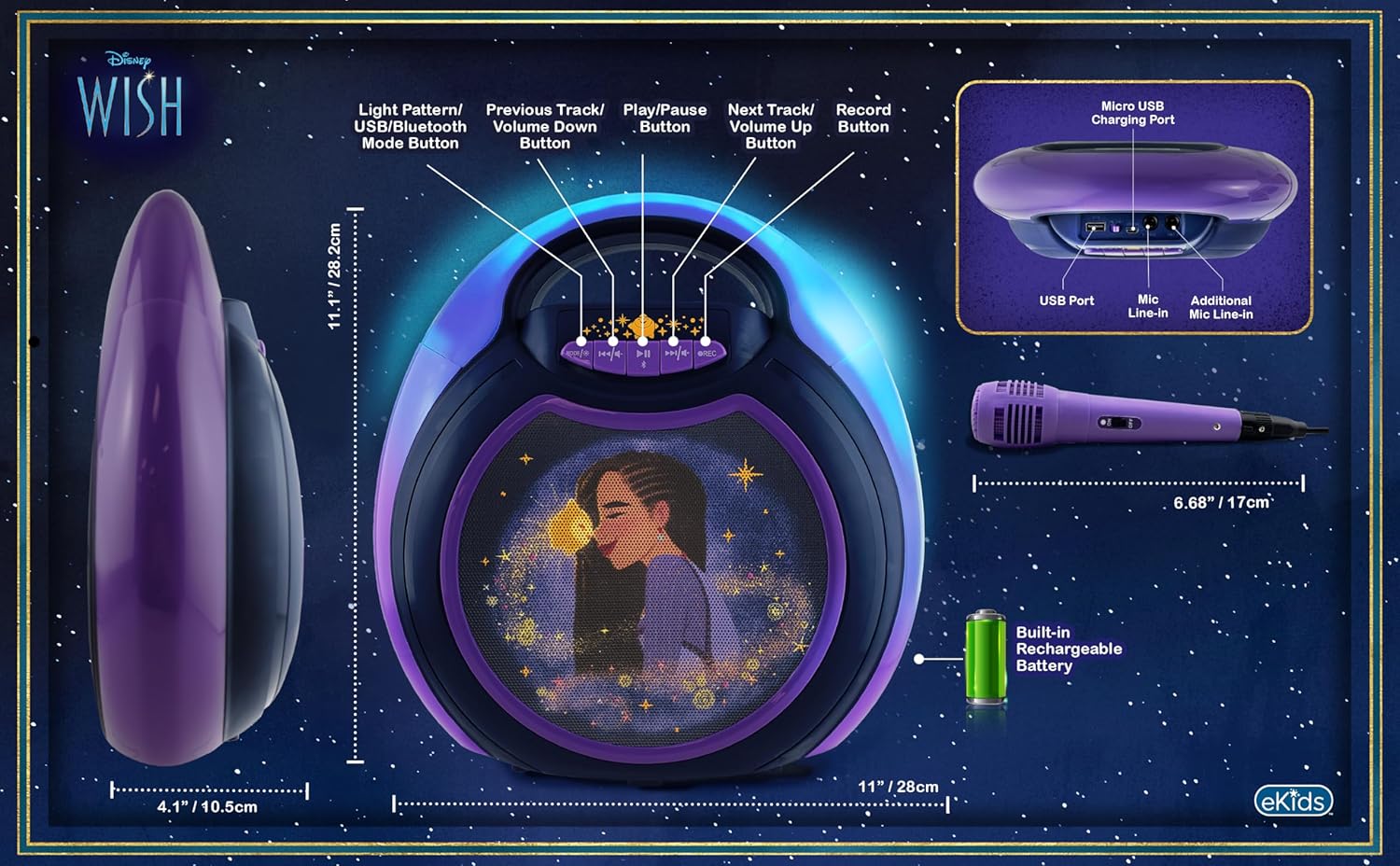
Image 4.1: Diagram of the eKids Disney Wish Karaoke Machine's controls, ports, and dimensions.
Valdikliai ir prievadai:
- MODE / # Button: Switches between input modes (Bluetooth, USB) and adjusts light patterns.
- Ankstesnis takelis / Garsumo mažinimo mygtukas: Navigates to the previous track or decreases volume.
- Paleidimo / pristabdymo mygtukas: Paleidžia arba pristabdo garsą.
- Kitas takelis / Garsumo didinimo mygtukas: Navigates to the next track or increases volume.
- REC mygtukas: Initiates recording (requires USB flash drive).
- Mikro USB įkrovimo prievadas: Skirta vidinei baterijai įkrauti.
- USB prievadas: For connecting a USB flash drive for recording or playback.
- Mic Line-in: Primary port for the included wired microphone.
- Additional Mic Line-in: For connecting a second microphone (not included) for duets.
5. Sąranka
5.1 Įrenginio įkrovimas
Before first use, fully charge the karaoke machine. Connect the provided USB charging cable to the Micro USB Charging Port on the unit and to a standard USB power adapter (not included) or a computer's USB port. The charging indicator will illuminate during charging and turn off when fully charged.
5.2 Mikrofono prijungimas
Plug the wired microphone's connector into the 'Mic Line-in' port on the karaoke machine. For duet performances, an additional microphone (not included) can be connected to the 'Additional Mic Line-in' port.

5.1 paveikslėlis: Šonas view of the karaoke machine with the wired microphone connected.
6. Naudojimo instrukcijos
6.1 Įjungimas / išjungimas
Paspauskite ir palaikykite MODE / # mygtuką, kad įjungtumėte arba išjungtumėte įrenginį.
6.2 Bluetooth poravimas
When the unit is powered on, it will automatically enter Bluetooth pairing mode. The indicator light will flash. On your compatible device (smartphone, tablet, etc.), enable Bluetooth and select "eKids Wish Karaoke" from the list of available devices. A confirmation tone will sound when pairing is successful.

Image 6.1: Bluetooth compatibility with various devices.
6.3 Muzikos leidimas
Once paired via Bluetooth, start playing music from your connected device. Use the Leisti / pristabdyti, Ankstesnis takelis / Sumažinti garsumą, ir Kitas takelis / garsumo didinimas buttons on the karaoke machine to control playback.
6.4 Mikrofono naudojimas
Ensure the microphone is connected to the 'Mic Line-in' port. Adjust the microphone's volume using the dedicated switch on the microphone itself. Sing into the microphone while music plays from the speaker.
6.5 Įrašų atlikimas
To record your singing, insert a USB flash drive (not included) into the USB Port. Press the REC button to start recording. Press it again to stop recording. Recordings will be saved to the USB flash drive. Refer to the Product Overview (Image 4.1) for the location of the USB port.
6.6 Light Show Modes
Paspauskite MODE / # button repeatedly to cycle through different color-changing LED light show patterns.
6.7 Garsumo valdymas
Adjust the main speaker volume using the Ankstesnis takelis / Sumažinti garsumą ir Kitas takelis / garsumo didinimas buttons. The microphone has its own volume control switch.
7. Priežiūra
7.1 Valymas
Nuvalykite įrenginį minkštu, sausu skudurėliu. Nenaudokite skystų valiklių ar abrazyvinių medžiagų.
7.2 Saugykla
Kai nenaudojate, laikykite įrenginį vėsioje, sausoje vietoje, toliau nuo tiesioginių saulės spindulių ir ekstremalių temperatūrų.
8. Problemų sprendimas
- Nėra galios: Ensure the unit is charged. Connect the USB charging cable and allow it to charge for a period.
- Nėra garso: Check that the volume on both the karaoke machine and the connected Bluetooth device is turned up. Ensure the microphone is properly connected and its switch is on.
- „Bluetooth“ neprisijungia: Make sure Bluetooth is enabled on your device and the karaoke machine is in pairing mode. Try unpairing and re-pairing the device. Ensure no other devices are currently connected to the karaoke machine.
- Įrašymas neveikia: Verify that a compatible USB flash drive is inserted into the USB port and has sufficient free space.
9. Specifikacijos
| Modelio numeris | WH-555 |
| Matmenys | 11.07 x 4.14 x 11.11 colio |
| Svoris | 3.67 svaro |
| Maitinimo šaltinis | Maitinamas baterijomis (įkraunamas) |
| ttage | 3 voltų |
| Ryšys | Bluetooth, USB |
| Pranešėjų skaičius | 1 |
| Ypatingos savybės | Light Up Speaker, Recording Function |
10. Garantija ir palaikymas
For warranty information and customer support, please refer to the documentation included with your purchase or visit the official eKids websvetainėje. Išsaugokite pirkimo įrodymą garantiniams reikalavimams.


