1. Įvadas
Thank you for choosing the Havit H2038U RGB Wired Gaming Headset. This manual provides essential information for setting up, operating, and maintaining your headset. Please read it carefully to ensure optimal performance and longevity of your product.
Svarbi saugos informacija:
- Venkite ilgai klausytis dideliu garsumu, kad nepažeistumėte klausos.
- Saugokite ausines nuo ekstremalių temperatūrų, drėgmės ar ėsdinančių medžiagų.
- Keep the headset away from water and liquids.
- Nebandykite ardyti ar modifikuoti ausinių. Tai panaikins garantiją.
2. Produktas baigtasview
2.1 Pakuotės turinys
- Havit H2038U RGB Wired Gaming Headset
- Nuimamas mikrofonas
- Vartotojo vadovas (šis dokumentas)
2.2 Ausinių komponentai
The Havit H2038U headset features a comfortable over-ear design with soft earcups and an adjustable headband. It includes a detachable microphone for clear communication and integrated RGB lighting for an enhanced gaming experience.

2.1 paveikslas: Priekyje view of the Havit H2038U RGB Wired Gaming Headset. This image displays the white over-ear headphones with RGB lighting elements on the earcups and the adjustable headband.
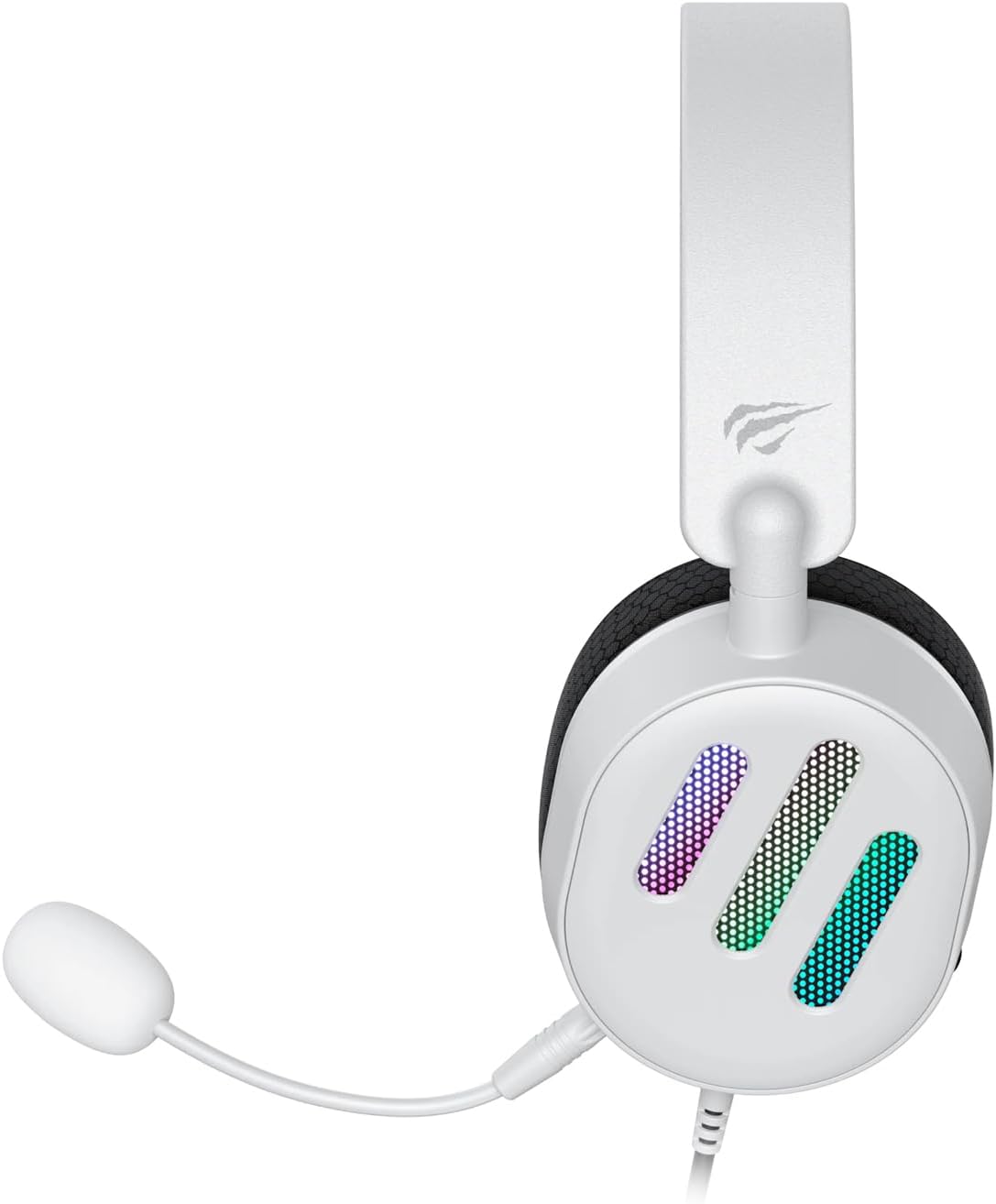
2.2 paveikslas: Šoninė view of the Havit H2038U RGB Wired Gaming Headset, showing the detachable microphone connected to the left earcup. The volume control wheel is also visible on the earcup.

2.3 paveikslas: Į viršų view of the Havit H2038U RGB Wired Gaming Headset, highlighting the adjustable headband and the soft, breathable earcups.
3. Sąranka
The Havit H2038U headset utilizes a dual-connection system for full functionality: a 3.5mm jack for audio and a USB connection for RGB lighting and virtual 7.1 surround sound.

3.1 paveikslas: Iš arti view illustrating the detachable microphone connection (3.5mm jack) and the USB connection for the Havit H2038U headset. This image also indicates 360-degree sound direction and 7.1 USB connectivity.
- Prijunkite mikrofoną: Insert the detachable microphone into the 3.5mm microphone jack located on the left earcup until it clicks into place. Ensure it is securely connected.
- Prijunkite garsą: Plug the 3.5mm audio jack from the headset into the corresponding audio output port on your computer, gaming console, or mobile device.
- Connect for RGB Lighting and 7.1 Surround Sound: Plug the USB connector from the headset into an available USB port on your computer or gaming console. This connection powers the RGB lighting and enables the virtual 7.1 surround sound feature.
- Ausinių pritaikymas: Adjust the headband to ensure a comfortable and secure fit over your ears. The earcups should fully enclose your ears for optimal sound isolation.
- System Configuration (for PC):
- Garso išvestis: Go to your operating system's sound settings and ensure the Havit H2038U is selected as the default playback device.
- Mikrofono įvestis: In the sound settings, select the Havit H2038U as the default recording device.
- 7.1 erdvinis garsas: If applicable, install any necessary drivers from the Havit official website to enable and configure the virtual 7.1 surround sound feature.
4. Naudojimo instrukcijos
4.1 Garsumo valdymas
The headset features an integrated volume control wheel, typically located on the left earcup or inline on the cable. Rotate the wheel to increase or decrease the audio volume.
4.2 Mikrofono naudojimas
The detachable microphone can be positioned for optimal voice pickup. Adjust its flexible arm to bring the microphone close to your mouth, ensuring clear communication. For privacy, you may mute the microphone using software settings on your device if no physical mute button is present on the headset.
4.3 RGB apšvietimas
The RGB lighting on the earcups is powered via the USB connection. Once connected, the lighting will activate automatically. Specific control options for lighting patterns or colors may be available through dedicated software, if provided by Havit.

4.1 paveikslas: The Havit H2038U RGB Wired Gaming Headset displayed with its active RGB lighting feature, showcasing the illuminated earcups.
4.4 virtualus 7.1 erdvinis garsas
When connected via USB, the headset supports virtual 7.1 surround sound. This feature enhances spatial audio awareness in games and media. Ensure relevant drivers are installed and configured through your system's sound settings or Havit's software for optimal experience.

4.2 paveikslas: An illustrative image demonstrating the virtual 7.1 surround sound capability of the Havit H2038U headset, enhancing immersive audio experiences.
5. Priežiūra
5.1 Valymas
- Use a soft, dry cloth to wipe the exterior surfaces of the headset.
- Ausų kaušelius švelniai nuvalykite šiek tiek drėgnu skudurėliu.amp šluoste ir prieš naudojimą leiskite visiškai išdžiūti ore.
- Nenaudokite stiprių cheminių medžiagų, tirpiklių ar abrazyvinių valiklių.
5.2 Saugykla
When not in use, store the headset in a clean, dry place, away from direct sunlight and extreme temperatures. Avoid tangling the cables to prevent damage.
6. Problemų sprendimas
| Problema | Galima priežastis | Sprendimas |
|---|---|---|
| Nėra garso iš ausinių | 3.5mm jack not fully inserted; incorrect audio output selected; volume too low. | Ensure 3.5mm jack is fully connected. Check system sound settings to select Havit H2038U as default playback device. Increase volume using the headset's control wheel and system volume. |
| Mikrofonas neveikia | Microphone not fully inserted; incorrect input device selected; microphone muted. | Ensure microphone is securely attached. Check system sound settings to select Havit H2038U as default recording device. Unmute microphone in software settings. |
| RGB apšvietimas neveikia | USB cable not connected; faulty USB port. | Įsitikinkite, kad USB laidas tvirtai prijungtas prie veikiančio USB prievado. Išbandykite kitą USB prievadą. |
| 7.1 erdvinis garsas neaktyvus | USB cable not connected; drivers not installed/configured. | Ensure the USB cable is connected. Install and configure necessary drivers from the Havit official websvetainę. |
7. Specifikacijos
| Funkcija | Specifikacija |
|---|---|
| Modelis | H2038U |
| Ryšio technologija | Wired (3.5mm Jack + USB) |
| Ausinių formos faktorius | Virš ausies |
| Varža | 24 omai |
| Dažnio atsakas | 20 Hz–20 kHz |
| Jautrumas | 114 dB |
| Valdymo tipas | Garsumo reguliatorius, mygtukas |
| Medžiaga | Plastikiniai |
| Prekės svoris | 550 g |
| Gaminio matmenys | 11.2 x 21.9 x 28.5 cm |
| Spalva | Baltas |
| Ypatingos savybės | RGB Lighting, Detachable Microphone, Virtual 7.1 Surround Sound |
8. Garantija ir palaikymas
Havit products are designed for reliability and performance. For information regarding warranty coverage, technical support, or service, please refer to the warranty card included with your product or visit the official Havit websvetainėje. Išsaugokite pirkimo kvitą kaip pirkimo įrodymą garantiniams reikalavimams.
Kontaktinė informacija:
- Official Havit Websvetainė: www.havit.com (Patikrinkite regioninius websites for specific support)


