1. Įvadas
The VIOFO A229 Pro 3 Channel Dash Cam is an advanced vehicle recording system designed to capture high-quality video footage from the front, interior, and rear of your vehicle. Equipped with dual Sony STARVIS 2 image sensors (IMX678 and IMX675), it provides 4K resolution for the front camera, 2K for the rear, and 1080P for the cabin camera, ensuring comprehensive coverage and clear details day and night.
Key features include HDR for all three channels, enhanced night vision, hands-free voice control, 5GHz Wi-Fi connectivity, precise GPS logging, and multiple parking modes for 24/7 protection. This manual provides detailed instructions for setting up, operating, maintaining, and troubleshooting your A229 Pro dash cam.

Figure 1.1: VIOFO A229 Pro 3 Channel Dash Cam System Overview.
2. Pakuotės turinys
Patikrinkite, ar pakuotėje yra visi toliau išvardyti daiktai:
- 1x VIOFO A229 Pro Dash Camera (Front Camera)
- 1x galinė kamera
- 1x vidaus kamera
- 1x CPL (apskritas poliarizacinis lęšis)
- 1 x automobilinis įkroviklis (4 m laidas)
- 1x Rear Camera Cable (6m)
- 1x Interior Camera Cable (1m)
- 1x Static (Windshield) Sticker
- 1x galinis laikiklis
- 1x Apdailos šalinimo įrankis
- 1x GPS modulis su lipduku
- 1x C tipo duomenų kabelis
- Atsarginės tvirtinamos lipnios pagalvėlės
- Vartotojo vadovas

Figure 2.1: VIOFO A229 Pro Packing List.
3. Gaminio komponentai
The VIOFO A229 Pro system consists of a main front dash camera unit, a rear camera, and an interior cabin camera. Each component is designed for optimal performance and integration within your vehicle.
3.1 Front Dash Camera
The main unit houses the front-facing camera with a Sony STARVIS 2 IMX678 sensor, a 2.4-inch HD screen, control buttons, and ports for power, GPS, and camera connections. It features a rotatable lens for flexible positioning.
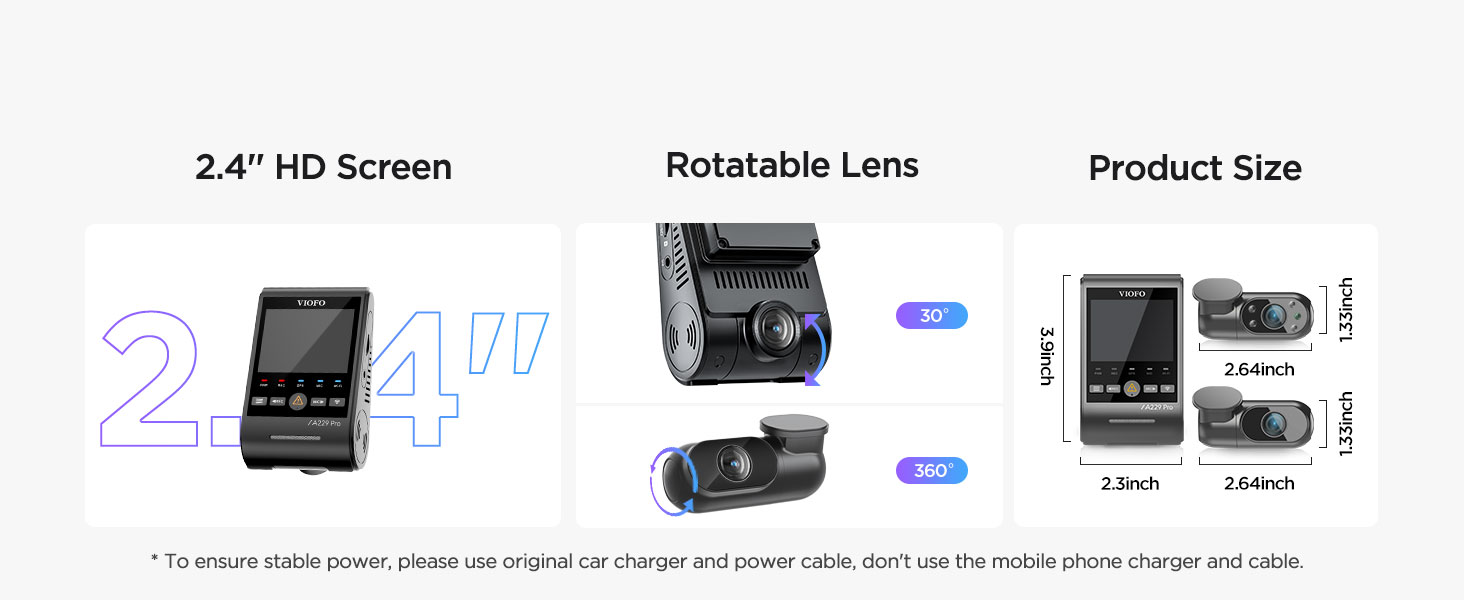
Figure 3.1: Front Dash Camera Features and Dimensions.
3.2 Galinė kamera
The rear camera captures 2K resolution footage using a Sony STARVIS 2 IMX675 sensor, providing clear recordings of the road behind your vehicle. It connects to the main unit via the 6-meter rear cable.

Figure 3.2: Rear Camera 2K HDR Recording Capability.
3.3 Interior Camera
The interior camera records 1080P footage of the cabin, utilizing a Sony STARVIS sensor and HDR technology. It features four built-in infrared LED lights that activate in low-light conditions, ensuring clear black-and-white images even in complete darkness.
Figure 3.3: Interior Camera with Infrared Night Vision.
4. Sąranka ir diegimas
Tinkamas montavimas yra labai svarbus optimaliam veikimui ir saugumui. Atidžiai atlikite šiuos veiksmus.
4.1 Preparing the MicroSD Card
The A229 Pro does not include a microSD card. A high endurance U1/U3 speed microSD card (64GB, 128GB, 256GB, or 512GB recommended) is required. Before first use, format the microSD card within the dash cam's settings to ensure compatibility and optimal performance.
4.2 Mounting the Cameras
- Priekinė kamera: Clean the windshield area where the front camera will be mounted. Apply the static windshield sticker first, then attach the front camera's mount to the sticker. Position it centrally, ensuring it does not obstruct your view.
- Galinė kamera: Pritvirtinkite galinio vaizdo kamerą prie galinio priekinio stiklo, užtikrindami aiškų vaizdą view. Use the provided static sticker and mount.
- Vidinė kamera: Attach the interior camera to the main front unit or a suitable location within the cabin that provides a clear view interjero.
4.3 Laidų ir maitinimo prijungimas
Connect the rear and interior cameras to the main front unit using their respective cables. Route the cables neatly along the vehicle's headliner and A-pillars using the trim removal tool to tuck them away. Connect the car charger to the main unit's Type-C power input and plug it into your vehicle's 12V power outlet.
Svarbu: Always use the original VIOFO car charger and power cable to ensure stable power and prevent issues. Do not use mobile phone chargers or generic USB cables.
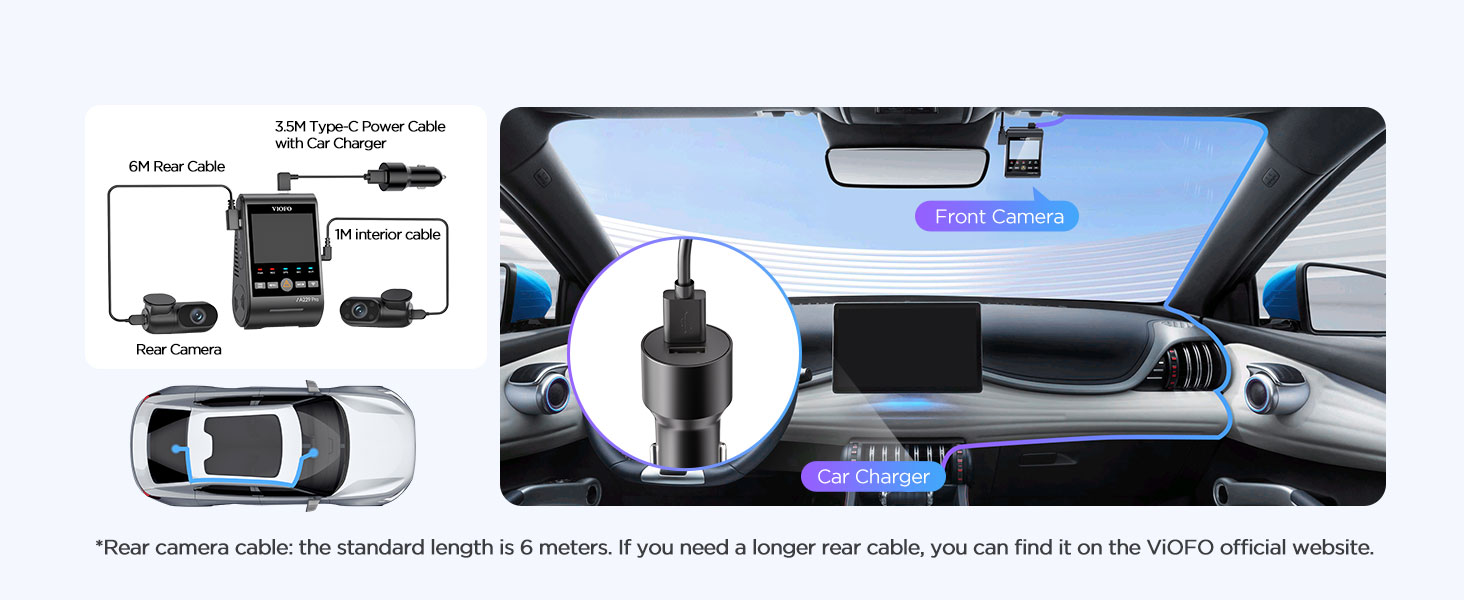
Figure 4.1: Dash Cam Wiring Diagram.
4.4 GPS modulio įrengimas
The GPS module is integrated into the front camera mount. Ensure the mount is securely attached to the windshield for optimal GPS signal reception. The GPS module provides vehicle location, speed, and timestamp data for your recordings.
5. Naudojimo instrukcijos
This section details the various functions and modes of your VIOFO A229 Pro dash cam.
5.1 Pagrindinis įrašymas
Once powered on, the dash cam will automatically begin recording. The front, rear, and interior cameras will record simultaneously. The recording indicator light on the main unit will confirm active recording.

Figure 5.1: 3-Channel Recording in Action.
5.2 Voice Control & Notification
The A229 Pro supports hands-free voice commands for common operations. This allows you to manage the dash cam without diverting your attention from the road. The device also provides clear voice notifications for settings adjustments and memory card issues.
- Example komandos:
Susiję dokumentai - A229 Pro 3 kanalai

VIOFO A229 Pro vaizdo registratoriaus naudotojo vadovas
Išsamus VIOFO A229 Pro vaizdo registratoriaus naudotojo vadovas, kuriame aprašomas įrengimas, naudojimas, nustatymai ir funkcijos.
VIOFO A119 MINI 2 Vartotojo vadovas
Išsamus VIOFO A119 MINI 2 vaizdo registratoriaus naudotojo vadovas, kuriame išsamiai aprašomas įrengimas, veikimas, sistemos nustatymai ir funkcijos, skirtos optimaliam naudojimui.
VIOFO A229 Dash Cam Gebruiksaanwijzing en Installatiegids
Gedetailleerde gebruiks- en installatiehandleiding voor de VIOFO A229 dashcam, inclusief functies, instellingen, ansluitingen en klantenservice-informatie.
VIOFO VS1 vaizdo registratoriaus naudotojo vadovas ir diegimo vadovas
Išsamus VIOFO VS1 vaizdo registratoriaus diegimo, nustatymo ir naudojimo vadovas, įskaitant informaciją apie VIOFO programėlę ir HK4 laidų rinkinį.
VIOFO A129 Duo vaizdo registratoriaus naudotojo vadovas ir vadovas
Išsamus dviejų kanalų VIOFO A129 Duo vaizdo registratoriaus naudotojo vadovas. Sužinokite apie diegimą, veikimą, sistemos nustatymus, tokias funkcijas kaip GPS, „Wi-Fi“ ir parkavimo režimą.
VIOFO A129 Plus Duo naudotojo vadovas – diegimo, naudojimo ir nustatymų vadovas
Išsamus VIOFO A129 Plus Duo vaizdo registratoriaus naudotojo vadovas. Sužinokite, kaip įdiegti, valdyti ir konfigūruoti dviejų kanalų vaizdo registratorių, kuriame aptariamos tokios funkcijos kaip „Wi-Fi“ valdymas, parkavimo režimas ir programinės įrangos atnaujinimai. Jei reikia pagalbos, apsilankykite VIOFO palaikymo svetainėje.