Įvadas
This manual provides essential instructions for the setup, operation, and maintenance of your Telefunken TDV-322 DVD Player. Please read this manual thoroughly before using the device to ensure proper functionality and to prevent damage.
The Telefunken TDV-322 is designed to play various disc formats, offering versatile entertainment options for your home. It includes multiple output options for connecting to different television and audio systems.
Produktas baigtasview
The Telefunken TDV-322 DVD Player is a compact device for playing DVDs and CDs. It features a front-loading disc tray, a digital display, and front-panel controls. Connectivity options are located on the rear panel.
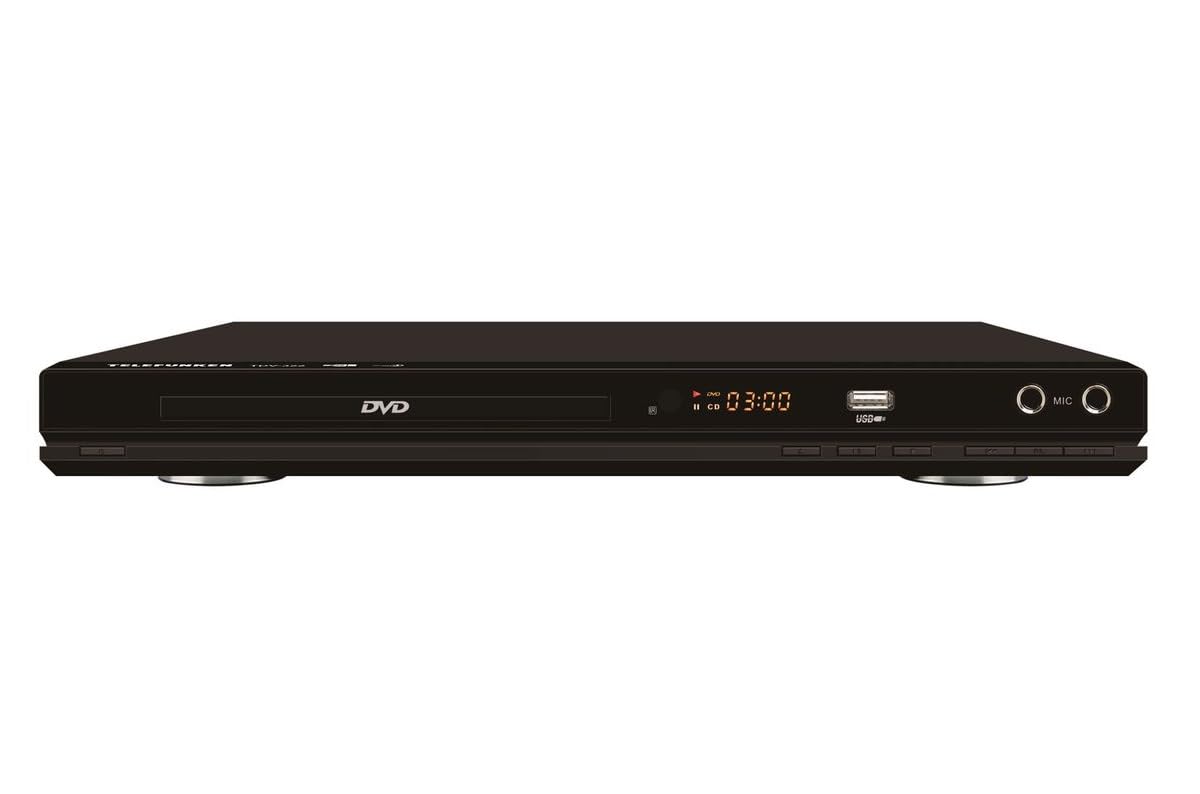
1 paveikslas: Priekyje view of the Telefunken TDV-322 DVD Player. The image displays the black unit with a central disc tray, a digital time display, a USB port, and two microphone input jacks on the right side. Below the disc tray are several control buttons.
Pagrindinės savybės
- Full DVD player functionality for various disc types.
- Lengvai naudojamas nuotolinio valdymo pultas patogiam valdymui.
- Component video output for standard-definition television connections.
- Composite video output for older television models.
- Coaxial and optical digital audio outputs for surround sound system integration.
- Parental control features for content management.
- Compatibility with DVD, DVD-R, DVD-RW, VCD, SVCD, CD, CD-R, CD-RW, MP3, WMA, JPEG, and MPEG4 files.
Sąrankos instrukcijos
1. Išpakavimas
Carefully remove the DVD player and all accessories from the packaging. Retain the packaging for future transport or storage.
2. Prijungimas prie televizoriaus
The TDV-322 offers several video output options:
- Komponentinė vaizdo išvestis: Use a component video cable (red, green, blue connectors) to connect the DVD player's component output jacks to the corresponding input jacks on your standard-definition TV.
- Sudėtinė vaizdo išvestis: Use a composite video cable (yellow connector) to connect the DVD player's composite video output jack to the video input jack on an older TV.
Note: This DVD player does not feature an HDMI port. Ensure your television has compatible input ports.
3. Prijungimas prie garso sistemos
For enhanced audio, connect the DVD player to an external audio system:
- Koaksialinė skaitmeninė garso išvestis: Use a coaxial digital audio cable to connect the DVD player's coaxial output to a compatible input on your surround sound receiver.
- Optinė skaitmeninė garso išvestis: Use an optical digital audio cable to connect the DVD player's optical output to a compatible input on your surround sound receiver.
4. Maitinimo prijungimas
Connect the power cord to the DVD player's power input and then plug it into a standard electrical outlet.
Naudojimo instrukcijos
1. Pagrindinis atkūrimas
- Paspauskite GALIA mygtuką priekiniame skydelyje arba nuotolinio valdymo pulte, kad įjungtumėte grotuvą.
- Paspauskite ATIDARYTI/UŽDARYTI mygtuką, kad atidarytumėte disko dėklą.
- Švelniai įdėkite diską (DVD, CD ir pan.) į diskų dėklą etikete į viršų.
- Paspauskite ATIDARYTI/UŽDARYTI mygtuką dar kartą, kad uždarytumėte dėklą.
- The player will automatically begin playback or display a menu.
- Naudokite PALEISTI / PAUZĖ, STOP, PIRMYN, ir ATvirkščiai mygtukais nuotolinio valdymo pulte arba priekiniame skydelyje, kad valdytumėte atkūrimą.
2. Nuotolinio valdymo pulto naudojimas
The included remote control provides full functionality for the DVD player. Refer to the remote control diagram (not provided in this manual) for specific button layouts. Ensure batteries are correctly inserted.
3. USB atkūrimas
Insert a USB flash drive into the USB port on the front panel. The player will detect the drive and allow you to browse and play compatible media files (MP3, WMA, JPEG, MPEG4).
4. Tėvų kontrolė
The DVD player includes parental control features to restrict playback of certain content. Access these settings through the system menu using the remote control. A password may be required to enable or disable these features.
Priežiūra
- Įrenginio valymas: Wipe the exterior of the DVD player with a soft, dry cloth. Do not use liquid cleaners or abrasive materials.
- Disko priežiūra: Diskus imkite už kraštų. Laikykite juos švarius ir nesubraižytus. Diskus valykite minkštu, nepūkuotu skudurėliu nuo centro į išorę.
- Vėdinimas: Ensure the DVD player has adequate ventilation. Do not block any ventilation openings.
- Saugykla: Kai ilgesnį laiką nenaudojate, atjunkite maitinimo laidą ir laikykite įrenginį vėsioje, sausoje vietoje.
Trikčių šalinimas
| Problema | Galima priežastis | Sprendimas |
|---|---|---|
| Nėra galios | Maitinimo laidas neprijungtas; Maitinimo lizdas neaktyvus. | Įsitikinkite, kad maitinimo laidas yra tvirtai prijungtas. Patikrinkite maitinimo lizdą su kitu įrenginiu. |
| Nėra vaizdo išvesties | Video cables incorrectly connected; Incorrect TV input selected. | Verify component or composite video cables are securely connected to the correct input on your TV. Select the correct input source on your TV. |
| Nėra garso išvesties | Audio cables incorrectly connected; Incorrect audio input selected on receiver/TV; Volume too low. | Check coaxial/optical audio connections. Ensure the correct audio input is selected on your audio system or TV. Increase volume. |
| Diskas nepaleidžiamas | Disc is dirty or scratched; Disc is inserted incorrectly; Unsupported disc format. | Clean the disc. Reinsert the disc with the label side up. Verify the disc format is supported (DVD, CD, VCD, SVCD). |
| Nuotolinio valdymo pultas neveikia | Baterijos išsikrovė arba įdėtos neteisingai; kliūtis tarp nuotolinio valdymo pulto ir grotuvo. | Replace batteries. Ensure correct battery polarity. Remove any obstructions. Point remote directly at the player's sensor. |
Specifikacijos
| Funkcija | Detalė |
|---|---|
| Modelio numeris | TDV-322 |
| Prekės ženklas | Telefunken |
| Spalva | Juoda |
| Palaikomi disko formatai | DVD, DVD-R, DVD-RW, VCD, SVCD, CD, CD-R, CD-RW |
| Palaikoma File Formatai | MP3, WMA, JPEG, MPEG4 (via USB) |
| Vaizdo išvestys | Komponentinis vaizdo įrašas, sudėtinis vaizdo įrašas |
| Garso išvestys | Coaxial Digital Audio, Optical Digital Audio |
| Papildomi prievadai | USB port, Microphone inputs |
Informacija apie garantiją
The Telefunken TDV-322 DVD Player comes with a 1 metų gamintojo garantija. Please retain your proof of purchase for warranty claims. For details regarding warranty terms and conditions, refer to the warranty card included with your product or contact Telefunken customer support.
Pagalba klientams
If you encounter any issues not covered in the troubleshooting section or require further assistance, please contact Telefunken customer support. Contact information can typically be found on the product packaging, the official Telefunken websvetainėje arba garantijos dokumentuose.
When contacting support, please have your model number (TDV-322) and purchase details ready.


